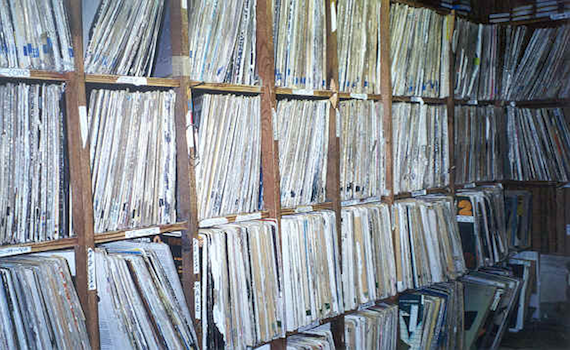
In Why Packing a Good Box of Tunes is More Important Than Ever, we talked about how important it is to get all your music ready before you get to a gig, and different ways you might achieve this using tags, folders and so on.
What I want to talk about in this two-part tutorial is ways to help you to always find the perfect tune to play next when you’re actually DJing. Today we’ll look at two pretty common tricks, and next week we’ll get advanced and experimental.
For our example, we’ll invent an imaginary gig: You’ve got a summer holiday residency, playing the whole night in a resort dance bar – from 11pm to 4am, for instance. It’s normally you playing, but sometimes there’s a local guest DJ (who you don’t get to pick). It’s a meeting place, where people have a few drinks before heading off clubbing. The bar has a dancefloor, and it gets quite lively later on.
How our imaginary DJ night might look:
11am - Empty (in Spain where I live nobody’s out till 12)
12am - Filling up
1am – Pretty full, lots of meeting and catching up going on. Dancefloor starting to fill
2am – Alcohol kicking in, dancefloor starting to rock
3am - Real peak time, dancefloor rammed
4am – Place closing, two or three tunes to end with required
So how do you arrange your music to help you find the right songs for all these “slots” within your night? How do you sort things so that you don’t have to randomly scroll through all your current tunes every time you’re looking for a new tune to play?
It’s essential that you know your tunes well
The first thing to state is that there’s no substitute for knowing your tunes well. However, if you know your tunes well and you also apply these techniques, you’ll find DJ sets fall together for you more easily than if you rely on your knowledge of your records alone to get you through.
There are many ways of organising your digital music within your music library or DJ software, but here we’re going to show you two of the most common and useful methods.
1. Use the BPM reading
Click the “BPM” column in your track browser on your DJ software, and arrange the BPMs from lowest to highest. (BPM stands for “beats per minute” and represents the speed of a tune. All good DJ software will attempt to work this out for you for your songs.)
As the night progresses, work roughly down the list. Of course, you won’t work from top to bottom strictly – that would take all the fun out, and it’s easy enough to mix a few BPMs either side of your current tune anyway – but at least the tunes around the one you’re currently playing in your browser will be most likely to be suitable for each part of the night.
Increase the BPM smoothly
So for instance, you may play 80-90 BPM r’n'b from 11-12pm, 100-120 BPM nu-disco and laid-back house from 12-2, 120-130 BPM house from 2-3, playing a final hour or so of 130-145 BPM harder house, trance or even go higher and end on some anthemic drum & bass. All mixed well (hopefully), with no abrupt tempo changes as you speed things up a BPM or two at a time slowly as you go along.
Of course, we’re assuming here that faster tunes are always more lively and energetic and so better suited for full dancefloors later on. This isn’t always the case, and what’s more, the above rule doesn’t work with all types of music. But it’s a popular way for DJs to do things, and better than making the rookie error of just “banging it out” early on because you know no better.

Star ratings for music don't have to be about how good you think a track is - smart DJs are using them for other purposes...
2. Use star ratings
Use your DJ or music library software’s star ratings not to record how much you like a tune (as intended), but to rate its “energy” level or “dancefloor friendliness factor”. You then have an easy way of differentiating between those warm-up “nobody here”-type records and full-on floorfillers.
This type of system crosses all BPMs and genres, and so is good if you typically play more than one type of music in your sets, because a slow dubstep or reggae tune may be an absolute winner for you and a crowd favourite, but still only have a double-figure BPM, so would be way down with the warm-up records using the BPM system.
Different stars for different times of night
So your 11am-12pm records get one star, 12am-1pm two stars etc up to 3am-4am getting five stars. (Zero stars might be reserved for samples, beats etc that you use at any time of night.)
Remember to re-star your tunes week by week; an upfront, unknown tune may start off in your warm-ups, but work its way into the floorfillers 4-star or 5-star section later on as it becomes popular.
Use a combination of the two
Experienced DJs or just more astute reader will have spotted a potential flaw in this system; if you rate all of your tunes this way and then sort by star rating, you’ll have BPMs that are all over the place. For indie or pop DJs, or if you never mix, this wouldn’t be an issue; but if you’re a mixing DJ, would you try and mix reggae into trance because they’re both “floorfillers”? Of course not.
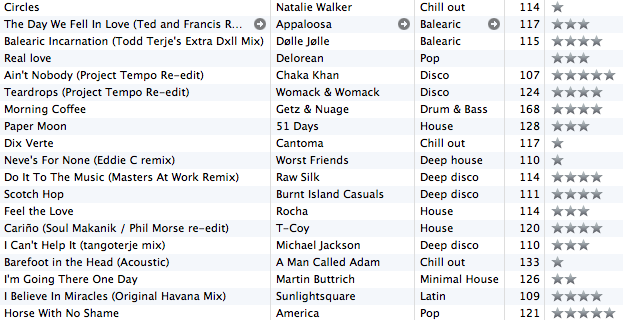
Using a combination of BPMs and star ratings will allow you to navigate more easily through your tunes, whatever the situation.
That’s why it’s good to use both systems alongside each other. Here’s two scenarios where arrranging tunes by BPM then by star rating (either by eye or actually in the software if it allows you to) will help you.
Warming up well
In our first scenario, you’re warming the crowd up, say in the 11pm-1am slot above. You arrange by BPM, and then as you play slowly raising the tempo by mixing roughly from the top to bottom of your list and moving the pitch up manually as you go, but only playing the tunes starred 1 & 2, maybe dropping the odd 3-star in as things get going. You started on 1-star 90 BPM tunes, and by 1am were playing 3-star 120 BPM tunes with a happy, early-night, half-full dancefloor.
Taking control after any other DJ
Or, imagine your bar has a guest DJ with you that night, and you’re coming on after him. He was playing drum & bass at 165 BPM, but it’s only 2am and you want to get back to 125 BPM so you can sustain the crowd for the last 2 hours.
You arrange your tunes by BPM, and then quickly find a tune at 125 BPM that is a five-star surefire floorfiller. You drop this tune in abruptly, and the crowd do two things. 1. They go “wooah, this is way too slow…”, and then immediately enough of them go “YES! I love this tune!” and they all promptly forget about the BPM change. Job done.
Coming up…
In part 2, we’ll show you some advanced techniques to help you programme still smoother, more professional DJ sets and come across even to other DJs in the crowd as an instinctive professional. Hint: It’s all in the preparation!
Do you use rating stars in this way or in a different way? Do you organise your tunes by BPM or have another way of navigating around your crates? We’d love you to let us know.
Now go to:
How To Organise Your Tunes While DJing Part 2
5 Reasons Why Long DJ Sets Rule
Why Packing a Good Box of Tunes is More Important Than Ever
Want to escape the bedroom and play in public - fast?
Our 1000s-selling How To Digital DJ Fast video course shows you how.
Learn to DJ Free - email course plus bonus PDF book
Sign up for our weekly email course for beginners now...
Trouble choosing a controller? Visit the web's #1 guide!
DJ Controllers: The Ultimate Buyer’s Guide 2013.
This work is licensed under a Creative Commons Attribution-NonCommercial-NoDerivs 3.0 Unported License.


i generally mix by time [year the songs were released], genre then bpm. it wud also depend on the venue, if its a mostly caribbean crowd, i start with old hiphop then work my way up to new reggae\dancehall or vice-versa.
u really do have to kno your songs, that star ranking is a good idea. Just because songs are around 130 bpm that doesnt mean they carry the same energy [like going from "omarion - ice box" to "darude - sandstorm"]
[ link ]I use CD’s (yeah, I know you hate them), so I have to print off labels, which gives me a good degree of flexibility in tune organising. I highlight each song with the genre (and if its say a cross between electro and house I’ll highlight it half-half with the colours for those genres) and then underline it with the energy of the track, red for energetic and green for chilling. Of course, if a track is in the middle, I’ll underline it half-half again. Its a really good way to get to know your tunes, and helps when you’re frantically flicking through looking for an energetic but not too upbeat house track
[ link ]I use a star system very similar to how you suggest categorising things. I have all my music then split into genres. There is no substitute for knowing your music though.
One question I have is that I would like to be able to see the star ratings in VDJ. I make a playlist with the different star levels at the moment it’s a pain to keep updated.
Infact I normally end up with media monkey open in the background and then just use the browser in VDJ. I find myself doing this if I am playing newer or older tracks as it just gets to mudled using the playlist method.
Any ideas will be helpful.
[ link ]To Caspar I love the coloured pen underlining idea – of course doing it digitally would reduce the amount of “frantic flicking” you have to do
I was thinking this morning about why personally I never took to CDs – for me, giving up vinyl was like splitting up with your first love – you thought you’d never get over it, but then you realised there were loads of things about her that actually really pissed you off and that not all girls are like that, and that there’s a whole world out there with more exciting, younger girls in it!
For me, moving to CDs would have been like going straight from that first girlfriend to dating her sister…
[ link ]Love that similie
[ link ]Her slimmer but less attractive sister
[ link ]Ah, I don´t care about genres. Just know my library in deep.
[ link ]“11am – Empty (in Spain where I live nobody’s out till 12)”
Of course, everybody knows that we spaniards are hidden in caves watching bullfighting in the tube and sleeping all day long.
You must live in some crappy corner full of english drunk tourists. Is that correct?
I use a combination of rating stars and BPM (God bless Djay for its BPM features) but having smart and well swtudied reproduction lists is essential.
Neat entry and great blog. But please leave that ghetto de guiris borrachos. Please.
[ link ]Hey Mig! Thanks for the kind comments.
Also, the bars round here are full of Spanish folk, and they don’t fill up till 12, believe me. Our town centre is a ghost town at 11pm on a weekend, but come 1 or 2am… and unfortunately you can see the bullring from the DDJT office! (Mind you, we haven’t had a bullfight there this year due to “la crisis”.)
[ link ]To Phil: Hahahhahaha, thats one of the best analogies I’ve heard for swapping vinyl for digital DJing. Each to his own, personally I love my CD’s, but at the end of the day, its what comes out the speakers that counts.
[ link ]To caspar As long as you’re not lustily eyeing up your g/f’s sister…
[ link ]I also use the cd’s and print off labels every other week
I was close to using your highlighter system – however found a better way to organise them (in my opinion)
To get all your tunes organised in this manner at the start is hard work but its well worth it and easy to update
I have my cd’s split into different genres
e.g
Trance
>Anthem / Build Up / >Peak Time
>Build Up / >Peak Time
> Vocal / Non Vocal
or instead of Trance have House split into
> Deep House / Prog House / Tech House
> Build Up / Peak Time
In each folder I have my tunes organised by key 1a to 12 b (have a look at mixed in key software if you dont know what this is, awesome for organising your tunes)
Each cd has 10 tracks on it and because its split into genres/ peak time or build up / then vocal or not vocal
its really easy to move round your tracks
once you have your cds organised like this its easy to update as you are only adding 1 cd at a time
may not be best for everyone, but is ideal for me
[ link ]One of the biggest killers to organisation of your library is having way too much music. DJ’s who brag about how many thousand songs they have are morons. Ponder that it’s tough to get so much as 15 songs in an hour, and a 4 hour gig is 60 tracks. That’s it.
Now, do you wanna troll through 10000+ tracks of nothingness? No. Plus, it’s really not practicable to be familiar with all that extra noise. Over the years, I’ve been set to play for a *very* broad audience. How big is my master library in my DJ rig? Less than 2500 songs.
[ link ]Hey Jorn – you’ve made me want to start trimming my collection even more than I did already! I have far too much stuff, mainly because I HAVE to have a full album, not just the tracks I’m interested in.
[ link ]Come on my “Compadres Espanoles” not fighting over at what time is the party popping, I guess it all depends if it is an adult or teen night party. For all I know here in NY and NJ alike at 10 pm only the people who wants to take advantage of the two for one drink shot are the one in the club. The club get live by around midnight even if the club will be close by 3am. Now on the subject, the BPM and star rading sound like a very good idea plus acknowledging the type of crowd.
[ link ]I used to use vinyl and then CDs, my record box was always filled with lower energy tunes at the front, higher energy at the back, so you had a natural progression in your bag, my cd wallet was the same. Now I am using the star system in the way you’re suggesting here, I play mainly house and prog trance, so BPMs aren’t as much of an issue, really.
I find the star system works really well.
[ link ]quote=11am – Empty (in Spain where I live nobody’s out till 12)
Where are you exactly? I’m in Barcelona!
[ link ]I remember when i was using records i had a rough idea of where ever song was, i had 400 records in 3 boxes No organization, with records/Cd’s you get the feel for them i suppose and remember where they are
[ link ]“1. Use the BPM reading
Click the “BPM” column in your track browser on your DJ software,
and arrange the BPMs from lowest to highest. ”
Great article (again) phil! was looking for this. I have some trouble sorting out my music and after reading this article i believe sorting out music by using the bpm reading anbd star rating would be very usefull. Is there any video of how u can do this because i don’t know where i can find and how i can use my bpm column in my track… Or is this hard to explain because it depends on which software u use? (mines traktor) Would love to have it sorted out just like that pictures in this article.
Cheers
[ link ]Great articles Phil!
I always keep my library organized by BPM, which remains a useful if rough approximation of energy.
I only download individual tracks that I like personally.
Then I subdivide them, by adding “good” to the comments if I really like the track.
Dj’ing should make the DJ happy too, and I’d much rather arc through the night playing stuff I like or love.
Also in comments I have some baselines. I assume house music has vocals, so I add an “i” for instrumental if the track lacks them.
Likewise trance is often the reverse, so I add “vox” if it has vocals. Or “chants” or “chorus”… A regular gig is an intentional sober ecstatic dance that asks for high energy but largely instrumental music.
I am going to look into the DJ Notation. No, it isn’t a substitute for knowing your music, but it might be a structure with which to gain mastery of your tracks.
Cheers
PS My experience in Spain matches yours. I visited Grenada in 2001, and was amazed to find outdoor squares with restaurant tables full at midnight with families, kids, and grandparents.
[ link ]Thanks for your additions, Rolf. As far as Spain goes, I was DJing on the beach last night till sunset, then walked home through a busy town with three generations out and enjoying the night. Wouldn’t change where I live in a hurry, I can tell you that
[ link ]I have started starring my music but I do this on Itunes which is not my favourite. Is there a good software to use where I can have my BMPs and stars together? (Like in the picture in this article). Thanks
[ link ]