Digital DJ Tips3>

Learn How To DJ With Digital DJ Gear

Review: Denon DN-MC6000 4-Deck DJ Midi Controller


« Previous page of Denon DN-MC6000 4-Deck DJ Midi Controller


A great feature of the analogue inputs is this: It is possible to route two of your analogue signal through software or keep their paths 100% analogue – it’s up to you, and there’s simply a little button on the back for you to set up your preference.

This is something the Allen & Heath Xone:DX we reviewed last week, for instance, can’t do (it’s all within software control only on that unit), and is indicative of the awesome level of flexibility this particular controller affords you.

Denon DN-MC6000 jogwheel

The Denon DN-MC6000's jogwheels are a great feature, up there with the best of them.

The controller sections
The transport controls are pretty much what you’d expect, with the usual play/pause and cue buttons. As with most of the main buttons on this unit, they are rubberised, backlit and of high quality, with a firm click when pressed – no complaints here.

Down here at the bottom of the controller there are also “vinyl bend” (which is basically a scrub function for moving quickly through media) and “pitch bend” (does what it says) twinned small buttons. The sync button syncs the selected deck to the master, and shift & sync makes the selected deck the master deck.

The jogwheels are as you might expect: high quality, with absolutely no give at all in them – rock solid. Like Vestax’s controllers, they have dual action – the metal top section is used to scratch, vinyl style, while the plastic outer section is a progressive equivalent of using the pitch bend. They feel good, and because they are high resolution they sound good too – jogwheels have come a long way in the last year or two and these are up with the pack.

Jogwheels have come a long way in the last year or two, and these are up with the pack.

One thing missing compared to some similar units is a visual representation of movement to show if your selected deck is “spinning” or not; the new Pioneer controllers and the Allen & Heath Xone:DX, for instance, have rotating lights when a deck is playing, but with this unit, a colour-coded “deck selected” indicator light occupies a static curved strip across the bottom of the jogwheel’s circumference.

Denon has chosen to lay each of the controller sections out identically (so the pitch controls are top right of the jogwheel on each side, for instance), not in a mirror image layout as preferred by some manufacturers. You may have a preference on this choice; I really don’t mind. It takes very little time to get used to it.

The pitch control alters pitch across a range set in software; there’s no way of switching this in hardware with the supplied mappings, which is no big issue. Finally for this section, key lock does exactly what you’d expect.


Loops, FX and sampler
Looping is the minimum you’d expect – you can set loop in/out manually and also auto-loop with beatmatched half/double functionality down to a small fraction of a beat and up to eight bars. There’s no loop memory though.

There are 8 cues available in Traktor, and four cues and four sample triggers available in Virtual DJ. As far as I can see there’s no way out-of-the-box to record samples, but I have to reiterate that everything is Midi mappable and you can set this unit up to do whatever you want within the limitations of your chosen software. Adding extra functionality using the shift key should be no real issue up to the total possible number of permutations of keys available to you, which is quite a lot.

The effects control varies depending on whether you’re using Traktor or Virtual DJ, but you have 4 adjustable parameters so there’s plenty of flexibility there.

Denon DN-MC6000 Traktor

Running Traktor with 4 decks: The exact configuration of the effects and sampler controls depends upon which software you choose to use with the unit.

Out of the box and with Virtual DJ, the first three knobs of the effects section control the effect you’ve chosen with one of the FX ON buttons, the fourth always controlling the filter (low pass filter to the left, high pass to the right).

With Traktor, the filters use two rotaries and buttons in the middle of the mixer section (which are used for video parameters in Virtual DJ) – again, though, all mappable to suit your own preferences.

Of course, these are software effects and so the quality is dependent upon the quality of the effects that come with your software.

Other features of the DN-MC6000
Plenty of other features have been included to ensure it could operate at the heart of the most complex DJ system without falling short on configurability.

It could operate at the heart of the most complex DJ system without falling short on configurability.

The channels the crossfader affects are fully assignable through switches on the front, along with the crossfade contour; there’s a standby mode selector; split cue on the headphones (a surprisingly rare feature on software controllers); and a stereo/mono switch across the master out. EQed and assignable booth send, plus echo and voiceover on the microphone channels, round the picture out further still.

The sound card is 16-bit/48kHz eight-in, eight-out; if you were expecting 24-bit/96kHz this may raise an eyebrow but it sounds fine to me; the frequency response is 20Hz to 20kHz and S/N for the analogue inputs between 87dB and 90dB, all perfectly respectable figures.

Conclusion

Denon means business with the DN-MC6000. It is similar in overall functionality to the American Audio VMS4 but in a different league as far as build quality goes, which is of course reflected in the price and the segment of the market Denon is aiming at.

This controller isn’t the most obvious choice if you’re a hobbyist wanting a pure software controller, because the Traktor Kontrol S4 has more software-specific tricks and arguably better software (its custom edition is also tied perfectly to the hardware).

And if you want pure plug-and-play convenience and equally rock-solid hardware but are prepared to sacrifice some functionality and most of the flexibility, the Allen & Heath Xone:DX is a more obvious choice.


However, once you start demanding more features of a general pro-DJing nature, as opposed to of a software controller/hobbyist nature, the competition begin to fall away.

Need two EQed mic inputs, or EQed booth send (remember, many controllers including the Traktor Kontrol S4, don’t even have a booth send)? Need stacks of external inputs, including the ability to route through hardware or software? Need something 19″ rack mountable? Looking for video mixing?

If any of these are on your “must have” list, the Denon not only has you covered, but is often your only choice.

Because it’s a full Midi controller, with enough time and effort just about everything about it is configurable in order to get it to how you want it (for instance, I suggest non-video-using Virtual DJ users would immediately re-appropriate the two middle knobs on the mixer as filter controls, as in the Traktor mapping).
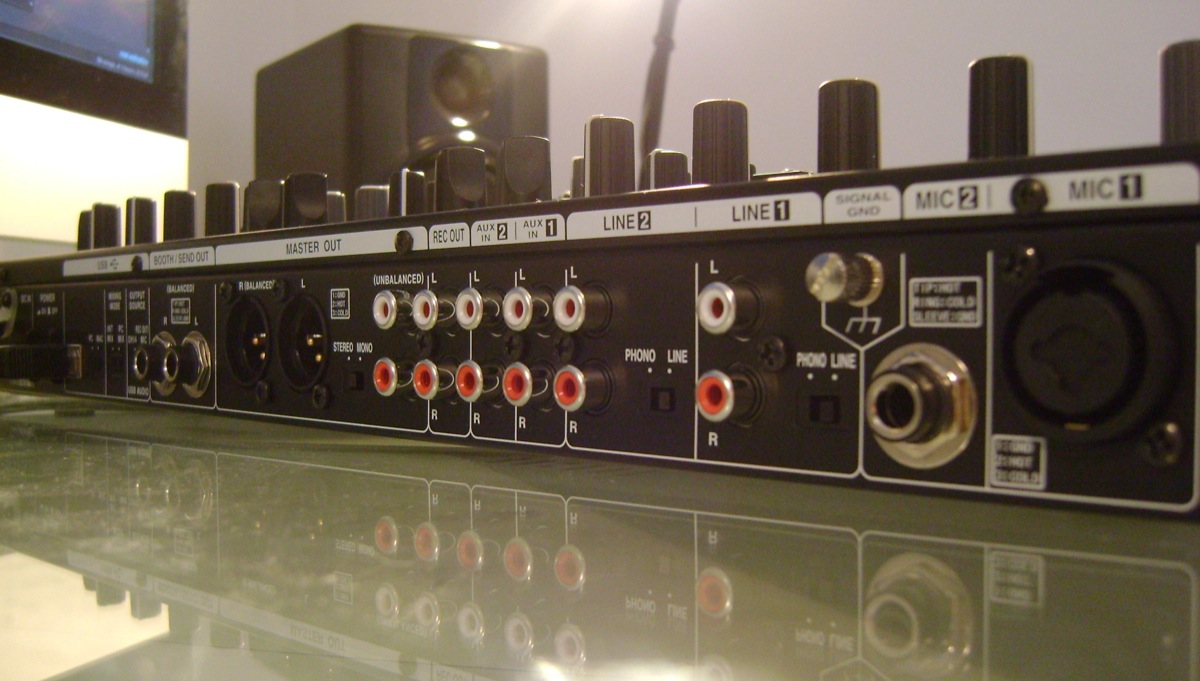
Denon DN-MC6000 rear

The back panel conceals a plethora of input and output options including a full 6 analogue inputs.

It will be interesting to hear back from Denon as to how easily those channels can be reconfigured to better reflect the way the decks are visually laid out in 4-deck mode on both Virtual DJ and Traktor – my biggest bugbear overall with this unit – but it’s not a dealbreaker, more a hurdle to deal with as you get it set up to suit your workflow and DJing style.

For serious multi-format or video DJs, professional mobile DJs, and also for installation in smaller DJ booths where quality and flexibility nonetheless remain paramount, the Denon DN-MC6000 would be ideal. It’s easily the most flexible four-channel DJ controller we’ve tested at Digital DJ Tips so far, and overall is a quality piece of kit.


Summary


We like:

  • Most flexible pro DJ controller at this price point
  • Well-built with excellent jogwheels and controls
  • Choice of software means you can go with what you prefer
  • Operates as a standalone mixer too

We don’t like:

  • Not the best integration out-of-the-box between hardware and software
  • Lacks some of the innovative features of the best software-only controllers
  • Mixer section a little bit cramped for fat fingers

Star ratings:

Features:

Build quality:

Sound quality:

Value:

OVERALL:

Product details:

Size & weight: 18.1 x 10 x 2″ (460 x 254 x 51mm), 10.3lbs (4.7kg)
Price: US$749 / £629 / €785
Buy from: Amazon (US), Juno (UK), Juno (rest of Europe & world)


What do you think?
What’s more important to you, flexibility or more innovative software control? Have you been waiting for video mixing? Does a bit of Midi mapping put you off or do you like to get your hands dirty? Let us know in the comments…

Now go to:
DJ Midi Controllers: The Ultimate Buyer’s Guide 2011
Exclusive: Numark NS6 4-Channel Digital DJ Controller Leaked
Traktor Kontrol S4 DJ System Announced

Want to escape the bedroom and play in public - fast?
Our 1000s-selling How To Digital DJ Fast video course shows you how.

Learn to DJ Free - email course plus bonus PDF book
Sign up for our weekly email course for beginners now...

Trouble choosing a controller? Visit the web's #1 guide!
DJ Controllers: The Ultimate Buyer’s Guide 2013.


Pages: 1 2

Tags: , ,


Creative Commons LicenseThis work is licensed under a Creative Commons Attribution-NonCommercial-NoDerivs 3.0 Unported License.

51 Responses to “Review: Denon DN-MC6000 4-Deck DJ Midi Controller”
  1. DeeJayIvan says:

    This has been the best and most comprehensive review for this unit that I have seen online period. As a 20+ yr professional in the business, this type of information hold tons of value to me which is the reason I send my friends who are either newbies to DJ’ing or pro’s looking to add digital kit over to this site to learn about DJ technology.

    I also wanted to share something about this unit I discovered online with DDJT readers who happen to be fellow Serato ScratchLive users as well — full platter support!!

    http://www.youtube.com/watch?v=YMIdgHzZN9I

    Albeit this is NOT official support from DENON/Serato, there are threads on both the Denon and Serato sites that discuss this further for those inclined to make this part of their setup.

    cheers,
    DeeJayIvan
    Toronto, Canada

    [ link ]
    • Phil Morse says:

      I guess it’s in keeping with the nature of this controller that people see the benefit of getting it running in all types of set-ups.

      [ link ]
      • marlon craig says:

        Am havin an audio issue, am using my MC6000 with my toshiba satellite laptop an virtual DJ but the audio from the unit is distorted, choppy, can u help?

        [ link ]
  2. L'As says:

    1st real review of this unit. Pretty accurate.

    I received mine last week and so far so good. I prefer using Traktor with it, then VDJ.

    Very solid piece of gear with a lot of flexibility.
    The only other controller I would consider after this is the NS6.

    I’m just waiting on the new version of Traktor to see how well it can work with the MC6000.

    [ link ]
    • Phil Morse says:

      I’m sure it will work fine, it’s just Midi mapping af the end of the day.

      [ link ]
  3. Adam says:

    Thanks for the review.
    I just picked mine up yesterday. One immediate thing I noticed was the improvement in sound over my NI Soundcard which was set up with a VCI-100. I have Genelec speakers which have really come to life now compared with a much more duller sound from the NI card. This alone has almost made the purchase worth it. I’m loving the Denon overall – the build quality is top drawer and nice feeling buttons and faders. Looking forward to finally doing gigs now without a mountain of cables and boxes!
    Cheers!
    Adam

    [ link ]
    • Phil Morse says:

      That’s interesting as the NI cards are renowned for sounding great… good news that it works well for you

      [ link ]
  4. exokinetik says:

    I think he was using the VCI 100 as a controller for the “internal” mixer in traktor.

    If you could run Traktor in external mixing mode, sending the decks directly to the channels in the analogue unit (i like this already….) then the summing that was happing in the computer (read compression) is now happening in the analogue mixing environment. So I think its more a component of using the mixer on the denon mc6000 and using CPU in your laptop when using the vci 100. And not so much he NI sound card.

    My audio 8 routed to my mixer for external mixing is bang on.

    When that same Audio 8 is forced to send the already digitally compressed sine wave of two or more tracks over ONE of its 8 channels into my mixer, it looses certain parts of the mix that do not get lost externally.

    I know this because I have the hardware to do the pepsi challenge.

    [ link ]
    • Adam says:

      Bang on. It was a VCI-100. And yes, the software EQ in tractor I found was terrible and a stark improvement using the real mixer on the Denon.

      [ link ]
  5. Andy Australia says:

    G’day from Sydney Australia.
    Firstly congrats on a very useful and informative site and well done on the first comprehensive independent review of this product. I ordered mine in late Dec after months of research into controllers and have been using it for the past month with great success. As a pro mobile/club DJ I have been lugging around a DJ mixer, a band mixer, a controller that felt like a toy etc for the past 5 years but now I finally have one piece of kit that does everything I need and more! I considered Reloop, S4 and Pioneer but once you compare ext inputs, mic inputs, master/booth outputs the Denon wins easily as an all rounder AND it does VIDEO too!
    It worked straight out of the box with my Macbook Pro and Traktor Pro no problems. I use channels 1&4 for CD players and 2&3 for computer as suggested in the manual. I find 2 decks with 2 CD players plenty so haven’t noticed the 4 deck issue you discussed.
    Then I discovered Virtual DJ Video mixing and was blown away! The Denon works great with Video and Virtual DJ. My first VJ gig is this weekend but I have already rocked 4 gigs with my Denon using Traktor Pro. I love that I can plug straight into master speakers with pro outputs and still have my own separate booth control, have full EQ over 2 mics and most importantly have full confidence that even if the computer crashes (it never has) I can still continue mixing immediately on external CD players without needing to flick switches on the rear of the unit, or simply use the additional channels to add in scratching/samples from CD players, iPod, iPhone, whatever! I have used the headphone out from iTunes into one channel and played songs via wi-fi control thanks to iRemote on iPhone4. Worked really well to make that grand stage entrance without having to walk on stage to press play! Next I will try the Virtual DJ control ap. Has anyone out there tried it at a gig yet?
    I do agree that you need small/nimble fingers to operate this unit though.
    Also the mic channels don’t seem to be routed to the Booth output so beware if you rely on cues from a singer. My vocalist would like some reverb on the mic rather than the echo effect. Is there a way to add reverb to the mic using Traktor/Virtual DJ?
    Overall I think this unit is the best all rounder available at the moment and the price is amazing value when you consider all it can do! My flatmate just spent 4 times the money on a Pioneer set up but he still can’t plug his computer straight in to control it and there is no way he can do video without spending closer to 10 times the price of the Denon DN MC6000!
    Any chance of more tutorials on Video DJing using Virtual DJ? File Management, Effects etc. Can you only mix 2 channels of video?

    [ link ]
    • Adam says:

      Hey Andy,
      Whereabouts in Oz are you? I’m in Sydney… Oz 6000 User group ? :)

      [ link ]
    • Hello DownUnder Andy,
      You can route the mics to the booth output by pressing the POST button in the mic section!

      [ link ]
  6. Charles Okanlawon says:

    I’m stepping up my rig to a full blown controller from Numark HDMIX. Kinda torn between DN-MC6000 and the yet o be fully reviewed Numark NS6. I’m not deeply routed in the details of mapping and configurations, but hope to learn progressively. The main factors necessitating my upgrade include effects (echo loop to be precise) to further enhance my transitions, auto loop, loop/sample storage for easy recall on the fly, and the standalone mixer option against total software reliance. I’m a full time mobile DJ and would like suggestions on selection based on the criteria set forth.
    Thanks and God bless. Oh by the way, I’m cost conscious as well.

    [ link ]
    • Phil Morse says:

      They’re both excellent, but as the DN-MC6000 is available now, and the NS6 might be another 6 months, plus as the Denon is perfect for mobile JDs, I’d say just get it. You won’t regret it.

      [ link ]
      • Charles Okanlawon says:

        Thanks for the feedback Phil. Any word on the availability of echo loop effect on this machine/software, and secondly do you know if this unit allows platter pitch bend in addition to the pitch sliders.

        [ link ]
    • Djtunde says:

      Hi Charles. Where are you based. I am also looking at the mc6000. I will never buy any Numark products again after what they did to their loyal mixmeister customers…… The Ns6 is not for me no matter how good it is…..

      [ link ]
  7. Andy Australia says:

    Oz user group great idea. I’m in Sydney too. Anyone know how to get effects from traktor or virtual Dj on the mic channels?

    [ link ]
    • Gbrown44 says:

      You’ll have to run the Mic out through a deck in Traktor using by way of changing that deck to an Audio-thru (the drop down box right beside the deck letter in the software).

      G

      [ link ]
  8. Gbrown44 says:

    Ordered Tuesday morning and the device was waiting on me when I got home from work today. Had an issue updating the firmaware (kept timing out and i’m not on a Mac), but that’s now resolved by way of installing from another Window’s machine. I like the device. It’s smaller than what I was using (Mixtrack), but in terms of build quality and controls it’s worlds above where I came from. It’s going to take some getting used to, but what i’m looking forward to is being able to do everything I need to do with this one device. I had to use both the Mixtrack and Maschine to get most the controls I needed at one time at my finger tips.

    Thanks for the input Phil. You rock.

    [ link ]
  9. Gbrown44 says:

    One last thing… i ordered from Music Trend and damn they were fast with the shipping. Not only, there’s promotion going on over there right now where you get a pair of Denon HP700 cans for the great price of FREE… S&H is free as well.

    [ link ]
  10. Leon Stafford says:

    HI,

    Just got a Denon DN MC6000 as a present. Never even used decks before, but i love my music, hopefully i’ll figure out how to use them. Can anyone help with what speakers i should get and what do i have to plug them into at the back, there is lots of places to plug things in but i haven’t a clue, (booth/send out masterout) what does it all mean, what do i have to get, any help would be great, thank you.

    Leon

    [ link ]
    • Phil Morse says:

      LOL didn’t you get the instructions with it? ;)

      Master out will do fine, any amplified speakers will do the job – most of our readers either use their home hi-fi or decent computer speakers/powered studio monitors.

      [ link ]
      • Leon says:

        Thanks Phil,

        I got instructions and breezed over them, never been one for reading instruction, i’ll just jump in and try and make it work. Grand so Master out it is, i take its just the small red and white plugs i use, take the big 3 pin things on the master out are for be amps or something like that.

        on another note, glad i found your website, i think i’ll be using the tips alot on it. loads on information as well, cheers it looks great.

        Leon

        [ link ]
    • Phil Morse says:

      Yes, they’re XLRs for pro PA gear.

      [ link ]
  11. S200REY says:

    I have had my DN-MC 6000 for around 2 months now, and I cannot fault it at all!..its an awesome bit of kit and yet again Denon build quality shines through! unlike some of the other units I have tried/tested over these last few weeks.

    Sound quality is also excellent! & after 2months of practice and a helping hand from a fellow DJ mate. I do my first club night next weekend! :D …cant wait!

    I will be playing funky/soul from back in the day (80′s & some early 90′s) and whats awesome with this set up is you dont have to outlay hundreds or thousands in vinyl!…another excellent thing about being digital.

    Cant wait to see the looks on peoples faces when I rock up with my Denon DNMC 6000 & my Mac Power Book! & have them proper rockin!..its my local night club and on numerous occasions the current resident DJ drops tunes in and out & doesn’t even mix & people are still happy!…un believable! and he gets away with it, solely because the music he plays the people love it! Dont get me wrong I am only an amateur at best, but I’m sure I will do a better job, and play rarer and better funky soul purely because am working with a ‘digital’ set up & have a little passion :P

    [ link ]
  12. Deco says:

    this unit looks good to go with my X1 to control various other things. i’m not a fan of having every button do two things. i think the X1 will become my sampler/loop deck controller in Tpro 2. and i’ll keep the hot cue buttons at teh bottom so i’ve got 8 hot cues without having to shift.
    thanks for the review Phil!

    [ link ]
  13. DJ BruncleB says:

    After using CDJ400′s for a short period with an analogue mixer, I’ve decided to go the controller route. I’ve been reviewing all the available controllers and this unit keeps coming up as the top contender. It’s nice to see that everything is mapable.

    After reading your review, I see there are many benefits to this controller that I hadn’t even considered like the ability to make the master outs mono and the ability to apply FX to the mics or not.

    Eventually I would like to be doing weddings and a simple, quick setup will be very important in my opinion. This excels over separate CD decks and a mixer in that department and still looks very professional, maybe even more so.

    Thanks for the review

    [ link ]
  14. Frenkee says:

    I didn’t buy this controller yet because I’m still daubing between the Denon 6000 or the A&H Xone DX or the Reloop jockey 3.
    The reloop jockey 2 ME I have now has a terrible soundcard.
    It is sooo loud that the sound is not good anymore. I’m wondering if this is the same as the Jockey 3.
    The A&H Xone DX is a typical ITCH controller although I have studied the Traktor TS files and it works I read. And it has a good soundcard I have read on other reviews.

    The Denon 6000 has one big problem for me, I read on a dutch DJ site reviewing the same controller…
    As a “fanatic” midi programmer; midi out address for the LED’s is not the same address as for the button.
    There is an ‘on’ and ‘off’ address and to change the color you have to experiment with the midi variables.
    Take a lot of time to program this.
    So Phil, you write: midi mapping is easy, yes but the led mapping is another story.
    Did you try this?
    Download the TSI mapping and you’ll see what I mean.

    I hope the Denon factory TSI mapping will work out for me for Traktor Pro 2.

    Someone else tried a custom mapping? I’dd like to know….

    Good review Phil!

    [ link ]
    • Phil Morse says:

      No, not tried midi mapping the Denon. The Jockey III has a great sound card to my ears. I know Denon recently launched a Traktor Pro 2 mapping for the DN-MC6000.

      [ link ]
    • AscioDj says:

      Hi there, just googlin’ around I found this useful site. I got the denon mc6000 since a month and I really want to change a couple of input but I can’t get the led to work.. any help?
      thk

      [ link ]
  15. Chad says:

    I just ordered mine from Music Trend. They still have the deal with free headphones and shipping or a free case and you pay for shipping. I went with the case since I have decent headphones already. Can’t wait for Tuesday when it should be here. Thanks for all the help in deciding which controller to purchase.

    [ link ]
    • Chad says:

      Well, I got my MC6000 last week and it is awesome! Takes a little programming to get it how I like it, but its not bad with the included tsi. My only complaint is about musictrends (the place I purchased) they had a deal for a free odyssey glide style case, when I got the unit it had the non glide style case. I contacted them to return it and get the proper case and they change the website as I was on the phone and then said they couldn’t do anything for me, even after I put up a fight and told them I had screenshots of before they changed it. Horrible business practice, great mixer.

      [ link ]
  16. DVJeXceeder says:

    Some of the very negative issues of this controller:

    #3. Bass EQ’s – move them 1 degree (from 12 o’cklock to eleven o’clock)and you get almost FULL Bass EQ kills, then keep moving them (*anticlockwise) you will notice very little change???
    coming from a DJM-800 quite frankly they suck… definately not linear. (Can get used to them thou?)

    #2. Carefull not to change the Cross-Over Curve, it’s positioned along with the mic EQ’s in a extremely annoying position… (Anoying, but not life threatening)

    #1. Even with the latest updates, sound quality can go to s#*t! Can be interferance from other power cables, ground loops??? You can try moving the unit very carefully trying not to unplug anything… Ultimately, Get ready to restart this “Stand Alone Mixer” in the middle of your DJ-set????
    Some advice to minimise issues:
    Buy a good quality USB cable (many reported problems from user’s regarding the one supplied)
    Buy a case, try and sound check before an event, have a back-up music device cued ready to play incase you need to re-start your computer… test untill you are 100% before you start to use it.. if you need to restart the mixer during your set, well…

    [ link ]
    • flyer says:

      #3. Bass EQ works perfect on my MC6000, apart from DJM-800 that takes out a lot of the mid frequences to……

      #2. The mic eq nobs are 1 cm apart and then it´s 13 cm to the cross-over nob. Maby if you got hands like tennisracket………

      #1. Had my MC6000 for six month now, and I never had to restart it, not ones!
      I changed from NS7 to this one and the sound quality really got a lot better, to my ears anyway.

      Luckily you seem to be the only one with these problems ;-)

      [ link ]
      • Rob Anthony says:

        Can anyone share info on the upfaders, please. A reviewer online mentioned & showed via video that the sound curve on the upfaders was too long…you did not get any sound until the fader was 2/3 of the way up. Anyone else have this problem? I ask because I’m looking to purchase one soon. Thank you!

        [ link ]
      • Phil Morse says:

        Unfortunately Denon didn’t leave a sample with us longer term so I can’t check that for you. Good idea to ask questions on the forum http://www.digitaldjtips.com/forum you’ll get a faster response.

        [ link ]
  17. Ean Sugarman says:

    Just bought home the DN-MC6000 after reading reviews, forums, youtube videos, you name it. Very happy with initial session. I use both Traktor Scratch Pro 2 + Cue (VDJ)
    This units feels well built, sounds fantastic, (eq is very musical) and although I agree that the unit is a little cramped, I don’t really find it a problem at all. Better to carry in my opinion.
    I already had the full and latest software versions, everything came up fine, but I must have inadvertently changed the midi channel because I could get sound but no controlling. I called Denon tech support and got straight through. In less then a minute I was rocking away and support stayed on the line while I checked out both programs.
    Very happy. Well done Denon!
    Oh and lets not forget the price…unbeatable!

    [ link ]
  18. Steve Gunn says:

    I love this controller BUT for the life of me cannot work this out!!
    Whenever I start it up I’m sometimes (most of the time) unable to get sound out from the midi channels. The only way to get sound is to use channel 1 or 4 in midi as well as 2 & 3. Then I get sound. I have to have both sliders 1 & 2 up at the same time to get sound. Weird. After awhile it seems to realize that’s not right and viola!! Works as it should. No reason just works right again. This is a very confusing situation to explain so I hope that makes some sense.
    Anyone else experiencing similar things?

    [ link ]
    • flyer says:

      Mine did that to at first. It was caused by the software that was using the wrong asio driver.
      I use VDJ and it works great as long as I start the laptop first, the controller second and then, the software.
      GREAT CONTROLLER!

      [ link ]
  19. neurologic says:

    just wondering how this unit performs with serato.i use a denon s5000 cd player with 2 techies mk5.will this integrate ok with 4 track in software.ill explain.serato track 1 and 2 via say turntables and track 3 and 4 software.

    [ link ]
  20. Djtavi77 says:

    My DN-MC6000 is not starting, only lights in standby mode. I’ve tried to activate the automatic standby mode “on” and then hit restart, then switched it into “off” and turned it on and off and nothing happened. Could someone help me, please! Thanks!

    [ link ]
  21. dj komza says:

    Guys,i noticed u alwys mention tractor software that works with DENON DNMC 6000 and you r not dwell to much on virtual DJ Software ; only thing that you mention when mapping virtual dj on video. Are you trying to say it works good on vi deo only or what pls i neeed ur advice because i want to buy ths controller and my worry is that i never use tractor software, when i’m djing i use virtual dj. Plz guys more suggestions

    [ link ]
    • Phil Morse says:

      It works very well with Virtual DJ, so if you wanted to use it with that software, it’d be a good choice.

      [ link ]
  22. Tupatupa says:

    Hi there :)

    I’ll realy appreciate some help..

    I’m planning a live/DJ project in the future so I’m wondering is it possible to connect two turntables, laptop (Traktor,two decks, and two live musicians (guitar and sax) to a Denon MC6000 and control it all at the time?

    Of course, little bit of switching won’t be a problem..

    I need to play some music from my turntables and some from my computer while the guys (guitar & sax) are following..

    Possible? :D

    Thank you..

    [ link ]
    • Phil Morse says:

      In theory, yes – you have enough inputs.

      [ link ]
      • Tupatupa says:

        hmmmm “in theory” doesn’t sound promising to me :P ..you see potential problems?

        [ link ]
  23. D Widdy says:

    Hi guys some useful comments to see, (Esp from exokinetik) i have always used internal mixing mode, but found the sound lacks “body” compared to the external analog inputs like cd players / mp3 player etc. The weird thing is they recommend internal mixing mode on the denon forum yet it seems that the external mixing mode would be a better option! Why is internal reccomended by denon? Is there less usability in external mode?

    [ link ]
    • Henrik says:

      The denon “only” have 2 stereo soundcards and if you want to use 4 decks in traktor you need to use the internal mode.

      [ link ]
  24. raphael says:

    Got mine about 3 weeks ago. Really love the quality build. I’m using it with Traktor. The one thing I’m trying to figure out is whether you can configure the EQ fading, because, unlike what this review claims, I cannot kill any of the bands by turning the knobs all the way down. There is still sound coming, and seeping into the mix, which is annoying to me. I come from a Rane Empath that not only has full eq kill but also bypass switches for really cool effects. If I can’t get full eq kills it will hamper my mixing style pretty severely. I’m looking for answers online… Is it a defective unit or a setting I missed. Started reading the 300 page manual, maybe it will provide an answer.

    [ link ]
    • raphael says:

      Me again… I found out you can assign different EQ profiles in Traktor. There’s one with full cutoffs but that one doesn’t give a lot of top end range, either. Still, it’s better than no cutoffs…

      [ link ]
  25. Riaan Swart says:

    I am selling my denon 1200 cd players and behringer ddm 4000 pro mixer to buy the denon mc 3000.I got a nightmare just now of my laptop freezing/crashing at a gig and woke up and knew,I can’t buy the 3000 because if the laptop crashes there is no power on unit,thank you for all the comments on the 6000 and i thinkthat is the one to have with its own power.guy is coming today to buy system and hope it was a good move selling my 1200s and behringer mixer to buy mc6000.

    [ link ]

Leave a Reply

Enter your details:

Or connect with:


Be constructive, be polite. Full guidelines here. Asking a question? Use the forum instead. Comment that don't meet our posting standards won't be published.


New to Digital DJ Tips? | What DJ controller? | Learn to DJ | Testimonials and Feedback | Privacy Policy