Digital DJ Tips3>

Learn How To DJ With Digital DJ Gear

From The Forum: How Can I Better Learn My Tunes?

Waveforms

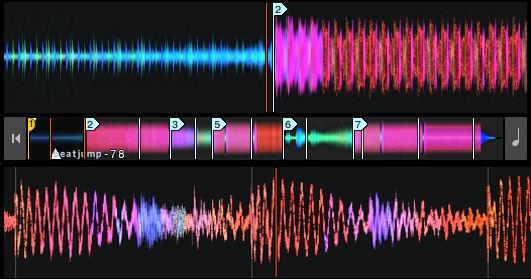
Developing your 'waveform intelligence' and learning to use cue points to your advantage are two ways of jogging your memory about the structure of tunes in order to mix them better.

Digital DJ Tips forum member Chris Webb writes: “How do you get to understand and ‘remember’ your tunes? To what level can you recall them when you’re thinking about what song to play next?

“I’m really new to digital DJing (still got my SL1200s but they’ve been gathering dust for a while!), but I love music – always have. I listen to a lot of it and regularly, and yet for some reason, even with those songs that I’ve listened to all my life, I still only ever seem to have a ‘vague’ memory of them before they’re actually playing (it’s more of a gut feel that ‘oh, this track would go well next’).


“I usually can’t remember how they start (unless it’s a blindingly obvious intro), nor how the initial intro breaks into the bassline etc. I’m really interested to know the level of detail other people have with their music and how they get that level – is it instinctive, or do you listen and ‘actively’ remember in some way?

“Do you have special tips on how you practise mixing with new tunes to get a better feel for records? Do you use cue points for anything other than markers for use in the mix (I have considered using them as a labels to give me a quick review of a track once it’s in the deck)?”

Digital DJ Tips says:

I think you’re right to think about this, but the fact that you instinctively “know” what you want to play next is about a thousand times more important than remembering song structures. I offer you that fact as encouragement, because you can learn to mix pretty much anything into anything, but knowing what to mix is much harder (and much more important).

Using cue points as memory triggers is a great idea, because you can save them with the track so quickly work out what happens and in what order. If your software lets you save loops, you can save a loop of the beats at the beginning of a track which will give you infinite beats to mix into as well, meaning you don’t have to be so sure how a track starts every time.

How many movies have you seen? How much can you really remember about most of them?

If your DJ software marks the waveforms every minute with a small line in the display, you can work out how far into the track certainly things like the first break occur, just by looking. Ditto the “sound” of the track, as long as the waveforms are coloured, as it’s easy then to spot if the track is predominantly bass or there are mid (eg melody/vocal) bits going on.

I am a big fan of annotating my tracks in the comments. I use “MWW” to indicated “mixes well with” and then note any tunes I’ve mixed well into our out of involving that track, which means you don’t have to start from scratch in working out a great mix every time, but you can take it even further than this if you really want – look at the DJ notation system invented by Philip Age for a truly organised way of tagging your music!


I also believe in keeping a lean “A list” set, and listening to it often. Have your main playlist on your iPod, in the background on your home stereo, in your car, at work, and just have it going in the background. You can eliminate tunes you don’t like, and at the same time you’re subconsciously “learning” all the others.

Just because you’ve known a song for years, doesn’t mean you can remember much about it – you have to constantly listen and remind yourself. (How many movies have you seen? How much can you really remember about most of them?)

• Our readers Terry_42, Rodders, Steelo, DarioJ and others go into more detail on many of these points over on the knowing your tunes forum post that this question originally appeared on.

What are your little tricks for learning your tunes? What do you use to jog your memory when you’re DJing? Please share your thoughts in the comments below.

Now go to:
How To Organise Your Tunes While DJing, Part 1
How To Organise Your Tunes While DJing, Part 2
Why Packing a Good Box of Tunes is More Important Than Ever

Want to escape the bedroom and play in public - fast?
Our 1000s-selling How To Digital DJ Fast video course shows you how.

Learn to DJ Free - email course plus bonus PDF book
Sign up for our weekly email course for beginners now...

Trouble choosing a controller? Visit the web's #1 guide!
DJ Controllers: The Ultimate Buyer’s Guide 2013.


Tags: ,


Creative Commons LicenseThis work is licensed under a Creative Commons Attribution-NonCommercial-NoDerivs 3.0 Unported License.

42 Responses to “From The Forum: How Can I Better Learn My Tunes?”
  1. My tips for Traktor users (MIGHT work on other sorftware; haven’t tried though):
    1 – Organize the living crap out of your collection.
    2 – Get Mixed In Key and analyse everything.
    3 – Add only the main genre in the genre box (house/trance/techno/etc), then add all relevant sub-genres in the comments (because you can still search for them there).
    4 – Use your hot cues to tag important parts of each track. I use the first 4 for points to start mixing in and the last 4 for points to start mixing out.
    5 – Customise the deck display to show this information as a reminder to help you pick the next track.

    Use these five points and it’s gonna be very rare that you can’t pick a track that works well.

    [ link ]
    • Ricardo Martinez says:

      My only variation to your system is in #3. I enter the sub-genre in the grouping field. In this way, I create Smart Playlists in iTunes wich makes it really easy when you want to listen to certain tracks in the car, at home, etc. The same goes, to the star system…I create Smart Playlists as well with those.

      [ link ]
    • Phil Morse says:

      Solid advice, thanks for focusing on one piece of software, sure to help all our Traktor users, although much of what you say transfers nicely whatever software you’re using.

      [ link ]
    • DJ Forced Hand says:

      Sounds good, do you use the Star System for tempo of the track, dance floor population, or something other than personal favorite valuation?

      [ link ]
  2. DJ Possess says:

    Eat. Drink. Sleep music. Use iTunes to organize data. 4-5 stars for bangers. Add comments cuz sometimes stars don’t import right into Traktor. I put my name into Grouping field. Use BeaTunes to analyze BPM and missing data and create Matchlists as a cheat sheet for song playlists. Take a genre of sons and sort by BPM and practice mixing. Then sort same songs by Key and use Camelot wheel to pick songs.

    [ link ]
    • Phil Morse says:

      Solid advice, DJ Possess, thanks for sharing.

      [ link ]
    • DJXKhan says:

      I do this bpm&key sorting all the time when I practice.

      [ link ]
  3. For me, way before I used Serato and even after, I put all my tracks in my Ipod and listen to them 24/7. All day (when I can) and all through the night when I sleep. Honest to God, I have listened to every single track in my library at least 20x.
    If I see a song title during my set, I get a flashback of how it sounds.

    This is my method. It’s a long process but, it works for me.

    [ link ]
    • Phil Morse says:

      And it’s one of the best methods, Gianmarco. No substitute for having a tight set and listening to it over and over.

      [ link ]
  4. I used to think that all the tunes I added to my collection were instant hits but it takes a long time to realise how crap some of them are until you hit the gems.

    Once you’re at this stage you start to minimise your collection because you know what works well and what doesn’t. As your list gets smaller (But with more tracks you’re likely to play) you start to remember most of your tunes because you know you like them. Delete ones the instant you don’t like them as it easy to get attached for the wrong reasons otherwise you end up making your collection bulge with useless crap.

    [ link ]
    • Eros says:

      Totally spot on and exactly what I did ! You get to a stage when you remove more tracks from your “A” collection than you add. The tracks you’re left with are the ones you generally listen to and play most of the time.

      [ link ]
  5. Nephew says:

    Really? All you have to do is listen, nothing more. This isn’t rocket science, it’s music. Music is a feeling, and once you tap into that you won’t have to “remember” anything because you’ll feel it as the track works its way through the arrangement.

    You can have all the toys in the world, but if you don’t feel it your mixes/sets will be stale and lifeless, and no one will want to listen then.

    [ link ]
    • ^This!

      It’s often overlooked as it’s so simple, but you’ve hit the nail on the head!

      [ link ]
    • Phil Morse says:

      Thanks Nephew, but for many it’s not quite that simple. Our reader plainly has that instinctive feeling, he’s just after some input on how other people find the subject. I find many of the tricks readers have shared here to be useful, and I’m sure others do too.

      [ link ]
      • LewisLace says:

        If listening to a song and remembering it’s general structure is like learning a science then being a DJ is not for you.

        [ link ]
  6. Dajmo says:

    I did a mix without listening to all the songs all the way. I choose songs first by listening to the type. Are they up tempo or more downtempo (same bpm) are they more house or tech house. Then i put them in folders depending on how they feel when listening max 30 sec. Then when i mix i choose those songs and listen at beginning, middle and end before i put it in. So a fast sorting of songs in folders. Then when mixing fast listening start, middle, end to get a feeling for the song. Viewing the waveform i see if it has long end or short end so i know if i need to plan a loop. But the most important is what you want to get, uptempo or more downtempofeel. Imoortant to mix so people feel the energy when mixing into a uptempo song. If i want a more planned mix then i mix theese songs a couple of times so i know them more well. And as a person stated before me, as soon as i feel a song isnt up to standards i delete it straight away. In the beginning i even put in a comment if its a uptempo song so i know them, they always save me if i miss a song, just set a more fun song after that and the crowd is all with you.

    [ link ]
  7. B.B. Koning says:

    I’m really glad this came up, because I’m constantly struggling with the same issue.

    I seem to have a pretty good handle on what flows together, but couldn’t recall the right points for mixing until I call up the song and do a preview.

    I haven’t the faintest mastery of hot cues and samples/loops as of yet.

    That being said, I have set some cue points in Traktor at the right beat/point in the song.

    Mastering this more technical end of the scale and throwing in all the bloops and beeps on top of it will be the challenge.

    That being said, most of what I listen to, I am generally of the opinion not to @#$#@ it up with tricks and bleeps, since the artist did a rather nice job to begin with.

    [ link ]
    • Phil Morse says:

      You’re thinking right re not messing with the artist’s work, in my view. But mastering loops to help you mix is a good one, as long as you don’t overdo it and start to sound cautious and dull.

      [ link ]
  8. DJ Gerard says:

    Hold on to that “instinctual” gut feeling you get after the song has played a bit and “feel” what is next. Not remembering the intro/ outro of a song is common but so are most intro outros. IMO mixed in key is a waste. You should never be mixing strings or baselines of 2 songs together on a whim. Utilize the percussion intro and loops. Start counting beats. Knowing where your breaks are comes with practice practice practice and listening listening listening. To be honest you seem to care enough about it that I am sure it is coming naturally to you. Do not over analyze. Over analyzing a mix to a science only will take all the joy out of two records (or three) playing together. Yes there is a method to the madness (science of DJing) but you are far better sticking to that gut feeling and let experience over time take you further rather than using a formula. No 2 moments in time will ever be the same. Neither will 2 of your mixes.

    [ link ]
  9. Rizzlah says:

    I also utilize beat counting especially when I’m moering a house/dance set. All tracks are made in multiples of 4 beats but the trick is to find when that first beat hits for a section (be it to mix in or out) and once you’ve got it, set a cue point.

    And Phil Morse is right… Never underestimate the power of the background. To ‘know’ you music, have your collection playing on shuffle anywhere and everywhere you can, you never know what might inspire a new mix.

    [ link ]
  10. Silver says:

    Quick Question – After listening to songs over and over, or the same playlists (organised by which songs mix well with the next in the playlist) does anyone else get a little tired of listening/mixing the same songs, and then when they practice a set or play a set with those songs, it doesn’t sound as great as it used to, or even possibly annoying because you’ve already heard the songs 1000 times in the same/very similar order? Does this bother or affect anybody else, or does anyone have similar problems?

    I’ve been DJing (mainly house + mainstream pop when necessary) for around 3 months now with one gig under my belt and a few coming in a couple of weeks. Sorry if this is slightly off topic.

    [ link ]
    • Phil Morse says:

      That’s a really good question, Silver, and one I was just thinking about yesterday. I think it comes back as always to one thing: Ultimately, DJing CAN be boring if done at home, alone, if you apply rules for public DJing (a taut, lean DJ set being one of them), If you’re DJing for personal pleasure at home, there ARE no rules – you can gat any songs, play them in any order, mess up as much as you like, not tie yourself to a proper setlist or all the other rules we go on about here.

      It’s only when you play in public that these things apply – and generally, good music played to a decent audience is not going to bore you, no matter how many times you’ve heard it before.

      [ link ]
    • shugafoot says:

      I can’t stop listening to music. Even if it’s my fav songs I can listen to them a hundred times and not get bored. The reason being is I’m always learning something from the song. Especially when I not consciously looking for something in the track. I hear an instrument I wasn’t aware of before. Or I make a connection with an older track from a different age or genre or another track I could mix with it. Without speaking with the actual artist who created a track you need to listen to your songs with fresh ears to really get the everything about it. My two cents ;)

      [ link ]
  11. shugafoot says:

    I create mini-mix playlists of 3 to 10 songs I think mix well. Load them up on my iPod and I play them everywhere I go. Then I practice mixing different parts of each song together. I’ll mix them harmonically or make loops and mix those in. The more I do that, the more familiar I get with the unique hooks, vocals, baselines of each song. It’s like exercise … without the sweat and aching muscles :)

    [ link ]
  12. Tesno says:

    play more. play even more.

    [ link ]
  13. Ed B says:

    Use your headphone cue. You have lots of time while a song’s playing to listen to intros of other songs over the current one and see if they work together. If you’re not beat matching I can’t see what else you would do in this time. Cue points at changes in the song will help you skim through quicker.

    [ link ]
  14. DJ Forced Hand says:

    When I was a kid, I used to play a game with my sister to see who could guess the song by the first few notes (as per name that tune) and it worked really well for getting intros to songs my sister and I loved. Later, we used the Radio Preset buttons to jump around radio stations and play the same game only at different points of the songs. Effectively, the radio played songs like an iPod shuffles songs so, if you have a friend you can make “name that tune” a game with, you’ll probably start remembering the songs better.

    [ link ]
    • DJ XFACTOR says:

      Great advice Dj Forced Hand. I used to do the same with my sis. Its proven that nothing makes a person better than competition, so use that to your advantage and IMHO you’ll reach any goal a lot faster.

      [ link ]
  15. Eric L says:

    Some have mentioned using MIK and PN, Which I have done for years. But I also create a CD of the latest tracks that I have added to my collection, then I listen to those CD’s while in the car, or while cleaning, studying etc. On occasion, I will create a playlist and listen to the tracks on my iPod while at the gym. The creation of the CD also functions as a backup in case your lap top takes a dump (what are you gonna do at a gig when your lap top acts up?). Having the tracks playing in the background will help draw your attention to the good tracks, or good parts in a track, causing you to take note of the song for future reference. In addition to this, I will record practice sessions at home to hear how the songs blend together, which will spark the creative juices, “that song would blend well with this song.”
    After a while, you will just skip the CD step (you should still back up your music, and burn a CD or two when preparing for a gig) and move straight to recording a set using the new tracks, to see what works and what doesn’t. You will find that the “this track mixes with that track,” will happen with just about every track. Like any other skill, it takes repetition to develop and tweak your workflow. Good Luck.

    [ link ]
    • Phil Morse says:

      Top tip re doing a CD, often that can be more convenient than trying to have a digital device with you, and I like the idea that you’re simultaneously making a backup. Thanks, Eric.

      [ link ]
  16. James says:

    After i buy tunes i make a mix tape with them, upload to soundcloud to listen at work, burn a cd for the car, make a digital copy on myphone for when i work out. U get to hear your tunes and how they sound in the mix then, also when u make ur mix save the tracklist as something like jun 2012 mix tape and u can think back to the tracks from ur car

    [ link ]
  17. M0kster says:

    I go this way:

    I buy my tunes ( mostly online // if not i “rip” the CD to HDD ) and the first thing i do is to “analyze” them. Look at the gain level / look for the Keys and making some first notes on paper! ( JEP!! PAPER :D )
    If this is done i open my traktor and beatgrid them correctly. Next step is to have closer look at it and scrolling through them with “Beatjump @ 32″( without playing the tracks ) U can figure out the construction strategy of the artist very soon. So now go back to the beginning of the Track and start beatjump again. When ever u hear and see prominent positions to mark ( like build up or breakdown etc ) SET A CUE Point. So there u are.
    Thankfully Traktor saves all your Cuepoints so whenever u load the track u see whats going on there. If u are really oblivious u can comment your CUES ( like: vocals starting )…that can be helpful too.

    [ link ]
    • Phil Morse says:

      Thanks M0kster, it’s really valuable to get real readers’ workflows on subjects like this, I appreciate you taking the time to share.

      [ link ]
  18. Matt says:

    Great article, I’m new to dj’ing as well, learning as I go. My usual job is a postman which requires driving for usually 7 hours a day. All the new tunes I buy off Beatport etc I sync to my iPod, then link my iPod to the radio in my ‘post van’ and play them all day even pulling in some times to take a note about a certain part of a song, then setting cue points in Traktor when I get home. A few djs tell me to mix with the ’16 bar intro/outro’ but on traktor you can actually see the waveforms, so usually with 1 or 2 min to go on track A I bring in Track B and mix them seamlessly using the Low/Mid Eq’s. As I said I’m new to this and I’m sure throughout time I will add effects and maybe change the way I mix which at the minute is kinda ‘blending’ but with knowledge of my house/electro tracks it can work pretty well.

    [ link ]
  19. Foldabledisco says:

    Do NOT buy a lot of music at once. Beatport (or other websites) makes it very easy to buy large batches of songs with a flick of a switch.
    My (new) strategy is, I’ll put everything I might like in my shoppingcart and leave it there at first. The next day I listen to the content in my cart and remove everything with a “mwah” factor instantly. That I repeat a few times till my cart is destilled to a list with about 5 or 10 potentially good tunes. Somtimes I look at Youtube for a full version when I have doubt about a song.
    I used to buy a lot of songs at once and then lost oversight over my collection. Result missing the “gems” and playin’ the wrong ones at the wrong time.
    Sometimes I play/practice a set from my whole collection at home with a blanco/new setlist ready, everything I like at that moment I drag into that list. Later I start building a nice playlist from there, by adding thing or remove things. You can call them musical moodboards if you like.

    Maybe this will help you, and like the others said… Eat, drink talk and sleep music! But watch the volume! Otherwise it will never be silent again in your head… (like mine)

    [ link ]
    • Phil Morse says:

      YES! That’s why I love Spotify – by the time I’ve bought a tune, I’ve listened to it at least 4 times, in full.

      [ link ]
    • Robert Wulfman says:

      I make monthly charts on beatport of the new songs from that month that I liked the most and then buy the chart. though usually I’ll get the full release instead of that one track.

      [ link ]
  20. Robert Wulfman says:

    I keep a very detailed organisation system so that, even if I don’t know the track at all, I can basically tell what works with what. I do my tagging in Rekordbox and use fields that Rekordbox, Traktor and VDJ all use. I also capitalize every word to give it a clean look.

    Title – This is rather standard. I like to keep things like “featuring” in the artist tag and keep the remix name in parenthesis.

    Artist – Just the artist name. if there is an “and” I replace it with “&”. featuring becomes feat. and if it’s “so & so present bla” I shorten it to “bla” to save space.

    Genre – I use this more like a sub-genre tag, using detailed and often made up names for them. I try to make sure that any two genre names I use have distinct sounds to them and if I have something that doesn’t fit anywhere (for exapmle Da Punk – Da Funk, which I have labeled as acid) I find what’s closest and then put what it’s similar to in the comments tag.

    BPM – This one is automatic really.

    Key – I use Mixed In Key and keep them in camelot notation.

    Comment – Here is where I put any other information I might need, separated by periods. First I mark any errors in the file with *s and all caps if it’s a major problem and lowercase if it’s minor like (in example *PART OF MIX* or *quiet*) Then I put weather is has vocals or not. After that I put whatever it’s close to in another field, using “A Little” if it’s minor or “Almost” if it’s major (in exapmle A Little French Funk or Almost Uplifting). I usually use this for the genre and mood tags. After that, if there’s space, I’ll put anything else that might help when searching for it.

    Label/Composer (for VDJ) – I use this tag as a mood tag. I’ll use one word to describe the general feel of the whole song, usually marking more subtle moods in the comments tag.

    Release/Album – I use this tag for something I call the energy level. I use a 0-9 scale for how much energy the track has (though I’ve never actually used 9). This system is a little hard to write out as it’s more of something you hear but the basic rule is: 5 is a base line and doesn’t lift up or down (a lot of Tech-House songs are at this level) 6 or higher takes the energy up from 5 and 4 or lower takes the energy down. This level is also very relative and is only there to give you a basic idea of what the track is like, if I’m doing a chillout set I can make a 6 sound like a 3 or a 4.

    Album Art – I don’t really use this very much so I’ve made some images in paint to designate whether it was obtained legally or not so that I can get legal ones in the future. I also find that a lot of illegally obtained tracks don’t have good audio quality. I also use this to mark files for deletion or replacement.

    The only problem I’ve had with this system so far is how long it takes to do. It can take 2-10 minutes per track and when you have 10000 tracks that can take a very long time. Once it’s set up though, you can find the right track to play in about 2 minutes or less. Still even with a detailed organisation system (and you should find one that works for you) it helps to know your tracks. I had an idea to fill up a mp3 player with the tracks you don’t know very well (or create a playlist if you have enough room for all of your tracks) and listen to that often to keep up with your collection.

    [ link ]
    • Phil Morse says:

      Thanks Robert, always good when people take the time to detail their exact library systems to us.

      [ link ]

Leave a Reply

Enter your details:

Or connect with:


Be constructive, be polite. Full guidelines here. Asking a question? Use the forum instead. Comment that don't meet our posting standards won't be published.


New to Digital DJ Tips? | What DJ controller? | Learn to DJ | Testimonials and Feedback | Privacy Policy