Digital DJ Tips3>

Learn How To DJ With Digital DJ Gear

Your Questions: Why Don’t Jogwheels Alter BPMs Permanently?

Technics pitch

The Technics turntable pitch control, complete with centre click – just like our reader’s Hercules RMX.

Digital DJ Tips reader Bruce writes: “I have always thought that there’s one feature that’s missing from software (Virtual DJ and others). Let me sketch the problem: Track 1 is loaded on deck A and playing (out). You are putting Track 2 on deck B and you hit the Sync button. The two BPMs are aligned. All seems well until you spot the alignment drifting out.

“You manually turn the jogwheel of the controller to nudge it back in again. It drifts out again slowly. You use the pitch slider to adjust the BPM a bit and it become better, but still not perfect. Experience will tell you how much to adjust the slider by and most importantly how many times you need to repeat this process until the tracks are perfectly at the same speed and completely in sync.


“My suggestion is that the controller/software could have adjusted the BPM for you without you having to hit the slider. What I am saying is that the first time when you had to slightly move the jogwheel to get the beats aligned, the software could have automatically changed the BPM value as well.

“I have the Hercules RMX and because of its centre ‘click’ on the pitch fader, if I have to start from that point doing the adjustment on the pitch fader it is not the easiest thing to do.”

Digital DJ Tips says:

Hi Bruce! One of the reasons that software doesn’t do this is that sometimes you legitimately want to move one track in relation to another, for reasons other than to correct a BPM mismatch. If the software always assumed the reason you were doing it was to correct a BPM mismatch, and thus changed the BPM (and that’s assuming it could work out the BPM you wanted to change to at all), you’d be in all kinds of trouble.
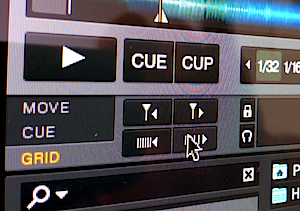
Traktor beatgridding

Beatgridding your tunes in Traktor: It negates the need to ever have to manually beatmatch, freeing you up to do other things while mixing.

Reasons for nudging a track could include to match non-quantised percussion elements of on track with the beat of another, to add some urgency to your mix by having an acappella coming in a fraction early on every line, or just to correct phase manually so the groove sounds right – all cases where your intention is not to correct a basic BPM mismatch.

The technique you’ve outlined – using the jogwheel to get the tracks back in time, then adjusting the pitch fader ever so slightly to hopefully mean they’ll hold together longer, then repeating several times until all is perfect – is the classic way of beatmatching, and with the sync button turned off or used just for the initial BPM match, today’s software basically duplicates this behaviour.

So if you are manually beatmatching, the “resolution” of your jogwheels and pitch fader are supremely important – coarse centre-clicks are bad, and you’ll hear much talk of “14-bit resolution”, which basically means it’s easier to make very fine adjustments in the way you describe.


(Also, you may be interested to learn that with the classic Technics 1210s, there is a big, fat centre click that can completely throw off a beatmix – most vinyl DJs move both decks a fraction faster or slower if one of them happens to be on the centre click, and then re-match the BPMs on that part of the fader.)

With the classic Technics 1210s, there is a big, fat centre click that can completely throw off a beatmix…

Where software has advanced is with “beatgridding”. This is where it actually “locks” beats together either at its best-guess sync position, or at one you’ve pre-decided by telling the software beforehand where the beats are in the track. With such sync systems, your mixes ought never drift in the first place. Another way, specifically in Virtual DJ, is just to hit the “sync” button again when you hear a drift – the software will then lock the beats back together, correcting your beats. You may have to hit it a few times in a mix, but it’s easier than the manual process you describe above.

Are there improvements you think could be made to DJ software that the companies aren’t adding? Have you struggled with beatmatching on controllers? Please share your thoughts in the comments.

Now go to:
Your Questions: Is Beatmatching By Ear Still Important?
5 Reasons Why All DJs Should Learn To Beatmatch By Ear
Over To You: Is It OK To Beatmatch Using Phase Meters?

Want to escape the bedroom and play in public - fast?
Our 1000s-selling How To Digital DJ Fast video course shows you how.

Learn to DJ Free - email course plus bonus PDF book
Sign up for our weekly email course for beginners now...

Trouble choosing a controller? Visit the web's #1 guide!
DJ Controllers: The Ultimate Buyer’s Guide 2013.


Tags:


Creative Commons LicenseThis work is licensed under a Creative Commons Attribution-NonCommercial-NoDerivs 3.0 Unported License.

21 Responses to “Your Questions: Why Don’t Jogwheels Alter BPMs Permanently?”
  1. softcore says:

    Great answer! havent got anything to add!

    [ link ]
  2. mr stifffy says:

    I guess you could almost do this in traktor with a shift button but it wouldnt be ideal…. I actually have mine so I can adjust bpm slightly by holding a shift key as one of my pitch faders stopped working

    [ link ]
    • Phil Morse says:

      Good stuff, and clever thinking re the remapping!

      [ link ]
      • TechNZ says:

        all my gear that i use with VirtualDJ is traktor gear, its all mapped by me to behave in the way that i want it to.

        if it doesnt work, make it work.

        [ link ]
  3. ToS says:

    It is a nice idea. My answer would be:
    They have not implemented it because it is way to radical feature for most regular DJs. I mean, just look at all that dissing of poor sync-button.
    On the other hand, it is something between manual beatmatching and full-on-sync.

    [ link ]
  4. DJ Forced Hand says:

    If you allow Traktor to automatically “Beat Detect” you’re really just flipping a coin and hoping that the beats will hit when you want them to. If you’re playing a track and the beats don’t align it probably means that the Auto Beat Detection is aligned to a point which is slightly off the beat and you’re better off turning off Sync and manually beat matching (just so that you don’t lock down to beats that train wreck) unless you have the time to adjust the beat grid.

    There’s a whole section in Traktor regarding beat gridding. In the Beat grid section, you can manually tap out the BPM to change even auto-detected beat gridding while also setting the beat grid, you can move the beat grid (to be on the (down)beat) and you can change the space between the beats (duration).

    It’s important to note that even when you have two songs perfectly beat gridded, that if the tempo range is too great, you will not be able to lock the beats together in Traktor… as of yet, there I know of no program that will lock down to half-time (or any other time signature) for BPM… although I know this is under construction in Livetronica Studio as well as the intelligent crossfader which syncs BPMs of two tracks and crossfades the BPM (locked in time) at the same time as the standard crossfade volume controls.

    [ link ]
    • scooterADAM says:

      Itch lets you sync tracks half time ie a 70bpm with a 140bpm track and vice versa

      [ link ]
      • DJ Forced Hand says:

        Good to know.

        [ link ]
      • Phil Morse says:

        I actually find that behaviour to be buggy, now you mention it…

        [ link ]
      • DJ B-LEVE says:

        If you double the BPM reading within Traktor on a 70ish BPM song say that it reads in the 140ish range you can mix half time like hot butter.

        [ link ]
    • Suva says:

      You can temporarily modify the beatgrid in Traktor to turn it to half/double tempo via the grid panel under the deck.

      [ link ]
  5. Yogesh Oza says:

    My advice would be , if you are using Virtual DJ and have no problem using the sync button, you can map a key to act as “play_sync_onbeat”.
    this instantly synchronizes the song with the other deck, using local beat information instead of the global beatgrid.
    you can use that assigned key instead of using play and sync separately. and whenever you think the tracks are going out of sync you can just press that assigned key and they will align properly again instantly.

    [ link ]
  6. alvin says:

    just… remap it. i’ve done this to all my mappings, instead for my twitch mapping

    [ link ]
  7. James says:

    I can see what you’re trying to say but I think if you actually think about how this would work – it doesn’t really make any sense.

    When you ‘nudge’ the jog wheel, you’re pushing the bpm faster or slower than it’s current speed. Think of a vinyl turntable here if it helps. It goes round at a constant speed, if u nudge it, you’ve temporarily increased it’s speed (to try to get the beats aligned). That speed increase has a curve. It doesn’t just go from 130.0bpm straight to 132.4bpm for example, it moves between those two values over time – the amount of time being determined by how hard or how long you nudged it. Once it reaches it’s top speed, it will then gradually fall back down to it’s original bpm of 130.0bpm. Again on a curve. As such, the actual BPM you’re actually looking for, to have the beats matched perfectly, is somewhere BETWEEN the min and max. I’m not 100% sure if digital systems work exactly like this for the ‘return’ phase to be honest, but the issue still applies. How does the software know what BPM it should actually lock to? is it the max BPM of the nudge? is it somewhere in between?

    What you’re really asking for is the software to do everything for you, which in my opinion (cue the never ending debate) isn’t DJ’ing, but each to their own I suppose.

    Another way to try to think about the issue here btw is to think about the ‘riding the fader’ technique of beat matching. Where you get two tracks beat matched by literally riding the fader of the one of the decks. This is basically where u pitch shift the deck you’re trying to beat match beyond where you think the bpm is supposed to be (so it’s temporarily faster than the other track, allowing it to ‘catch up’ in terms of sync) and then you pull it back down again to where you think the two will align. You keep doing this with the amount of your rides reducing until you get to a point the two are perfectly matched. This is what the jog wheel is for only with an easier mechanic. It temporarily pushes the bpm beyond what it should be (to allow the deck your matching to ‘catch up’ to the one that is playing to fast, and then the bpm comes back down again. The difference is with the jog wheel, you also need to manually adjusting the pitch fader as well as otherwise you will have the problem you’re talking about where it just goes out again later. But as for having the software adjust that automatically for you – 1) how does it know which bpm in the range you’ve just nudged it needs to lock to? 2) even if it could become sophisticated enough to do so, you’re just leaving yet ANOTHER thing down to the software to manage for you. Which I’d argue a) questions what YOU are actually doing and b) leaves more potential for error and issues to occur – e.g. imagine it locks onto the incorrect bpm. HOW then do you even fix the problem? You can’t by nudging it as the software keeps locking to the wrong place, so now you’re screwed.

    [ link ]
  8. ToS says:

    You are all solving a problem that does not exist, and answering a question that is not set.
    The post has an idea, a proposal for a feature. An interesting neat feature.

    [ link ]
  9. Arun says:

    Even with the beat grids, sometimes they are just a fraction off and you want it to align and not just change the speed. On a second track, the line may be just ever so slightly off (compared to a playing track). No?

    [ link ]
    • Phil Morse says:

      Agreed, it’s not as simple as beatgridding and forgetting, as tunes have “groove” and you may want to move them slightly in relation to each other to create a new groove of your on, dependent on the two tunes you’re mixing. All stuff that’s intuitive to manual beatmixers, but not always to beatgridders.

      [ link ]
    • Irvin Cee says:

      Yep, indeed. I use autosync and do my beatgridding at forehand.
      I still need to correct slightly almost every mix.

      [ link ]
      • Kenny says:

        Interesting to hear you say that. Are you manually beat gridding your tracks and still needing to correct the mixes when you play?

        This is exactly the problem that is solved with Ableton Live’s Warping feature, which allows the option of correcting any and every specific off-beat part of the track to align it with the beat grid. Of course, many tracks that were computer sequenced don’t need any correcting, they are spot on all the way through. Nevertheless, there are still quite a few that drift in the way you describe.

        One of the main reasons this drifting occurs is that many of the tracks that were created with a sequencer are rendered as audio files and then subjected to further editing in an audio editor that isn’t locked to a beat grid. A typical scenario might involve copying a 4 bar loop and pasting it in several times to expand the intro and or doing something similar with any other section of the track. Or perhaps cutting a section out, etc.

        The thing to note is that a skilled (human) audio editor can do all of these operations simply by eye and ear, without any type of beat grid and all of it will sound spot on perfect to even the most trained ears. However, any or all of those loops that were manipulated might be just a few samples longer or shorter than the exact length of the beat grid. These small difference aren’t audible by themselves. Then consider that these slightly longer or shorter loops are pasted in several times, each time pushing the phrase slightly more off the grid timing. In the end, the track will be drifting way from the grid when but to our ears (which are lacking a built in beat grid) the drift isn’t noticeable and the track sounds perfect. But when you play it with another track, those slight differences are very audible and will be quite a problem.

        Beat Gridding in Traktor can correct many or even most tracks where this drifting occurs but I don’t think it easily allows the type of total control that Ableton Live’s Warping offers. In Live, you can move through the entire track and easily correct anything that is off, even down to the sample level.

        Again, with most recent electronic music, there are few if any corrections needed and Auto Gridding or Auto Warping will work just fine but it’s an awesome feature to have total manual control when you need it and once that’s set, you have total confidence that your tracks will sync perfectly.

        [ link ]
  10. Bruce says:

    Hi Colleagues,
    Thanks for all the interesting answers to my post. My idea is simple: Just as the pitch slider adjusts the BPM when pushed up or down, I mean that the BPM can be adjusted “miniscule” amounts when the jog wheel is turned (up or down) – this do not ‘lock’ the BPM it adjusts it to the amount I need – and re-adjust it when I need. I do understand that the jog is used for other purposes than to correct BPM and this “feature” can be assigned through a button.

    Thanks again,

    Bruce (aka DJ Busy)

    [ link ]
    • DJ Gerard says:

      Yes, but what if you do not want the bpm changed and you just want to move the track along one way or the other – Now you have a different pitch than the one that was set right.
      Anyway if this is a feature you really want that is the beauty of customizing your mappings :)
      Phil is right “using the jogwheel to get the tracks back in time, then adjusting the pitch fader ever so slightly to hopefully mean they’ll hold together longer, then repeating several times until all is perfect – is the classic way of beatmatching”
      NEVER forget there is a method to the madness (ie there is a reason why controllers are made the way they are) and all this gear and software is built on emulating its predecessor and then back to its forefather the turntable. The physical dynamics do not change but are altered with advanced.software. (does that last sentence make sense hahaha)
      Also thank you for being one of those DJs that think outside the box because we will end up being replaced by a computer if we settle!

      [ link ]

Leave a Reply

Enter your details:

Or connect with:


Be constructive, be polite. Full guidelines here. Asking a question? Use the forum instead. Comment that don't meet our posting standards won't be published.


New to Digital DJ Tips? | What DJ controller? | Learn to DJ | Testimonials and Feedback | Privacy Policy