

Video Review
Ever had the thought that jogwheels are a bit unnecessary when DJing with digital music? Or dreamt of a controller that replaced them with functions more suited to digital DJing? Looked at technogeeks with their custom controllers and wanted in on the action? If so, the new Novation Twitch DJ controller may be right up your street.
We’ve had a Novation Twitch for review for a week now. We’ve devoured the manual, tested the features, and played a real-life gig using it. So we’re in a great position to answer the question: After all the hype, is this diminutive little controller the way forward, or a brave failure? Let’s find out…
Since the advent of digital DJing, DJs have faced a bit of a dilemma. The truth is, digital music files are not like records – they’re not round, and they don’t spin. Yet that’s what DJs have always done – spin things that are round. It’s something that’s proved hard to get away from.
So, back close to the advent of digital, digital vinyl systems (DVS) appeared, to let DJs use “real” record decks to control digital files. To some it was great – the feel of vinyl with digital music! To others, it was the worst of both worlds – none of the simplicity of playing real vinyl, yet you still needed all the old equipment for it to work at all.
Then, dedicated controllers came along. Over time they got better and better until the performance of the best of them pretty much matched vinyl, with convincing spinbacks, nudging, cueing and scratching all possible from their tiny little platters.
Since then, in search of better “feel”, and also to try to escape the “toy” appearance of many of these devices, DJ controllers have slowly got bigger and heavier (witness the latest batch – the jumbo [ddj-t1] and [ddj-s1], the not-much-smaller [ns6], the [jockeyiii], plus of course the daddy of them all, the humongous [ns7]).
In getting bigger, these units have at least partially sacrificed the portability that, on paper, is one of digital DJing’s great promises.
The controllerism underground
Meanwhile, a parallel scene has developed. From DJs using just laptops and keyboard shortcuts, to those hacking Midi keyboards or dedicated buttons and pad banks, to Ableton Live DJs performing radical sets with performance tools, a whole underground of DJs have “ditched the jogwheels” to prioritise different aspects of digital DJing in their sets.
The first mass-market DJ controller to recognise this was the [s4], which shrank the jogs and pushed them to the top of the unit, replacing them with banks of buttons for controlling hot cues, samples and the like, and coupling this hardware to new features in software like sample decks and a loop recorder.
A runaway success, the S4 has proved that if you offer the right innovations, the DJ market will respond positively. However, the S4 didn’t make as bold a move as to drop the jogwheels entirely. Also, to cram in jogs plus all of those buttons, it was big – borderline for taking in hand luggage on a plane, for instance.
So now, enter the Novation Twitch. A small, lightweight DJing performance tool, the Twitch takes the controllerism ideal – that digital is not vinyl, and shouldn’t try to emulate it – and develops it a stage further than most controllers, by ditching the jogwheels entirely.
Why should real world DJs have to hack together self-mapped DJ systems just to use digital’s most exciting features easily? This question must have been at the forefront of Novation’s designers’ minds as they put together the spec for the Twitch.
As we’ll see, here’s a controller which takes some of the most important elements of controllerism, adds in the essential parts of traditional DJing, and puts it all in a DJ controller that looks like a serious performance tool without taking up half your DJ booth or needing a trolley to move it around. Let’s find out more…
First impressions/setting up
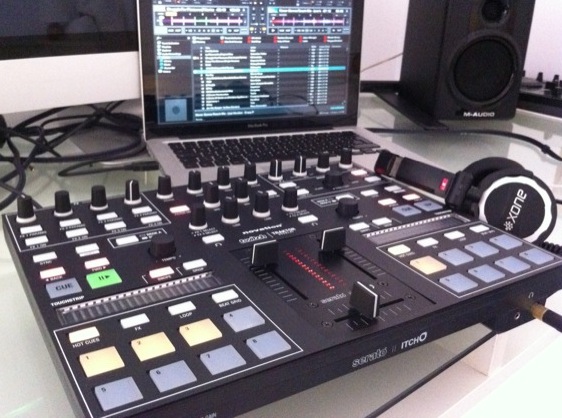
The Twitch is a small controller – about the size of a 15″ laptop. It is given some gravitas by being raised on four moulded “feet” – a bit like a mini-version of the way the Pioneer controllers are engineered, although in this case, the front two “feet” contain the mic and headphones jacks, and the back “feet” have the inputs/outputs, a couple of settings controls plus the Kensington lock hole.
Novation makes nice gear, and this is no exception – the body is thick black plastic, and the top plate is a single sheet of 1mm-thick brushed black metal. Buttons and knobs are variously rubber and plastic, and lit (sometimes multiple colours per button) as necessary. The overall impression is that it is as big as it needs to be but no bigger, and that it’s a serious bit of kit – a pro DJing tool or a performance instrument, not a shrunk, toy-like version of two-decks-and-a-mixer.
The channel faders are nice and loose, but the crossfader is maybe a little stiffer than some scratch DJs would like – but a jogwheel-free DJ controller is hardly going to be appealing to scratch DJs anyway!
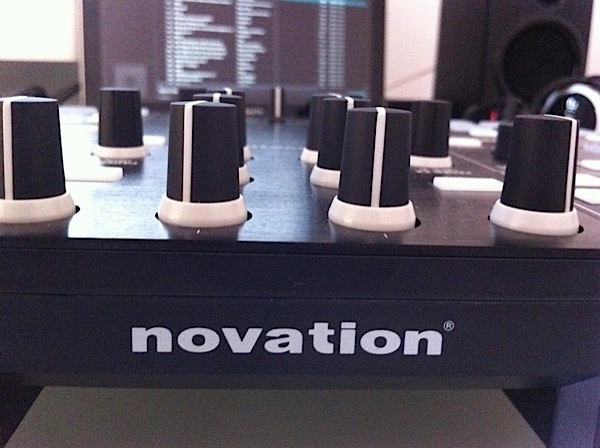
Contrary to what you may have read elsewhere, there’s no stiffness in the knobs – on the review model we have, the EQs and a few other knobs had been overeagerly pushed too hard onto their spindles in the factory, but pulling the plastic caps up just a fraction of a millimetre solved the problem in a matter of seconds.
The Twitch is designed to be used with Serato ITCH, which is famously simple to set up and get running – you just install the software, and plug the controller in. No configuration, no options to set. How it should be.
So – software installed, Twitch plugged in to computer (it’s USB powered so no need for external power), and a DJ set dragged into the library and analysed, we’re ready to look at the features.
Basic functions
Let’s look at the stuff you’ve seen before elsewhere first, moving on to the innovations when we’ve covered these areas.
It is a two-deck device, so it has a two-channel mixer. Each channel has its fader, plus gain (“trim”), low, mid and high controls, and headphone monitoring. VUs are 16-bar stereo master, switching to cue when headphones cue is selected. The LEDs are all red, with no peak colour to show clipping, although the function is identical – you just avoid pushing it all the way as you would with any VU monitoring system.
To the left and right of the mixer are two decks, each a mirror image of the other. However, above each deck the controls differ. Above the left-hand deck are the effects and mic/aux controls, and above the right-hand deck are the library and output volume controls.
The mic/aux inputs
You’re not meant to plug extra decks or CD players into this. It does, however, have a single aux input, which could have various uses – for a backup music source such as an iPod, or as a live source input channel for a sampler or the output from another electronic performer’s system, for instance.
The microphone input is mixed internally with the aux, and they’re treated as one by the system – both the aux (round the back) and the microphone (at the front) have small gain rotaries to get the balance right if you’re using both.

Meanwhile, there’s a master level for this combined input, plus on/off and headphone monitoring switches.
A nice feature is that you can run this input through the software, thus making use of the onboard effects (there’s a channel fader for it within ITCH, complete with three-band EQ), or you can feed it directly through the unit – better if using as a backup.
Clearly the Twitch doesn’t pretend to be a comprehensive mixer like some larger DJ controllers. These inputs are a nice compromise between delivering enough flexibility for the Twitch to be taken seriously as a pro device, and keeping the focus on what the unit’s intended use is – a digital performance system.
The master effects
There are actually three effects unit on board, but we’ll get on to the others a bit later. The single master effect unit has 12 effects to choose from – reverb, delay, LPF, HPF, flanger, phaser, crusher, echo, tremelo, repeater, reverser and braker.
Your chosen effect can be assigned to either deck, the aux/mic input, or across the master output. Effects are tied to a factor of the BPM, and of course this value is user-changeable. As well as the wet/dry mix, there are one and sometimes two extra parameters to control.
It’s pretty standard ITCH effects fare, which means that there is a big bar on the screen to show you the controls of the effect you’ve selected, right between the decks and the library sections.
The library controls
The library functions are well implemented, with an infinity rotary for track selection that also acts as an “enter” button when pushed, plus a buttons for expanding or shrinking the library onscreen through showing small, large or no waveforms. There’s a button for cycling through the focus windows within the library, alongside back and forward buttons, and buttons for loading the selected track to deck A or deck B respectively.
A nice feature of the library is the “sort” function – by holding “shift” and repeatedly pressing “area”, the software will sort the active window in the library by the first four columns, which you can choose by dragging and dropping them.
I like to sort by BPM, key, genre and title, for instance, so this allows me to do that without having to resort to the laptop keyboard. The point is you could choose to sort by any four available fields to suit the way you DJ.
The master output controls
You get headphone volume and headphone mix (ie the cue / master balance), plus a booth and master out. The booth is connected via two RCAs, the master via two balanced 1/4″ outputs.
It makes sense to drop the RCAs for the master out – if you want RCAs you can just use the booth out, and if you do have a separate booth speaker, you’ll be using balanced leads anyway to feed the PA. There are no XLR outs, though – there’s no room for them.
Advanced features
So now the juicy stuff – let’s find out what has replaced the jogwheels at the front left and front right of the unit. First, though, a bonus innovation…
The fader effects
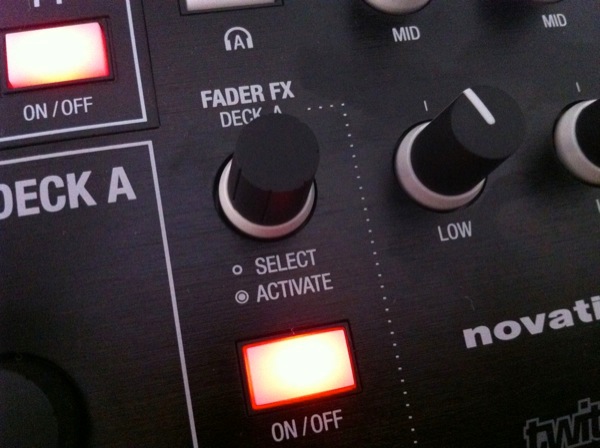
The two channel faders are dual purpose. As well as controlling volume, by pressing an on/off toggle above either, you can switch on “fader effects”. When in this mode, the faders become wet/dry controls for a limited number of the effects. You toggle the effects by pressing the fader FX rotary immediately above the on/off button for each side, and control one parameter per effect by turning this rotary.
It’s simple and great fun – although I’d certainly like to have seen the vinyl-style braker effect here, for instance, which is one of those that’s been missed out. These are wonderful to use as filters, and in practice, it’s not confusing at all to know whether you’re set to FX or volume, as the on/off button is lit, and the VUs stop showing output and start showing wet/dry level with a single light when you’re in FX mode.
So, on to the decks…
The touchstrips
These horizontal, touch-sensitive plastic strips replace the jogwheels, but take up a tiny amount of space in comparison and contain no moving parts. They’re central to how Twitch packs in all the other functions while remaining light and portable.
When you load a track, moving your finger left to right on the touchstrip is the same as moving a jogwheel clockwise, and right to left, anticlockwise. You can do it fast or slow, and you can “throw” them like a jogwheel too (so it carries on after you take your finger off). This way you can easily find your cue point, for instance – it’s basically akin to “scratch” mode on jogs.
There are two buttons to assign different functions to the touchstrip, called “swipe” and “drop”. Both have two functions. Swipe lets you nudge (when lit solidly) or scratch (when flashing, and as described above).

When pressed once (ie solidly lit), “drop” is a needle-drop function as on Pioneer and some Numark controllers, which lets you jump to any part of the MP3 in one go by pressing the “drop” button then touching the strip – left for the start, right for the end. When flashing (pressed twice), it allows you to fast forward or rewind through a track. The latter is the least useful function, as it’s in practice easier to throw the track forward or back in scratch mode instead.
The touchstrip has 19 vertical red bars which are lit left to right when the track is playing and which cycle around in time with the onscreen “decks” – one revolution of an onscreen deck is the same as one cycle of the lights on the touchstrip.
The performance modes
Called “performance modes”, the following functions all make use of the eight square pads at the bottom of each deck. They are: hot cues, slicer, auto loop and loop roll. Let’s look at them more closely:
- Hot cues – This button turns the eight pads into user-assignable cues – eight in total – which are set and saved with the track, so you can recall them later (even on other ITCH systems because they’re saved within the track itself). They work like hot cues normally do – you hit a cue to assign it, and delete it by hitting it with “shift” held. The buttons light yellow to show they’re assigned
- Slicer – The slicer takes a number of beats and “slices” them into eight equal parts. The eight pads then let you “play” the parts in any order, perfectly quantised. Everything stay beatsynched with the other deck. You can choose how many beats and also a quantise amount (which selects the amount of each slice that’ll be played back) by changing the value with the touchstrip. Two modes exist: The first lets you do this as the track plays on, the second loops just the chosen section while you chop it up. The pads light red when they’re in slicer mode
- Autoloop / loop roll – Two modes for autoloop. In the first, the eight buttons correspond to eight beat-timed loops – so from 1/4 to 32 beats, for instance. You press the pad that corresponds with the loop amount you want in order to activate it. (By using the touchstrip you can select a shorter set of consecutive values – 1/32nd to 4 beats, for instance. Press the button again, and it flashes to indicate memory mode – now you can hit a pad to remember the current loop for recall later. Loop roll is just like the first of these two autoloop modes, except the track continues to play underneath, and returns when you turn loop roll off. The pads light green for both of these modes
Other deck functions
Serato’s beatgridding is advanced, allowing you to effectively beatgrid material with tempos that drift, and two beatgrid buttons let you do this on the fly. There are the usual keylock and sync bottons (sync has two modes – full sync and BPM-only/semi-sync, accessible using “shift”. Of course, there are the ubiquitous play/pause and cue buttons, which are jumbo and backlit like the pads.
Finally, the pitch controls are endless rotaries, like the Allen & Heath Xone:DX, and are stepped in 1/100th of a BPM intervals, although pressing and turning them takes you from -50% to +50% lightning fast – so fast, in fact, that it could be used as a performance tool in itself.
In use
This unit turned up on Wednesday last week, and by the weekend I was confident enough with it to take it to my regular gig and try it out.

I’ll be honest – I don’t particularly like DJing with tiny controllers when I’m stood up there on stage. I DJ in a beach bar, and my gear is the only thing on the big deck table. If I perch a little controller on there, it just looks like I’m fiddling with a toy rather than DJing. Of course, you forget about this when you’re playing and people are having a good time, but you always feel it when you set up.
With the Twitch, it felt a little different. Because, as stated earlier, it doesn’t look immediately like a DJ controller, it didn’t have that “it’s DJ gear, only smaller” feel about it – it looks like a tool designed to do a job. I liked that feeling as I prepared to start my gig.
At first I felt uncomfortable DJing with Twitch. I realised that my DJing style involves nodding away to the beats, hands hovering over the jogs, ready for a quick correction or tweak. But here, there are no jogs to hover over! I literally didn’t know where to put my hands. Very soon though, they learned to hover near the EQs instead – but it felt weird at first.
Little things struck me at first. I liked the fact that I could genuinely sort my music without touching the keyboard. I usually play that particular gig with a Vestax VCI-300, and it’s a bugbear that I need to use the keyboard to sort by key or genre on that particular controller.
Using the touchstrip was actually pretty easy. I don’t think it’s quite as accurate for setting beatgrids as a jogwheel is, but in practice it was fine, and setting cues on loading was intuitive. You have to learn to keep your hand on the “drop” button when needle-dropping because as soon as your finger leaves the touchstrip, the drop turns off by default.

Sometimes when I wanted to nudge a tune that was slipping out of time, I needed to manually turn the “swipe” transport mode on, and I didn’t work out when this was the case. That was annoying as obviously a jogwheel is always either in nudge or scratch mode so you don’t have to worry about that on that type of system.
I sometimes left the loop roll or auto loop buttons pressed and didn’t realise, so when I tried to nudge the tune with the touchstrip, I actually changed the parameters of those functions instead. When this happened, it took me a while to work out what was happening. I guess you’d get used to this.
Beatgridding, effects and loops
I was surprised that I actually did quite a lot of beatgridding while I was DJing. I often don’t bother beatgridding my music, preferring to let the software determine the BPM then just mixing it manually, but in keeping with the spirit of the Twitch (it is obviously very beatgrid-led, for instance there’s no manual looping at all), I attempted to beatgrid most of my material for this set. I found it easy to use the built-in beatgridding functions in this way.
The fader FX were great fun. I used them for filters mainly, but also for echo just to mess with the outgoing beats under an incoming tune a couple of times. I can see DJs getting seriously into using these because frankly it looks good when you’re purposefully using a fader to do something, so the more excuses to do so, the better!
However, I didn’t get to do anything really complex with effects over the master outputs in addition to this. You could feasibly use the master FX to give some processing to a vocal microphone, for instance, and the deck FX for your recorded music, which would suit having a live vocalist perform with you. I also admit – I did nothing with the slicer! This is something to practise for next time.
One thing I noticed which excited me was that because saved loops are all right there in front of you, you use them more. Most controllers allow you to save loops – indeed, the aforementioned VCI-300 lets you have three right there on hotkeys, and I make use of those often – but this is another level: eight perfectly synched, saved loops at your disposal means you can chop tunes up really easily.
For instance, I play some 70s Latin, rock and disco music in my sets – Doobie Brothers, Steely Dan, original dubs and the like – and much of this stuff fades out at the end. But there’s always a funky drum loop somewhere in the song, or a guitar lick on its own, that can be used as a tool.
With the auto loops, I found myself habitually setting loops for these parts, so as soon as a track began to fade, I’d hit the fader FX to put some echo on it, then cut to a loop of its middle eight drums to give me an interesting (and more to the point, endless) texture to mix out from.

I suspect over time you’d get used to thinking of your set as a number of loopable elements and not just as set records, which in this case for me could really liberate pre-dance material and allow me to be more adventurous mixing with it.
I found the VU monitoring to be great – nice and bright – but the lighting of the buttons not so; my sets are at sundown so some of my DJing is in daytime. As soon as it got dark they were all well enough lit, and I accept that most people will after all be using the unit in a dark environment, but a brightness control would have been nice.
Overall, I didn’t miss the jogs; the gear felt professional to use (and I felt I looked professional using it); and while I only scratched the surface with the features (for instance, I haven’t yet found a creative way to use the slicers – I’d love to chop up the Amen break on them, for instance…), I can already see how DJing solely with this would encourage you strongly to set creative cues and loops and start doing stuff you’d never normally attempt with your material. I’m looking forward to DJing with it again.
Conclusion
This is an important controller. Vinyl and digital are not the same, and this is the first mainstream controller to fully acknowledge that.
While it looks complicated and in some ways it is indeed advanced, it’s nothing to be scared of – in fact, it’s quite simple (only two decks, no samples or loop recorder like Traktor, no manual looping, to name a few presumably deliberate limitations).
Where it excels is taking the obvious advantages of digital and put them centre-stage. By beatgridding your material, you can slice it up, easily add beat-led effects, jump around within it, play from loops, and generally perform in a way that is impossible with vinyl, and with the Twitch, you can do all this on a small, lightweight unit.
More importantly, you can do so out of the box. It’s always seem a little ridiculous to me that DJs who want a lot of these functions have to build or reapportion Midi devices and program them themselves, spending valuable time getting their hands dirty with mappings when they could be finding great music and learning creative ways to mix it instead.

The ITCH software isn’t for everyone, not least because barring a few setting tweaks you get what you’re given, but those of you who want more granular control over how everything works will be pleased to know that there’s a Traktor mapping supplied, as well as an overlay for the unit indicating how everything works with Traktor. The notable omission in the Traktor mapping is the slicer, although you do get your four decks back. However, ITCH and all future updates are free.
Speaking of number of decks, it’s interesting that Twitch is two-deck only. I guess the thinking is that with all this ability to manipulate two tracks, DJs can have so much fun that they really won’t need decks three and four to “get creative”.
Certainly it will be interesting to see what happens when ITCH 2 comes out, because there’s a sampler in that, and if the Twitch manages to incorporate that somehow, it again lessens the need for extra decks – two decks plus a bank of samples should be quite enough for most DJs.
So the question we asked was: Is this diminutive little controller the way forward, or a brave failure? Well it’s definitely brave, but also it deserves to do well. I suspect it will scare off some DJs who may feel they’re not learning the “right” skills by having no jogs, but for every one of those there will be another DJ who wants to learn a thoroughly modern way of DJing, free from many of the limitations and cliches from the old way of doing things.
The more you use it, the more Twitch makes sense. I’m very much looking forward to spending a decent amount of time DJing with it to see how it changes the way I play my sets. I suspect it has the capability to change the way I DJ quite profoundly, and very much for the better.
Would you be tempted to go down a no-jogwheel route to get back some portability,? Are you excited by the way this controller prioritises its features? Let us know your thoughts in the comments!


