


Last week we took a look at DJ Remixer 2 and found that while playing with looped segments of a track can be fun, the app had its quirks, and we were left wanting more to sustain our interest.
Meta.DJ is an app with a similar concept. Although it’s been around for a while, it’s returned to my attention recently thanks to a few major updates promising stability, in-app recording and some other neat new features. So how well does the improved meta.DJ app perform? Is it really up to comparisons with the likes of Traktor? And more importantly: Is it for you?
Meta.DJ is developed by Sound Trends LLC, who have a healthy stable of established music-based apps available. These include Looptastic HD (a loop based two-deck mixer), Studio.HD (an expansion of Looptastic to the point of being able to create your own loops for use, but mainly to sequence loops) and Grüvtron (a synth app with pads, keys, buttons and sliders for control). This app pulls together aspects from each of these previous offerings and gives you the chance to pick and choose what to do with the four decks available.
First impressions/setting up
All of the important action takes place on one screen, split into quarters or “decks”. Each pair of decks has a tiny crossfader between them with central volume slider controls. The crossfader is small, simple and non-configurable, but suitable for basic fading.
At the very top of the screen, you have the in-app recording button – on first release this was missing which put me off when I initially purchased the app. I was frustrated that I could use a number of elements to create something new but not have any way of saving my creation.
The recording feature is a much-needed addition to the app and works perfectly. The recordings (in WAV format) can all be previewed within the app and either emailed, uploaded to SoundCloud, exported to iTunes or opened in any other installed app that can handle wav files.
In use
The choices as to what to put in each deck are Drumtron, SaMPL3R, Looptastic, TrackDeck, One shot and Riser. Let’s take a look at each:
Drumtron
Think of this element as the basic items of a drumkit with four different patterns played out on each. These are not just sampled loops, they are sequenced hits – so you can adjust the master tempo (at the top of the screen) or the pitch of the sounds (using the slider bar) and the sequence will get played out correctly. I found the pitch slider on this element, in particular, to be incredibly useful to spice up the selected sequence.
SaMPL3R
This is very similar (if not identical) to having the Grüvtron functionality embedded within the app. You can use the SaMPL3R element to add instrument sounds (such as bass, leads and arpeggios) to the mix. With these sounds, you have the option either to use the array of 40 buttons to trigger pre-defined sequences or use the strip view.
With the key view, you can apply a filter and modulation to the sound, depending on where your finger is on the strip, a little like a ribbon controller. You also get the option to set the scale and key that the SaMPL3R sounds are in – handy if you’re playing along with a track that you know the key of!
Looptastic
As with SaMPL3R, Looptastic is the equivalent of squeezing another of SoundTrends’ established apps into the meta.DJ interface. This element allows you to drag and drop pre-defined loops into the main section. The loops are colour-coded for quick identification:
- Grey = Drums / Percussion
- Green = Bass
- Blue = Synth/Keys
- Red = Extras/FX
The speed of the loops is adjusted automatically based on the master tempo, so they should always play in time with everything else on the screen. You can purchase additional loop sets from within the app, these range in price but tend to be around US$1.99 for each set. Don’t forget though, you can also load your own loops via app filesharing in iTunes or from another app on the device using Audio Copy/Paste.
TrackDeck
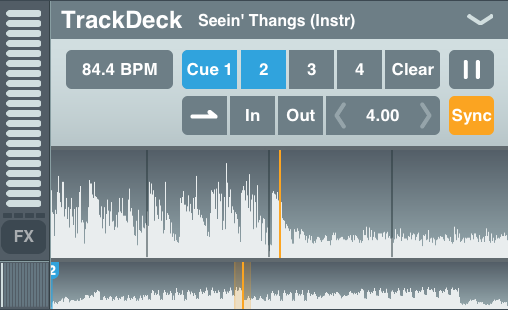
When the first track is loaded into the app, the master BPM tempo is set – you can manually adjust this if needed. If you add more tracks to the other decks, you can use the Sync button to align them with the master BPM.
The track selection screen is thankfully not the familiar generic one, so you get access to the track title, artist name, duration and BPM. You can access the tracks by song title, artist, playlist or BPM. The BPM button sorts all songs by BPM, not just those displayed – so you can’t view a playlist sorted by BPM which is a shame. It would be great to see the Comments metadata here as well since it’s a good place for storing harmonic key data.
By pressing the BPM information on the TrackDeck you can adjust the BPM by half, 1x or 2x as well as adjusting the beatgrid to tie up with the track correctly. You may have noticed that the deck doesn’t have any pitch adjustment, so you either have to trust the BPM calculated or trust the “sync” button function.
Since there’s no keylock feature with meta.DJ at the moment, you can easily end up with unwanted chipmunk vocals on your tracks. My advice would be to ensure you’ve got BPM data on your music library first; at least you’ll stand a better chance of picking a track in the right range for your set. Unfortunately, there’s no batch analysis with the current version of the app. The TrackDeck gives you some rudimentary on-the-fly looping functionality which at times was tricky to get satisfactory results with. You can set an “In” and “Out” point for the loop or use the preset button to instantly loop a given number of beats. The odd thing with the preset beat-based looping was that I expected the loops to snap to the nearest beatgrid marker, which they didn’t.
One shot
This is a familiar looking MPC-style interface with 10 pads available, all very simple. As with the Looptastic element, you can increase your library of “One shot” samples either via in-app purchase or with your own samples. There’s a useful video from SoundTrends stepping through the process of setting up your own “One shot” sample element.
Riser
This element was added recently and gives you two X-Y pads; one to adjust the Pitch/Filter and the other to affect the modulation parameters. The Riser element brings some Kaoss Pad / Kassilator type interest to the mix, giving you an easy way to build drama and create rises or falls.
This practice is perhaps what you may have achieved using a white noise track on a CD-R, but with two X-Y pads, it is much easier. You also get a choice of a few different sounds (such as sine wave, saw wave or white noise).
Other features

Each deck can have up to four FX applied and using the “Hold” button on the FX screen you can apply up to all four on a single element at the same time – potentially 16 continuous FX across the whole app!
There are an impressive 15 FX available, each controlled using an X-Y pad. I found that combining a few different FX a great way of giving the One shot samples some interest, rather than just flat instant playback. A slight echo or reverb setting on the Riser elements was equally pleasant.
The app also offers USB Midi capability (compatible with Numark’s iDJ Live unit) and audio splitter functionality as well. The latest version has incorporated support for retina display – always welcome on the newer devices but perhaps less welcome if you’re using a first generation iPad with limited space.
Conclusion
The main premise of the app is that it blurs the line between DJ, musician and producer.
If you’re already a DJ who plays tracks with looping or using effects (but are mostly concerned with careful beatmatching) then there are more suitable apps for doing so. As a musician, you are already spoilt by the number of quality synths, drum machines and sequencer apps on iOS. And as a producer, there are several other ports of call for you, and once again you would possibly be better served with a dedicated music production app.
However, if you’re a DJ who has some musical knowledge and wants to remix tracks from your music library on the fly, adding your own flourishes (whether they’re loops, sequences, samples or synths) then meta.DJ is certainly flexible enough to cater for most of your needs. And even if you’re a traditional “two-deck” DJ, while this may have you running for the hills in fear, it may also just trigger your creative side and push your multitasking capabilities.
The app shines when you use it to experiment with more musical elements, whereas I found that when trying to mix between tracks in a traditional DJ manner, I was too much at the mercy of the built-in BPM detection.
Have you used meta.DJ? Do you use four decks? Are you intrigued by tools like this that blur the line between DJ and producer? Please let us know your thoughts in the comments.

DJ Hombre


