

Video Review
The Denon DJ SC3900 is the company’s most advanced digital turntable controller and media player to date, and it’s definitely got something different from its competitors, offering genuine vinyl turntable feel plus state-of-the-art digital features. These include the ability to network SC3900s with each other and a computer / iPad; compatibility with existing DJ software via Midi and a built-in timecode generator; innovative ways to set up and use them with Denon’s new Engine software; plus versatile USB or HDD playback. Oh, they can play CDs too…
We’ve had a pair here at Digital DJ Tips for the last few weeks, and despite having played with them within a variety of situations, we’re not close to testing everything you can do with these units. They’re certainly designed to make sure you don’t outgrow them. We do now know enough to review them confidently for you, though, and to let you know who we think they are going to appeal to. So let’s get going…
First impressions/setting up
They’re heavy, large, clearly well-made units, looking like a cross between a CDJ deck (like, for instance, Denon’s own new SC2900s) and a Technics turntable – the similarity to the latter being accentuated by their Technics-esque four big silver feet. They appear similar to their predecessor, the DN-SC3700, but at first, glance have a smaller piece of vinyl (confirmed: it’s 9″ instead of 10″), no onboard effects (which always felt a bit tacky to me on a CDJ, don’t know why) and an extra hot cue. Dig deeper and much more has changed in addition, as we’ll see…
The chassis is metal, but the rest of the unit is made of moulded, metallic-finish painted plastic. Buttons are mainly rubberised and backlit, apart from the cue and play/pause buttons, which are hard plastic with a definite “click”. The pitch control is long and very Technics-like.
Of course, the main thing you’ll notice on these is the spinning, motorised (torque-adjustable) platter. You actually have to do a bit of assembly, screwing a piece of real vinyl down onto the platter, which to all intents and purposes feels exactly like that of a Technics turntable. You’re provided with a felt slipmat to put on first, then the vinyl is mounted in place with a central disc that slots over the spindle.

The platter’s edges have strobe dots that appear to be the same as those on Technics turntables (I didn’t dig our dusty old office Technics out to test this), and overall the feel will be uncannily familiar to anyone used to DJing with the real thing.
Other first impressions? The display is functional but not as good as the excellent display on the Pioneer CDJ-2000s. Nonetheless, it’s bright, informative and still managed to squeeze in a rudimentary waveform. Multicoloured laptop waveforms need not quiver in their boots just yet, though; the display is definitely one place where the Denon players don’t equal best of the breed.
Round the back, apart from the usual line outs, on/off and power sockets, there are fader start, computer USB, and network sockets; the USB/HDD input is top-left in the face of the unit, and CDs, of course, slot in the front.
With CDs or USBs…
How you set up is going to depend entirely on how you want to use these. The simplest way to use them is to plug them into a mixer, power them up, slot a CD in (audio or music data) and start playing. As you’ve probably guessed, though, that scratches about 1% of the surface of what these can do.
So alternatively, you could plug a USB in with some tunes on. Using the top-right navigation controls, you can surf your folders, load a tune, and play it. If you have an Ethernet network cable connecting two SC3900s together, you can also do this on the second one, meaning you can plug one USB into one unit and play from the other player from it too.
With your existing DJ software…
Next, you could set it up with Serato Scratch Live or Traktor Scratch Pro 2. Plug two players into your DVS box and you can control such software natively, without needing timecode CDs, in so-called “hybrid” mode.
You do still need a DVS box though; they’re only “native” for these applications in that they can generate the correct timecode signal. There are mapping files available from Denon itself, so all the surface controls – library, hot cues, looping, keylock and so on – can control your software, and of course, you can remap them at will.
(To get Midi working alongside DVS, you need to USB the units to your computer too; I tried this with Serato Scratch Live, putting them through a passive USB hub into the other spare USB on my MacBook Pro, and it worked fine, even though the company recommends you use a powered hub for this.)
With Denon’s Engine software on a laptop…
Most interestingly, you can use these with Denon’s own, brand-new, “Engine” software. We’re hoping to do some detailed workflow videos soon on how real DJs in the real world will benefit from using Engine because frankly to do it justice is going to take more than a few lines in a review, but here’s the gist of it:
Firstly, you need to get it set up right. These players are truly networkable. Instead of just plugging two of them into each other, you can add a router, just like the type you have at home for your internet and WiFi. It’s possible to network up to four players into a wireless router, add your laptop to the network, and load Engine up on the laptop.

Now, with your laptop containing your tunes, you can do all your sorting, playlist arranging, searching etc – and then drag a tune onto any connected device right there on the screen. Bam, it loads and buffers on the device ready for playing. You can also “pull” from the software, using the controls on the players. What’s it like to look at and use? If you’re used to the offline version of Serato’s software, you’re getting there. Otherwise, imagine the most library-centric view of your particular DJ software, whatever you use. That’s basically what Engine looks like.
Think of it as library management software, on the surface a little like Pioneer’s Rekordbox, but with certain differences. In particular, Denon claims massive library search speed improvements over Pioneer’s software. An important thing to note is that the music gets physically sent over to the player – the players aren’t controlling MP3s within Engine on your computer, so your computer doesn’t take any of the strain – the hardware does. So practically any old laptop can do the job.
With Denon’s Engine software on an iPad…
Open the Engine app on your iPad, join the same network, and you can control the same tunes from there too. Seem a bit pointless? Maybe, but put those tunes on to a USB stick and close your laptop down completely, and as soon as that USB stick hits the network (by inserting it into one of the 3900s), the iPad version of the software picks it up and takes over, acting as big library screen, or a mini version of the PC software, depending on how you want to look at it.
Finally, just like with Pioneer’s Rekordbox, you can forget any external device, and play your engine pre-arranged sets and playlists from USB.
In use
As you can see, there are an initially bewildering array of options for getting music ready to play on these things. But once you’re set up, what are the SC3900s actually like to use?
Let’s get the big stuff out of the way first. If you’ve ever DJed with vinyl, all I can say is that you’re in for a real treat DJing on these. Denon has nailed it. They feel better than vinyl. Yup, better. Why? Because Denon’s used a motor that rotates the platter in an utterly convincing Technics-type way. The torque feels right, the slip of the vinyl on the mat feels right, and crazy as it sounds, the 9″ vinyl actually feels better than 12″ vinyl – it’s the perfect size. Now add the fact that there’s no needle and tonearm to jump and skip, and you’ve got the best bits of vinyl control minus the drawbacks.
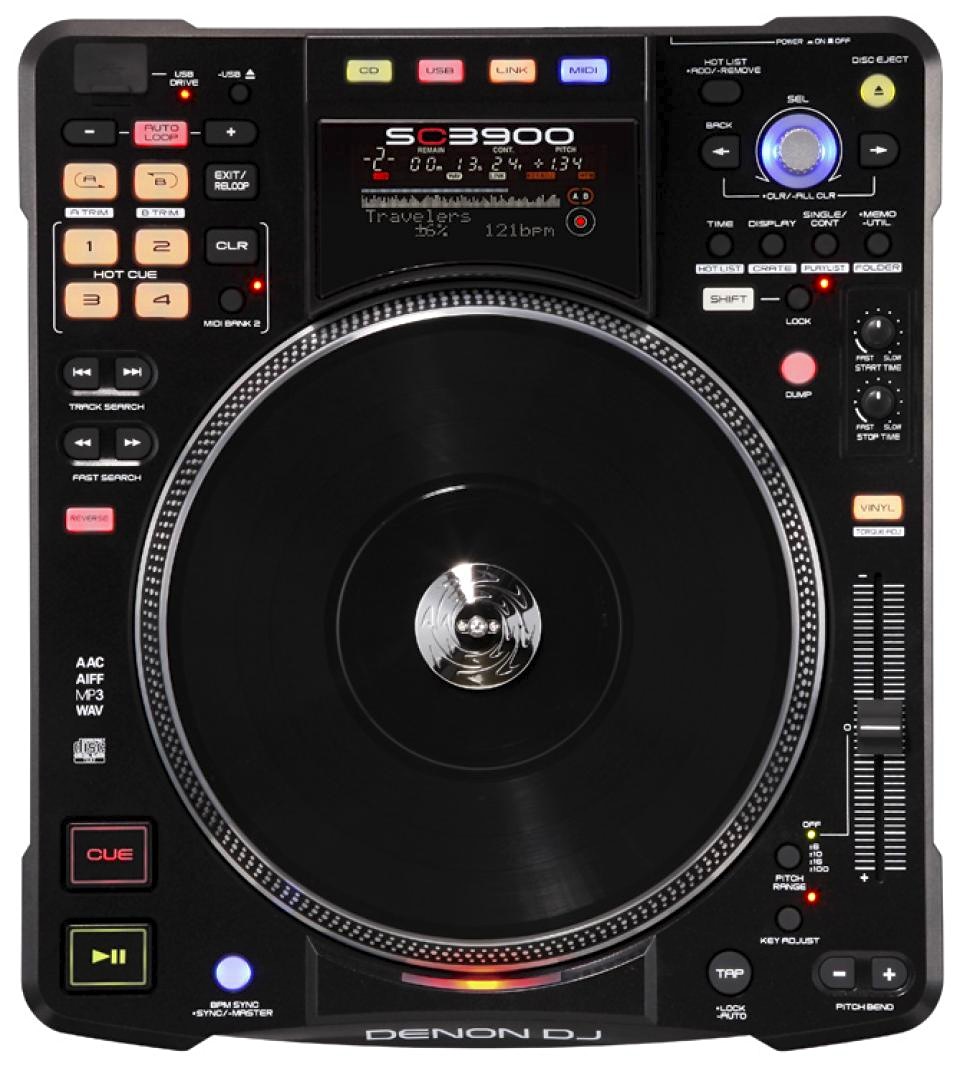
While the SC3900 platters are comprehensive decks with a lot of menu options accessible under the surface, the stuff that’s got its own controls is the stuff you’re going to use daily: Key, pitch range, BPM tap, “dump” (it’s Denon’s take on Pioneer’s slip mode), cues, loops, navigation and various display options are all easy to access. For such a complex machine, the controls are actually relatively simple to pick up. Accessing the stuff hidden away in menus is fiddly, though, as with all such devices.
Likewise, DJing with just the screens on the units is not for me a nice experience, as I’m a screen freak. For me, I got the most fun DJing with this using Serato Scratch Live in hybrid mode. But having said that, once I got it set up in a way I liked, I’ve never had so much fun DJing here in the workshop with any hardware/software combination as this one.
My preferred set-up gave me the best stuff from the old vinyl days, plus with the library and waveforms of industry-standard software DJing. I am sure the Traktor experience is equally impressive, as it uses the same hybrid mode for platter support, guaranteeing totally tight control.
(As I said above, I really want to give Engine a proper go, but it needs its own review entirely – suffice to say for now that Denon has come up with an innovative, resource-intelligent and potentially game-changing piece of software there. Watch this space for more on Engine.)
The sound quality is stupendous, and the scratch quality equally so. There are start and stop time controls, and Denon has given settings for those that eliminate and cue point slip when scratching – a bugbear with previous digital/motorised turntable systems, including Denon’s own. For digital motorised turntables, feel-wise, these are, I feel, as good as you’re ever likely to experience.
Conclusion
So the easy bit. They’re well made, lovely to use digital turntables. They’re also extremely versatile; in being able to control both Traktor Scratch Pro 2 and Serato Scratch Live right out of the box, they’re pretty much the perfect digital vinyl decks for serious software DJs who want an analogue feel without compromise.
The networking stuff means that they’re field-leading in this area, especially when you add in the Engine software with its wireless iPad connectivity (remember, with Engine the tunes don’t ever play from your iPad and don’t play directly from your laptop, either; the computer is your screen, with the tunes safely loaded via USB or network to the players themselves).
It’s only the fact that the SC3900s don’t have displays as good as, say, the Pioneer CDJ-2000s that stops them being pretty much best of breed (or at least up there) in all areas.
But now to the harder bit. Who exactly are these for? Who will shell out US$999 each for a pair of these? Because I can’t see them beginning to appear in DJ booths any time soon, not when DJs expect Pioneer gear there – and frankly many DJs would not know what to do with motorised platters anyway, such is the stranglehold of fixed-platter CDJs in DJ booths. (indeed, Denon DJ has recently launched a model of its own, the SC2900).
I also can’t see our core readership of often cash-strapped new digital DJs going for these in their droves either, because frankly, you can get a wonderful DJing experience with a DJ controller costing a fraction of the price of a pair of these and a mixer – and of course, DJ controllers have all the benefits of portability too. Try popping a pair of these and a mixer into a backpack!
No, instead I can see these appealing to the following groups: Firstly, they’re going to appeal to any turntablist who tries them – period. I defy any scratch DJ (especially those who already use Traktor Scratch Pro or Serato Scratch Live) to not fall instantly in love with these on demoing them.

Secondly, they’ll be on the radar of any pro or prosumer DJ looking for the ultimate in DJ control for their home or studio set-up. Because they’ll work with any Midi software (there’s a standard Midi mode too, although I didn’t try mapping the platters to anything, I only tested them in hybrid mode), and because Engine is clearly a platform Denon wants to build on (and because they’re also perfectly capable “analogue” players), there’s practically nothing these can’t or won’t play nicely with.
If you want to DJ at home for pure pleasure, you want the best feel possible, and you want something you can use in pretty much every way, you need to give these a go. I can see DJs who’ve used vinyl in the past and who are now, shall we say, not as young as they once were, really taking to these – especially as this is the same group of people who may have a bit more money than some younger readers to invest in such a system that’ll probably last them for the next decade.
Finally, I can see touring DJs who take their own set-up out with them being tempted, too. I’m thinking DJs with (or in) bands, high-end mobile DJs, DJ/producers who carry a stage/video show around with them – basically, anyone who isn’t a turn-up-and-play-on-whatever-is-there style of DJ, and who therefore has a choice of gear. Because again, I think once such DJs have tried them, and seen the set-up options (especially networking and wireless control with iPad / Engine), they’ll be impressed and tempted.
Me? I fit into the second category. I have been DJing for 20 years, vinyl, CDs and laptop/digital, and I’ve used all types of gear. For pure DJing fun, these decks are the best I’ve ever used – and what’s more, everyone who’s come to our workshop and had a go on them since we’ve had them set up has agreed with me.
Your dream control surface, or an expensive mix of past and present technologies? Is there any point anyone other than Pioneer making CDJ-style controllers? And what do you think of wireless iPad library management? Please share your thoughts in the comments.


Phil Morse


