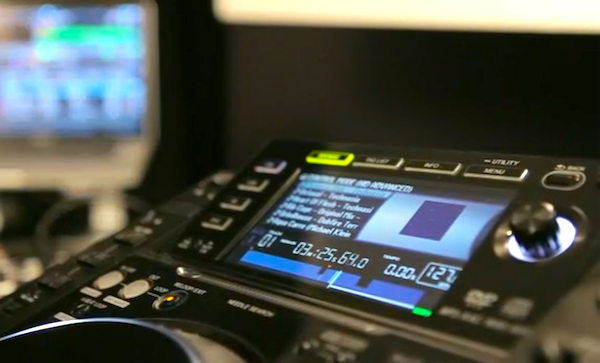
The CDJ-2000 showing the depth of integration from Traktor. Note waveform cover art and library browsing.
Traktor users who dream of rolling up at standard (read: Pioneer equipped) DJ booths, plugging in their laptops and – you know – just playing, will be fascinated by the news and video we have today.
The news first: Pioneer’s latest CDJs (the 2000, 900 and 400) now work seamlessly with Traktor, meaning any club equipped with the above is also now truly “Traktor ready”.
That means that cover art, waveform display (CDJ-2000), cue points and track browser (CDJ-2000 and CDJ-900) and general transport control behaviour (all models) are now practically identical in use with Traktor as they would be were you using CDs or Pioneer’s own Rekordbox software: It’s plug and play, and there’s no need for an external sound card.
Pioneer’s higher-end CDJs now work seamlessly with Traktor…
Plug in the DJM-900nexus mixer to utilise its Traktor Scratch-certified built-in audio interface, and the whole Pioneer DJ booth set-up thus becomes effectively a gigantic Traktor DJ controller. All you need is to USB each device into your computer (using a hub if necessary – there’s unfortunately no compatibility with Pioneer’s Pro DJ Link, which seems an opportunity missed for just one cable for the lot), no audio cables required, and you’re good to go.
Why it matters
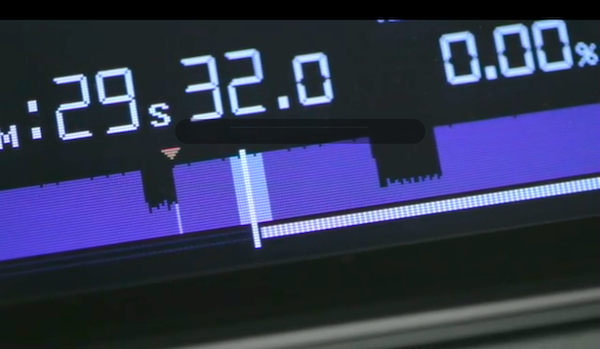
Cue points and waveforms right there on the CDJ, from Traktor. The idea is that you’ll spend less time looking at your computer screen.
This is an interesting development because it means a DJ could have an all-in-one portable DJ controller for home practice, as a back-up system and for smaller gigs, but when playing in clubs they could leave their controller at home and just plug their laptops in to the club’s Pioneer set-up, while still getting the best out of the CDJs. Thus it could equally appeal to CDJ DJs wanting to take the leap to Traktor, or Traktor DJs wanting to master DJ booth equipment.
Of course, NI would also like you to add a Kontrol F1 for sample triggering and on-the-fly remixing – exactly the kind of thing that marks software DJing apart from using a USB/Rekordbox set-up with the same Pioneer gear, but still meaning all you need to find room for in the DJ booth is your laptop and the relatively small footprint of you extra controllerist weapon of choice.
The video
While this stuff has all been available since Traktor 2.5.1, which is a few weeks old, the reason we’re covering it today is that Native Instruments has just released a performance video that does a good job of demonstrating the new compatibilities in action:
Good move by both companies? Is this going to bring controllerism and pro DJ booths closer together? Does it make sense for Pioneer to be pushing the Traktor route while at the same time releasing the XDJ-Aero controller, for its own (DJ booth enabled) Rekordbox software? Please share your thoughts below…
Now go to:
Review & Video: Traktor Pro 2.5 & Traktor Kontrol F1
Are CDJs Better Than Midi Controllers?
Pioneer Announces The XDJ-AERO: WiFi-Enabled DJ Midi Controller & Mixer
Want to escape the bedroom and play in public - fast?
Our 1000s-selling How To Digital DJ Fast video course shows you how.
Learn to DJ Free - email course plus bonus PDF book
Sign up for our weekly email course for beginners now...
Trouble choosing a controller? Visit the web's #1 guide!
DJ Controllers: The Ultimate Buyer’s Guide 2013.
This work is licensed under a Creative Commons Attribution-NonCommercial-NoDerivs 3.0 Unported License.

Very cool. Makes me glad I went to Traktor.
[ link ]How long were you able too manage figuring out the Gui & Software in general?? I guess visual layouts & how too use your options fx, loops, etc??
[ link ]Completely agree… love my traktor
[ link ]Finally, FINALLY! Seriously makes me think about letting my EKS Otus controller retire. I’ve used it for 4 years soon and loved every minute of it, but this could mean that I don’t need to carry it with me anymore. I’ve got some specific control assignments in Otus, but I’m pretty sure I can do the same with the 2000s, or possibly with the F1 that I’m currently checking out and creating content for.
[ link ]The best thing i can see is now talented digital djs who once couldnt get into clubs because of (use cd’s or go home egos) now have the perfect chance
[ link ]one could now say the industry standard is no longer cd,s but digital
Would the Sync button on the Traktor Kontrol X1 still be ok if i used this with the mixer and cdj ?
[ link ]Don’t see why not. I’d still need it as I still need Maschine to stay synced up.
[ link ]There’s always “U” and “J” on the keyboard
[ link ]I have played last Weekend at the same Setup except the Mixer (Xone 92) and it worked perfectly together. Thats a great leap forward on Stage
[ link ]In the beginning all the Drivers needed to be installed but as it was done … Big Fun
Can someone that has experience with this setup comment on the latency? Does the jogwheel feel pretty spot on?
[ link ]Spot on.
[ link ]My CDJ-400 are MIDI/HID compatible thinking bout looking into dis!! I mean so far i managed too use as MIDI in Serato (Jet/Roll/Wah) buttons as Instant Double/Auto Loop/Loop Roll lil by lil touching up my techniques in certain transitioning i work on perfecting as often & time permits.. been thinking bout buying an Audio2 one day and jump aboard given i am open minded bout music in general!!
[ link ]will this news was so spectacular that made the site http://www.native-instruments.com/ stop excessive hits??
[ link ]In Brazil we can’t get access
Will this work with Traktor pro or will you need Traktor Scratch?
[ link ]It will work with any Pro version of Traktor…it’s HID, Scratch just enables TIMECODE use which wont be necessary
[ link ]The last 2 gigs I’ve had to do djing for artists allowed me to use the Pioneer DJM900 mixer. It was nice to just plug in the USB cable & use the time code vinyl to do the set without having to deal with all the wires & audio 8 interface.
I’ve also tested a CDJ900 at one of the schools I sometimes teach at. Again, I love the integration. I prefer to use vinyl & the X1 rather than time code CD, so it’s good to know the HID integration works well & I wouldn’t have a problem using them.
As mentioned in the article, not having the pro link is a miss, but for me setting up with just USB & the DJM900 is great. Especially when most of the other djs I spin with use serato. So now they’re left messing with cables.
[ link ]This turns those $2,000 (per unit) CD decks into “just” controllers. It seems like an intermediary step until CDs are finally done away with once and for all. And then what? Why pay $4,000+ for control units when FULLY integrated control units are already available for well under $2,000.
[ link ]The evolution of digital DJing is, like most other technologies, about convergence and streamlining. It is a bit of a shame that “industry standards” take so long to catch up. But I suppose manufacturers have to make money in the meantime.
Of course you wouldn’t go out and buy the CDJ-2000s just to use it as a Traktor controller. The point is that many venues have one of these Pioneers already installed. If that’s the case, then you’re in pretty good shape using the CDJ 2000, 900 or 400 as your Traktor controller. It’s a simple, easy and quick. One thing that many laptop DJs have to deal with is simply finding any room in the booth for their controller, let alone an ideal arrangement. Using the built in Pioneer CDJ as a controller eliminates that hassle.
That said, it looks like the F1 controller is going to be essential for Traktor users that are used to using it or need more controls for things like Fx than the Pioneer offers. Once you start adding in the F1, some of the benefits are lost.
[ link ]You mean X1, not F1.
[ link ]I just love the hype.
A)Traktor is buggy as hell since the new 2.5. (2.5.1 wouldn’t open so I sold it.)
B) If you have a laptop in front of you with a great looking wave why would you want to strain your eyes looking at the one on the CDJ.
C) Scrolling through a Playlist.LOL. 4 lines of text on the 2000 and 2 lines of text on the 900. What you going to be looking at….The laptop.
So you’re going to do a set in a club with Pio 2000′s or 900′s, you’re used to pre set cue points and loop stored in Traktor. Well you have another choice. Download a copy of RekordBox analyse and quantize your music, set cues and loops. Create playlist and export to a Flash drive and jump in to the booth. When you’ve finished your set put the flash drive in your pocket and party.
[ link ](Remember if girls ask you what that hard thing in your pocket is always tell em it’s 64Gb)
What about the EFX I hear some say. Well with quantized playlist the 900NEXUS, the DJM2000 and RMX1000 will sync those babies to the beat
I was also wondering about compatibility with the pioneer quantize function for synced effects on the djm900.
Would be great if the mixer could use traktors beat grids to sync effect.
[ link ]I think you’re looking at this all wrong. You’re thinking like a controllerist moving to standard club installs. This update was designed more for people doing the opposite. As someone who can speak from experience, this is a big deal. The vast majority of well established DJ’s started out on non-digital equipment so this is a way to have their oldschool (and time tested) workflow with the benefits of modern technology. CDJs screens were way more basic in previous models and non-existent on vinyl turntables…they are not necessary, just and added tool (or luxury). The functionality of HID is much better than using the timecode CDS but achieves the same result, with less messing around and cable clutter.
[ link ]As far as Traktor goes, most people seem to be having a pretty trouble-free experience, no small feat considering the major updates it received. Now that Traktor is homing in on becoming the industry standard software, you can be sure NI will work on stomping out any bugs asap.
Except for one bug:
There’s an issue with some Windows 7 users (32 bit) where Traktor will overwrite your tags when you write something in the comments field.
NI has acknowledged that it has been an issue over the last two versions, and are ‘working on resolving the issue’.
Must be a helluva an issue from a technical perspective.
That being said, I think that Traktor as a program has a great workflow, and NI is doing a great job at becoming an industry standard.
[ link ]Will there be the same support for the cdj850 and djm850?
[ link ]Does that imply that Traktor will also finally support HID in any HID device like also many controllers and their nice jogs or is this just something NI does because they made a deal with Pioneer?
[ link ](I am really close to selling my Traktor license, because if NIs holding back features from customers who payed for the software…)
I think right now, NI is working on becoming the industry standard DJ software so I imagine they will focus on current equipment you’ll find in the booth. After wold domination, they may look at HID for other stuff. Right now they still gotta deal with making the experience as bug free as possible. Whilst they may be limiting what people can do with certain equipment currently, there is a logic there and I don’t feel its wise to ditch Traktor just yet. Unless Serato does some serious work with Itch, they will get left behind especially now that Virtual DJ has lifted their game.
[ link ]I really hate all videos with the mixer in RED . RED IS BAD !!!!
[ link ]Misconception now that red is bad. If the mixer is set up properly then red doesn’t mean distortion. Pioneer mixers have an output attenuator so that 0 on the output scale can actually be much less. This allows for morons to light up the mixer like a christmas tree but not actually degrade the signal. Allen and Heath also have the metering scale on their channels at the wrong place to trick people into not coming close to digital distortion. Rane also has done something on their master outs so that there is a large amount of headroom. They all go red, but its not the bad kind.
[ link ]the output attenuator is for the master , not for each channel .
[ link ]0db it is what is is : 0db
BTW : when you use the attenuator , the sound is not the same .
[ link ]it would be good to have Phil Morse opinion here .
[ link ]This isn’t relevant to the thread, feel free to take it over to the forum if you wish
[ link ]Quick question and please excuse my ignorance or lack of understanding of the video above… But could you buy just a 900 nexus mixer and plug your laptop with Traktor, and leave the CDj’s completely out of the setup. Because I have always wanted to get a pair of 2000′s and a mixer, but they are so damn expensive, that even after a year of saving I could never afford them… any idea peeps?
[ link ]Yes you could, but what would you use as decks?
[ link ]If you don’t need jogs and want to take CDJ’s completely out of the picture, you could just add a Zomo MC-1000 to the DJM-900 and you’re done.
[ link ]Anyone know how to hook up everything?
I assume you still have to use one usb cable for each cdj? Or can you connect one usb cable and use link for the others to connect?
Also, do the cdj’s now recognise wich outputs they have to use, or do you have to select them in the output routing tab like we’re used to?
I’m excited by the news anyway, but if it so much easier than it was before depends on my questions above I guess.. :d
[ link ]Yes, so two CDJs and a Nexus would entail 3 x USBs (and a hub if you’ve not got 3 decent USB sockets on your laptop).
[ link ]In that situation, if you are using the CDJ2000s via advanced HID, why would you plug anything into the DJM900?
There is no need, not even a reason as far as I can tell, to have a third USB cable in the booth that has CDJ2000′s.
You would only use a cable to the DJM900 if the booth doesn’t have Traktor compatible decks (i.e. 1200′s, CDJ1000′s) and use the 900′s Traktor Certified audio interface to send timecode signals to the decks.
[ link ]There does seem to be a workflow (NI were talking about it), but I agree, it’s not immediately obvious why you would do this. I guess maybe to use the 900nexus to receive the timecode signal, and using HID for the rest of the display stuff. I guess this would be the tightest possible performance, but without getting it all set up here and experimenting, I can’t really give a definitely answer yet on that one.
[ link ]I love this sooo much however only one bar in my country has a pair of 2000s and everywhere else including the clubs all have 800s thus requiring timecode…which meansssss imma have to either continue walking with my timecode cds and audio6 or with my s4 which i wish i didnt have to, i love HID and MIDI and just feel “held back” when playing via timecode
[ link ]This is great news. I tried the hid mode for the cdj 400′s a couple of years ago and it was not the best. So looking forward to trying out the new hid mode. No more lugging my controller about and feeling a bit part in the booth I can once again be in the centre of the booth. I will like be having the most powerfull record box or cdj wallet ever the possibilities are endless when hooked up with a x1. Can anyone recommend a decent USB hub for a mac book pro
[ link ]easy I have two “mobil it” seven port powered (3.5a 500mv) stacked on mine , I mean they are full, five tets of external storage, a mixtrack x1 trigger finger axiom 49 (dont laugh at the next one) hercules mk2 audio 8 and who knows what else. they work fine. Dont get a non powered anything. that is a no gooulda.
[ link ]i have CDJs 900 and DJM 800 , can i run traktor with no timecode cds and external sound card ??
[ link ]of course you can .
[ link ]you don’t need an external soundcard , just use the cdj as it .
[ link ]I tried the system tonight but I don’t like it .
[ link ]All is working good but …. if you move the pitch , CERO point is also moving (when you use sync) . so , after some minutes my CERO is set at -4 (not good at all)
Isn’t this completely normal behavior? CDJ’s weren’t designed for sync so thiswill happen. Same with using sync and turntables.
[ link ]Its not normal .
If I have a song with the pitch at ZERO , the software = at Zero pitch , i use sync for put at the same bpm with the other deck . BUT , if i move the slider in the CDJ the software moves the pitch directly .
With Vdj , if i move the pitch , the software moves the pitch ONLY when the cdj is in the same position .
I mean , If I have +3 pitch in one deck (software) , i can move the Cdj slider , but the software starts to move the pitch ONLY when I have +3 , never before (Vdj) . With Traktor , the movement is reflected by the software inmediately .
[ link ]Was a problem so many years before with Vdj and they fixed it .
I’m not quite sure I get what you mean Mauri because even if you’re using a controller with traktor and have your decks synced, moving the pitch fader will do the same thing you mention above with CDJ’s
[ link ]Man, ive got, well im exited. This is the thing we have been waiting for, isnt it? Kudos to these two companies (albeit a forced hand on ni’s part given the market share of pioneer in the clubs) for getting it together. Wow. Yeah there are things to be worked out, but when arent there anytime a new thing is introduced? Music is going to leap forward, believe that.
[ link ]