


The Lowdown
If you are buying from scratch, MixVibes to me offers the best value complete DJ/VJ system out there. You can’t get a comparable Virtual DJ or Serato DJ + video system for anywhere near this outlay. Taking into account that the software is already excellent without the video plugin, the MixVibes hardware is likewise very good and is well integrated with the software (coming of course from the same manufacturer). The addition of a decent video plugin rounds out this package brilliantly. If you’re taking the MixVibes/CrossDJ route, we recommend this.
First Impressions / Setting up
Nowadays a growing number of DJs are incorporating video into their sets. The MixVibes Video Plug-in is an add-on for MixVibes’s respected Cross and CrossDJ software programs, that brings video to these DJ platforms for the first time. Like the Serato Video plugin for Serato Scratch Live and Serato DJ, and like Virtual DJ‘s built-in video capabilities, the MixVibes Video Plug-In is designed to let DJs play, mix and scratch video files using the same workflow they’re used to with audio. Read our MixVibes Video Plug-In review to see if it’s for you…
First impressions and setting up
This is a plugin for the MixVibes CrossDJ / Cross family of software products. We’ve reviewed MixVibes CrossDJ elsewhere, but suffice to say it’s a capable and rapidly maturing software platform that has recently hit v2. Especially when taken alongside the company’s own U-Mix Control 2 hardware, it offers a good value, compact and professional system for digital DJs (and now for VJing too).
Because MixVibes Video is a plugin, you need to have a working copy of CrossDJ or Cross on your computer, and typically you’ll have this because you got it when you bought the MixVibes controller. You can buy the plugin on the MixVibes website (it’s currently half price until 31 December). You download it, run it, and next time you open CrossDJ, the word “video” has appeared on the opening splash. Enter the serial on the next alert box and you’re all set to go.
In use
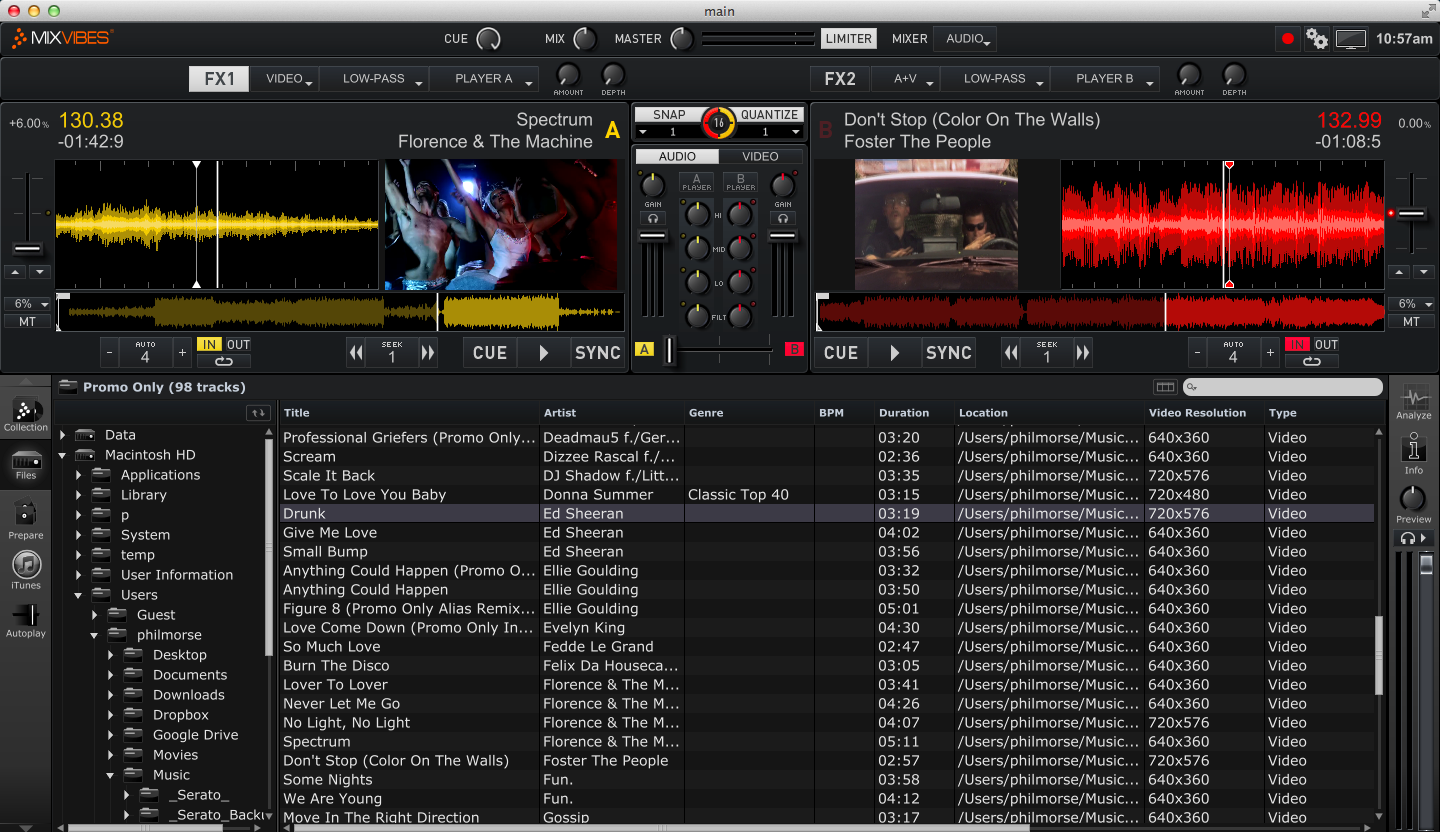
The plugin adds an extra page to the program’s preferences, and this page opens automatically for you on first launch. The preferences are quite straightforward: You can turn the plug-in on and off; choose if the plugin is to preserve aspect ratio by cropping videos or size them to fill the screen; enable the ability to load only the video or the audio of a clip; and allow full screen (useful if you don’t have a separate monitor or output for your video playback).

In Use
there’s an advanced option, that when ticked add some extra controls – one to each deck and one to the master. These let you choose whether audio, video or both are affected by the mixer’s controls and the effects – useful, for instance, when you’re using video washes where you may only want to crossfade to the video enables advanced audio / video coupling for enhanced controls using the software’s effects and the mixer’s faders. You can download two DVDs’-worth of VJ material to get you going with adding visuals to your audio sets. (Do it overnight – they’re 4GB each.)
You can navigate to your music videos and load and manipulate them exactly as audio. I found it to be fast and smooth, with no discernible lag or jumpiness (I tested on an early 2012 MacBook Air). There are 20 video transitions built-in so there’s plenty of scope for getting creative past the usual smooth fade from one video to another.
One thing I liked is that video has been nicely incorporated into the software, so the addition of video doesn’t disturb the workflow from audio-only; of course, as it’s a plug-in, you can just switch it off if you want to play audio-only. But you quickly realise that the software is treating video exactly the same as audio, in that you can have loops, cues, BPM/beatgrid analysis and use snap and quantise just as if you were mixing with audio.
Output is up to 1080 HD. There is only support of one external monitor for video (which is usual for DJ software video plugins, and the big difference between such plugins and “full blown” VJ hardware/software systems).
Conclusion
MixVibes has experience in this area, having previously launched its VFX system – a dedicated hardware/software platform for video DJing. This, however, brings the concept to the consumer and semi-pro DJ.
When you consider the cost of a U-Mix Control Pro 2 DJ controller (which comes complete with CrossDJ 2.2) and this plugin, for a total of US$340 / £214 / €263 (until December 2012) you can have a full-blown audio / video hardware / software solution that’s completely capable of letting you DJ or VJ everywhere from your bedroom to a small club gig, complete with two DVD’s worth of additional VJ material to get creative with.
For the price I really couldn’t fault it. I am no video DJing expert, having previously only dabbled with Serato Video and Virtual DJ’s built-in video engine; in truth, the reality is that you probably won’t be choosing between these systems – you’ll be using the one that works with your DJ software of choice.
If you are buying from scratch, though, MixVibes to me offers the best value complete DJ/VJ system out there. You can’t get a comparable Virtual DJ or Serato DJ + video system for anywhere near this outlay.
Taking into account that the software is already excellent without the video plugin, the hardware is likewise very good and is well integrated with the software (coming of course from the same manufacturer), then the addition of a decent video plugin completes the system brilliantly. If you’re happy to take the MixVibes / CrossDJ route, we can thoroughly recommend it.

