Video Review
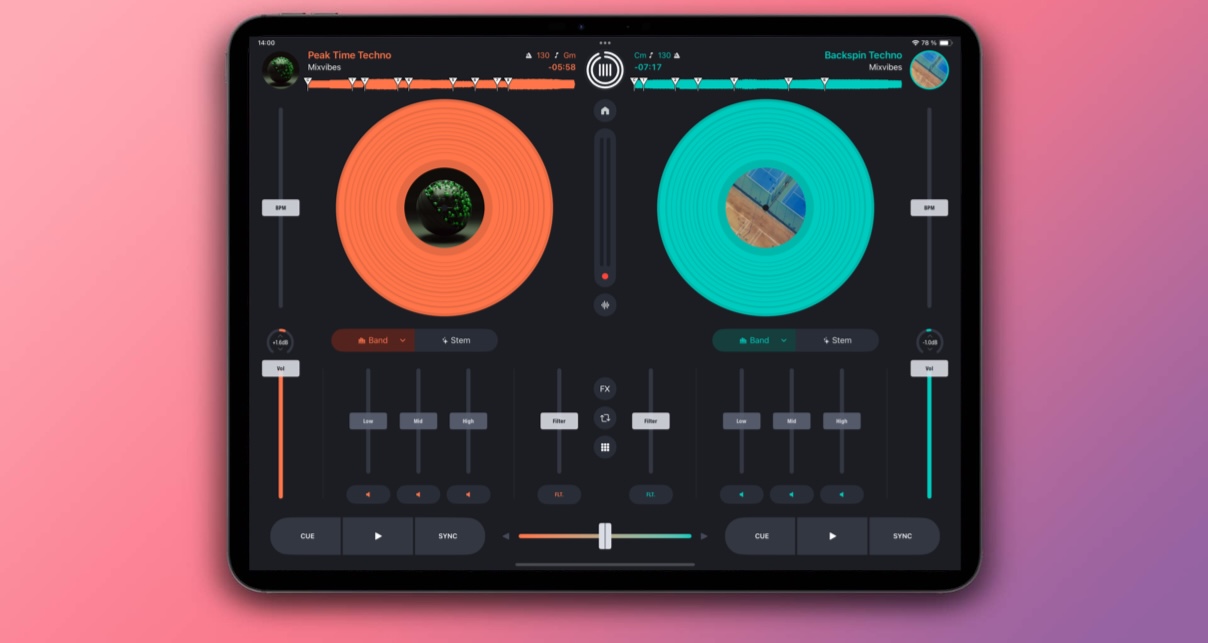
French company MixVibes is one of the smaller digital DJ companies, but is well-respected in Europe and especially in its native France. The company has MixVibes Cross DJ as its flagship software product, and now it has a controller to go with it – the U-Mix Control Pro. (Incidentally, there’s iPad remote control software on the way too – we’ll review that too when we get our hands on it…)
When you buy the controller, you also get the full version of the software – no “light” edition, and so no need to then go and invest in a full-priced version or an expensive upgrade to unlock important features, as happens with some DJ controllers. Let’s look at the package as a whole…
First impressions/setting up
The box outlines the feature set within, which is a decent one: two-deck DJ controller; built-in sound card (two-stereo-in, two-stereo-out, meaning it can handle external decks or CD players and a microphone as well as two software decks); two sizes of headphone jack; touch-sensitive dual-use jogs; and lots of additional features including crossfader curve adjust, separate gain controls, press-to-kill on the EQs, and tight hardware control over hot cues, loops and effects.
In the box are a CD with serial for the software, a bagged manual in English and French, and three leads: A USB lead for connecting to the computer (the device is USB powered; no need for mains), and two types of audio lead to suit differing set-up needs. The latter is a nice touch; many manufacturers don’t cover both of these bases for you, meaning you may have to go out and buy an extra lead to get it working.
The unit is compact, attractive and pleasingly heavy; it’s obviously a well built, rugged controller and feels much better than many controllers in its class. It has a solid metal chassis that wraps up the front and back, with big rubberised feet; a chunky earth pin and Kensington lock on the back alongside the various inputs and outputs (only unbalanced RCA outs, by the way, and no booth control); and a compact but well laid-out control surface with high-quality knobs, buttons and faders. The jogwheels are smaller than most but well made, solidly attached and pleasing to spin, with some weight behind them.
The EQ controls are perhaps a little plasticky and scratchy, but the gains right next to them (for instance) aren’t, so this is probably by design. The two-volume faders are stiffer than on most controllers but smooth, and the crossfader is nice and loose. The addition of a crossfader curve adjuster on the back means that the unit could be easily used for scratching.
The overall impression is of a compact, well-designed and attractive controller, that seems well-built and certainly capable of withstanding some heavy-duty use.
Getting up and running
Unfortunately, the USB cable supplied with the review sample didn’t work; it provided power to the unit, but no control and the interface software didn’t recognise the unit when plugged in. However once I’d worked that out, set-up was simple enough; you install and run the software, check the sound device is selected in the audio preferences and check the controller is selected in the Midi preferences too (both already were in my case).
Moving the controls on the unit confirms that the Midi is working when the corresponding controls react on the screen, and plugging in headphones and speakers and dragging a couple of tunes on to the decks confirms the sound is working as it should too.
In use
Library functions
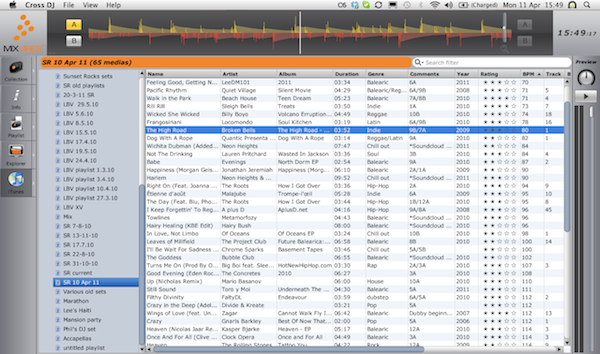
Like most DJ software, you have a library of tunes within the program. So if you play a tune, Cross DJ adds it to its virtual “library”; you can then access that library by clicking “Collection”, where all the tunes known to the program appear, cue points remembered and so on.
There is also a file browser for locating music that’s not yet in your collection anywhere on your system, and (most usefully to many DJs) direct access to your iTunes folders and playlists.
iTunes folders aren’t nested, so if you have playlists or folders within other folders in iTunes, they’re presented as one long list. Not a big issue unless you’ve got a complicated iTunes library, but a niggle nonetheless.
Even if you choose to DJ directly from an iTunes playlist (because you like to prepare your music in iTunes, away from your DJ program), the software still remembers any cue points you’ve set beforehand, which is good.
Like Traktor, you can’t edit title, artist, rating, comments and so on from here, which is annoying because if you want to add a comment to a tune in the comments field while DJing from an iTunes playlist, you have to go to the Collection and find it there to do it, or switch back to iTunes. We saw Cross DJ 1.6 at the Musikmesse show recently and one of the features is improved iTunes handling, so we’ll see if some of these niggles get addressed in the latest version of the software.
A browse knob that clicks on turning allows you to browse the contents of the currently selected folder or playlist; clicking down on it moves down a folder or playlist in the list, and shift-clicking moves up one. It’s a bit non-standard but fine when you get used to it. To browse more quickly within a folder you press shift when turning the knob, and pressing “load A” or “load B” loads the song.
There is a preview mode in the program, which it would definitely have been nice to have access to from the controller. Finally, for this section, you can dock and undock track info, browser, iTunes and your Collection and have multiple windows open at once, which then go into vertical columns.
Cueing and jogwheels
The 14-bit (ie hi-res) jogwheels are dual purpose and touch sensitive, like many DJ controllers; that is to say, the top is metal and does a different thing to when you touch the edge, which is plastic; touching the metal acts like you’re manipulating a piece of vinyl, assuming the “vinyl” button has also been pressed, while the edge is a pitch bend (there are also pitch bend buttons). If you don’t press “vinyl”, the whole wheel acts like pitch bend.
All of this assumes the music is currently playing; when you first load a tune the whole wheel lets you scrub through the tune to find the chosen start position to set a cue point. The functionality so far is pretty standard; what’s maybe not so standard is that the unit acts like a CDJ by repeating a frame of music rapidly when you’re scrubbing instead of acting like a real piece of vinyl.
If you’re used to CDJs this will feel normal, but if you’re not it may take some getting used to. It’s actually an effective way of locating where you want to start from once you get used to it. Finally, holding “shift” and moving the wheel when a record has first been loaded or is not playing scrubs very quickly through the tune.
The program doesn’t automatically guess your first cue point, so you located that and then hit “cue” when you load a tune. Pressing cue when playing returns to the cue point; shift and cue when playing sets a new cue on the fly. There are six numbered cues apart from the default; they are selectable between 1/2/3 and 4/5/6 with a select button. Shift plus a cue button removes that cue.

Pitch and tempo
The pitch faders aren’t very long throw but are pretty accurate, especially as you can choose their range from +/-4% to +/-100% (the latter is a good creative tool). There is pitch lock which is also fairly standard, and the algorithm sounded pretty good to us. There’s also a “hybrid” mode that interestingly tails off the pitch correction at extremes (+/-66%), so should you pitch way out of tempo, the keylocking gracefully fails. I think most music keylocked sounds awful way before these extremes, but again this may be useful for using tempo changes creatively.
There is, of course, the ubiquitous “sync” button, big and bold by the “cue” and “play/pause” buttons; no pretending it’s not there if you’re trying to hide from diehard vinyl buffs! Holding shift while pressing sync only syncs the BPM; pressing it alone matches the beats too. There is no concept of beatgridding in this software, so if its best guess of tune’s phase is out, you’ll need to line up the beats yourself; if it gets the BPM wrong, then you better be able to manually beatmatch. You can tap BPM for when the software doesn’t guess, by clicking on the BPM counter.
Gain and VU meters
There are no VU meters on the unit but there is a red LED by the master volume that lights when the main output is clipping. However, you should use the meters on the screen in the software to adjust your gain and levels to ensure clipping (digital distortion) doesn’t occur: Adjusting the gain control so the pre-fader meter never peaks means that even if the master is on full, the clipping light will never light up. (You need to watch EQ and especially the effects as these can cause a previously set gain level to need adjusting further down).
There is no red and green on the VU meters on the software; if they touch the top, they’ve peaked. It’s easy enough to work with, and there’s also a limiter you can switch on and off in the sound preferences (it’s on by default) meaning that even if you mess up, things will just sound more compressed rather than distorted. It’s good that they’ve given you gains though and the ability to turn this limiter off; a good DJ knows how to use these controls to ensure the sound quality remains high at all times.
Effects
The effects are definitely the weakest part of this software. It offers flanger, hi-pass filter and delay; there is also a “hi-pass+” and a “delay+”, whatever that means. You can select the effect, and the effect amount – and that’s it. No parameters, no beatmatching.
They don’t sound too good, either. The delay has a bizarre pitch increasing effect when turned to full, the filter is harsh. And if you’re only going to have one filter, why not make it high and low pass? Both are equally ubiquitous effects. The flanger is just about passable, but if you’re looking for a good effects section, this is not for you. Hopefully, this is something they’ll work on for future software releases, as it’s not up to standard at the moment.
Looping
Looping is all controlled by one knob (that also clicks), and the shift button. Turning the knob selects loop size from 1/8 to 16 beats; clicking it engages/disengages the loop. You can jump loop position by holding shift and turning the knob; holding shift and clicking the knob decides how far the loop is to jump (although there’s no visual indication of how you’ve set this last function).
It works well enough, although certainly, I’d expect a 32-beat loop as the upper limit as this is the standard eight-bar section length that many DJs use to set up a bed for doing something creative over on the other deck.

Microphone and external inputs
The microphone plugs in the front and has talkover if you want it. There’s a microphone level control, but apart from that it doesn’t route through the mixer at all, so you can’t add delay to it using the internal FX, for instance.
The external CDs/record deck input is switchable between the two at the back, and you tell the unit to switch the channels from software to these inputs by pressing shift and the cue button for the channel you wish to switch. Gain meters appear to the left of the main waveforms on the software to help you set the levels correctly.
Conclusion
This is an appealing little package. The fact that the software and hardware come from the same company is neat and should allow Mixvibes to continue to add tightly integrated features and upgrades as things progress.
It’s good value too; you can record, for instance (something you can’t do with most LE software that comes with budget DJ controllers), but not only that, it’s just good to know you’re getting the real deal, full strength software package with your controller rather than a starter version.
The software is pretty good, but has areas where improvements could be made; it is a bit “jumpy” in use when altering pitch (visually, not audibly), it needs a 32-beat/8-bar loop option, and the effects are not up to the mark.
Better iTunes integration would be welcome, and there’s no beatgridding right now. However, as we say, you can double click on the BPM and then tap a BPM manually to correct any auto-analysing mistakes.
Sound-wise it is fine for a unit of this price, although don’t expect 24-but/96kHz for this price! And connections-wise, there are no balanced outputs or booth as mentioned earlier, which won’t worry 90% of users – after all, even the Traktor Kontrol S4 has no booth output.

So if you’re looking for a tightly integrated basic two-deck DJing system that you can plug external CDs/record decks into and use a microphone with for the odd announcement, and you want something well made, reliable and compact, you should seriously consider the MixVibes Control U-Mix with Cross DJ 1.5; especially as the software is due to an upgrade which looks like it might correct some of the current shortcomings.
The unit itself is Midi mappable too, so there’s nothing stopping you using it with other software, should the hardware appeal to you but not the Cross DJ software – but at this price, the best value is to stick with what’s “in the box”.
I’d see this appealing to bars where real estate is valuable but they want a DJ set-up behind the bar (it has autoplay too), and where there may be the need to plug a CD player and/or MP3 in too; to DJs with decks who want to add digital to their setup, as this can also be their mixer; and to anyone who wants a professional-feeling controller while paying what you might expect to pay for something that’s only consumer quality.
Are you looking for a small, compact, pro DJ package? Would you consider buying an integrated system that doesn’t come with one of the “big three” software brands? Let us know in the comments.

Phil Morse