


The djay software platform has come on in leaps and bounds in recent months… if you’re an iPhone, iPod Touch or iPad user, that is. The poor old Mac version got left well behind as Algoriddim, the software’s producers, clambered over themselves to keep up with iOS’s rapid advances.
So while the iOS versions are pretty much universally respected, the Mac incarnation (this is strictly an Apple product) has come in for a bit of stick, with “no waveforms!” being the enduring criticism. Well, it’s been a long time coming, but today djay for Mac got one hell of an update. And the launch price is US$19.99. Bear that figure in mind as you read our world-exclusive first review of djay 4 for Mac…
Coming from the Apple way of thinking, Algoriddim – the maker of djay – has always tried to keep things slick, attractive in use, and more than anything, simple. It sometimes felt that they had tried too hard to keep things simple, resulting in a program that, while dazzling to use, couldn’t… well, couldn’t actually do very much.
So when we saw the feature list for the new version, we were more than a little surprised at how much the makers claim to have packed in: Harmonic mixing, on-the-fly audio analysis, iCloud integration, Midi learn plus plug and play support for many modern DJ controllers, innovative effects… the list goes on. This is a long review, but suffice to say there’s plenty we don’t even touch on.
The question is, though, how effectively have they integrated these into the package? And how much do the new features compromise the software’s basic tenet – easy to use, great to look at? We’re going to look at djay anew, rather than compare back to the old version. With all the new features, it is asking to be compared not to its previous incarnations, but to other top-flight DJ software, so that’s how we’ll approach this review.
First impressions/setting up
First thing is that it is simple to install – you drag it to your applications folder and you’re done. Thanks, Mac.
Upon opening the program, it is still good looking – two turntables with convincing felt-look slipmats occupy the top two-thirds of the screen, and the bottom third is what to all intents and purposes looks like the iTunes library (why it lists my iTunes books and movies, I don’t know – these need removing from the items displayed by default, I’d say).
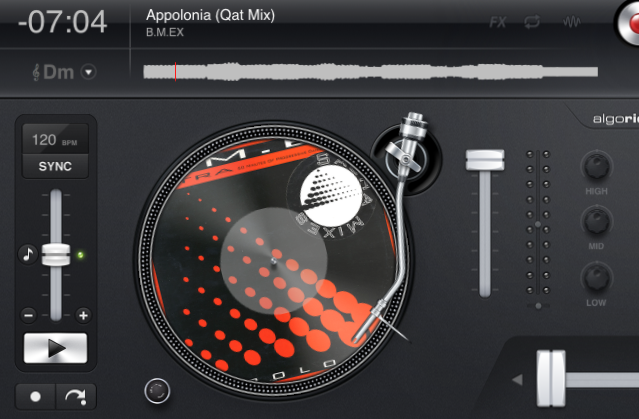
The main new thing you notice are the waveforms at the top of the screen. They are pretty much identical in use to those offered in the iOS versions; they don’t overlap and are small and grey – nothing multicoloured. To be honest they’re disappointing – waveforms should be parallel in my view, and there should maybe be an option to have them coloured to show the frequencies, like Serato and now Traktor do. It would just make them more useful, and I can’t see that it’d upset Algoriddim’s sleek and smooth design ethic – after all, coloured waveforms can look really nice.
The display has got kind-of “smoothed” edges, a bit like someone’s pointed a camera down on a real set-up and snapped it. There’s a hint of 3D about the controls, and some digital sharpness is sacrificed for a more grainy, analogue look – it’s hard to explain but it kind of makes your screen look like it’s a piece of DJ gear, at the expense of sharp fonts – at least, in the main window. You’ll either like this or not, but it fits with the idea that djay is a close copy of two decks and a mixer, even in look and feel.
In use
The library
One thing that I’ve always disliked about DJ software is the way it insists on visibly running its own library of your music. I’ve already got a music library, thanks, it’s called iTunes and it works just fine. If my software needs to do something else just to let me DJ with the tunes I keep in iTunes, then I’d like it to do that behind the scenes, and not hassle me with the details. Traktor is worst for this; Serato and Virtual DJ are better but not flawless.
djay gets it right, though, in my opinion. It basically appears as if the software is just presenting you with your iTunes library, and some decks bolted on! All your iTunes playlists are there, as are all the columns for you to choose from and rearrange. While djay does indeed have to analyse your files, like all other software, it spares you the details.
One thing you can’t do is edit your ID3 tags right from in the software – it would be good if this were possible, for adding comments to tunes as you play them (for instance). And of course, the software still has to analyse your music. (Best to let it do it all in one go via the Library menu, because then you’ll be able to sort by BPM and key from the off.) Six views are possible: your left-hand screen lists from iTunes, sorting by artist, by album, by genre, by history, and an innovative newcomer, by harmonic key.
Music in the key of iLife
When you sort by harmonic key, you’re presented with a circle of fifths which shows you all the songs in a particular pair of major/relative minor keys, but also allows you to quickly peek at neighbouring keys that are likely to mix well with the currently selected song or group of songs.
When djay loads or analyses your music, it works out the key for you, thus doing the job of standalone software like Mixed in Key, right there in the program. Harmonic mixing is a big bonus of digital DJing, and this is the easiest in-software implementation of it I’ve yet seen. While I’ve not tested how accurate their algorithms are, assuming they are there or thereabouts, it’s a great addition.
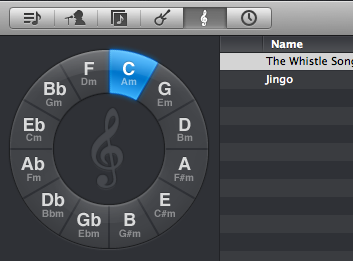
On top of all of this, it’s possible to digitally alter the key of the tune you’re playing on the fly, in order to attempt to match keys throughout your DJing. All of this digital key manipulation has a downside in that it inevitably reduces sound quality, but as long as you’re listening out for unacceptable compromises, it can be great fun, especially for matching Acapella up with instrumentals. (By the way, both key analysis and on-the-fly pitch changing are also present in Virtual DJ, but not in Serato ITCH or Traktor.)
There’s a little switch bottom left that lets you turn the library from night to day to make it visible DJing in all conditions. Would be good if it could invert the colours of the rest of the window too. There’s a pretty cool auto-playlist to the right that you can drag tunes to, and their album covers appear when you do – nice for parties where you are having too much fun for anyone to DJ! A fast, instant search box completes the library features, and overall they’ve done a nice job of it.
The decks
This is strictly two-deck DJ software. If you’re looking for four decks, look elsewhere. It also ties itself tightly to the two turntables and a mixer idea, with two convincing-looking turntables, complete with needles that move across the “records” as they play, and even the Technics-style on/off knobs and red lights, lighting up the strobes around the edges of the “platters”.
The decks are impressive and visually fun to look at and spin on if a little kitsch. A big, chunky crossfader, pitch controls and volume faders, plus standard EQ knobs complete the old school look.
Playing a record involves dragging it onto the turntable, which invokes an equally impressive piece of virtual vinyl flying across your screen, with the old record flying off the turntable back the library if you’re replacing something on a deck. If there’s cover art it is used as either the whole record’s surface or just the label in the middle, depending on how you set things in preferences.
You would normally then drop a cue point at the first beat, and use the trackpad or mouse to find that beat; when you do so, the waveform zooms right in so you can see the individual beats easily, zooming automatically out again when you’re done. The cue point appears both on the waveform and as a dot on the record itself.
There are actually very few further controls to tell you about at this stage, which is in keeping with the “keep it simple, stupid” philosophy of the software – the rest is there, but you have to go and look for it.
There’s a keylock toggle, the aforementioned key change control, a sync button (there’s no beatgridding; sync will attempt to match the beats – if it is out, pressing it again moves the track 1/2 a beat which will nearly always match it for you), and a big red record button top centre – and that’s about it.
Closer inspection (much closer, in some cases!) does reveal a few more controls: There are channel gains hidden in the VU meters, channel pans at the bottom of the meters, pitch bend controls at the bottom of the pitch faders, and subtle little controls above the waveforms that allow you to toggle them from always-zoomed to only-when-needed-zooming, as well as similar controls for instantly activating the loop and FX sections to turn on/off whatever you’ve got set (more on loops and FX next). But for overall, two-deck DJing, djay remains simple, fun to use and non-threatening to beginners.
The effects
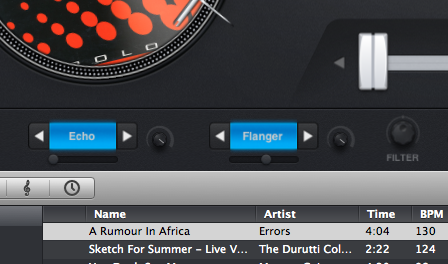
Clicking an innocuous-looking arrow at the top of the library opens a small extra bar of controls that contains a lot of goodies, the first being the effects section. This is accessed by clicking a tiny FX button on the chosen deck. It turns out that djay now has some powerful effects, accessible in three ways, with little arrows above and below the “FX” lettering, there to cycle you through the options.
The first is “instant” effects. They’re called Absorb, Drift, Sway, Crush, Punch and Twist. Absorb is like a low pass filter and echo combined into a progressive effect. Drift is the hi-pass version. Sway is a long-cycle flange-type effect. Crush is a resonating bitcrusher. Punch is best described as an extreme, digital-age deck slowdown, and finally, Twist is like a reverse censor function. All of these effects have no parameters at all – you press and hold a button to turn them on, releasing it when you want the effect to stop. They’re for short, sharp bursts, and because they sound great, they’re a lot of fun.
The second way to access the effects is kind of like a manual version of the above, and best controlled using two fingers on the trackpad because they’re X/Y effects. You get echo, reverb, flanger, phaser, bitcrusher and gate, and each effect has one parameter, triggered by the X axis.
Meanwhile, all effects are also combined with a filter, and the Y axis controls that: up for a high pass, down for low pass. I particularly liked the bit crusher/filter combination here.
The third way to access them is more conventional – this is the only option that gives you a wet/dry, for instance. In this mode, you get the same effects as just listed plus the wet/dry and single parameter controls, but you get two separate effects per side, which can be daisy-chained, Traktor-style, into one unique effect. In this mode, there are two filter knobs too.
I think Algoriddim has got this part right – there aren’t dozens of effects, and there aren’t multiple parameters per effect, but if you want easy access to great sounding one-button FX they’re here; if you want to make use of the trackpad to do something special you can do that too; or if you’d rather get creative by building something unique, you can do that as well. There’s a good balance of ease-of-use and power. Just as importantly, the effects all sound great.
It is worth mentioning here that all of your Audio Unit effects (you’ll have some in GarageBand) are available too, via the menus at the top of the screen; two sets, one for either deck. They open in small popup windows.
Cue points
There are four cue points per deck, and these are colour coded instead of numbered.

One is accessible via the deck controls, because it’s the first cue point that marks where you’ll want to start playing a tune from, and thus it’s pretty much essential. The second, third and fourth are accessible via the cue points section and are red, green and blue respectively. You drop a cue point by pressing its coloured button and jump to it by pressing a small arrow button next to that.
Cues appear on the surface of the vinyl as well as in the waveform for the track, which is a nice touch, even though it can look like your records have multicoloured measles when they’re all dropped. If you’re on iCloud / iTunes Match, cues appear in all libraries across all of your devices running djay. Erasing cues is possible by holding the desired cue button for more than a second.
Looping and skipping
Looping has three modes of operation; like with FX, they’re selected using little up and down arrows. The first is a simple loop, from 1/16 of a beat to 32 beats, with three controls: on/off, halve and double; familiar stuff, and whatever you set here is instantly accessible by clicking the loop control above the deck, so no need to come back to here to find it. Perfect for those 16 or 32-beat loops to buy yourself some time when you’re late to a mix.
The second option is manual looping, with a loop in, loop out and reloop controls – like the first option, this is pretty standard stuff. The third option is pretty neat, though, being a “loop roll” function – this allows you to loop any length from 1/16 of a beat to two beats, by holding the bottom down. You can move between loop lengths by dragging the cursor when the button is held, and when you release, the track carries on playing from where it would have been had you not engaged this feature. Like the use of effects with the trackpad, this is good because it makes use of the trackpad in an innovative way.
Skipping lets you navigate through the playing tune by beats, from 32 down to 1/8. For me this is good for moving subtly back or forwards through a tune to extend or shorten it (best done with 32 beat – eight bar – intervals) or for correcting phrase matching when tunes have drifted apart (for instance, one tune has a four-beat dramatic pause in it; using skip, you can “skip” the other by that amount so their bars line up again, even while in the mix).
Samples
Yup, djay has its own take on that flavour of the month, sample decks. You access them by pressing a little button in the middle of the effects bar; upon doing this you see six buttons. They come set to Gunshot, Sirene (sic), Bass Drum 1, Snare Drum 1, and Hi-hat 1. Pressing the button triggers the sample.

By each sample, there is a small arrow that opens the options in a little window. Here you can choose which sample the button is set to trigger; there are a whole host of sound effects provided, nearly all of which are better than the infamous, tired old Virtual DJ samples we all know and love!
You can adjust sample volume, and also toggle one-shot status, meaning the samples will carry on playing after you’ve taken your hand/cursor off the button. They can’t be beat-looped, though, like in other software. It is possible to record samples straight from either deck or the microphone and save them for future use, and this is simple to do.
Overall, these sample decks are a good start but are limited compared to most other solutions.
Using external gear
The software will play just fine with any external audio card, meaning you can route your pre-fade listen and master to wherever your headphones and speakers are situated in your system. Same with the microphone – it can use your Mac’s built-in microphone, obviously, any microphone plugged in, or a mic on an external sound interface. The microphone channel has an echo (useful) and auto pitch (not to be taken seriously but pretty neat!).
The software can also use a splitter cable solution, where you buy or assemble from other cables a cable that splits your left/right audio output into two mono channels – one for the speakers and one for your headphones. It’s a good stopgap if nothing else.
Algoriddim actually has its own cable available for this.
As far as DJ controllers go, the big news is that it now works out of the box with a number of DJ controllers, although not all by any means. They’re listed on the Algoriddim website. So no more being tied to the Vestax Spin – it is now possible to enjoy this software straight out of the box presuming you already own one of these controllers. I’d hope Algoriddim would press ahead and map more because this is where software falls down a lot of the time.
The even bigger news, though, is that you can now make your own mappings, because djay now has Midi learn – and it’s the friendliest, fastest Midi learn I’ve seen on any DJ software to date.
Midi mapping for the masses
To use Midi mapping, you just plug in a Midi device – I tried it with the Novation Twitch and the Numark DJ2GO, and it recognised them both instantly. You then touch a control, and it recognises it. You choose a “target” (turntable 1, turntable 2, mixer, music library etc), and a list of actions appears depending upon the target you chose and the type of control you touched. You then just select the action, and presto! It’s mapped.
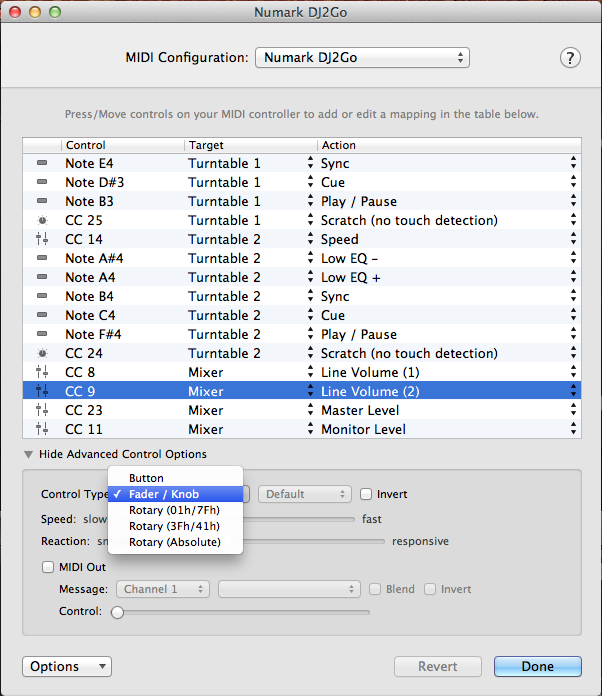
Below this simple window, there is a little triangle called “Show Advanced Control Options”. Here you can specify the type of control a little better – so you can differentiate between normal knobs, infinite knobs, and jogwheel types, and also specify toggle or hold for buttons. Hi-res Midi is supported. Furthermore, you can “invert” the control if it’s operating in the wrong “direction” for you. More than that, you can choose the speed (slow/fast) and reaction (smooth/responsive) to set jogwheels for exactly how you want them to feel. This stuff is all done on simple drop-downs and with faders. It’s been excellently executed.
Finally, you can specify Midi out messages to feed back to your controller, for complex mappings. You can also define a “shift” modifier key so it’s easy to map shift-button Midi items too. I tried it with Numark’s DJ2GO, for no reason other than because that’s such a small controller that I knew I could map it to the hilt without spending all my reviewing session doing so!
As well as duplicating all of its controls (admittedly there aren’t many), I used a shift modifier to turn the jogs into fat filter controls, and mapped EQs to the volume and master/headphones knobs too, adding extra functionality. Once finished, you just save and you’re done.
The only issue I could see was that there is no “soft pickup”, so sharing faders and non-infinite knobs using shift is risky because when you next touch the knob without shift pressed, it jumps to the current position rather than waiting for you to move it to where it was left. Maybe something for Algoriddim to look at (unless I am missing something here).
DJing with it
I think the best way to DJ using this is to have a controller but also to use the laptop. The reason for this is that Algoriddim has built in some fun multi-touch gestures, and there are also extensive keyboard shortcuts to get to lots of functions. Learning a combination of the two would be ideal.

Having said that, from what I have seen I think it is perfectly possible to map this software to just about any DJ controller. For instance, the VCI-400 from Vestax has lots of buttons that could be utilised for the samples, one-hit effects and so on. The very idea that once-lowly software like this could pack the VCI-400’s numerous controls with exciting functions shows how far the software has come.
In writing this review, I spoke to Algoriddim about some of the features, and they said they had just mapped a Numark NS6 entirely to djay without having to write a single line of code, just using the Midi learn functions. That’s pretty impressive.
I didn’t like the beatgridding (or lack of it) and sync; because the BPMs are rough (there are no decimals, so two tunes shown at “121” may be at 121.1 and 121.9 and you wouldn’t know), I used sync to save me manually beatmatching, but sync also tried to guess the phase at the same time, often wrongly. This can throw tunes out of phase.
Touching the button again usually corrects this but it’s not ideal. I’d rather have the option for sync to just tempo match for you, or for the phase to be defined by where you drop the first cue point, ie for the software to assume that that first point is the downbeat.
I also feel that an alternative view would be nice. Now that the software can be mapped to all range of external controllers, it would be good to knock the mixer out of the screen view, for instance, in the same way, that you can choose to do with Traktor, and like Serato ITCH is anyway. It seems a bit passe to have controls on the screen “magically” moving when you touch them on your controller in this day and age.
Overall, though, djay is really satisfying to use – the effects are innovative and fun; it looks great; using playlists straight from iTunes without worrying about adding them to the software’s own collection is smart, and it is now undeniably powerful software – once you get under that deceptively simple exterior, that is.
Conclusion
My, what a long way djay has come. It now deserves to be considered alongside the big boys. It’s not as fully featured as Traktor, but it’s also about a hundred times easier to use. It is kind of like a two-deck Virtual DJ minus the video stuff and with a GUI that’s immeasurably nicer. But the way it handles the library and its overall ease of use make it more akin to an open-platform Serato ITCH.
None of these descriptions does it justice, however. Because one thing djay undeniably is can be summed up in one word: Apple. All versions – djay for iPhone, iPad and now Mac – are “Apple” products through and through. They have the ease of use, power-under-the-hood and user experience that the best Apple products deliver.

If you want your DJ software to look beautiful, to hide its workings from you, and to have lots of “wow” factor moments – from the cool animations when you put “records” on the decks, to iTunes just being “there” when you boot up, to ridiculously simple Midi mapping – you’ll love it. The difference now is that it’s actually getting more and more capable as a piece of software you may never outgrow.
But there’s more, something we haven’t elaborated on yet. This software can now work with iCloud (and the just-launched iTunes Match), meaning you can sync it with your iTunes library in the cloud. That means you can buy tunes from your iPhone, practise DJing with them on your iPad, and then have them waiting for you on your MacBook when you come to DJ that evening.
All of these devices can run djay, and cues and BPM information edited or added in will appear immediately in all of the others. There’s even a remote control available for iOS that’ll let you control the djay app on your MacBook over wifi (Virtual DJ can do this last thing, too).
While professional and specialist DJs (four-deck techno DJs, mash-up kids, hardcore controllerists, touring pros) will still find djay limiting, and club DJs would probably justifiably feel a bit silly with two almost kitsch spinning Technics on a MacBook screen as their software of choice, for the consumer/DJ – everyone from party DJs to semi-pros playing in bars – this is now a serious contender.
If you’re already sold on the whole Apple way of doing things, and anxious to try cloud music and DJing, it’s going to be very tempting for you just to throw in the towel and go with djay as your platform of choice, especially because it is priced at launch at $19.99! That price is frankly ridiculous for fully fledged DJ software complete with key detection. Anyone who looks at that price and thinks this isn’t to be taken seriously will miss out on an absolute bargain.
Are you a djay DJ who’s been waiting patiently for this update? Does the idea of DJing using the cloud across all of your iOS devices excite you? Have they prices it too low to be taken seriously? Let us know your thoughts in the comments…


Phil Morse


