Traktor is great software, but is not known for its user friendliness in certain areas, one being Midi mapping. Put simply, it is tedious to work with. Want to change the Midi channel of a bunch of commands? Get ready to do each individually (goodbye, evening). Want to expand the mapping window to full screen to see what you’re doing? Not so fast, buster. Scrolling? Cut and pasting? Sorry.
In lieu of a long-awaited overhaul of this area of the software, we have Xtreme Mapping, which has now hit v1.2.
Why Midi map at all?
Midi mapping is a great thing – it’s the DJ software version of pimping your ride, and far from being just a geeky diversion for people who really should get a paying gig / girlfriend / life (it often happens in that order, I have observed), it has real obvious practical applications for the serious digital DJ.
Midi mapping is the DJ software version of pimping your ride…
From getting a controller you love to work with software it wasn’t intended to, to making two controllers play nicely together, to making a redundant knob control something you’re always having to use the keyboard for, being able to map or remap your DJ hardware can improve your DJing experience and performance a lot.
While I believe wholeheartedly in “set it and forget it”, there’s no harm at all in being able to set it exactly how you want first.
Setting up
Which brings us nicely on to getting going with Xtreme Mapping 1.2. Firstly, you need to go and get a copy from the App Store (it’s an OSX app only at the moment, so PC users will have to read in envy I’m afraid).
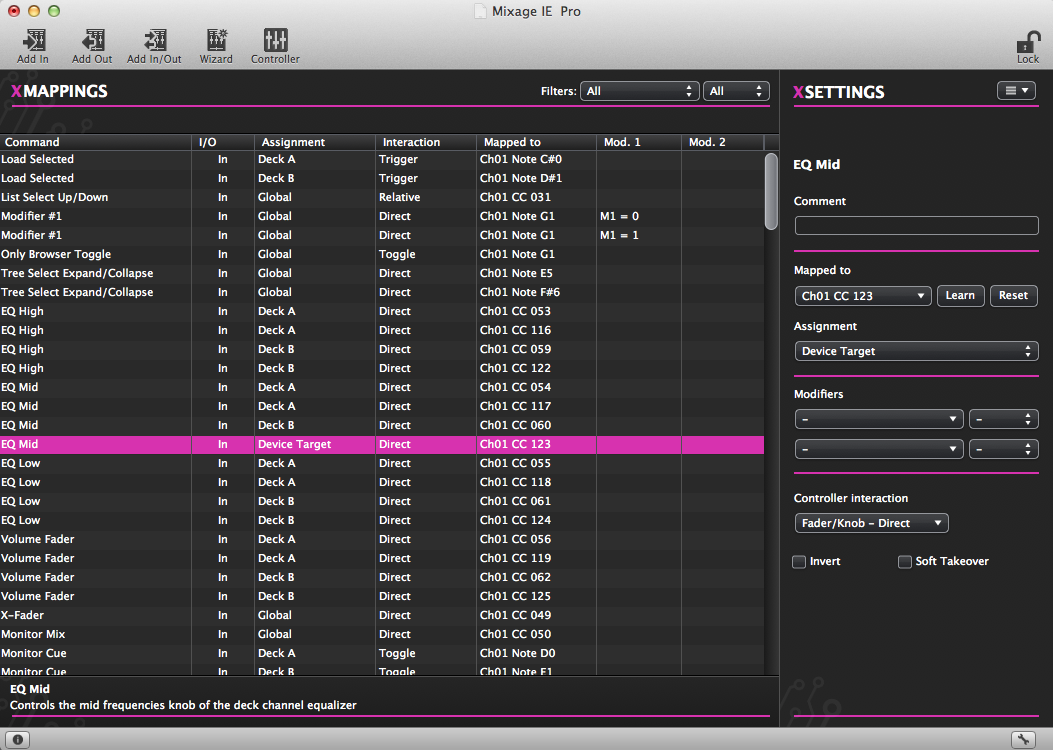
Like moving into a four-bedroom house after spending ten years in a bedsit, there's just so much.... space!
What becomes clear right away is that this is a standalone app – it doesn’t integrate with Traktor at all, so you load a TSI file (TSI files are the name for Traktor’s mapping files), do your work, then save it for importing into Traktor. This is a disadvantage if you want to see the results of your changes, or at least test them, as you go along – if so (and it’s a reasonable assumption that you will), it makes the process more long-winded than if you could work on the “live traktor file”.
However, look what the GUI offers: Cut and paste, ability to resize the screen; up/down arrow scrolling; ability sort your mapping’s elements by command; up/down arrow keyboard scroll; I/O, assignment etc – it’s immediately apparent that simply as a working environment, this is incomparable to the stunted Traktor mapping window.
It’s not rocket science, but oh how welcome these basics will be to anyone who’s struggled in Traktor’s mapping area. No wonder there are stories about how people making “official” Traktor mappings for various hardware have been using the app to do it, or rescuing new gear set-ups at trade shows with quick backstage tweaks using this software to save the day.
In use
Midi mapping is not something anyone can just “do”. If you want to get serious about it, firstly I strongly recommend you buy Traktor 2 Bible, which will give you the grounding in the software that you’ll definitely need to be able to do any of this successfully. (I also recommend you try your hand with mappings in Virtual DJ or Algoriddim’s djay, because in both of these packages you can work out the basic concepts without tearing your hair out).
It’s actually perfectly simple to make a mapping from scratch yourself…
There are probably two types of Midi mappers, just like there are two types of computer programmers. There are the “dabblers”, who want to make small tweaks and changes to what already exists and hove no wish to do it all from the ground up (yup, that’s me), and the hardcore who prefer to start with a blank slate and come up with weird and wonderful custom mappings to suit their own fiendish ends.
But with Xtreme mapping, it’s actually perfectly simple to make a mapping from scratch yourself (well, as simple as these things are by nature, anyway).
The mapping wizard
There’s a mapping wizard, you see, which moves you through the main areas you might like to map (such as a deck, some FX, or a mixer section), complete with Midi learn, where you just touch or move the control and the software picks it up.
Once you’ve mapped an element, it moves on to the next command (for instance, if you were mapping a deck, it would ask you for the cue button, the play button, etc.)
This way, you can build up a new mapping section-buy-section, ready to save, import into Traktor, and test. As mentioned earlier, you’d likely be in and out of Traktor a few times to get such a mapping right, but nonetheless it makes something possible for people who otherwise might not even attempt it.
Manually editing mappings
Otherwise, you’re able to edit the mapping manually, in much the same way as you do in Traktor, but with all the benefits already described, and more.
For instance, say you have two identical DJ controllers, and you want to map them both to Traktor. You can cut and paste a complete mapping for one, and by highlighting the new copy and altering in one got the Midi channel, suddenly they can both work concurrently – and it’s taken you about 10 seconds. Try doing that in Traktor’s default mapping window!
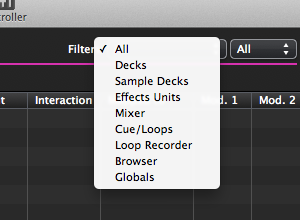
Exactly the same modifiers etc are all available to you as in the main Traktor software, and for complex mappings, there are filters so for instance you can set it to only show you the FX section of your mapping, clearing what you don’t need out of sight.
What’s new in v1.2
We didn’t review the first release of the software, but there are reviews over on the Traktor Bible website and on DJ Tech Tools if you want to read more about what I summarise below.
Basically, the main issues most early reviewers had were conceptual (you can’t edit a mapping you’re using, as I pointed out at the start of the review), and niggly bugs, which have by and large been addressed in this release.
There is now explicit support for the X1, S2 and S4.
There is now support for Traktor 2.1.x, with a backward compatibility mode for older versions of Traktor. (This is really nice: Although I imagine anyone getting stuck into mapping will have the latest version of the software, it doesn’t mean the mappings you find or wish to to modify will necessarily have been made for the latest version.)
Also there is now HID support / NHL as Native Instruments’ take on a jogwheel mapping protocol is called. There is explicit support for the X1, S2 and S4. While there’s no Midi learn for Native’s controllers, due to their proprietary protocol, you can still remap your NI devices with considerably more ease than if you were using Traktor’s mapping window.
Conclusion
In an ideal world there wouldn’t be a need for this stuff. In the meantime, Xtreme Mapping 1.2 will be warmly accepted by the modding community as a way of simply saving a lot of time, and making the whole process more enjoyable.
If Xtreme Mapping 1.2 could hijack Traktor, as Greasemonkey hijacks Firefox, so it existed within Traktor itself, it’d be even more convenient, of course – and this brings to the fore another weakness, in that Xtreme Mapping is only as good as how quickly the developer can catch up with changes to Traktor. For instance, with Traktor 2.5 around the corner, Xtreme Mapping will be out of date for at least as long as it takes for the next update.
At the end of the day though, this is a simple but at the same time powerful editor, that will allow anyone who wants to make changes, big or small, to their Traktor mappings – even to the mappings for the X1, S2 and S4 – to do so far more easily than attempting the task natively. At only US$5.99 on the Mac store, it’s a no-brainer, really.
Now, NI: Why not consider making the developer an offer he can’t refuse and incorporating the code into Traktor 3.0 natively?
• There’s a good set of videos explaining the features in more detail on the Xtreme Mapping website.
Summary
We like:
- Sorely needed for any serious Midi mapping
- Helps to demystify the art for beginners
- HID / NHL a welcome addition to 1.2
- Nice explanatory text makes things even easier
We don’t like:
- Limited functionality with NI’s controllers
- Can’t work on the active mapping
- Mac only
Star ratings:
|
Features: |
|
|
Ease of use: |
|
|
Value: |
|
|
OVERALL: |
Product details:
Price: US$5.99
Buy from: App Store
What do you think?
Have you struggled with mappings in Traktor? Have you tried this or the earlier version of Xtreme Mapping? Please share your thoughts and experiences in the comments.
Now go to:
Review: Traktor Pro 2 – Is It Evolution, Or Revolution?
Diary of A Novice Midi Mapper, Part 1 – Getting Started
Kontrol F1 Hardware & Traktor Pro 2.5 Software Announced
Want to escape the bedroom and play in public - fast?
Our 1000s-selling How To Digital DJ Fast video course shows you how.
Learn to DJ Free - email course plus bonus PDF book
Sign up for our weekly email course for beginners now...
Trouble choosing a controller? Visit the web's #1 guide!
DJ Controllers: The Ultimate Buyer’s Guide 2013.
Tags: mapping, midi mapping, Traktor, traktor 2, xtreme mapping 1.2
This work is licensed under a Creative Commons Attribution-NonCommercial-NoDerivs 3.0 Unported License.


I am buying this, today! Mapping in Traktor makes my brain hurt…
[ link ]I’m still messing with it, been here 12 hours. Really… must… eat…
[ link ]I bought it some weeks ago and have made a mapper for my VMS4 to do what I want it to do. It is really easy to use and if planed beforehand what you like to do it takes almost not time to do a mapper from scratch. You could also make a close to perfect mapp then do the final adjustments inside Traktor like sensitivity of jogs and so on. I’m glad I did this purchase.
[ link ]But in maybe 2 months I’ll have to start mapping again in Traktor 2.5 hopefully there will be a new version of Xtreem mapper soon to
I have been using this for awhile and it is a great product. This review sums it up niceley. The main bug is that it ALWAYS uses the default effects order. In case you e.g. import the DJ techtools TSI’s or any other TSI which is using a different effects order it will display the incorrect name of the effect.
Their reply:
We already know about the “bug” you are describing, which is not actually a bug but more
of a bad design choice made in TSI file format. When you map an “Effect Select” command,
let’s say in Button-Direct mode, only the index of the effect you selected in the list of your
“favorite” effects is stored in the TSI (as you can imagine, we have no control over this).
In XM we put the default effect list as a reference (it works if you use the same effect arrangement
in Traktor) but, as soon as you change your effect listing settings (Preferences > Effects) that issue
you described comes up… I hope this has been explanatory even if, unfortunately, we still have no
fix for this “bug”
Just to clarify even further, this would happen also with Xtreme Mapping out of the picture, in the
case you and a friend of yours having two different lists of “favorite” effects and trying to share a
TSI with the controller mapping only (if you export all of your Traktor Settings TSI the favorites
will be exported as well and eventually overwritten during the import operations).
=================================
I suggested workarounds e.g. having a table within xtreme where we can change the order if needed so that it displays correctly. I had no response on that.
Another shortcoming is that you can not import the TSI files (multiple TSI) which are exported with the big export button. You can only import the single TSI (small export / import). Therefore you can not directly import any TSI file that has besides the mapping also effect orders and other settings. E.g. you can’t directly import the gratification mapping. There are workarounds and if you are aware of it shortcomings it is a great tool.
[ link ]This looks really useful, shame I’m on a PC. But is it possible to use the app on a Mac and export a mapping, then transfer that mapping to a PC to use?
[ link ]I can’t see why not. It just exports a standard TSI file.
[ link ]My biggest issue and why I don’t use it often is I can’t test stuff easily when I’m mapping something. It sucks to map say 5 different things to one button and something not work. At least in Traktor’s window I can make a change and immediately test it.
[ link ]Invested a couple of weeks back. It does the job and I tip my hat to the developer. However I feel the bottom line here is that this app should not be required. I am sick of NI (and the tech industry as a whole) more features sells more units attitude. People have been literally screaming at them to improve the mapping editor for years! As well as bug fixing / improving many other areas of the program. But no, we get “Remix Decks” which literally no one will actually use. And pro features are always overlooked in favor of stuff aimed at beginners and useless bells and whistles to add to the feature set.
THERE IS NO MONEY IN THE CURE.
[ link ]Being a long-time Traktor user myself I agree with NI’s lack of updates to the MIDI Mapping.
However, you make two contradictory points:
1. “Remix Decks” which literally no one will actually use: I disagree. If they are there, someone will use them.
- You may not use them, hell, maybe 95% of Traktor users may never use them – but it’s a long shot to say no-one will use them.
2. “And pro features are always overlooked in favor of stuff aimed at beginners and useless bells and whistles…”
- Would you agree that the remix decks are a Pro feature?
[ link ]Uncle Grumpy,
You’re right I did contradict myself with that hastily written post. Should have learned to think before I speak by now!
Remix Decks could indeed be a Pro feature. Though I personally believe they will see little use. As someone who puts music and selection before flashing button gimmicks and live remixing / destruction they just don’t appeal to me, but hey it’s a great excuse to knock out a new “must have” controller.
I should have said:
Features relied on by pro users or otherwise are left desperately in need of bug fixes and updates while the company spend time and resources working on new features and devices purely aimed at sales to new users or extracting more cash from their long suffering user base. This IS a business, however;
There are a few basic functionality issues (not to mention stability) with Traktor that severely need addressing. Throw us a fricking bone here and we will be loyal customers for years to come instead of contemplating jumping ship every time there’s a new update.
I like Traktor and many other NI products but the niggling issues cause plenty of headaches. For a prime example of a loyal user base left in the dark check the Reaktor forum.
All the best to the DDJT readers and staff.
[ link ]OMG im new to mapping and eventhough i know some stuff, i just cant get the modifiers things i think i need to get a mac
few days ago i was thinking on devaloping some software like this, never knew it even existed thanks! i think it should be for windows too
[ link ]Well, you could always check out DJ Shiftee’s MIDI Mapping Guides http://www.youtube.com/watch?v=AQ5AsqJACto . Those are FREE online and as long as you’re willing to learn what he has to teach, take notes and are willing to use the little Controller Manager window, you can do almost everything listed here. There’s also a couple of MIDI guides found in the links on this page: http://www.colly.tv/collection-of-traktor-pro-tutorials-tips-tricks/ …and don’t forget Ean Golden on DJ Tech Tools.
Native Instruments barely approaches MIDI Mapping in their Guides and make a mention or two about Mapping LEDs to the buttons (DJ Shiftee calls them ‘buddons’).
[ link ]Great links – thanks for this Forced Hand
[ link ]Had no idea about the Colly TV site. Pffff, I see late nights a-comin’…
I have owned xtreme mapping for a while now. It works well & is worth the bucks.
However I would use it ALOT more if it had a ‘comment’ column in the main window. Like any complex programming task, comments are prime tools not to get lost in code. Even though the Traktor midi window is tiny, I find I still use it because I can sort my commands via comments. So if I’m working on the ‘Delay Freeze FX’ in decks A&B, I can sort the various related midi commands regardless of their CCs just by sorting them by comments.
The DJTT TSIs are organized that way and I can’t for the life of me understand why the XM developers haven’t included a ‘comment’ column yet.
Still, it’s a good utility for building mappings from scratch.
[ link ]Hi futureglue,
this is Enzo, XM developer. The “comments” column in the main table view is a feature in 1.2 update. Download the free update, if you haven’t yet, then click on View > Show table columns > Comment menu item… that’s it!
Since I’m here I’d like to thank everybody, Digital DJ Tips editors and comments to this review, for the good words you spent about the app!
Ciao from Italy, Enzo.
[ link ]Thanks for coding it Enzo. You have saved us all time / money in the long run.
[ link ]Thaaaank you!!!!!!!
This is fantastic.
[ link ]I have to say it seems a bit ridiculous that people are forced to use additional software because NI haven’t sorted out a) their MIDI mapping interface & b) Key detection. These seem pretty essential to me, remix decks… do not (not to say I’m never going to use them).
Traktor seemed to be way out ahead of the pack in DJ software about a year ago, and now that there are more competitors it’s a shame the added pressure hasn’t made them sort out the nuts & bolts stuff instead of adding on frivolous stuff.
[ link ]That’s probably because they don’t really care about the complex midi programming stuff. All NI wants is for people to buy/use their native controllers.
In a way, with all the pirated software, who blames ‘em. I was going to buy the X1 but now the K2 is killing it, so long live XM and midi programming.
[ link ]