Digital DJ Tips3>

Learn How To DJ With Digital DJ Gear

Review & Video: Hercules DJ Control Instinct With DJUCED Software

Hercules DJ Control Instinct Review

Everything you need to learn to DJ, for a bargain-basement price? In today's review we find out if the stripped-down Hercules DJ Control Instinct has got enough to get you past go...

Back in 2004, I was asked to review the very first Hercules DJ controller – one of the first DJ controllers ever made – which was a tiny device not dissimilar in looks to the Hercules DJ Control Instinct, which we look at today.

Despite having no sound card (so no headphones) and some pretty serious design misgivings, that little controller was what got me hooked on digital DJing. Now nearly a decade later, we have the latest little baby in the company’s range to look at. How does it shape up in a very different world? In today’s Hercules DJ Control Instinct review, we find out…


First impressions and setting up

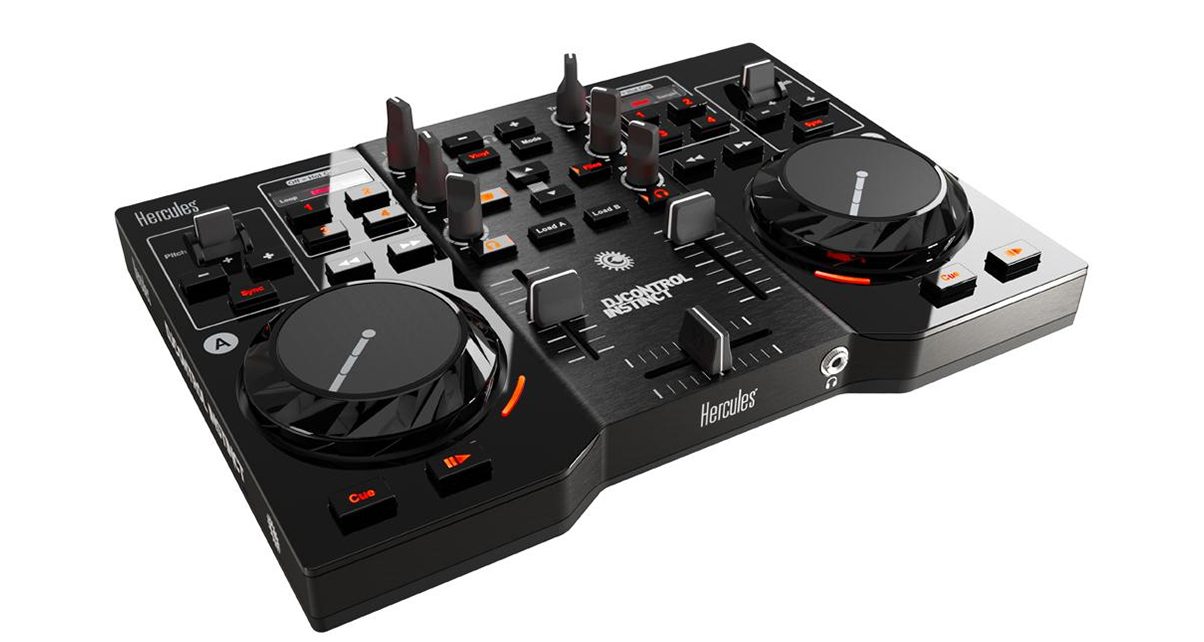
It’s tiny! It comes in a little box, and is no bigger than a paperback book. Lightweight and in a mixture of glossy and matt black plastic, it hat two shrunken, clunky jogwheels, three faders, six knobs, a couple of paddle controls, and 35-odd buttons.

There are 1/8″ TRS sockets front and back for headphones and speakers respectively, and also twin RCAs at the back for speakers. It has a hard-wired USB cable. Four big, shallow rubber feet hold it steady on your surface.

While it’s completely plastic and plainly consumer oriented, it’s perfectly well made for what it is.

While it’s completely plastic and plainly consumer oriented, it’s perfectly well made for what it is. It feels like it will last for a long time, and at least the fact that it’s black means that it looks only partly toy-like.

The supplied software is called DJUCED, which is not one of the big DJ software brands. Indeed, currently it’s only available with a couple of Hercules DJ controllers. You install it from a supplied CD. In fact, you have to install the Hercules drivers (it annoyingly installs drivers for every Hercules controller – bloatware alert!) and the software separately, something the instructions don’t make clear.

Once you’ve jumped that hurdle, though, thankfully everything else is set up for you on opening the software, which means when you plug your headphones in they work as they should, and when you plug your speakers in they do what they’re meant to. Far more respectable DJ software brands can’t get this bit right, and it’s a major stumbling point for countless beginners, so well done Hercules and DJUCED.

In use

The hardware
With only three knobs and three faders, of course this is going to be DJing stripped back to its bare basics. Here’s the good news: You can DJ perfectly well on this. The responsiveness is good, the jogs scratch and nudge reasonably well (although you can’t do spinbacks, turntablists, because when you remove your hand from the jog, it loses scratch functionality), the cue/play/pause buttons are repsonsive, and the sound quality is fine.

Hercules DJ Control Instinct

The Hercules DJ Control Instinct top panel: What there is works well, but the controls are limited. (Click to enlarge.)

By “fine”, I mean that it is perfectly acceptable for anything anyone is likely to throw this controller at (you’re not planning on using it in a superclub, are you?), and that the keylock and beatlock algorithms are as good as the majority of the competition.

A couple of functions that would have knobs on bigger DJ controllers have a pair of buttons instead, specifically library scrolling and headphone volume. While this isn’t ideal, it’s not a dealbreaker.

One compromise that is a bit more worrying (but that is understandable) is the use of paddles for pitch controls rather than sliders. Truth is that 90% of users of such a controller will use the “sync” button to match the speeds of their tunes, so won’t need to use these controls at all. But if you do want to manual beatmatch on it, they’re a poor option. It’s possible, but it won’t be as easy.

Likewise, while the DJ Control Instinct has access to hot cues, loops, effects and even samples in the software, you need to cycle between functions to make the same four little buttons work with all of these functions. Forget to switch to “loop” before hitting the loop button, and you may just accidentally hit a hot cue and completely wreck your mix.

The jogwheels work better than they initially appear they’re going to. Unlike most brands, they’re mechanical – pressure rather than touch engages the scratch mode.

The jogwheels worked better than I initially guessed they were going to. Unlike most brands, they’re mechanical – pressure rather than touch engages the scratch mode. This works well, and apart from the aforementioned inability to perform spinbacks, they do the job.

And I’m happy to report that unlike the play/pause and cue buttons on that Hercules controller I reviewed all those years ago, the buttons here are sure and responsive.

There’s no auto gain on the software plus no gain knob on the controller, so that means that to get the levels right you may sometimes have to use the mouse.

Overall, the controller has limited buttons and functionality, but what it does it does OK. It’s not the most fun or the easiest to use for these reasons, but can you DJ on it? Yes.


The DJUCED software
In a break from tradition (tradition being “throw Virtual DJ LE in and be done with it”), this controller comes with a fully functioning version of its software, DJUCED.

Firstly, it’s good that the software works fully. Often you get LE software that means you have to pay more to get all the functions. Beginners often don’t understand enough to know what they’re actually buying, and equally, they tend to expect what’s in the box to work properly without more financial outlay.

This software does work fully, the only caveat being that the controller needs to be plugged in, and that the software only works with the controller you buy it with. Seems a better arrangement to me.
DJUCED software

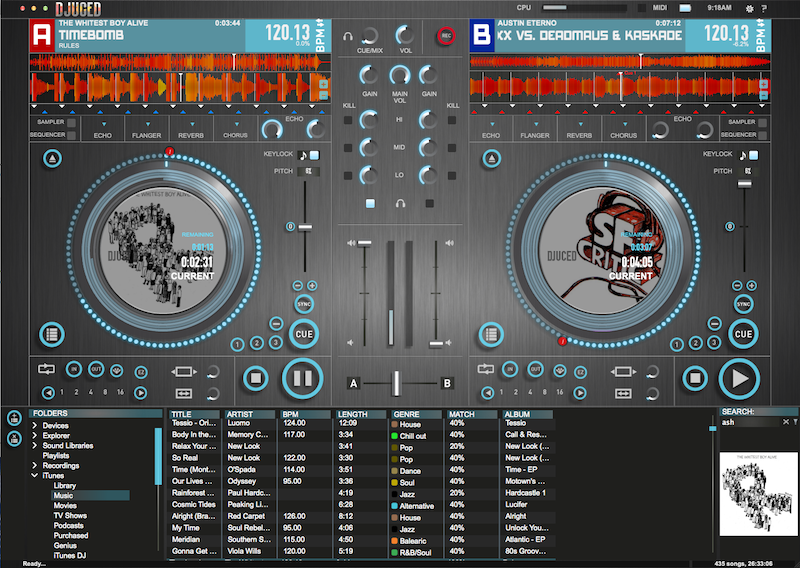
The DJUCED software is not as good as the market-leading titles, but it covers the basics and has a few surprises of its own, including a simple step sequencer. (Click to enlarge.)

So what’s it like, quality wise? Well, the “big three” – Traktor, Serato and Virtual DJ – have spend considerable time and money getting their products to the mature states they’re at now. DJ software is daunting stuff to get right, and is far more important than hardware when it comes to what you can and can’t do as a DJ. The fact that DJUCED is even anywhere near these guys (which it is) is praise enough.

It has nice touches: the visual waveform beatmatching system is intuitive (two little triangles under each waveform that show how well lined up the decks is are with the other deck, plus a coloured background that snaps in when the decks are in sync); there are concentric circles around the decks to show each minute of the song, with markers for cue points and looped sections; the on-screen VUs show track gain, not master gain, which is better for setting your levels when DJing; the search function is instant, and works well; and as well as reasonable hot cue and looping features, there’s a sampler / sequencer too.

Sampler and sequencer? Yup, there’s a simple four-bar sequencer that lets you piece together up to four elements (there are four sample slots) per deck. It comes loaded with a (completely inappropriate) rock drum kit, but you can easily enough grab loops from your music and load them in. It would be good for quick vocal snatches, sampling rhythm patterns etc, and is a good place to start learning about sequencing.

The sampler itself is simple, but can handle one-shot and loops. Each sample deck / sequencer section is tied to a software deck, so the crossfader turns both off at once as you mix out of a track into another.

The effects are basic, and quite weak: The hi and lo-pass filters seemed to be either “on” or “very on”, and I couldn’t get any time adjustment on the echo, for instance, but you get the basics for splattering a little extra something into your mixes.

It’s good that the software works fully. Often you get LE software that means you have to pay to get all the functions.

There are other anomolies. For instance, it’s not possible to hear the track while moving quickly through it, which is weird. Another? The manual pitches (those little paddles) repeat like a key on your keyboard: You hold it, it moves one step, waits a second, then repeats rapidly. This felt bizarre in use.

Overall, though, the software is a decent stab, and it’s certainly possible to perform all the basic DJ techniques on it. There’s also plenty here to keep you amused when you want to try more ambitious stuff, although as you get better you’ll feel its limitations. It’s not up there with the big boys, but you won’t be made to pay again, and it won’t stop working fully after a month.


Conclusion

Want something you can learn about DJing on, for the lowest price possible? This will do the job. It has an acceptable soundcard built in, it has full software, and it has all the controls you need to learn the basics. Add a pair of cheap powered speakers and some budget headphones and you’ve got all you need.

For me, there’s an acid test: Our How To Digital DJ Fast video course teaches you all the necessary skills so you can DJ in public, from scratch, in a month. Could you complete that course and play your first gig using this controller? Yes.

Hercules DJ Control Instinct Review

Want something you can learn about DJing on, for as little as possible? This will do the job. It has an acceptable soundcard built in, it has full software, and it has all the controls you need to learn the basics.

Once you’ve got to that point? The fact that the software is non-standard, and that some of the controls here are very basic (or just missing entirely) means that you’d quite quickly want a better controller, so at that point you’ll be looking at a new software solution too.

And yes, it would be slightly easier to learn to DJ on more expensive gear. But I learned to DJ on cheap belt drive turntables and a mixer that didn’t even have a crossfader.

I was talking to a scratch DJ the other day who told me he learned to do DMC-standard scratch routines on two turntables ripped from 1970s music centres.

I keep coming back to this, but the truth is that DJing is not the gear, it’s the music. It’s not the software, it’s the guy controlling it. You could produce perfectly fine DJ mixes, and even play parties and bar gigs quite happily, using the DJ Control Instinct. And if you then decided DJing wasn’t for you? Well, you’ve really not lost much finding out, have you?


Video


Summary


We like:

  • Great value for money
  • Small, light, does the basics
  • Built-in sound card (rare at this price point)
  • Full version of software included – no extra cost

We don’t like:

  • Non-standard software
  • Some key controls missing

Star ratings:

Features:

Build quality:

Sound quality:

Ease of use:

Value:

OVERALL:

Product details:

Size & weight: 10.4 x 7.4 x 2″ (264 x 187 x 51mm), 2.6lb (1.2kg)
<Price: US$121 / £84 / €105
Buy from: Amazon (US), Juno (UK), Juno (rest of Europe & world)


What do you think?
Do you like the look of the DJ Control Instinct? Have you got one? What do you think of the DJUCED software? Please share your thoughts in the comments.

Now go to:
Exclusive! New Hercules DJConsole RMX2 To Ship With Virtual DJ 8
Review & Video: Hercules XPS 2.0 60 DJ Set Speakers
Review: Hercules DJ Control AIR DJ Controller

Want to escape the bedroom and play in public - fast?
Our 1000s-selling How To Digital DJ Fast video course shows you how.

Learn to DJ Free - email course plus bonus PDF book
Sign up for our weekly email course for beginners now...

Trouble choosing a controller? Visit the web's #1 guide!
DJ Controllers: The Ultimate Buyer’s Guide 2013.


Tags: , , , ,


Creative Commons LicenseThis work is licensed under a Creative Commons Attribution-NonCommercial-NoDerivs 3.0 Unported License.

33 Responses to “Review & Video: Hercules DJ Control Instinct With DJUCED Software”
  1. keian says:

    that looks good for my 6 year old boy, so he can stop messing with my CDJs

    [ link ]
  2. HS says:

    Tiny and light, with decent soundcard and OK response?

    I was thinking backup controller, if it can be easily mapped to VDJ and Traktor

    [ link ]
  3. I don’t see the notes. Can you harmonic mix with the software?

    [ link ]
  4. Aske says:

    I think that in about 6 months most of users will sell them on ebay for a half of it’s original price.

    BTW: Congratulations Phil, you’v just invented rhythm matterns :D (and anomolies)

    [ link ]
  5. David says:

    Can other controllers be used with the software at the same time? Like could i jack in a nanokontrol to take care of some of the other functions?

    [ link ]
    • Phil Morse says:

      There is a mapping section on the software, although I didn’t investigate it. But the software definitely needs the controller to be plugged in to work. One for the Hercules forum I’d say.

      [ link ]
  6. Kreg says:

    I love the way you pronounce DJUCED. Though I think it is pronounced “Dee-Juiced”, which is what this video for the Air calls it:
    http://www.youtube.com/watch?v=95Vo6_ph2PA&feature=related
    It looks like a pretty good set up to see if DJing is your thing.

    [ link ]
  7. DJ Phatso says:

    If I may clear a few points:

    - Hercules has been using the unified driver package scheme for the DJ Series since 2005.

    What this means is that one driver package can be used to install any Hercules DJ controllers (not unlike nVidia for graphic cards). Consequently, the graphic files necessary for each specific DJ Control panel are installed, but everything else are shared libraries and drivers.

    - Regarding the Pitch levers, you can get rid of the “keyboard” feel and have them respond instantly by modifying the settings in the DJ Control Panel. I would recommend the “Repeat frequency” at 30 ms and the “Delay” at 0 ms.

    [ link ]
    • Phil Morse says:

      Thanks for the update. Serato does it too for ITCH (hence you get loads of Numark stuff installed when you add a Vestax controller). Personally I don’t like it as your choice of controller brand may be arbitrary and not a statement of loyalty for life.

      Good work re the pitch lever setting – wonder why it isn’t set in the best way (as you outline) straight out of the box?

      [ link ]
  8. Dajmo says:

    For me its again the most interresting part the price. Why does the so called PRO mixers cost like 10-15 times more? Made of gold??? Hopefully price will go down as more amateur models get better and better. The question then is more if you feel cool enough playing on Hercules or other “cheaper” brands.

    [ link ]
    • Phil Morse says:

      In nearly every single way, a pro DJ controller is vastly superior to something like this. That doesn’t mean this doesn’t have its place, but that “you get what you pay for”. Having said that, some more expensive gear is better value than other.

      [ link ]
    • Klaus Mogensen says:

      I’m definitely not a gear snob. I feel just fine when using Hercules gear in public.

      I probably wouldn’t choose this one, but the good ol’ RMX (or Steel with an NI DJ2 sound card”) for 2-deck mixing? Not a problem

      I feel the same way about most gear. The American DJ lights that actually look good? Fine by me. Behringer headphones or mini-mixers just for line-in and master output. Again, fine by me

      Best regards
      Klaus

      [ link ]
      • Phil Morse says:

        I am with you. Get the right thing for YOUR job, look after it, and then concentrate on what matters – DJing! :)

        [ link ]
  9. Dan says:

    Today I received a package with the controller. And it does not work as it should. Speaker Output defective. The sound was going to L & R channels only if I hold the cable by hand. And if I use the speaker output and the RCA output and does not hold speackers cable by hand then stops working and one of the RCA channels too. I used all the cables and headphones in the house – nothing works! Please help! See the my small videos:

    http://www.mediapolis.ru/IMG_0245.MOV
    http://www.mediapolis.ru/IMG_0246.MOV
    http://www.mediapolis.ru/IMG_0249.MOV

    [ link ]
  10. Neil says:

    Hi Phil,
    I currently use a Hercules Control MP3 E2 just for messing about at home with. Other than the internal soundcard, would there be any major differences between the Instinct and the MP3 E2?

    [ link ]
    • Phil Morse says:

      No, I wouldn’t change if I were you, especially if you already have an external sound card.

      [ link ]
  11. luc williams says:

    hi, i’m new in djing and im a dj for a party coming up and someone recently asked will they be loud enough for a party? i never knew about this,so would i need new decks or would these be suitable? i would appreciate any replies!:)

    [ link ]
  12. I’m looking for something that i can mix using my PC at home without switching on a hifi as i just don’t get the time anymore.

    I need to be able to knock out more recent sets as the last was almost 4 yrs since my son was born.

    I am an experienced DJ but only need something that get’s me piecing together two tracks to create the journey required in a no fuss way.

    Watching the video this controller looks to be able to do this except for the gain refinement issue.

    One question though: I assume I can play through the PC without connecting remote systems so I can just pull tracks from the hard drive and just preview via headphones?

    I hope to hear from some one soon.

    Regards,
    Andy

    [ link ]
    • Phil Morse says:

      Yes, you should be able to just set your computer’s audio drivers in the settings, though I can’t recall for sure as we’ve no longer got this in the workshop. go to the DJCUED website and ask on their forum for a definitive answer.

      [ link ]
  13. Tommo says:

    Hi phil, i recently purchased some numark cdj’s and mixer and im trying to learn to mix that way but i would also like to learn how to mix digitally and this controller seems ideal.
    Would your ‘how to dj fast’ tutorials be easy to follow using the hercules instinct controller?

    [ link ]
  14. Top says:

    Hi there.
    OK, so do i need to plug my speakers directly into the console or will the sound just play from my speakers being in my PC as normal?
    Cheers.

    [ link ]
    • Phil Morse says:

      You need to plug your speakers directly into the console.

      [ link ]
      • Top says:

        Thanks Phil – shame that means that i probably won’t get them now though…
        Cheers anyway.

        [ link ]
  15. Joe Saint says:

    Hey! I just started this dj thing and i recently bought the hercules dj control instinct, im pretty happy with that but i have one problem and i tried in almost every single dj software and it kept giving me the problem that is that i can’t preview the next song on my headphones. I’m not supose to hear the next song in the headphones before it goes to the speakers? and yes im cliking in the button that has the headphones but it stil kept not working, what do i do?
    Thanks for the help.
    Cheers!!

    [ link ]
    • Phil Morse says:

      You need to set your audio output routing correctly in the software, and make sure you have the correct drivers installed. It’s the trickiest part of setting up DJ controllers, but it’s always explained in your manual. Go back and look closely at the steps they tell you to make, and ensure you’ve followed them all.

      [ link ]
  16. Valentin says:

    Hi! First of all, sorry about my english, I’m Spanish but I’m following your web this days and It’s awesome, congratulations!

    I’m introducing myself on the DJing world, and I wanted a cheap DJ control but I’m not an expert on this field.

    Would you recomend me the dj control instinct or the dj control air? Is it worth it to spend more money only for the pads of the control air?

    Thank you!

    [ link ]

Leave a Reply

Enter your details:

Or connect with:


Be constructive, be polite. Full guidelines here. Asking a question? Use the forum instead. Comment that don't meet our posting standards won't be published.


New to Digital DJ Tips? | What DJ controller? | Learn to DJ | Testimonials and Feedback | Privacy Policy