


Video Review
https://youtube.com/watch?v=bmyjmq84Jrc
When Apple produced the Camera Connection Kit (CCK) to patch the hole left by lack of USB support with the iPad, digital DJs, musicians and software companies jumped on it as a means to transport CoreMIDI data to/from the iPad for hooking up external gear such as DJ controllers and keyboards.
Unfortunately, the same loophole wasn’t available for iPod Touch and iPhone users, and as such, they were left out of the Midi connectivity scene. But now the Vestax V-Midi has come along to change all that…
Unveiled earlier this year), not only does the Vestax V-Midi solve the iPhone/iPod Touch Midi issue, but it goes a stage further, adding a high-quality stereo audio output too.
First Impressions/Setting Up
First impressions of the unit are good. It’s small and makes a nice change to the usual boxy and boring looking Midi alternatives. Connection to your iOS device is via a 30-pin connector, which is perfect for older devices but for the next generation, you’ll need to invest in a 30-pin-to-lightning connector (available from Apple). The Midi socket on the unit is six-pin mini Midi. Fear not though as the V-Midi comes with a mini Midi to large USB ‘A’ cable. Most of my spare USB Midi gear has a mini USB socket, so I invested in an additional adaptor, which cost literally pennies.
The V-Midi takes the audio signal of the iOS device from the 30-pin connector and passes it through a mini amplifier (controlled by the rotary dial on the top surface) sending it out via the stereo 1/4″ jack socket on the side.
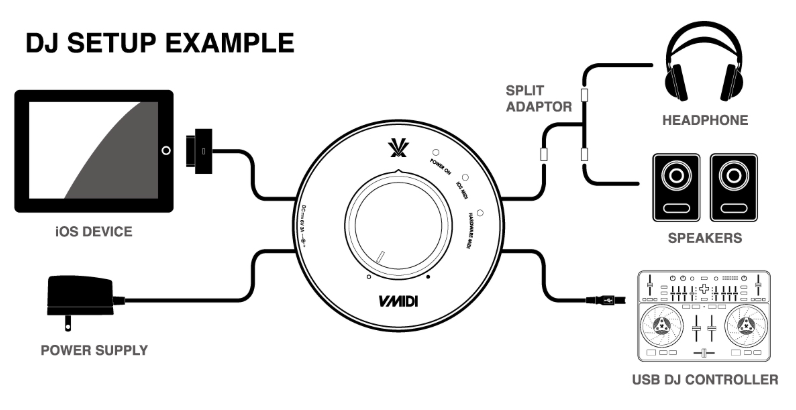
The V-Midi offers a single Midi connection, which perhaps is limiting to the more adventurous music makers or controller addicts. A Midi signal can be passed from your hardware to the iOS app of your choice, for example triggering drum sounds in an app like FL Studio using a set of Midi drum pads (like the AKAI LPD8). In this scenario, it makes sense to route the audio from the iOS device back through the V-Midi and into your mixing desk or amp.
Of course, you could use the V-Midi to send Midi messages from your iOS device to an external piece of Midi kit like a Midi synth. You could possibly do this at the same time as having a background app running which would be sending an audio signal via the V-Midi. For the DJ, the V-Midi brings a reliable way of connecting up a USB class compliant controller to your iOS device and not worry about the battery running low, as your device will receive a constant charge while connected.
Using the V-Midi, Vestax Spin owners will now be able to use their units with djay by Algoriddim running on smaller iOS devices. (The djay app has long supported the V-Midi, it just hasn’t been publicised.) For DJ Player owners, it means you can also get creative with your Midi mapping on the smaller iOS devices, although the audio is simply whatever is coming out of the headphones socket – there’s no way to have something different coming out of each as with some devices.
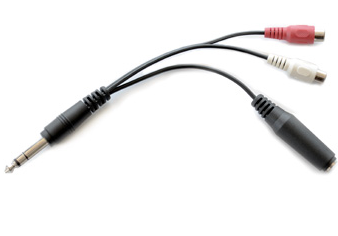
The V-Midi is shipped with a robust looking splitter cable which probably suggests that Vestax is aware of this. While this is a shame, it does mean, of course, that the unit is backwards-compatible with older devices.
Conclusion
The V-Midi has no frills or complexities, its simple aesthetics are a pleasant diversion from the cables you’ll have strewn around it! The over-sized rotary volume dial is smooth in movement and feels robust enough but it would have been good to see some calibrations around the dial… if only to assist with mixing in the iOS audio in a consistent manner to another source.
When I first saw details of the V-Midi, my hopes were that it would provide a sturdy way to connect Midi hardware to my iOS device of choice and provide me with a high-quality dual stereo master output signal, with different outputs available via the headphones socket on the iOS device (for cueing) and the V-Midi (for a master).
But while the Midi works fine, unfortunately, there’s no dual stereo audio, so you still have to use a mono splitter cable. However, you do get high-quality audio with the output that it does have; plus, don’t forget that the audio from the V-Midi is not under the same output restrictions as the headphone socket on the iOS device, so it can also go louder.
Because the V-Midi is bringing something previously unavailable to the smaller iOS devices, it’s a shame that you’re being chained to a wall socket for your power requirements. A nice improvement would be for a battery compartment in the base to allow for a portable setup for your Midi controlling needs away from mains power.
The price tag feels a little high, especially when you consider the price of a smaller iOS device that this is mostly aimed towards. However, in adding the ability to charge plus a decent stereo output to the Midi offered by the Camera Connection Kit, this unit may well find appeal with users across the whole iOS device range, not just with iPhone and iPod Touch users for whom it is currently the obvious choice.
• Vestax has created a list of USB class compliant devices that its engineers have tried the V-Midi with. The list isn’t exhaustive, but it’s certainly a good place to start if you’re thinking about compatibility. If you’re wondering which apps support CoreMIDI, there’s a good list (albeit music-making oriented) over at the iOS Musician site.
Do you DJ or create music with your iOS device and Midi hardware? Is this the answer to your problems getting connected? Which USB controller would you love to hook up via such a device? Please feel free to share your thoughts in the comments.


DJ Hombre


