(Or, the dark art of waveriding…)
Some DJs have been spotted in the wild playing sets without headphones on, causing a right uproar among the purists. There’s whispering talk that they’ve been locked in their bedrooms, practising the dark art of “waveriding”.
It’s time to come clean. Is that you? Are you a “waverider”? Have you read this far and suddenly decided you want to be one? Do you not have the faintest idea what I’m talking about?
What the hell is “waveriding”?
Waveriding is not a cool term for surfing, and is not something you do at the football when the game is boring.
Instead, it refers to the dark art of DJing by sight alone, using the waveforms as displayed by some modern DJ software to ensure the tunes you are mixing are “on beat”.
Not to be confused with auto-syncing (where the software actually locks the tunes for you and you never have to do anything to keep them rock solid on the beat), waveriding is nonetheless seen as one of the dark arts by DJ purists who think that unless you’re hunched with one ear next to the monitor speaker and your headphones cupped over the other ear, you’re simply not a real DJ.
So how does one do it? Is all waveriding the same? And can you do it too much? I think it’s time we investigated how to waveride with today’s DJ software, and got all of this out into the open.
1. The basic waveride (using Virtual DJ)
To get you started in the dark art of waveriding, let’s use as an example Virtual DJ, as this software has the first important characteristic for successful waveriding – track waveforms that run together or parallel. Let’s see what I’m talking about.
This is the top half of the Virtual DJ screen with two house tracks playing together (click on the image to enlarge it):
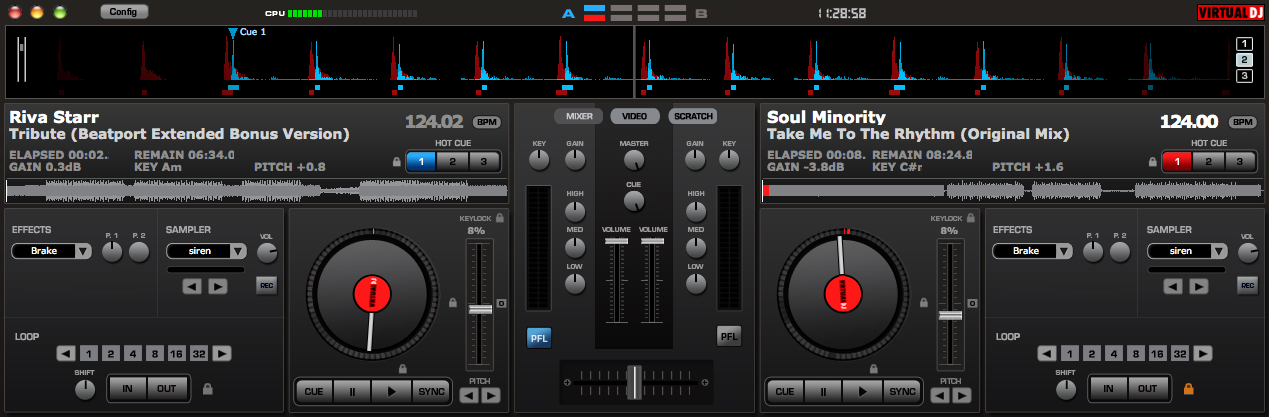
Note that their BPM (beats per minute, or pitch, or speed) is pretty much set the same – 124 more or less. (Most DJ software will do this for you if you ask it nicely when you load a new track, or you may have to do it before you actually play your set.)
What we are looking at here is two tracks playing together. Virtual DJ shows them as a red waveform and a blue waveform across the top of the screen, so you can tell them apart. The vertical peaks are the “thud – thud – thud” of the kick drums, the main beat of the tracks.
The observant among you will have noticed that these two tracks don’t have their vertical peaks, or kick drums, in the same place – one is lagging slightly behind the other. This would sound like the classic DJ “galloping train” bad mix – where you hear a “thud-thud, thud-thud, thud-thud” as the drums sound, both tracks being a fraction of a second apart instead of together.
If this was a DJ mixing in a real situation, with both tracks playing through the speakers together, he would hopefully hear instantly and correct the situation, by nudging the track that is behind forward a bit, or nudging the one that is in front back a bit. Now the kick drums, or vertical peaks, would line up, and happily the sound would be a crisp, clear “thud – thud – thud” as the beats are properly aligned. The display would now look like this (again, click to enlarge):
Now, in the old days of vinyl and CD mixing, this was all done by ear. But DJ software lets you do it by sight too. For instance, I could look at the display in the first picture above, and see that the “red” track (the right-hand deck) is running slightly behind the “blue” track (the left-hand deck), and so give it a little nudge forward without actually checking on the headphones. Indeed, a deaf person could do it! This is what we mean by “waveriding” – “riding” the waves on the screen instead of doing it aurally through headphones or by listening to the mix the crowd is hearing.
In reality, what tends to happen is you’ll hear the tracks slipping out of time, quickly glance at the waveform to see which way to correct, and give it a quick nudge, instinctively continuing to listen to check all sounds good after the correction.
(By the way, one of the reasons there IS still skill here is that all tracks are different, and sometimes the “right” sound might actually be with the waveforms showing not totally synchronised on the screen. You still have to listen.)
Now thinking on, imagine there’s a quiet part of the track coming up. You’ll see that too, because the main thudding drums (the vertical peaks in Virtual DJ) will not be there. You’ll be able to spot this just before it happens (remember the waveforms are moving from right to left so you can see what’s coming), and if you’re in the middle of mixing two tracks, that may indicate a good time to drop from one to the other. Again, this can undeniably be done without listening.
2. An advanced waveride (using Serato ITCH)
Many people love Serato ITCH because of its multi-coloured waveforms, and that nonetheless at the same it still retains some of the purist edge of old skool vinyl DJing. You see, with ITCH 1.5 (the current version), there’s no “lock” that lets you lock two tunes together so they never drift apart beat-wise. You can get the software to make their BPMs similar (so they’re going at pretty much the same speed), but as they inevitably drift apart over time, you have to use your headphones to monitor them, or alternatively “waveride”, them to keep them together.
Combined with the quality jogwheels on dedicated controllers like the Vestax Serato ITCH ones, this gives a nice, fluid feel when DJing that’s similar to using vinyl or CDs. However, because of those wonderful multi-coloured waveforms (and other tools provided by Serato ITCH), there’s a lot of potential waveriding goodness to enjoy too. Let’s have a look, shall we?
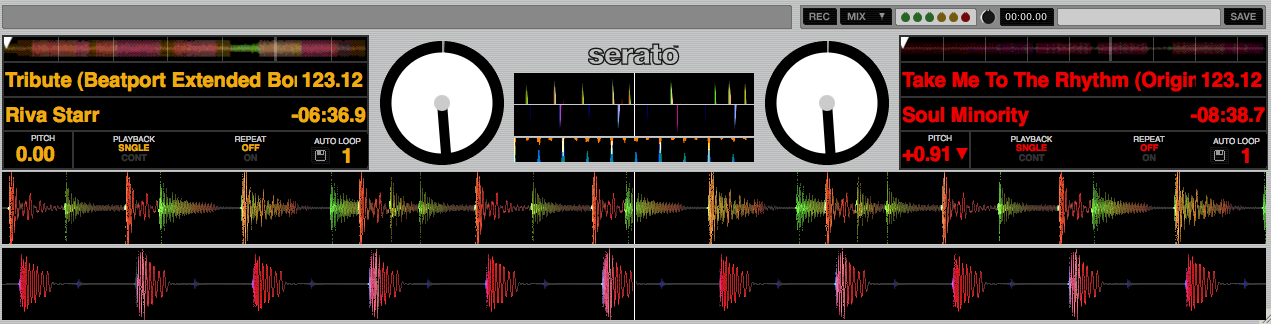
OK, so that’s the same two tracks as before. You’ll see that Serato ITCH displays the waveforms parallel, not overlaid. It’s even clearer to see what’s going on.
Again, you’ll notice that these two tracks are plainly out of sync, the bottom waveform being behind the top one. Let’s nudge one of the tracks to get them in time, shall we?
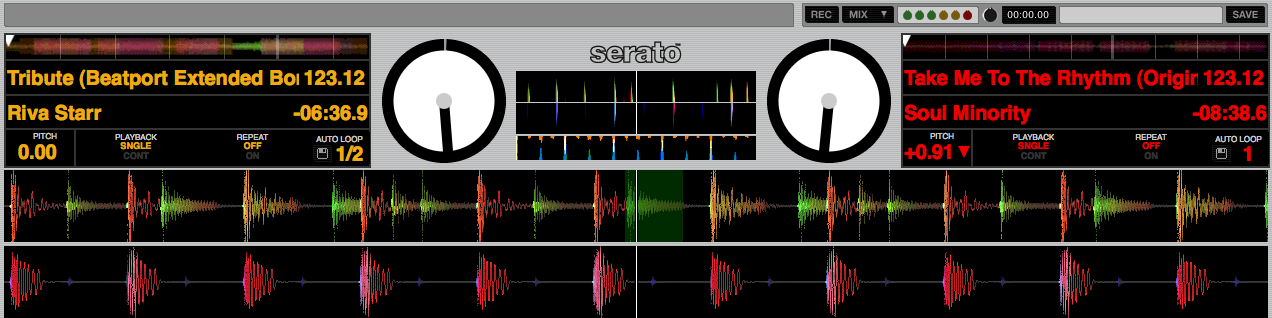
That’s better! This is now as good a mix as the one we showed you above in Virtual DJ. However, Serato ITCH is actually showing us a lot more here. Look at the “shape” of the waveforms. To start with the kick drums are a different “shape”, and will sound different. Next, the top track has other stuff going on between the kick drums, whereas the bottom track is plainly just a “thud – thud – thud”. Serato ITCH, because it has these parallel waveforms, lets you “read” the tracks more visually than Virtual DJ. Knowing one track is a “thud – thud – thud” and the other is a “thud – t-t-ts – thud – t-t-ts” or something similar helps you with adjusting the bass, middle and treble on the mix to keep things sounding sweet.
And there’s more. As mentioned, the displays are multi-coloured, lower frequencies being reddish, higher ones the green-yellow in this instance. That’s what tells me (in the top track, for example) that the bits between the main (red) drums are a different, higher sound (a snare sound or cymbal “tsss”). Good DJs learn to “read” the tracks by this information, adjusting EQ etc instinctively, and don’t have to listen as intently. Like it or not, they’re falling for the dark art of waveriding. They might even not use the headphones and still manage to mix perfectly!
Those samples are from the very start of both tracks – the intros that are just drums. Let’s roll the tracks on a bit and look at some more involved music information:
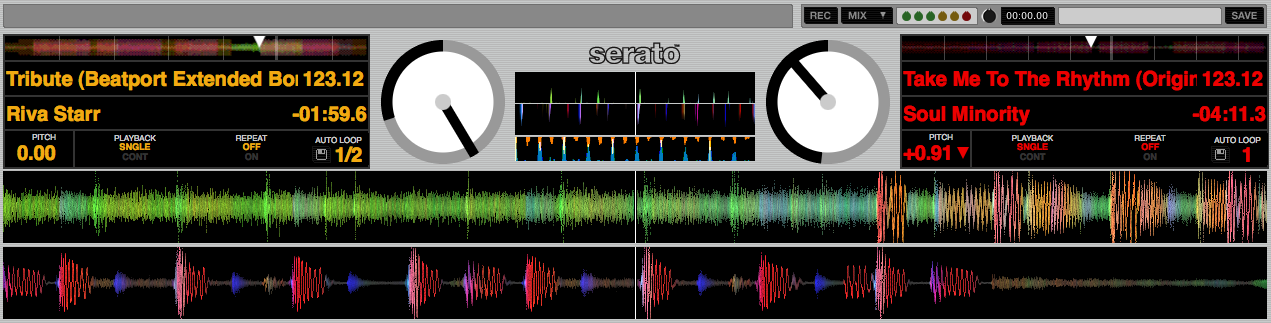
Here, the top waveform is showing that this track is in the middle of a smooth, midrange section that’s about to kick right in with a thumping drum – it’s a second or two away from probably the peak of the whole tune. The bottom track, or the one on the right-hand deck, is different: It’s more subdued (there’s less going on in the waveform) and the drum is about to stop, leading in to a quiet break.
Happily, they’re both perfectly aligned, so there’s room for a good DJ to be messing with the EQ, filters, cutting from one to the other (this could be a good place to do just that) and generally staying on top of his mix and his game.
Here, waveriding is adding to the music information available to the DJ. He still has to use his ears, but he’s getting a confirmation of what’s about to happen on the track visually.
(In Serato ITCH there are other visual aids, which are the two smaller waveforms in the middle of these screenshots, but we’ll leave those to another time).
3. Auto-syncing, and just a bit of waveriding (using Traktor)
Traktor users tend to work slightly differently to those of the former two programs. You can work out the BPMs and “beat grid” songs (overlaying where the beats happen, like graph paper) so it always knows they’re in time and where their first beats are, and from here on in they will never drift apart. So there’s little need to sync by ear or to waveride in the same way as you would with Virtual DJ or Serato ITCH. Just as well; the waveforms aren’t parallel or overlaid. Each “deck” has its own module, separate from the other:
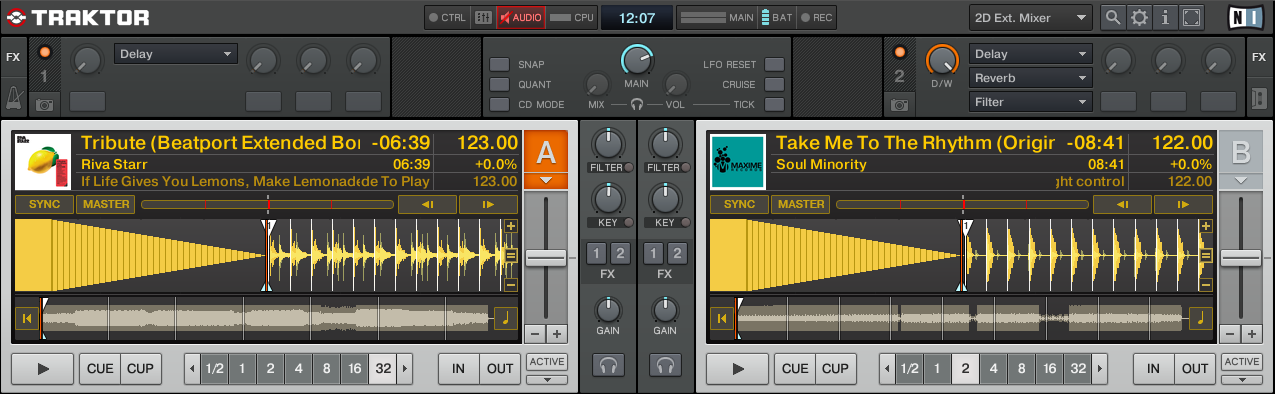
You can still see to a certain extent what’s coming in the tracks, but there are no colours to show you frequencies so no advanced waveriding at all.
But wait! Assuming your tracks haven’t been “beat gridded” and Traktor is just working out the BPMs on the fly (it can do this, but like the other programs, it won’t know for sure the tracks are lined up) there is a feature called the “phase meter” which… you can waveride with. It’s not the same, but it’s undeniably waveriding:
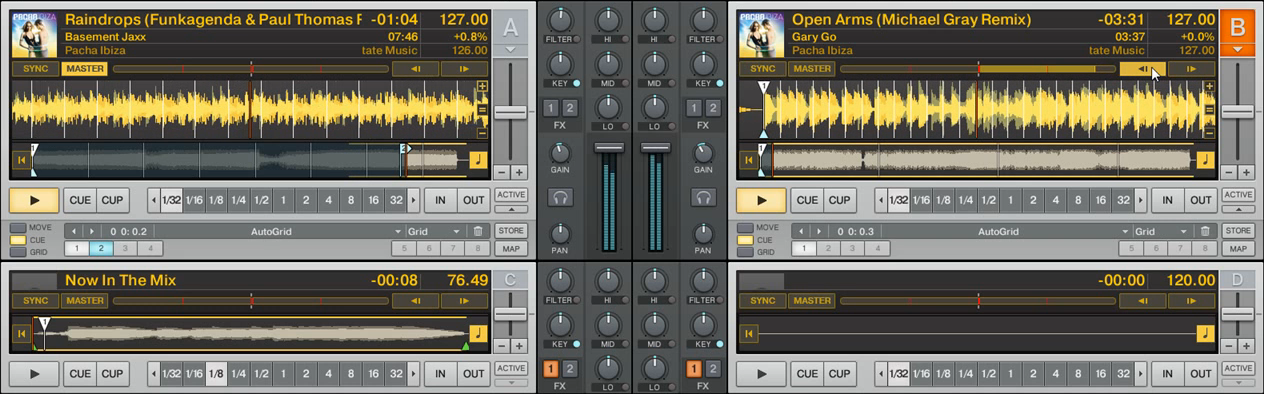
Look above the right-hand waveform in the screenshot. See the horizontal yellow bar and the cursor clicking on the left arrow? The bar is indicating that this track is “out of phase” (ie out of time) with the track to the left; Traktor has attempted to get the two tracks to the right BPM, but as it hasn’t been told for sure where the beats all go, and these tracks aren’t “beat gridded” together, they need to be jogged together.
You can do this by ear by clicking on those arrows until the tracks sound right together (ie they are nudged “into phase”) but if you watch that horizontal bar as you do it, it will get smaller (or bigger if you’re going the wrong way). When it’s gone, you’re on the beat. Feels very much like waveriding to me!
4. The “that’s just ridiculous” waveride
Ableton DJs set up loops, trigger points and other elements of tracks way in advance, and the software “launches” them on time, on the beat, and without any timing necessary from the “DJ” other than to casually decide what’s coming next and kind of, you know, let the hardware know, in a nonchalant style.
This is not DJing but a blend of DJing and production. It’s great, but there aren’t even any waves to ride, so it must be disqualified from this discussion. Except we’ll include it because it’s the one that REALLY gets the “it was great in ’88!” crew foaming at their mouths!
So, is it REALLY possible to DJ without headphones?
In all seriousness, I’ve yet to find any real DJ who does this. You’d look an idiot, to start with. Plus there’s a lot more musical information in tracks than just that which can be shown on a screen, even a smart multi-coloured one. But beat gridding, syncing, waveriding… it all helps you to perform better: That’s the bottom line.
While the diehards say this is not real DJing, the truth is that all of these thing are great for good DJs, but they won’t save bad ones. All it takes is a beat grid to be out; or a panicking DJ to turn the wrong song off because a galloping train starts to happen as two songs drift apart; or someone to think they can DJ without even having the headphones on, only for the the keys of the songs to clash horribly; or any one of 100 other technical or musical issues to can go wrong (not to mention the DJ just someone having no musical knowledge and taste that sucks) and that DJ has just sucked in public. At least if he’d had headphones on he wouldn’t have heard the booing.
You still have to be a good DJ to perform well with any of these programs and any of these features. It’s just that waveriding helps you to make a better, more creative job of it.
Do you waveride? Do you see DJs not even putting their headphones to their ears and find it annoying? Do you think it’s important to be able to do it well by ear even if you don’t always use your ‘phones for every mix? Let us know your feelings.
Now go to:
5 Reasons Why Digital DJing Beats Vinyl
The Magic Mix for Successful Digital DJing?
Should Digital DJs Be Bothered About Mixing in Key?
Want to escape the bedroom and play in public - fast?
Our 1000s-selling How To Digital DJ Fast video course shows you how.
Learn to DJ Free - email course plus bonus PDF book
Sign up for our weekly email course for beginners now...
Trouble choosing a controller? Visit the web's #1 guide!
DJ Controllers: The Ultimate Buyer’s Guide 2013.
Tags: advanced djing, djing without headphones, Serato ITCH, Traktor, Virtual DJ, waveriding
This work is licensed under a Creative Commons Attribution-NonCommercial-NoDerivs 3.0 Unported License.


great article….
would like to add that is the psy trance scene many producers (who call themselves dj’s) use cubase for dj’ing and call there show a “live act” where they play there own music only (they get paid a fortune for this) and dont use headphones…in the world of psy trance playing a tune right after another tune still sounds good..cause you are not mixing stories you are mixing rhythms….
http://www.youtube.com/watch?v=SqvU_anCnH4&feature=related
http://www.myspace.com/liquidsouliboga/photos/628020
http://www.youtube.com/watch?v=wAPYL7wbBH0
these guys are fake dj’s and great cubase technicians – basicly most of the crowd is on acid and dont care !!
[ link ]Great piece Phil and now I know why my Traktor driver mate struggles to get his head round Serato. Was going to ask you whether headphones could become redundant with digital.
[ link ]Another great article! I feel the up and coming DJ’s should at least learn the art of beat matching or Transitions. But if you can master “waveriding” that’s fine. I think the biggest issue older DJ’s have with the technology more than anything… True “A Horse and Carriage will get you there but I’d rather take a car any day!
[ link ]I WaveRide…. always been doin it… i didnt kno there was a term for it until i read this post
[ link ]Id say it takes more talent to DJ without headphones on a MIDI. i think anyone who uses headphones on a midi looks like a dork. theres a sync button. why need headphones???
[ link ]a dj…using headphones…is dorky? I hope this is an attempt at sarcasm.
[ link ]Lolz I didnt know there was a name for it either! I waveride all the time!!!
djN8G
[ link ]This is a good article. I have to say although I tend to prefer DJing with vinyl. Now I’m using Traktor Scratch Pro… I find it incredibly useful to view upcoming quite sections within a track on the laptop. It’s more a luxury than a necessity I suppose. But I like it.
[ link ]The problem with Waveriding lies in live gigs…
bcuz there are no headphones
if you have a track that wasnt set up prior, then you might be afraid to mix it in…
and also you have no idea of the volume of the next track. you just hope for the best.
[ link ]I’m with Dj Crooks. I’ve been reading and riding waves for years now. Feels so good to put a name on it.
[ link ]I learned to dj with ableton, then learned on real decks, then sold the decks to get more production gear and went back to live… I think I do “wavecuing,” I beatmatch tracks in advance and tend to mix in a very straightforward way (for ableton), except if I want to start at a particular point in the track I just guess where it is on the whole track’s waveform. don’t really worry about the volume thing or whether tracks “work” together, that all comes down to practice and knowing your tracks.
[ link ]Interesting to learn. Coming from the standpoint of a live musician, then a Live musician, it’s good to know that perhaps the hybrid approach is the best. Unless you’re an old hand at DJing, I can see how it would be overwhelming to only rely on one sense.
I would question the attack on psytrance producers. Sure, it seems kinda cheezy, but this is music that, while seemingly straightforward, is certainly made in a nonlinear fashion, and to reproduce that on stage is hard, unless you go with the ol’ standby looping method. Which is probably not an option for those guys.
[ link ]Have been doing it since Atomix v2.0 and was the best way to learn tracks on the run…vinyl dj’s hated me for it because i didn’t have certain equipment…but the punters were none the wiser
[ link ]And that’s what we’re here for, to please the punters… not other sad DJs lol.
[ link ]That’s the truth.
If people (other DJs included) don’t see what you are doing, how you are doing it and what you are doing it with they are none the wiser.
I have had DJs come over to tell me they thought my set was amazing but when they saw I was using my old plastic Numark controller with Virtual DJ they were like “that’s cheating”
My answer is if the set sounds good does it matter if I’m using Technics and vinyl or nothing but a laptop if it sounds sweet?
In the past few years I have been lucky enough to warm up for some pretty big names who loved the music I played and didn’t say anything about my equipment.
It’s usually the less accomplished DJs who have a bee in their bonnet about what you use.
That said I know I have lost gigs by turning up to an audition with a controller. I have even been told not to bother doing the audition because they only wanted real Djs!!
That’s why I moved onto Serato Scratch Live with CDJs. Now I’m using the industry standard kit the snobbery has evaporated.
[ link ]Great article. I use Traktor Pro from time to time but I don’t really like the idea of waveriding too much. Of course it’s a wide variety of mixing techniques out there and each to thier own, but to me using a computer to dj is a way to automatize some tasks so I can consentrate on something else old techniques don’t let me.
For example, I have CDJ’s also and like them, I like the physicality. But the time with them goes to the beatmatching and concentrating on the switch, it’s classic beatjockeying. Playing with Traktor is a whole different thing. If I’m using Traktor I let it sync my tracks and everything so I can go crazy on the loops and throw in any kind of stuff in an instant, things I would never try to think about with a CDJ.
What’s the use of a DVS system on a 1-2 hour gig if the only thing you do is beatmatch manually, but on a computer? Let the computer do the work and let yourself concentrate on the music and what new things you can do with it now.
[ link ]I can see how purists don’t like anything that makes DJing easier. But DJing has changed. In reality, the old school DJs have an advantage of being rooted in fundamentals. I think that the best DJs will have to use the techniques that help them play what people want to hear… bottom line. If that is waveriding, production based, sync’ing, elaborate cue points, effects, harmonic mixing, a mapped out playlist, whatever… I say to each their own. For me, it really depends on what I’m mixing and how much I’ve prepared. If it is random, first heard tracks (often, as I’m an amateur that mainly messes around), then I rely on any tricks I can to get a good mix. Try to make a note of what I did… mostly don’t. Or record to create something new.
[ link ]That’s the spirit! Anything that helps more people to have a go and make something good sounding out of it is alright by Digital DJ Tips.
I was mixing Axel F with Soul II Soul today as they were the first two tunes that landed on the decks of the DJ software I was testing… and with a bit of time-stretching, key matching and some heavy reverb/echo, it sounded great and I had a good hour’s fun. Try doing that on two belt drives and an old Tandy mixer.
We’ve got it good nowadays and no mistake.
[ link ]As somebody who shares a place with like 4 roommates, I have to use headphones exclusively (although I own a great pair of sony MDR’S). I know the basics of how to use headphones for cueing though, I should practice more though for the real world.
[ link ]That’s a good point, and technically you need a DJ set-up with a “split cue” setting for the headphones, which allows you to split what goes to the left and right of your headphones. Unfortunately not many DJ cheap controllers have this – I can’t actually think of a cheap one off the top of my head.
[ link ]Hey Phil,
How do I get my headphones (in vdj) to listen to both tracks when cueing up the mix…I guess pre listen the mix before actually upfading it.
Thanks!
[ link ]The headphone_mix function allows you to set a control to do this, you’d have to assign it to a knob on your controller or a pait of keys on your keyboard as most don’t have this set up as standard.
[ link ]To Chris and Phil, just before Christmas 20011 when I got my Numark Mixtrack Pro Controller, I just used VDJ 7 Pro, a mouse and keyboard, with a USB (second) Soundcard which I used for Headphone Monitoring and nothing else for 18 months. This should cost you £40.00 GBP or less!
The way I configured VDJ is:
Inputs: None
Outputs: Master: First card / Headphones: Second card
Soundcard: 2 Cards: SoundMax Digital Audeo
(Your Computers Internal Soundcard)
USB Audio
I trust this helps?
[ link ]I prefer to beat match by ear. I’ve tried using the waveforms, and find myself staring at them too long. Maybe I’m not used to it however, and I plan on learning later this month once I finally get a DVS (been on straight wax for 15 years). I do think everyone should learn how to beat match by ear alone, and then learn the visuals if they need to.
I’m not entirely sure, but I have many tracks with quiet intros, and I don’t think you could wave ride them, if you mix the track from the beginning. Especially if it’s just vocals, with only a hint of the instrumentals.
[ link ]You’re right, it’s practically impossible to waveride without a beat.
[ link ]Hi Phil, sorry to bump an old thread but i was reading with interest the various opinions on waveriding and i didn’t understand this comment.
)
In my experience what is impossible is to beat match without a beat. When waveriding with a beat grid, however, you still know where the beats are, even if there is no music at all in that particular musical phrase. I find this opens many more possibilities than having to rely solely on those parts of a tune that are suitable to beat match with..
Could you clarify this? I am wondering if I am missing something
Thanks once again for your excellent article
[ link ]Yes, that’s one of the great uses of beatgrids.
[ link ]Weird to finally put a name to it, but I used to waveride a hell of a lot when I used AtomixMP3/VirtualDJ. I’d actually say I mixed ‘phoneless more than I did with, although I was very familiar with all the tunes I’d play back then.
Haven’t done it since switching to Traktor, as I’m not a fan of that sync button and the separate waveforms don’t make it worth doing.
[ link ]it’s more then possible to play without headphones… but unless you know all your song just by looking at the name inside out… you should still use headphones!!!
[ link ]This article is an example of how dj’s make a big deal out of something small. What i mean is, its mentieond how other dj’s frown on you for not being traditional? Man who cares? Where in the Dj rule book does it say u have to use headphones, or vinyl, or this, or that. I dj, i dont use headphones, i dont use controllers, i dont use soundcards, i go right out my laptop, into a mixer, to some powered speakesr, and i do a good job. Not just cus i say i do, but the parties tell me do. I mean just edit ur tracks. Cut out the parts u dont want and have the ready for dancing. U can match beats by memory, and if its hard to remmeber or u have alot of new music that u dont remmeber, just write up a little list and try to follow that list. U dont have to stay with the liast u can mix and match (good songs to start with, good second songs, good third songs, good finish up songs) (good songs to go with fast, and sloow)……then u dont have to be tucked away in a headphone and distracted
[ link ]Waveriding a nice term I really like it
Yes I do it when matching beats, for me its much easier to sync tunes with eyes not ears (using SSL so no sync button for me) but after I sync I listen through headphones to check how well these 2 tunes blend should I change the tarck or go for the 2nd drop etc…
[ link ]Waveform is sonic information not sound itself, so imho you should listen the 2 songs for how well they blend..
“In all seriousness, I’ve yet to find any real DJ who does this. You’d look an idiot, to start with. Plus there’s a lot more musical information in tracks than just that which can be shown on a screen, even a smart multi-coloured one.”
I assume Steve Angello isn’t a “real DJ” then? I don’t believe this is a technique for a newcomer, it’s something that has to be mastered AFTER learning the basics of mixing and with years of experience. As for “more musical information in tracks”…know your tunes. If you don’t know your tunes, you need to, and if you do you won’t need any references to the musical content as you’d simply know where the bass kicks, etc.
[ link ]Quote: “…. As for “more musical information in tracks”…know your tunes. If you don’t know your tunes, you need to, and if you do you won’t need any references to the musical content as you’d simply know where the bass kicks, etc.”
Do you honestly mean you always listen to all of your tunes x-amount of times so you know them off by heart before you mix them into your sets? Well I love to mix tunes I’ve listened to just before I purchased them, (just knowing the genre fits), and use them in a set for a damned good challenge to see if I can do it LOL
[ link ]You guys should update how the order of comments is. Because someone replied to my comment and i dont know where mine is or where the other one is. I know i can check my email but im lazy….so like….what i mean is…..these comments dont have any time or date or im not sure what order they are. Meaning if the old ones are first or the new ones are first. Its a good website. And I dont mean to be disrespectful. Just suggesting. I hope you don’t mind. Thank you. Take care.
[ link ]They’re threaded, so replies follow the thread they reply to – pretty standard stuff. I agree it can be confusing if you’ve never seen it before, but we get LOTS of comments, and we think it makes it easier. Thanks for your feedback, though
[ link ]I think that if you mix while wave riding, syncing, or beat matching your a DJ. I do believe though if you mix while wave riding or syncing you need to try and put a new element in to it. Either cue juggling, live remixing, effects, or just anything interesting. I personally use controllers but I’m thinking about getting some vinyl turntables just because I kinda want that classic feel (just to have some fun not to bring to gig’s). I never use beat matching, the occasional wave ride and usually just sync. although I try and use a lot of effects a lot of cues some acapella’s and I’m always looking to try something new.
[ link ]I think it’s a lot better to mix with headphones, as i just got my new soundcard and headphone mixing helps you make a better choice in the next song you’re gonna mix
But, I know my music very well, and I know the messages, which part of the song will get the most forward in a dance (I’m from Jamaica btw) etc. so it really helps if you know music, cause i can mix EXTREMLY WELL without headphones
[ link ]I learned and im still using Virtual DJ, it had teached me the basics and now i got my decks(which require virtual dj or ipod) but i rather play at a gig w my laptop and have the ipod as my “Back-up” incase something goes wrong w the lap top, You jxt never know. I find virtual dj to be very helpful, i really dnt need headphones but i still use them, because that way i can hear the song thats next and if i feel “right” i play it and if i dont i look for another song that kind of goes w the same melody.
[ link ]Hey guys, I am not a commercial DJ, only do private entertaining for my get together’s here at home so I like to mingle with the friends and families as much as I can and not have to stand at my rig all night so what I am attempting to do is to find a digital software which will allow me to view the downbeats of both tracks and allow me to line them up, that’s all I need, can anyone tell me which software out there will do this the best please? I’ve tried with VDJ and Mixmeister but they both don’t work accurately every time in my experience? Thanks.
[ link ]Mixmeister is easily the best for this, and used properly is 100% accurate. VDJ will work fine if you take the time to set up the mix points.
[ link ]If I have planned my set and the sound system is good then I probably could do without the headphones but I always like to preview what I’m about to play to be on the safe side.
In the bar I am currently working in they have no DJ monitors so using my headphones is doubly important because I need to hear it as keenly as the punters do which I can’t without monitors.
Also using your headphones makes you look busy and if your getting paid well the last thing the promoter wants to see is you doing nothing but drink beer, smoke tabs and look like your surfing the internet
[ link ]I use waveriding, not for the sync part of mixing, but for keeping track of were in the tune I am.
[ link ]In a top 40 tune it’s easy to remember were you are, but if you’re someware in a instrumental 7 min tune with several breakdowns and build-ups and you want to do voice-overs, mash-ups etc waveriding is crucial.
Waveriding lets me do stuff live, on the fly, that I had to pre-program or pre-record before.
Think the waveforms of the tunes adds a new dimension to the dj-ing.
I will admit to waveriding however….
I learnt to mix on Vinyl back in the 90′s and moved away from the UK, selling all my equipment. I bought a Mac + Traktor and played around with it a t home….
I now have Traktor Pro 2 and Macbook pro to play out with, I am very happy waveriding as I put a lot of effort into collating the mix before I play it out… and play it out live is what I mean.
I play Deep House and Minimal and Techno, I know my tunes inside and out and when I am booked I am booked to play a set that I want to play not a set that can change due to audience tastes… that may seem big headed but I know what will work and how to use that to best effect over a two hour set.
So yes I waveride, I am not ashamed of it, I am proud of the fact that I have put so much effort into my set in prep that I can play my set visually and totally interact with the audience.
[ link ]My worst DJing experience was when I was in a club, and my headphone jack broke. I had to do an hour of “waveriding” before my mate could get another pair of headphones to me. It was difficult and there were some pretty hairy mixes.
Worst part? I was using CDJs, not a DDJ system
[ link ]I’ve been doing it since I made the switch to a software based solution. It was the first thing I noticed. It let’s me add new elements to my mix and run fast paced quick mix sets on the fly. I think it’s a great tool. It’s like it was designed with a dj’s best interest in mind, and if you’re a good dj you use it to enhance your set just like you can you effects, loops, and hot cueing to enhance your set.
[ link ]I purchased a Pioneer DDJS1 last May, and though I primarily have taught myself I understood those waves going across the screen were there to assist, the dj still has to know when to bring in the next song in, still has to know the music and how to create a mood, you cant get that from waveriding. Now because the DDJS1 does not have a monitor, I use the headphones heavily, and could not even think about djing without them. I have only been djing a year, and though its a little late to invest in vinyl, I am willing to master the craft of djing with my ears. After all I dont want to look as if I am reading my email while I am playing. Good info!!
[ link ]If you are using a computer-based DJ controller, it is so easy. Just zoom-in the waveforms and checks for instrumental parts of the track that you can loop, there you can transition without using a headphone. The sync button has its use, so if it’s there use it.
DJing is all about playing the right tunes at the right time. If you want to see techniques, then go to controllerism and turntablism competitions.
[ link ]I do indeed, even though I still use headphones
I mainly use it for visual nudging assistance, but I also use it when mixing for instance old 70′s disco, where the song changes bpm all the time and on some songs it’s a lot. I beatmix this by looking ahead on the wave forms and doing constant nudging while mixing. It works like a charm on Virtual DJ. Not so well on Traktor, though, since it’s harder to look ahead in Traktor
Best regards
[ link ]Klaus
This is a great piece – I love the detail that’s gone into it. Yes, I waveride, in fact I don’t even waveride in VDJ 7, I ‘beatkeep’ if that’s what you call aligning the red and blue segments displayed over the waveform. I’ve developed a technique – well I’m developing a technique for doing it – that’s just starting to deliver results. For me it works OK on tracks where the BPM is different so I at least get a clean start to the ‘incoming’ track and with a pretty brisk fade of the ‘outgoing’ track it works OK.
I take headphones to gigs – good ones ironically – but I hardly ever use them.
[ link ]Love it or hate it, all it does is allow you to reallocate your attention. It doesn’t take much skill to be able to beatmatch, really… the real skills in DJing are what comes beyond that. Regardless of what people think or say, the quality and technical complexity of your mix will increase when you stop worrying about it.
I started DJing on vinyl with a scratch style mixer in 1999, swtiched to DVS somewhere around 2005. Switched to Itch a few years ago with no vinyl at all…
Headphone have their use, but holding one up to your ear for half a set just doesn’t seem to make sense anymore, except for show.
[ link ]I use it all… learned on 1200′s then CDJ’s & now Ableton live with MIDI. Headphones are key even with sync. Just because the tempo of tunes are matched, it doesn’t mean the rhythms don’t clash or they don’t sound good together or that the drops line up in an appealing way.
[ link ]Headphones are a must in many occasions, in the world of waveform Djing, as much as i love it, you still must realize: This is music we are talking about,not feeling the music is to not DJ at all in my book,im sure theres a balance
[ link ]and headphones fit that balance.
i’m an extrememley new dj, and have been teaching myself to beatmatch manually. do you find it “cheating” and by cheating i mean cheating myself, if i beatmatch the song manually and then use the phrase bar in traktor pro to nudge it right on?
[ link ]