Video Review
On the surface, the new Traktor Kontrol S2 DJ controller strips away a lot of the features of the company’s all-singing, all-dancing Kontrol S4, leaving a leaner and more conventional controller.
In part because of this, as well as because of its reduced price and size, the Kontrol S2 squares itself up for a battle where most of the business happens in pro DJ controller land – the mainstream mid-market. It is therefore probably the most important DJ controller Native Instruments has launched today. But will you end up wanting one? And is it really good value? Let’s find out…
First impressions/setting up
We had a pre-release unit so it didn’t come in the retail packaging, but judging by the S4, you’ll get a printed, two-sided colour feature map to visually help you learn the unit’s controls, alongside a USB cord and a Traktor 2.1 CD. There will be a power supply too – it’s not essential although it is advisable to use this (not least because there was a high-pitched hum I couldn’t get rid of when using just USB power on the test unit provided to us, that disappeared as soon as I plugged the power unit in).
If you’ve never installed Traktor before, installation involves getting your drivers up and running (for Windows users), then installing the software and registering it by setting up an account at Native Instruments. From there, actually getting the unit working is really easy; Native Instruments has made sure that – at least when Traktor is used with its own controllers, such as here – everything “just works”.
The only thing that wasn’t particularly intuitive was that the software told me I had chosen to use an “English keyboard”, when my keyboard is actually Spanish; I had never selected such an option, and clicking “back” gave me no option to change this. This may come back to bite me later down the line when keyboard shortcuts don’t do what they are meant to, but as the whole point of a controller is to avoid using the keyboard as much as possible, I’m not going to lose any sleep over this at the moment.
The unit itself is, on first impressions, a great little controller. It’s big and austere enough to look like the real deal, but small enough to be properly portable. It basically looks good, while retaining what I have always seen as the main advantage of DJ controllers over modular or installation equipment: a small footprint.
Differences between the S4 and the S2
Unlike the borderline-portable Kontrol S4, then, this is easily small enough to tuck in a backpack or flight bag and move around. The high-tech plastic construction makes more sense at this size, and while it’s only a few inches narrower and shorter than the S4, those inches make all the difference. If you ever looked at the Kontrol S4 and frankly felt a bit scared by how complicated the thing looked, this may well appeal to you more.

While it ditches many of the controls of the S4 (at first glance: no default filters per channel, no loop recorder, no snap / quantise / master buttons, no loop-length readout) it actually adds a few new functions: Pitch reset and mic on/off may appear minor, but a booth out is a major improvement. The booth out works by letting you switch the RCA-outs to either booth or main (the 1/4″ TRS outputs always being main), and there’s a booth out volume on the back too. So no XLRs, but I’d say this is enough for a small DJ controller. Well done, Native.
Not so good, though, is the immediately obvious omission of any external inputs bar the microphone. While I
don’t really see the purpose of having a DJ controller that can also act a flightdeck for plugging in everything from decks and CD players to the washing machine and next door’s house alarm, I do think having an emergency-through is a good idea.
Systems can and do crash, and more than that, the flexibility of being able to have something else plugged in (iPod for emergencies, or the output from another DJ’s system, for example) is sometimes important when playing in the real world, ie outside of the bedroom. For the sake of a couple of extra RCAs (or even a stereo 1/8″ jack), this is to my mind a curious omission on a “serious” controller.
Sample Decks
What of the sample decks, though? Well, before booting up and getting stuck in, it is clear that samples are still there (there are sample buttons, although now they share the same buttons as hot cues), but that they have their own channel – there’s a sample volume knob bang in the middle of the mixer section, with sample decks A and B activation buttons.
This is the hardware evidence of the “2 + 1” feature described by Native Instruments in the marketing blurb – two channels plus an “extra” channel for samples. On the first encounter, this seems like a sensible compromise. We’ll find out how well it works later.
There are lots of other little differences – the tempo faders are shorter throw; some of the knobs are a little shallower; there are no Midi in/out or footswitch sockets round the back; there’s are no mode change buttons for view or effects modes; and the pitch offset buttons have been replaced with pitch reset buttons – but it’s minor and predictable stuff.
In use
If you are coming to this review having used the Kontrol S4, there’s little to report about the feel of the hardware – it’s stripped down, but the same build quality is there. However, if you’re here afresh, you’ll want to know a bit more, so let’s talk through it. Those familiar with the S4 may want to skim this section to quickly pick up on the differences.
Loading and playing tunes
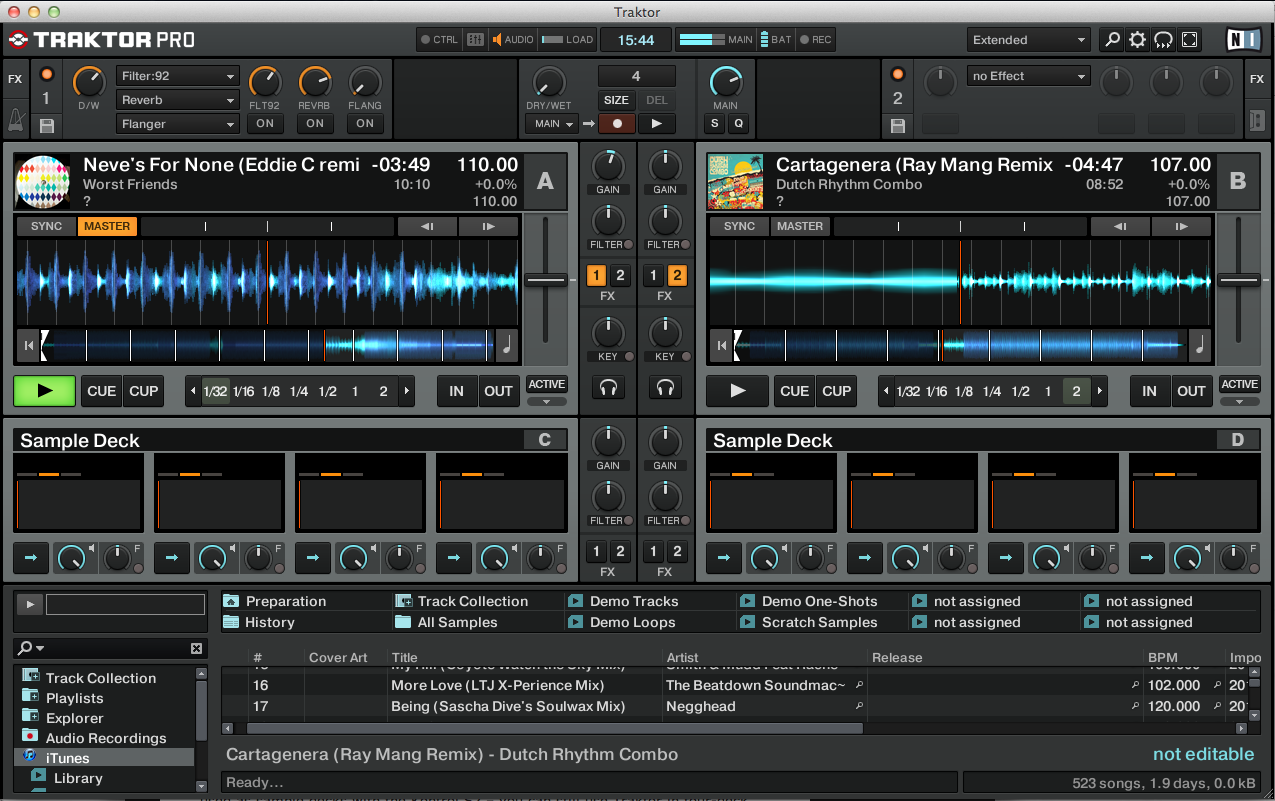
Traktor does not make massively effective use of its screen real estate, so on a 1280 x 800 screen, you’ll want to use the useful library view function. By pressing the big, stepped browse button bang in the middle of the controller, you knock out most of the controls, leaving you a big browser section to search through your tunes.
Small A and B buttons let you load your chosen tune onto either of the decks, then you set the cue point using the jogwheel and cue button, with “play” doing exactly what you’d expect (play/pause), and “cue” jumping you back to your cue point when playing or setting a new temporary cue when paused. The transport controls have small strip LEDs in them, which is a stylish touch.
To navigate through a tune, the “move” knob quickly moves through the track by the amount the current loop length is set to (more on loops in a second), allowing you to scrub easily and on the beat.
Of course, the jogs allow you to scratch through a tune too, using the microswitched top-plate, the edge of the jogwheels being for nudging. Because the jogs are big and chunky, it’s no problem that “scratch” is always “on” – you’ll not hit this part by mistake as you would with fiddlier, smaller jogwheels.
Note that there is no hardware access to decks C and D, which are intended to be used as sample decks with the Kontrol S2 – you can still use Traktor in four-deck mode if you like, but you’ll have to use those decks via the keyboard (or get mapping), and you’ll lose sample deck functionality – it’s an either/or.
Hot cueing and looping
Cue points are simple to set by pressing one of the four “cue” buttons – they light up to show they’re assigned. “Shift” and a cue button deletes that cue point. If the track is paused, the cue buttons are momentary, if it’s playing, they trigger and leave the track running. Pressing play while holding the cue button turns a momentary cue into continuous play mode. Note there are only four cues, not eight; this is to my mind going to be enough for most DJs.
You can set a manual loop by using the “in” and “out” buttons, but the loops you’ll use the most are of course beat-and-measure-matched loops. You set such a loop’s size by turning the size/set knob to choose loop length, and activate it by pressing this knob.
You can alter the length of the loop on-the-fly by then turning the knob, and you can move the loop by its own length forward or back by turning the loop move knob (or move it by a beat by holding “shift” and turning this knob). Finally, the “move” button activates the currently set loop but doesn’t jump to it.
While more advanced loop functions are of course available in the software, this is the extent to which you can manipulate loops from the hardware.
Sync and tempo
Sync works with Traktor’s master sync logic, that makes sense across multiple decks but I find a little complex for just two – but not overly so. (Of course, tunes need to be analysed first on addition to your library, as with all DJ software.)

Basically, you can assign a deck as the “master” and sync to that deck. Shift and “sync” does this for you, or you can just let Traktor’s sync logic sort it out for you (we carried a video recently that goes into this in more detail).
The tempo controls, while shorter throw than on the Kontrol S4, are still accurate – it is pretty simple to make 1/100th of a BPM changes to track tempo, which is plenty good enough for convincing and accurate manual beatmatching.
The mixer section
The mixer is simplicity itself – two lines with gain/hi/mid/lo and a crossfader. Crossfader curve can only be adjusted in software, and there are no filters per channel like with the S4, which is no big deal because you can assign one of the effects as a filter anyway if you wish, or use a tweak in the preferences that make the gain controls function as such.
The master level is top middle, but the booth level is tucked around the back, along with the microphone levels. A small “mic engage” button on the front turns the mic on and off, and a small microphone light in the middle of the mixer indicates how this is set.
The only other controls on the mixer section are for the sample decks, comprising a volume knob that turns decks C and D (ie the sample decks) up and down together, and A and B buttons for activating either or both sets of four sample decks.
The sample decks
If you’ve not come across sample decks before, they’re an innovative feature of the new version of Traktor, that first appeared on a hardware product with the Kontrol S4. While you can load samples (up to 45 seconds) into each sample deck, the best thing for me about them really is that you can grab one-shots or loops from currently playing tunes, and reconstruct music on the fly using them.
Software-wise, you can now have key locking on sample decks, meaning you can preserve the key locked state of a sample when lifted from a tune that was itself off-pitch and key-locked, and you can also headphone monitor your samples, which is new (for more new features of Traktor 2.1 which comes with the S2, see below).
However, hardware-wise, you’re tied to more basic controls – you’ll be resorting to the keyboard shortcuts or your mouse to control the deeper intricacies of the sample decks. We discussed sample decks more in the Kontrol S4 review. The only real detail missing is the lack of loop recorder, which in the Kontrol S4 lets you sample your own voice (for instance) and then drop it into a sample shot if you wish.
Virtual DJ has had sample decks for aeons, although it just calls them “samples”, which have much of the same functionality, and Serato ITCH 2.0 now has a sample player too. The difference is that this controller (alongside the Kontrol S4) gives you access to the samples via hardware. No ITCH controller can do that, and only the odd Virtual DJ one can (I’m thinking of the CNTRL-7 from Gemini, but we’ve not yet reviewed that so can’t currently report back on how well samples are integrated into the hardware there).
Effects
Traktor has awesomely complex effects, but on the Kontrol S2, sensibly they’re by default set up to be nice and simple to use out of the box.
Effects are as usual assigned to a channel by pressing the appropriate button on the mixer section, and can be assigned to the sample decks on an individual basis too. There’s more about how Traktor handles effects in the aforementioned Kontrol S4 review and our Traktor Pro 2 review – suffice to say the majority of what you’ll need is directly accessible via the hardware.
Default effects can be assigned in the Traktor Kontrol S2 preferences page – see below for more info on this.
The new software: Traktor Pro 2.1
If you’re new to Traktor DJing, and this is your first Traktor controller, the good news is that the combination of the Kontrol S2 and Traktor 2.1 is actually a decent leap forward and represents the most refined Traktor experience yet, with some of the more irksome things about the software ironed out.
Indeed, the new incarnation of the software – as supplied with the Kontrol S2, and indeed necessary for it to run – adds a whole host of refinements. Lots of these are under-the-bonnet stuff that just makes the program work better, but the biggest ones you’re likely to encounter as an S2 user are:
- Better setup wizard – It’s smoother and friendlier
- The ability to increase audio headroom in the mixer – Basically makes it louder without distorting. Serato ITCH has this and it’s a godsend when plugging straight into fixed-volume PA systems, and also for sneaky system boosts when the manager’s back is turned. Not that I’ve ever done that 😉
- Better main VU level meters – They now have an “orange” section between the “green” and “red”. Anything that helps DJs to gain stage is good
- Keylock on samples – This was a bugbear with the previous software, and basically means that however you use keylock in your DJing, samples will sound as you’d expect
The biggest thing missing which has always inconvenienced me as an iTunes user is that I can’t correct tune details in the browser when I’m DJing from iTunes playlists. So if I have a playlist for tonight’s set, ready to use in iTunes, and I open it and start playing, there’s no way of clicking the ID3 info and correcting a typo or adding a quick comment about the tune. Native, loads of us use iTunes – can we have this, please?
The preferences page
This is a good time to introduce the Traktor Kontrol S2 preferences page. Here you can set what effects you have set by default, as well as usefully choose to have the gain knobs work by default as channel filters (whichever of these functions you choose to relegated can still be accessed by using shift and gain).
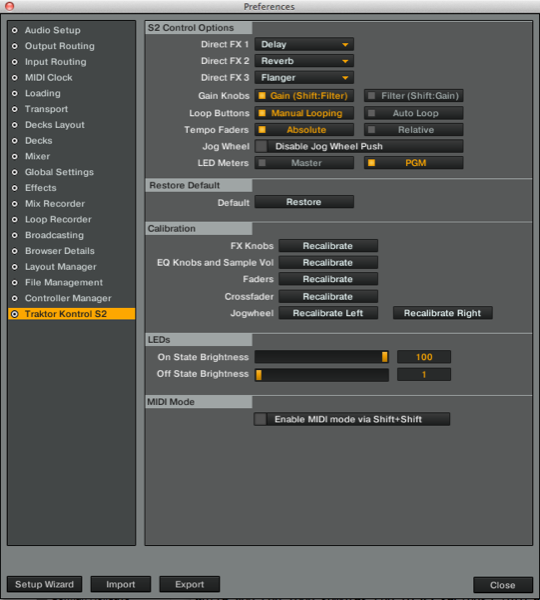
Top marks for this – saves a mapping hack for a rather obvious option (setting auto gain and using the gain knobs as a filter is something I suspect many DJs would have done otherwise by doing just that). One preference that you’re given is the ability to use the VUs on the Kontrol S2 itself as either PGM or master monitors, meaning they can be set to monitor individual tracks or the master output.
I am not sure why this is necessary; it would be more intuitive to do what many other systems including hardware mixers do, which is simply to allow them to monitor individual decks (for gain staging) when the “cue” button is pressed for that deck, reverting back to master monitoring if not. It’s a small thing, but to have this as a third option here would be nice.
Sound quality
We always leave sound quality to the end with today’s DJ controllers, because frankly, it’s not a major concern to 99% of DJs, as practically all gear sounds great nowadays.
With Native Instruments being famed for the quality of its Audio range of sound cards, you won’t be surprised to hear that the Kontrol S2 sounds as good as the Kontrol S4, which is to say excellent. The addition of variable headroom in the preferences is a bit of icing on the cake here. No complaints.
Conclusion
The Kontrol S4 was an awesome controller for Traktor and got nearly everything right – no mean feat considering it came alongside a pretty major upgrade of the Traktor program too. It came at a premium, but then so do Apple products. No big deal. It deserved its success.
But for many, it was too much, and for those people, the Kontrol S2 will be plenty. To some of those DJs who “play records” rather than pull stunts (I wager that’s most), the S4 may have felt like using a sledgehammer to crack a nut. Less is definitely more, and while there are fiendishly creative people no doubt doing wonderful things with the S4, most DJs, well, just spin for a living. Beatmatching, the odd effect – sure. But not much else.
Because of this, for those DJs, other factors come into play in their choice of a controller: Portability, having the right balance of features rather than everything possible crammed in, weight… and in all of these areas, the S2 comes out well.
It’s a good size (the S4 is a little too large for me – try getting one on to a budget airline flight as hand luggage); it’s a more realistic price than the S4 (while still not being particularly cheap); and while Traktor remains a behemoth of a program, with nearly every feature you could possibly imagine crammed into its complex interface, the S2 wisely strips hardware features back to doing the basics well, only throwing in the “essentials” from the bells and whistles available to you in the software. This keeps things innovative, but relatively simple to use.
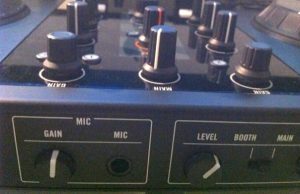
The booth output is a good addition and will be welcomed by mobile DJs, although tucking the microphone volume round the back won’t be. I also think it is curious that the unit doesn’t have audio through for an emergency auxiliary music source – that’s the omission that puzzles me the most.
So how does the Traktor Kontrol S2 fit in with the non-Native Instruments competition? As far as Traktor controllers go, it doesn’t really have any competition, as it offers the best control over Traktor 2 of anything (it actually comes with the full software, unlike all of its competition, for starters). It is the only controller with convincing sample deck control; it is the only controller with properly mapped jogwheels. For these reasons alone (and the fact that it has its own preferences page in the software), all other Traktor controllers now look decidedly clunky against it.
Other controllers to consider
The closest controller to this, though, would be the Vestax VCI-100 Mk II, which should certainly be considered alongside the Kontrol S2 – especially as Vestax is promising a sample deck-enabled mapping soon. Reloop’s Jockey 3 should also be considered: although it’s bigger and heavier, it’s a quality piece of kit for two-deck DJing.
The Kontrol S2 could also be compared to the Novation Twitch – both are small (although the Twitch is smaller and lighter still), both are innovative in different ways, and both would appeal to the same kind of serious-but-pragmatic digital DJ. The Twitch wins in some ways – proper auxiliary throughs is a big one, and more innovative controllerist functionality brought about by dropping the jogs and bringing more hot cues, better looping, on-board beatgridding and the genuinely new “slicer” function to the fore is another. The Twitch is cheaper as well.
However, Twitch misses a trick by not offering proper control over the sample decks of ITCH 2.0 (the Twitch uses ITCH software by default), and so suffers from the same issues that all other Traktor controllers suffer from in comparison to the S2/S4: less than optimal software/hardware integration.
Of course, in the Twitch’s case, your choice will also be led by the software you wish to use – if you like ITCH, then the S2 won’t even be on your radar, and if it has to be Traktor, likewise the Twitch won’t be top of your list (although it does come with a Traktor mapping and overlay, but I refer you back to my statement about how Native Instruments has got hardware/software integration absolutely nailed with its own products in a way no other manufacturer has, including Novation, with theirs).
Bottom line? If you were tempted by the Kontrol S4 but felt it was too complicated, large or expensive (delete as applicable), look closely at the Kontrol S2 – it could be just what you’ve been waiting for. Indeed, with a booth output, it improves on the S4 (expect a Kontrol S4 Mk II soon, I’d say, if only to correct that). It is still not particularly cheap, but it’s substantially cheaper than the S4. And if you want a good basic Traktor controller that offers access to all of that software’s headline features, the S2 is pretty much unparalleled.
Don’t want sample decks? Not bothered about Traktor?
If you don’t know what software you’re interested in, then your choice is harder – especially if sample decks aren’t really important to you. Then, there are lots of good two-deck controllers available that can do an adequate job with Traktor, most of which will let you control all four decks more easily than the S2 does: out of these, the Vestax VCI-100 Mk II, the Reloop Digital Jockey 2, and the Reloop Jockey 3 are all worth considering. For ITCH, the Vestax VCI-300 Mk II should also be on your list. The American Audio VMS2 is a shoo-in for Virtual DJ contender. All of these controllers are well built and up for the job, although the American Audio is at the more budget-build end of this group.

Overall, the most significant thing about this launch for Native Instruments is that the company now has its own controller on this particular part of the playing field. With its full range of the X1, Kontrol S2 and Kontrol S4, the company has created a coherent, balanced and professional range of controllers that carry its vision for its software through to DJing hardware, and will strengthen its grip on digital DJing.
Indeed, bearing in mind the disadvantage at which this puts all brands trying to compete with Traktor, I really wouldn’t be surprised if other manufacturers aren’t working on their own software in order to do much the same thing as Native has so successfully achieved with Traktor and the Kontrol hardware range.
If one or more of the big manufacturers launched their own software to complement their controllers, things really would start to get interesting. Meanwhile, Native has just made an astute, market-share-strengthening move with the S2.
Have you been eyeing the Kontrol S4 but have now decided to go for this? Or are you an S4 user who thinks the extras are worth having? How do you think the DJ market will play out with Native Instruments (it seems) now with an increasing stranglehold on both hardware and software? Let us know your thoughts in the comments.