Digital DJ Tips3>

Learn How To DJ With Digital DJ Gear

Controller Clinic #5: The VU Meters On My S4 Aren’t Good Enough!

Traktor VU meters

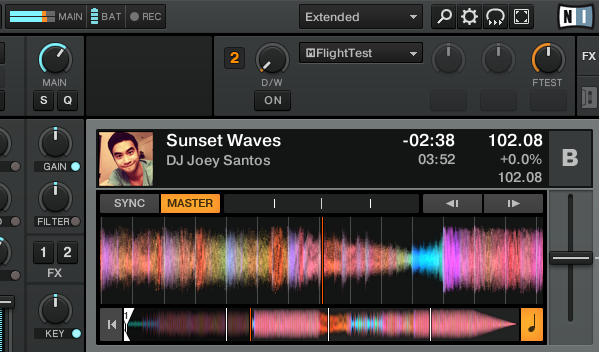
The VU meters on Traktor software (top middle) may be small, but they're accurate and have orange/red to show you clearly when you're peaking and really peaking...

Reader sameoldsong writes: “I sometimes find it hard to keep the master level constant during transitions with my Traktor Kontrol S4. Particularly after playing for a few hours, when a bit of ear fatigue sets in, I sometimes note that there are undesired volume changes in my mix.

“That’s obviously not a good thing as volume has a lot to do with the energy level on the floor. I do use Traktor’s auto-gain but it’s very much an imperfect tool.


“Therefore, I would love to use VU meters as a visual aid. But on my S4, there are only five LEDs per channel (L/R). Actually, in practice, you only have four LEDs as the fifth one merely lights up when you clip or when the limiter hits. I think it’s a similar issue on many other controllers: there are either no level meters at all or they are too coarse.

Traktor Kontrol S4 VUs

The VUs on your controller aren't your only choice when DJing with Traktor.

“So the question is, is there a hardware or software solution that provides for accurate metering? I want something that is at least on par with the 15-segment level meter on the DJM-800.

“I thought of something such as an American Audio DB Meter or a Stage-Line VU 800. But those aren’t exactly compact and are supposed to be rack-mounted, so I’m not quite sure that would be ideal. (Although, I’ve never seen one of those “live.”) Perhaps there are better solutions out there?”

Digital DJ Tips says:

I know what you mean – DJs tend to raise the level if left to their own devices, so it’s important to acknowledge ear fatigue and to make sure you compensate for this in your performances. Good on you for being professional enough to care.

Let’s look at levels first. Remember that whatever controller you use, there are always the on-screen meters, which are showing you the same information and are far more accurate in many cases.

Secondly, if you’re DJing through a club’s mixer, you could make it a rule to keep an eye on that mixer’s VUs as your monitor of what you’re actually outputting.

If you’re DJing through a club’s mixer, you could make it a rule to keep an eye on that mixer’s VUs.

Now let’s look at when you’re actually mixing. The best thing to do is adjust the crossfader curve so it’s set to have a slight dip in the middle, so if you’re the kind of DJ who reverts to simple, crossfader-led mixes a few hours into a mammoth set (and who can blame you?) you’ve got a bit of compensation built in.

Try recording your sets and listening back – you’ll soon start to see where you habitually turn things up a bit too much, and then you’ll begin to compensate instinctively.

Finally, though, you need to train your ears to serve you even when you’re tired. Just like a driver wouldn’t trust his GPS without also looking out the window, so no amount of metering is going to replace your judgement. The very fact that you’re thinking about this says to me that you’re closer to making a great job of it than you think.

Do you sympathise with “ear fatigue” and level issues for DJs playing long sets? Have you been on the receiving end of “everything up to 11″-style DJing? What do you do to keep your levels in check on your controller?

Now go to:
Getting The Volume Right: A Practical Guide For DJs
Review: Traktor Kontrol S4 – A Great Leap Forward For Digital DJing?
Your Questions: Plugging My Controller Into A Club Mixer

Want to escape the bedroom and play in public - fast?
Our 1000s-selling How To Digital DJ Fast video course shows you how.

Learn to DJ Free - email course plus bonus PDF book
Sign up for our weekly email course for beginners now...

Trouble choosing a controller? Visit the web's #1 guide!
DJ Controllers: The Ultimate Buyer’s Guide 2013.


Tags: , , , , ,


Creative Commons LicenseThis work is licensed under a Creative Commons Attribution-NonCommercial-NoDerivs 3.0 Unported License.

16 Responses to “Controller Clinic #5: The VU Meters On My S4 Aren’t Good Enough!”
  1. Colin Brown says:

    Metering on even the best digital dj controllers is pretty woeful at the moment.

    One thing to be aware of is that most digital meters are peak meters, and give a poor indication of how loud something actually sounds.

    Meters that measure the average level (e.g. RMS) give a better indication.

    As Phil suggests, routing your S4 output through an analogue mixer and using the VU meters on that is probably the best solution.

    VUs are designed to display an approximation of the RMS level.

    I’ve experimented with routing the audio from Traktor through DAW software plug-in meters like Blue Cat Audio’s Digital Peak Meter Pro, displaying the plugin’s meter on an iPhone via AirDisplay. Worked quite well but far too fiddly to use on a regular basis.

    [ link ]
    • Hey, this is what i do, i only use four blue lights on the Traktor S4 and i set the secondary mixer channel it is plugged in to to 0 db pretty much the optimum. I also make sure the master on the secondary mixer is also set to 0 DB but some times i move the slider for the master on it a bit higher if it’s a big crowd and i want to be a ‘greedy dj’ with all the muster at my disposal. I have the master output knob turned up about 3 quarters the way up on the Traktor s4 (obviously this can be turned up to there gradually eventually across the evening but the system still works the same way with the blue lights as trim) and use the individual volume or gain knobs at the top of each channel on the Traktor S4 to govern the volume letting it go to firstly 4 blue lights then five blue lights by the end of the night. Always important to prefade trim every track before actually bringing it in to the mix first to 4 blue lights and then later on in the night 5 blue lights but never letting it clip whilst prefade trimming which is very sensible and you will obtain the same volume pretty much throughout the night obviously giving you the chance to keep the energy on the dancefloor going . A little trick i use is once a track is attacking the dancefloor i wait a bit then slightly decrease the volume punters never notice and it then gives you a little bit extra injection in to the next track without having you clip, cause clipping is distortion and we never want that. You can do this all night with every track.You will always have enough power this way should you play a lowish db track you wont get caught out this way. Obviously there are other aids too i.e. your perameters, bass mid treble etc etc but then you now that already cause you are constantly using these to blend and tweak into the next song right ? Hope this was helpful.

      [ link ]
  2. DJ Jdub says:

    only option is to watch the club mixers VU meters… another option is to autogain all the tracks with better software such as platinum notes.

    i use a djm 800 and still listen to the recording track just to monitor while recording. I use input D on my audio 10 dj, set it as a thru channel, patch it into channel 4 on my djm 800 and instantaneously I can hear what the mix “could” sound like if i add eq/filters/effects. It also provides you with a better idea of where your mix is as your using 2 VU meters

    [ link ]
    • ToS says:

      there was a mention of free software called Mp3Gain wich will set the gain without recompression (yes all saved tags/cuepoints are untouched).

      [ link ]
  3. Frost says:

    How about applying MP3Gain to all the tunes? Most people rock the MP3′s rather than lossless still and MP3Gain is a godsend in this age of mastering engineers all having lost their collective minds and compressing everything until it’s crazy loud and has the dynamic range of a turnip.

    Tunes that have had their gain adjusted (this is an entirely reversible process and doesn’t require reencodes, it basically “flips a bit” in the mp3 file to adjust volume) will all sound roughly as loud to the human ear. This should, in theory, keep the need to fiddle with volumes to a minimum.

    There’s AACGain if you use that, too – for FLAC you’d need to have software that was replaygain-tag aware and set the gain in the tags.

    [ link ]
  4. WB says:

    In my experience most club mixers use peak not analogue VU meters (RMS).

    An RMS meter next to the existing Traktor master meter would be a good feature. Even better would be proper peak and RMS metering per channel.

    There is a forum discussion of this topic here http://www.native-instruments.com/forum/showthread.php?p=972203#post972203

    [ link ]
    • Colin Brown says:

      +1

      I’ve suggested this as Traktor feature before too. Good to see other people are asking for it.

      I like to think that my request

      http://www.native-instruments.com/forum/showthread.php?t=112909

      might have been an influence on the recent addition of the “orange zone” on the Traktor meters (maybe not but it makes me happy :-) . The “orange zone” is a great improvement, as it gives you a target level to aim for without having to hit the limiters. I’d still like to see NI go further though.

      Even if there was nothing on the software UI showing the RMS level, if there was a midi output from Traktor containing the RMS level you could assign it to LED’s on your controller.

      I had a go at mapping the peak level midi outputs from Traktor to the lights on an X1 – it works but peak meters just aren’t that useful for gain matching.

      [ link ]
  5. pepehouse says:

    1-Mixer meters can help but they don’t actually measure average volume or RMS so you’ll still have to trust your ears anyway.

    2-Mp3gain always works in steps of 1,5 dBs so is less accurate than Traktor’s auto-gain which still has to fail me and that I don’t understand why some guys keep saying is not good, unless you are playing a combination of old and new tunes and that’s due to mastering not Traktor.

    3-Agreed about meters in the S4 and all the rest, they suck big time.

    [ link ]
  6. Dimitris says:

    Try using traktor’s new feature headroom under mixer section in preferences: set it to -6 or -9 db and you will have “room” to boost the gain if your mp3s are low volume!!!
    Since i have used it i get no distortion, the vu meters stay always in the blue area and if i want really loud sound i boost the amplifier or the mixer i plug the s4 in.

    cheers and sorry for my english ;)

    [ link ]
    • Your English is fine Bro, and that’s a good tip.

      [ link ]
    • WB says:

      Absolutely, I would recommend -6dB for all users as a minimum. I use -9dB with my mixer no problem.

      [ link ]
  7. tony says:

    I will try to help
    VU metering is never perfect its a question of using your eyes and ears.
    Most djs use the up faders incorrectly using then as though they were an on/off switch,they are faders for a reason you are supposed to smoothly fade in,if you do this you will notice the correct level as you fade in and can adjust accordingly.
    If you just wack the fader up and its too loud both you and the crowd will hear this at the same time leaving you no margin for error.
    Technically the up faders should not be fully opened but should be opened about 3 quaters the way up but thats a whole different story!
    The top and bottom of this is that it has nothing to do with the controller or whether you are using a laptop or cds its a technical mixing error which is easy to correct. Hope this helps
    PS Please do not waste your money on a db meter,there is no need to use mp3 gain for this issue just learn to use your mixer properly

    [ link ]
    • Colin Brown says:

      Good post, some really interesting issues here.

      Totally agree that VU metering is never perfect and ears need to be used; the trouble is that Traktor’s metering is worse than most analogue VU meters if you’re trying to match gain.

      The point you make about running faders wide open or at 3/4 relates to where “unity gain” is found on the mixer.

      I’m sure you know this already but for the benefit of other readers, unity gain is the point on the fader where the master level matches the PFL (cue) level.

      I know most live desks and some high end dj mixers (e.g. Rane MP2016) have unity at around 3/4, but it has become increasingly common for DJ mixers to have unity gain at the top of the fader. I think this is partly to cater to DJ’s who like to cut a track in quickly using the fader.

      Like it or not that’s the way most DJ mixers (including Traktor’s built in mixer) are configured these days. This means if you are seeking to achieve a smooth blend you have to use both the fader and the gain trim.

      You might ask why can’t I just run with the faders at 3/4 regardless of the unity gain position? The answer is that if you mix “in the headphones” the PFL will then be much louder than the master level, so you end up riding the headphone volume as you pan your cans back and forth between mix and cue.

      It would be nice to be able to set Traktor’s unity gain position in prefs – I’d much prefer to be able to have full control over the level from one control instead of two!

      [ link ]
  8. sameoldsong says:

    Phil,

    Thanks a lot for posting my question as well as your answer to it!

    All,

    Many thanks for all the suggestions, giving me some excellent food for thought :)

    [ link ]
  9. celtic-dj says:

    my tip is to assign 2 led buttons (using the “add output” option) to “master clip right” and “master clip left” and then whenever you are in the “red” levels these buttons will start flashing…
    so while i mix i can use them as an indicator…

    being doing this for years and it works great.

    good article and discussion…

    thks..

    [ link ]
  10. james says:

    what about recording into audacity to see a waveform ???

    [ link ]

Leave a Reply

Enter your details:

Or connect with:


Be constructive, be polite. Full guidelines here. Asking a question? Use the forum instead. Comment that don't meet our posting standards won't be published.


New to Digital DJ Tips? | What DJ controller? | Learn to DJ | Testimonials and Feedback | Privacy Policy