Digital DJ Tips3>

Learn How To DJ With Digital DJ Gear

Video DJing, Part 4: What Software To Use

Resolume

From dropping pop videos in your local bar to controlling multiscreens at arenas, there is digital video software out there that can help.

In part one of this series, we defined what video DJing is, and in part two we considered why you may wish to expand beyond audio DJing to introduce a video element to your performances.

Last week we showed the difference between old-style or “analogue” video DJing and new, or “digital” video DJing, and explained why we’re going to concentrate on digital solutions. So now we can begin by looking at some of those. This week we’ll look at software, and next week move to hardware – controllers, laptop specs, projectors and the like.


Integrated or separate software?

The first decision you need to make is whether to run a single piece of software to control both your audio and your video, or to go with two separate pieces of software – one for each.

Not many budding DJ/VJs have the luxury of bringing their person along to do all the video stuff for them…

Remember that we want you to be able to control this stuff yourself – at least at first. After all, not many budding VJs have the luxury of bringing their person along to do all the video stuff for them. Also recall that we are interested in showing you solutions whether you’re wanting to simply DJ with music videos, or add an independent visual element to your shows.

So the choice you make here depends to an extent upon where you fall with all of this. If you want to DJ with music videos, or just want to add “a few visuals” to an audio performance (maybe your DJ logo, for instance), you will probably err towards an all-in-one solution. It’s simpler, cheaper and you probably already familiar with if not already using one of the packages in this category.

Akai APC20

The Akai APC20 is a popular controller for video DJs. Next week we'll look more closely at the kind of gear you may want to buy for video DJing.

However, if you’re thinking of getting seriously into VJing, or you’ve got more complex requirements, you’ll definitely want to consider dedicated VJ software to run alongside your DJ program of choice. Such software tends to be better featured (for instance, you can usually run multiple screens making it perfect for big venues)chosen program, even if it has absolutely no video capabilities at all (step forward, Traktor).

Alongside this though, it is likely to demand more from your laptop: You may well decide to use two laptops (one for your audio software, and one for your video software) – although today’s high-end laptops can often comfortably run both.

You can link such software with your audio DJ software to keep everything in time.

Here we look briefly at three of the big systems in each arena: DJ software with video capabilities either included or as a plugin, and dedicated video software (the later can play video clips with sound, but it’s not the main focus).


DJ/VJ software


Serato Video SL screenshot

Serato Video SL, soon to be replaced by Serato Video - but it's still the same concept: a plugin for Serato DJ software.

Serato Video

Serato video adds video capabilities to both Serato Scratch Live and Serato ITCH, meaning it can be used by both digital vinyl fans and “true” Midi / digital controllerists.

Serato’s system only used to work with Serato Scratch Live and was called Video-SL, but this latest incarnation of the plugin (currently in public beta) has been renamed Serato Video and now adds video capability to both Serato Scratch Live and Serato ITCH.

It has built-in transitions and effects, including text and image effects, and also effects that are automatically triggered by the music.

When used with Serato Scratch Live, you can control video using your record decks or CD players via timecode with external Midi control available too, and when used with ITCH, you control the video using the mapping for your particular ITCH controller as provided by Serato.

System: PC & Mac
Price: US$149 (as a plugin to an SSL or ITCH set-up)
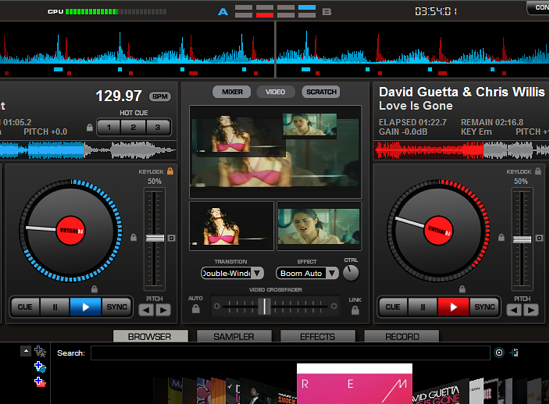


Virtual DJ video

Djing with music videos in Virtual DJ. Note the dedicated video crossfader. (Click to enlarge.)

Virtual DJ Video

Virtual DJ has had video built in for a long time, and indeed was one of the first to get on this. As such it is used by DJs worldwide, and claims to work stably with a wide range of video formats.

Again, there are a host of video transitions and effects, and the software can also play computer-generated images in rhythm with the music or display static images of your choice.

Like Serato’s plugin with Scratch Live and ITCH, this works with both timecode (Virtual DJ’s own) or Midi controllers, of which a couple have dedicated video capability, such as Denon’s DN-MC6000 with its switchable crossfader for video.

System: PC & Mac
Price: video capability included with Virtual DJ Pro Full – US$299 / €249


MixVibes VFX

MixVibes has its own controller for VFX, although the software only works on PCs (not Macs).

MixVibes VFX 1.3

This is a system built from the ground up for DJ audio / video mixing.

It has the ability to play music videos and video clips, alongside Flash texts, animations, logos and so on. Each audio effect is matched with a visual effect and can be synchronised with the beat. You can incorporate live camera feeds, and it outputs in HD. There are some pretty neat extras like a perspective tool (for “correcting” the angle on huge screens in venues), zoom in/out, and video preview by mouse-over-artwork. It is sold with lots of free video loops (over 8GB).

It’s available as part of a complete hardware/software solution with the company’s own VFX Control hardware, but is also sold as software only, It’s advertised as HID compatible with Pioneer’s CDJs, meaning you can control both audio and video from a club’s existing set-up.

System: Windows only
Price: Full system: €399, software-only: €299


Dedicated video systems
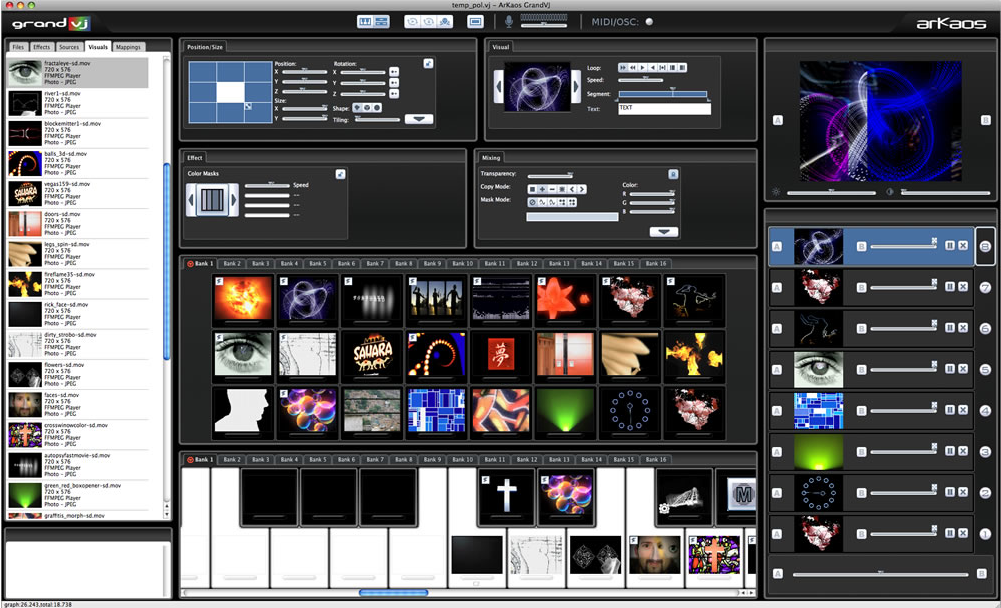


GrandVJ

GrandVJ lets you mix up to eight sources in HD.

GrandVJ

Offers up to eight layers (or channels) of video clips, including animated text strings, Flash animations, and live cameras. It comes with a vast library of “video effects, transitions and sound-driven visual generators”. It’s got Midi learn for easy mapping to controllers, and supports OSC meaning you can even control it with your iPhone or iPad. It can receive sound or Midi from audio programs for easy syncing.

It has scores of transitions, Mac Quartz compatibility, up to 60FPS – and having been developed for over a decade, is a mature and stable product

All version come with SD (standard definition) source material, but the boxed version additionally includes 2.8GB of “high quality” loops exclusive to the program, made by pro VJs and visual artists.

System: Windows/Mac
Price: €299 (boxed), €279 (download)


Resolume 4 Avenue

Resolume 4 Avenue, like the other programs in this category, moves way beyond video clips and simple transitions.

Resolume 4 Avenue

Handling an equally wide range of inputs as GrandVJ including Flash, Mac Quartz and text input, Resolme Avenue’s latest incarnation boasts VST plugin effects and FreeFrame GL (FFGL) effects.

There is a global BPM tempo which you can link everything to to create a fully synchronised audiovisual performance, which has “beat snap” (basically like quantise) to trigger clips in sync with the beat, and you can send different layers to different screens which don’t even have to be rectangular (you can warp your video onto curved screens).

Again like the programs in this category, it has a feature set that moves way beyond video clips and simple transitions, like autostart for layers, autopilot, scale-to-fit, and even control from DMX lighting desks.

System: Windows/Mac
Price: €329 (boxed), €299 (download)


Modul8

Modul8 is Mac only, but claims to take full advantage of your Mac's capabilities to enhance its performance.

Modul8

Mac-only Modul8 makes much of its easy control of effects, transitions and layers in real time, and claims to be easier to use that other VJing software which still allowing you to build up complex performances.

Designed to work at extremely high resolutions through taking full advantage of whatever Mac hardware you have access to, the makers claim up to 100 images per second in HD or higher with no pixelisation.

Graphics and text and handled by modules, it supports most Quicktime codecs, and of course it can also handle multi-screens, with you deciding what parts of the composition get sent to which screens.

One nice feature is the ability to record a live set at 800×600, then render it later at a higher resolution when you have the processor power available to do so.

Again, it can be controlled via Midi, and there’s a BPM module so you can connect rhythms to the software.
System: Mac
Price: €299 (download)


Next week…

Next week we’re going to look at the hardware you’ll need – from laptop spec to screens.

• Thanks to Dan Booth for his valuable input in this article. A DJ for 15 years, Dan began adding visual content to his act in 2005. As well as developing his own AV act to incorporate four virtual music decks and up to three separate video outputs (all running from one laptop!), he has performed visuals for Carl Cox, The Shapeshifters, Armin Van Buuren, Paul Van Dyk and Defected Records to name but a few, to crowds in excess of 30,000 people. He’s based in Goa, India.

Do you VJ with any of the programs above? What is your set-up? We’d love to know what you use, so please share in the comments.

Now go to:
Video DJing, Part 5: What Hardware To Use
Video DJing, Part 3: Why You Should Take The Digital Route
Video DJing, Part 2: Why Video DJing?

Want to escape the bedroom and play in public - fast?
Our 1000s-selling How To Digital DJ Fast video course shows you how.

Learn to DJ Free - email course plus bonus PDF book
Sign up for our weekly email course for beginners now...

Trouble choosing a controller? Visit the web's #1 guide!
DJ Controllers: The Ultimate Buyer’s Guide 2013.


Creative Commons LicenseThis work is licensed under a Creative Commons Attribution-NonCommercial-NoDerivs 3.0 Unported License.

31 Responses to “Video DJing, Part 4: What Software To Use”
  1. MFx says:

    I used Resolume for a while (until version 3) and I can say for visuals it’s topnotch! Realy amazing software! Can’t say anything about the audio functionality and mixing with audio, because I never used that option.

    [ link ]
  2. I’ve been trying Modul8 and really like it. It brings sound active effects to a new level :D you can choose if a video fx reacts to low mid or highs. I also tried Resolume 4 Avenue and GrandVJ but just like Modul8 better for what I would like to do when I’ll integrate video to my setup. I’m not so much for music video mixing as I tend to thing that people could just as well sit at home watching MTV or similar channels.

    [ link ]
  3. Djnaawz says:

    I think mixemergency is one of the best video softwares out there, which wasn’t mentioned.

    [ link ]
    • Phil Morse says:

      Well, you’ve mentioned it now :)

      [ link ]
    • Code:E says:

      Mix Emergency is by far better than anything listed here except for Modul8 and grand VJ. I have used all of the above, and nothing else compares.

      [ link ]
  4. Is there any software that can be used in conjuction with Traktor? Or is my best bet to run something alongside Traktor?

    [ link ]
    • Phil Morse says:

      You’ll need to run something alongside Traktor, which is exactly what Dan does.

      [ link ]
      • what would you say is the best/easiest to run alongside Traktor?

        [ link ]
      • djerikt says:

        exciting… who is dan? and what software does he run along side of tracktor?

        [ link ]
      • Phil Morse says:

        Dan is an established VJ who is helping with the series, his profile is in the article. He uses GrandVJ alongside Traktor.

        [ link ]
    • you could use any that have some sound active options. You might be able to use the Traktor Virtual output to midi trigger, but not sure as I have never tried using virtual ports myself. If that works then could maybe trigger video clips together with say cue points.

      [ link ]
  5. paul says:

    I used to love resolume until version 3. They sacrificed 2D effects for 3D and you can no longer have the clip playing react to a sound source, something they’ve been promising to fix for years. In fact, I’m struggling to get any aspect of the programme (effects) to react to the sound. Time to move on. I shall check out Mixvibes and Virtual DJ. I assume you need an itch certified controller to go that route.
    I’ve got an Alienware laptop with 12 GB RAM, i7 CPU and 2GB Radeon HD 6970M GPU. Should do the trick.

    [ link ]
  6. David says:

    I’m not as interested in music video type stuff as much as generative visuals, you know? Like visuals that react to the music in real time. Any suggestions? Would any of these solutions work?

    [ link ]
    • paul says:

      G-Force Platinum 4 requires no effort other than installing the software and then having it react to the music either through your laptop’s in-built microphone or running a line into your laptop’s sound input. I guess it’s a visualiser.
      I’m also wondering what is the best software if you take a more manual approach on a PC. Resolume doesn’t have the facility to have the clips react to sound anymore.

      [ link ]
    • Phil Morse says:

      They all have some elements like this in them, more so the dedicated software.

      [ link ]
  7. paul says:

    Does anyone know of an app for PC that specifically allows the clip playing to react to sound?

    [ link ]
  8. Zubetei says:

    Is there any opinion on this VJ program DVMX5 http://vidvox.net/ ?

    i am considering it.

    [ link ]
  9. Craig says:

    I use Virtual DJ with a USB capture card for live video and Pangolin SMS http://www.pangolinsms.com/
    With this I can beatmatch Music videos, run Sonique beat synched graphics, show a live Camera and display txt messages sent by the crowd as well as pre-prepared logo videos.
    I’m a mobile VJ playing 21sts, Weddings, etc (sometimes with video, sometimes not) and I also run visuals for Night club events.

    [ link ]
  10. Obsidianice says:

    I have a question…how many people are running dedicated video software along with audio software on the same laptop? I have a new 2.4ghz i7 Macbook pro with 8gigs of ram and the AMD Radeon HD 6770M 1g memory version. Can I safely run some video software along with Traktor?

    [ link ]
    • Phil Morse says:

      You should try it, because increasing people are doing just that.

      [ link ]
      • Obsidianice says:

        I think I might just do that. I was thinking about getting a SL3 or 4, to use Serato Video, but the dedicated software seems more flexible. I have an APC40 that i’m currently using to DJ with Traktor Pro. I’m thinking it would be great to use that for a dedicated vido controller after I add an mc6000 to my collection.

        [ link ]
  11. Mister D says:

    Using the Pioneer VJ System and recently for Audio discos swapping over to Serato with the Pioneer itch controller. When the Video plug in was launched I thought time for a complete change, to be frank it’s poor and hard work to add visuals to track which you do not have videos to – with the SMV1000 you can feed a camera, visual DVD or use the graphic generator. So I bought Visual Dj with Dennon3000 Controller to give that try – again the mac version is short changed as you cannot add text like serato or SVM1000 – but you can on PC version. Gave up on that … Then It thought I will buy a PC and try Mixvibes VFX… well for £329 including controller it by far the best in the testing I have done easy to use and most effective as you have a visuallizer when only using audio. Please be carefull when buying a PC to run this software as most laptops nove come with switchable Graphics cards and VFX does not support Intel HD cards. I could not get the Intel card to switch off completely hence could not use. I found the only laptops in PC world that had Non Intel Graphic on its only were some of the Sony’s – But like all things you pay a premuim for the name. Hope this helps anybody looking to go down the VJ route. On another point if you already have Mixmash or Promo Only DVD’s it will take you a month of Sundays to convert the VOB files to MPeg-4 using free Handbrake software(mac or PC)

    [ link ]
  12. Mister D,

    What is for you the best PC for VFX.

    Thanks

    [ link ]
    • Phil Morse says:

      Impossible to answer as thousands of PCs can do the job. Jut grab one which meets the recommended spec.

      [ link ]
  13. Thanks,
    I am thinking in this one.

    Intel® Core™ i7-3610QM Quad Core (Ivy Bridge)
    2,3 GHz
    3,3 GHz
    6 MB
    16 GB
    DDR3-1600
    750 GB
    17,3 ‘
    LED HD+ 1600×900 pixels
    TruBrite
    NVIDIA® GeForce™ GTX 670M
    3072 MB dedicados

    [ link ]
  14. John Webb says:

    Hi why has no one memtioned Ots AV DJ? I have used this since 2009 when Virtual DJ crashed during a Xmas party in London! It is stable and now with Esperance features added I would use anything else! Cheers John Eastbourne UK

    [ link ]
  15. pjjoe says:

    You forgot to mention OtsAV, which works very well for video. Have to convert videos to their format, but after that, you have a very stable, powerful program for DJ, KJ and VJ use. New features include looping with their latest release. Controller support is limited, but will be expanded in future releases. I highly recommend trying the trial version.

    [ link ]
  16. Can i use Resolume 4 with serato itch?

    [ link ]

Leave a Reply

Enter your details:

Or connect with:


Be constructive, be polite. Full guidelines here. Asking a question? Use the forum instead. Comment that don't meet our posting standards won't be published.


New to Digital DJ Tips? | What DJ controller? | Learn to DJ | Testimonials and Feedback | Privacy Policy