

Serato has opened the public beta for Serato DJ 5.0, and the headline feature is a completely rebuilt beatgrid engine called Lucid Beatgrids. It automatically detects tempo changes and downbeats across both fixed and fluctuating-BPM tracks, which Serato says reduces manual grid editing and makes difficult tracks easier to play with confidence.
If you have used Serato for any length of time you will know that Serato’s gridding has historically been a weak part of an otherwise generally good piece of software, and anything recorded by a human drummer meant sitting there dropping beat markers by hand, all the way through the track, before you could trust the sync button or a loop. On a nine-minute disco record that is half an hour of work. Lucid Beatgrids is Serato’s attempt to make that job disappear, and it is available on both Serato DJ Pro and Serato DJ Lite. Existing tracks need re-analysing to pick up the new grids.
Alongside the grid work there is a new Flexible analysis mode, an improved Fixed mode, better grid editing controls, and BPM labels in the waveform showing where the tempo changes. Serato calls this its most accurate, aware and customisable beatgrid engine ever built – so we tested it. (See below for our thoughts.)
Open Streaming and Cue Loops
A couple of other features worth knowing about. Open Streaming lets you log into multiple streaming services at the same time and mix across providers and your local library without switching accounts (late to the party here, but well done Serato). Each provider now appears as its own crate, with a search dropdown for moving between them. BPM and key data also show for streaming tracks before analysis, which is supported on Beatport, SoundCloud, Tidal and Spotify, but not Apple Music.
Cue Loops let you save a loop straight to a hot cue, so hitting that cue jumps the playhead there and fires the loop in one press. That one is Serato DJ Pro only.
First Testing
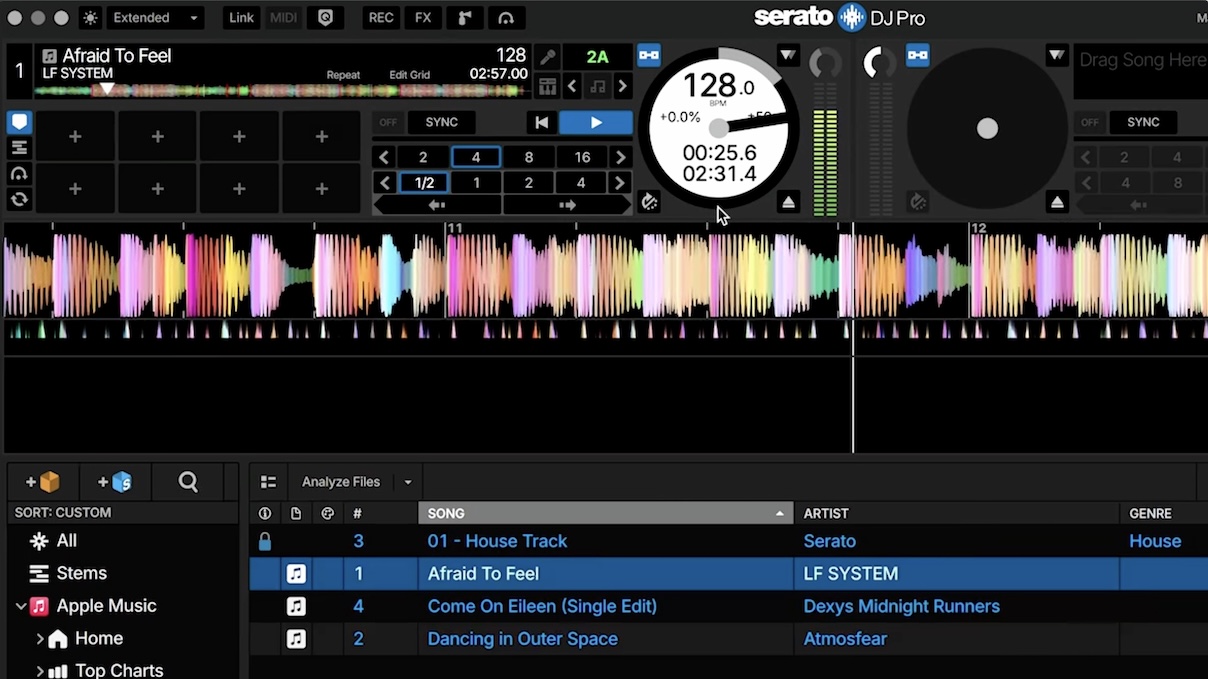
We have had a play with the beta, testing with three tracks chosen to give the engine a hard time: Dancing In Outer Space by Atmosfear, which is an old disco record with a real drummer and therefore a wandering BPM; Afraid To Feel by LF System, which holds a steady tempo until it suddenly doesn’t; and Come On Eileen by Dexys Midnight Runners, which slows right down and speeds right up, and which we have used as the litmus test on this stuff for years.
The beats are right. On the disco track the grid followed the tempo from 129 through to 131 and beyond without dropping a beat, and, crucially, it was still bang on at the very end of the track, which is where a slipped grid usually catches you out when you are mixing out. Drag and drop, one analysis pass, done. That is a big change for Serato users.
The bars are a different story. On the disco track the engine put the bar lines two beats out, so the downbeat landed in the wrong place, which took one click of “set grid start” in the grid editor to fix – and in fairness, the best-in-class Djay Pro gets that one wrong too. On the LF System track it lost the bars in the bit where the beats drop out and the tempo jumps, which is a spot djay Pro does handle properly: it works out that the gap is where the speed changes, and keeps the bars lined up through it. Beats in the right place with bars slightly off is something you can live with, though, and sometimes the music really does have extra beats in it, so the software is only telling you the truth.
Two things may be worth a rethink by the developers before release. First, Come On Eileen reported 242 BPM in that famous slow-then-fast section. The grid lines stayed on the beats, but a doubled BPM readout will catch you out if you are trying to mix out of the end of a track with another track synced. Second, the grid editor can trip you up. Set grid start behaves itself and keeps the new grid intact, but the other buttons in there appear to flatten the whole thing back to a single fixed tempo. Halving or doubling the BPM manually also wiped the flexible grid in our testing.
K.I.S.S.
Our overall advice to Serato’s developers might be to take some of the complexity away rather than add to it. Algoriddim in Djay Pro got this right in our view. There is now a setting for whether BPM changes are detected on the bar or on the beat, another for how many BPM labels appear in the waveform, and a choice between Flexible and Fixed analysis, on top of a new name for the grids themselves. That is a lot when really all DJs want to know is whether the grid can be trusted. The whole point of this feature is set it and forget it, and people do not trust things when they are presented with multiple options and a suspicion that they have picked the wrong one.
None of that changes that this is very good and the most meaningful thing Serato has shipped in a while. Sort out the bugs and the options, and Serato joins the genuinely useful grid party, delivering what the sync button promised all those years ago: no gridding, and beats you can rely on.
- The Serato DJ 5.0 public beta is free and open to all users now. Serato hasn’t given a date for the production release, so treat anything you find in the beta as work in progress, and if you are in there and spotting things we haven’t, tell us in the video comments.


Phil Morse


