Digital DJ Tips3>

Learn How To DJ With Digital DJ Gear

All You Need To Know About DJ Splitter Cables

A DJ splitter cable

A DJ splitter cable (this one is made by Algoriddim and Griffin).

Beginner DJs are often told about a secret “hack” that means they don’t need to buy an expensive sound card in order to use their DJ software properly. They may even find out that this little DJs’ trick involves a DJ “splitter cable”…

And here’s where the problems usually start! Where do you get one? Will this iPod splitter I got at the airport do? No? Well, what exactly do I need then? How do you set up the software to work with it? Why doesn’t mine work?


Because people usually choose to go down this route right at the beginning of their DJ careers, when they may not even understand fully how a DJ uses his headphones and why it is necessary to “split” the audio or to have two outputs at all, the confusion is often that much greater. So let’s look at all of these points a little closer.

Why do DJs need two outputs?
Unless you understand this, you’re not going to understand the need for a “DJ sound card” or a “splitter cable” or any similar set-up.

DJs need to hear a different track in their headphones to the one the audience is hearing. Typically it will be the next track scheduled to play – to double check it is right for the moment, to find the right place to start it, to get it to the right speed, to adjust the EQ and so on.

Thus the need for some way of having two outputs, not one.

Where does the sound come from?
If you’re using a modern DJ controller with your software, more often than not, it has a DJ audio interface built in, and you needn’t worry further – if it has a socket for your headphones and plugs round the back for your speakers, you’re in.

But if you have a DJ controller that doesn’t have a built-in sound interface (many older and cheaper models don’t), then the sound comes from your computer – and specifically, from its headphones-out socket. Trouble is, there’s only one of them. and we’ve already worked out that you need two outputs.

And if you’re DJing with your iPad, iPod Touch or even your iPhone, maybe using one of the Algoriddim djay programs, then the iPad has only one headphones output too.

Numark DJ IO

The Numark DJ IO is a good value and popular DJ sound card... but it's still pricey compared to a cable!

So what are the solutions?
If you’re using a computer, you have two choices. Firstly, you can buy a standalone DJ sound card or DJ audio interface (the terms are used interchangeably) that plugs in by USB to your computer and gives you two outputs. It effectively takes all sound generating responsibilities away from the computer and handles them itself. You plug your speakers and headphones directly into it.

Alternatively, you can use the little “hack” that splitter cables take advantage of. The “hack” is this: By getting your software to send the signal that your audience should hear down the left-hand channel of the computer’s headphones output, and the signal for your DJ headphones down the right-hand channel, it effectively splits one stereo audio output into two separate (albeit mono) outputs.

All you need then is a special lead that will take the left-hand output and send it down a “stereo” cable (although the signal is really in mono) for your audiences’ speakers, while tasking the right-hand output and sending it down another “stereo” cable for your headphones. Plug everything in, and you’ve just achieved two separate outputs.


What are the advantages and disadvantages of this?
The obvious advantage is cost – for the price of a cable you solve your dual sound output issue. For new DJs who are maybe experimenting with DJing using cheap or free software and no DJ controller, the price of a pro DJ sound card can be prohibitive – at least this way you can see if DJing is for you before committing.

If you’re an iPhone, iPad or iPod Touch DJ using software like Algoriddim’s djay, there’s no way of adding an external sound card to these devices, so a splitter cable is your only solution.
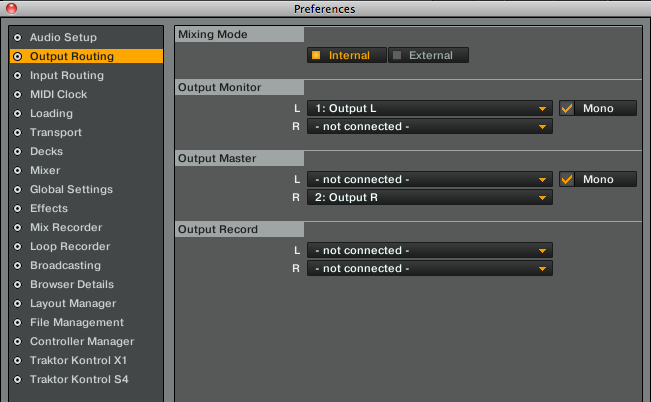
Splitter settings in Traktor Pro

Splitter settings in Traktor Pro (click to enlarge).

Another advantage is keeping things simple – it’s one less thing to plug in. A further advantage is to have it as a back-up in case there’s an issue with your sound device or your controller. At least you can then set up quickly and DJ from your software and keyboard should you have to.

The disadvantages are that you’re relying on the quality of your computer’s in-built sound. If its sound card is a bit ropey, your DJing sound quality will be ropey. Plus the signal is in mono, but this shouldn’t really concern you as most club and bar PA systems are in mono anyway. and it’s got half the pwer, although that’s not always an issue if you’ve got good headphones and are plugging into a mixer or PA that can boost the signal back up again.

What else is needed for one of these to work?
The crucial final part of the puzzle is that your DJ software needs to play along. You need to tell it to send the master signal (ie the sound intended for the speakers) down one channel of your computer’s sound output, and the monitor, cue or headphone (they all mean the same thing) signal down the other.

Virtual DJ and Traktor Pro do it fine, and djay for iPhone / iPod Touch and djay for iPad do too – the cable featured above is marketed for use with their software, after all. But you need to check whatever you’re using first, especially if you have an “LE” version of your software.

What if I can’t get a cable?
You can buy one on Amazon, buy you can also make your own by buying cables and/or adaptors. You’ll need an 1/8″ stereo headphones (TRS) plug to two 1/8″ mono headphones (TRS) jack lead, and then two 1/8″ mono headphones (TRS) plug to 1/8″ stereo headphones TRS jack leads, so a total of three leads.

Conclusion

This isn’t a permanent solution for the pro DJ, but it’s a great starting point for new DJs, and a good back-up for any DJ. Plus, if you’re DJing with an iPad, iPod Touch or iPhone, it’s currently your only solution. Just understand the type of cable you need, and the fact that the software has to be configured to use it, and you’ll do just fine.


Video


Did you ever, or do you, use a splitter cable? Have you struggled to get one to work with your system? Please let us know your thoughts and experiences in the comments!

Now go to:
The Essential Guide To Audio Cables for DJs
All About Sound Cards for Digital DJing
DJ Sound Cards Under $130: Top Models Reviewed & Rated

Want to escape the bedroom and play in public - fast?
Our 1000s-selling How To Digital DJ Fast video course shows you how.

Learn to DJ Free - email course plus bonus PDF book
Sign up for our weekly email course for beginners now...

Trouble choosing a controller? Visit the web's #1 guide!
DJ Controllers: The Ultimate Buyer’s Guide 2013.


Tags: , , ,


Creative Commons LicenseThis work is licensed under a Creative Commons Attribution-NonCommercial-NoDerivs 3.0 Unported License.

59 Responses to “All You Need To Know About DJ Splitter Cables”
  1. IQuake says:

    You always do a great job with these articles, Phil.

    [ link ]
  2. DJ Sir Andy says:

    A few years back I began DJing using three leads, a M-Audio X-Session Pro and Torq LE. It was a great inexpensive way to learn proper cueing while getting my feet wet with DJing. Since the XSP(which came with Torq LE) and cost of the leads was less than $119 US I was able play small bar gigs and parties with this and an iMac. I finally upgraded to a proper soundcard, the Torq Conectiv, when I started playing nightclubs as the sound quality with the three leads was definitely lacking by comparison. Having learned to DJ with this type(cheap!) setup, I always suggest this route to anyone who says “I’ve always wanted to learn to DJ”.

    It doesn’t make sense to me to spend $200+ if you don’t really know whether or not you’ll be looking to get into “serious” DJing and just want to learn the basics of beatmatching and mixing.

    Great article Phil, I’m sure this will help some beginners make an educated decision whether to go all in with a controller that has a built-in soundcard, or go the “cheap” route to see if DJing is something they want to commit to as more than just a hobby.

    Cheers.

    [ link ]
  3. Nate says:

    When I first started DJing I went the cheap route and used one of those $7 tiny USB sound cards for my headphones.

    [ link ]
    • boris says:

      Where do u get them at? I once borrowed one from a fellow DJ, but didn’t get the chance To ask him where. He had adquired it

      [ link ]
      • Nate says:

        If you search for “USB sound card” on Amazon you should see a bunch of them. I had the Syba SD-CM-UAUD.

        [ link ]
  4. eric hillis says:

    is anyone actually using an iphone or ipod touch to play out?

    [ link ]
    • Phil Morse says:

      You’d be surprised – but think about parties too, for instance.

      [ link ]
  5. PierS says:

    If i use a splitter cable and I record my mix – will my mix be recorded in stereo?

    [ link ]
    • marinelli says:

      if you use the internal recording of Traktor, yes it will record your mix in stereo.

      [ link ]
  6. Softcore says:

    Splitter cables is a good solution for a beginner – guy who just wants to experiment a bit but it should be strictly pointed out that it can lead to a lot of frustration. The fact that you will be using an on-board soundcard means that you might have poor responsiveness from the software (due to latency introduced form the lack of solid ASIO drivers)- the quality wouldnt be much of an issue (on board soundacards are decent nowadays) but audio drop outs or glitches could appear due to poor – “designed for the masses” drivers of said soundcards. One might suggest ASIO4ALL but again a starter would be confused on how to set things up properly.
    In my humble opinion, If a starter asked for my advice I’d definitely suggest getting a cheap yet solid USB audio interface (like the NI 2) and avoid splitter cables.

    [ link ]
  7. Alex T. says:

    I started DJing in ´86, so I´ve used everything from vinyl to CDJs to laptop + controller. I love vinyl and my record collection, I had no problem playing CDJs and I´m not a purist. I´m now very excited with the iPad and its possibilities. I´ve tried the Red Bull BPM and Sonossaurus apps and didn´t like them, but IMHO Algoriddim got it right from the GO.

    It´s so easy, complete, accessible and precise that you end up playing a lot of time at home, in the bed, at work, when traveling, anywhere. In doing so, you get really good at taking the best from it and avoiding screw-ups. At the same time I now listen a lot more to my music (and library). I found myself testing mixes and tunes and tricks a LOT whitout even noticing or putting an effort.

    So I´ve been using it sparingly in my sets, so far with zero problems. You sure have to be carefull with the small buttons and the sensitive touchscreen, and the iPad does have an output/monitoring limitation (I use the splitter cable sometimes but most of the times I use the Apple dock-to-RCA for signal and clarity). But everything has a learning curve and I believe in adaptation.

    Yes, sometimes I have to mix without pre-cueing. Yes, I rely on the SYNC a lot when not using the splitter. But it hardly shows now, even my DJ friends can´t tell and say it´s incredibly smooth. Quite impressive for an iPad app. As I gain confidence, I find myself playing bigger and bigger parts of my sets from it, even at clubs and big gigs.

    The latest update brought some cool FX and BPM/library features, those are really useful and spice up the sets. And I´ve been recording all my performances, that is really easy with the DJAY on iPad. And I don´t care for other´s opinions, because the crowd doesn´t either – as long as you´re rocking them, that´s the whole point of DJing.

    I´m now looking for a new controller to use with my laptop. It´s more reliable and flexible but also more complicated. But the iPad is definitely incorporated in my DJing now, and I´m looking forward to improvements. If it only had a good, solid output and monitoring, it´d be a 9/10 for me.

    Cheers and thanks for the site!

    [ link ]
    • James says:

      Hey Alex, I like what your saying and your attitude. I’d like to link you if poss for maybe a bit of advice and a few pointers on controllers for the iPad. (I know of three but have only seen one in the flesh so to speak.)
      If not, then cool. Finding time in this crazy world is hard an I understand totally.
      But if so then great, my email is attached to this comment..
      Cheers for now, James.

      P.s I have also done some DJing back in the 80′s but had a big break due to family commitments and they have all flown the nest now and took the wife with them, lol. So finding time for me now..

      [ link ]
  8. Dimos F. says:

    Dear Phil ,

    I would like to ask you if the Griffin Djay splitter works okay with Virtual dj LE which comes with Numark DJ2GO.

    Many Thanks

    Dimos

    [ link ]
    • Phil Morse says:

      Yes, it does as far as I remember, you can select “splitter cable” in the Virtual DJ config.

      [ link ]
  9. Croma says:

    For anyone wanting to get splitter cables, just because they have the word “DJ” in them doesn’t mean you have to pay the premium price. Especially if you can pay half that with regular headphone splitter cables. They do the same job too!

    [ link ]
    • Phil Morse says:

      To be clear folks, while it’s perfectly possible to duplicate the way a dedicated DJ headphone splitter cable works using standard cables plugged together, DJ headphone splitters are NOT the same as normal headphone splitter cables – this is the #1 mistake people trying this method make.

      DJ cables split the left and right channels apart to use for cueing and house sound; normal headphone splitters do NOT.

      [ link ]
      • mark says:

        hi phil, thanks for all your work. this website is an incredible resource.

        i’m trying to get my head around how the “hack” works. surely if the standard splitter cable just sends out two identical signals, then extending each signal will just do the same. at what point and how are they separated? i trust that it works, i just hate using a system that i don’t fully understand!

        [ link ]
      • Phil Morse says:

        Yup, so you can’t use a standard splitter cable – you need to use a DJ one that splits the right and left channels into two pseudo-stereo channels, one for cue and one for master. The software then sends cue mix down (say) the left channel and mater down (say) the right channel to effectively give two outputs from one stereo output.

        [ link ]
  10. Nevil says:

    Hi Phil,
    I’ve been trying to set up a DJ system from months but I somehow cannot figure out what kind of chords or interface i require to make it work. As of now I am just using a splitter cable to play the Software. Will give you a brief on my system.
    1) Traktor PRO
    2) NI Audio 6 (for audio interface)
    3) Controller – Behringer DDM4000
    4) Speakers- Yamaha which has a TRS as well as XLR jack.
    The problem now is that my controller also has an XLR out A and RCA output B and audio interface only has the RCS outs ofcourse.I am using a Windows PC.
    Please advice solution.

    Thanks

    [ link ]
    • Phil Morse says:

      You need to use Traktor in external mode and plug 1/2 and 3/4 out of the Audio 6 into two of the Line Ins on your Behringer mixer, then plug the master out from the Behringer into the speakers. If you get stuck, best place to ask for help is our forum where the readers can pitch in and hopefully get you closer to a solution.

      [ link ]
  11. Dj KroNiX says:

    Hey guys! I Just wanted to show you what i did with a couple of adapters i had that i bought for $1 on ebay.

    [IMG]http://i40.tinypic.com/2rd7ofb.jpg[/IMG]

    It Works! Great Cheap backup. Hope this helps someone outheir!
    Best of wishes to all From Puerto Rico

    -Joshua (Dj KroNiX)

    [ link ]
    • ReTox says:

      Ha! Great hack, Joshua :) This is exactly how splitter cable should work.

      [ link ]
  12. Jairo says:

    Hey BIG thank you for this article! I have to say you have a great talent at explaining things in a very clear way.

    I will try the splitter cable thing, see if it works but here’s the deal:

    I’ve tried a Reloop, a Numark and a Hercules controller and in spite of trying every possible thing, I could not get clear sound! Always burpy, scratchy sound. So, do you think it may be related to my AMD turion X2 processor? It’s a HP Pavillion, running Vista, updated. This computer is supposed to have a decent sound card but I have not gotten the actual model.

    Thanks again, great website, I hope you get a raise for your great job! Any help very welcomed!

    [ link ]
    • Phil Morse says:

      The sound card on your PC shouldn’t matter as your controllers have sound cards built in I would guess (can’t be sure as you don’t state the model numbers).

      [ link ]
      • Jairo says:

        Reloop Mixage 9the model with sound card) and Hercules RMX, so yes, they had sound cards. I finally got a little DJ2GO to work, so maybe this would do it for now, but still it would be nice to know if I may need to change laptops.

        [ link ]
  13. Radio F.C. says:

    This might be slightly off topic but does anyone know if it’s possible to configure (using a cable or otherwise) a Hercules RMX so that you can have split audio in the headphones (i.e. track A on left can and track B on right can) – this was a nice feater of the MK2 controller… The mix/cue knob works well of course but this would be useful too. Cheers.

    [ link ]
  14. Adam Daniel says:

    I’ve done this many times. Although on my newest laptop when I tried I struggled as both channels seemed to play no matter where my balance setting was (using winamp to test)

    turned out my oem sound software (realtek i think?) had “features” for improving sound quality etc and one of these was causing some left channel to be heard in the right and vise-versa.

    so make sure you have none of these “enhancements” on when trying this!!

    [ link ]
  15. Nathan says:

    Hello there,

    I am trying to set up Virtual DJ Pro to allow me to pre cue and monitor tracks. I have literally looked at every single method for doing this, using two sound cards and using the griffin DJ cable you have mentioned here. I am using a Hercules MP3 e2 DJ Console for the actual djing and this has no audio outputs at all so I am relying on the 2 sound cards or the audio cable from my laptop. However using both methods I still here both tracks playing through my master speakers and headphones. Does anybody have any idea on what I might be doing wrong or give me an alternative?
    Thanks a lot!

    [ link ]
    • Phil Morse says:

      You need to set your audio settings correctly in the preferences.

      [ link ]
      • Nathan says:

        Do you mean on Virtual DJ?
        I have tried that, I have used every combination possible, and I have done the same using Mixxx but either way it wont work, I’m starting to think it might be something to do with my laptop?

        [ link ]
  16. Justin says:

    Hello Phil
    I have the griffin cable with the home edition ofvirtual DJ. for some reason i cant get the sound to split. When I do the preview or the play it goes out of both inputs. I selected the laptop with Y cable option in config but nothing changes. Is there some other setup required or is this a home edition issue?
    Thanks Justin

    [ link ]
  17. Kyle oldfield says:

    I’ve always loved playing about with music software on my laptop but unfortunately it got a little wet a while ago so I’m using my blackberry playbook for music… The pacemaker app has just been released and i can tell you it’s fantastic, I’ve never used this cable set up before I’m guessing it will work with a playbook, I know the audio output quality on them are fantastic!!

    [ link ]
  18. Douglas says:

    I’m using a amp/dac with my headphones ( fiio e17 ). As the sound would become mono would it be possible to continue using it after using a splitter cable?

    [ link ]
  19. Randy j says:

    I was using splitters for a while with traktor… Back in 05 i had a numark mixer already, purchased a y-cable 1/8″ stereo to rca, and got two rca splitters which were 1female to 2male style… Plug the splitters into channel one n two and plug the y-cable into that… white(left) goes to channel 1 red(right) channel two… Route traktor for external mixer and mono, deck 1 left deck 2 right…. and boom plug up the speakers to the mixer and you’re good… That also took alot of stress off the laptop, from internal mixing, made it run smoother.. did some successful reggae parties with this setup, just hookup the same way to the house mixer… nobody in the clubs we did, knew of the setup, but after a year or two those y-cables were part of the mixer connection in those same clubs…

    [ link ]
    • Phil Morse says:

      Agreed, people can get snobby about this but it works, most club systems are in mono anyway, and it’s considerably better than nothing…

      [ link ]
  20. Willk says:

    Hey Phil, I enjoyed the article but I have some questions.
    1)Am I correct in thinking that the splitter cable is stereo on the male side and mono on the two females? I have a splitter and it is stereo on the male and female sides I assume that it doesn’t work because the female connections are not mono??

    2)how would you set up Virtual DJ Pro to use the griffin DJ splitter?

    [ link ]
    • Phil Morse says:

      It is stereo on the male side and twin mono on the female sides, each female side being fed by one of the stereo channels – hence “mono splitter cable”. Virtual DJ Pro has a mono splitter option in the sound output configurations.

      [ link ]
  21. Richard says:

    So, you can’t use any old splitter cable right? Has to be mono/master??

    [ link ]
  22. rocketship27 says:

    As an alternative to the griffin cable, I had a 3.5mm to 2×3.5mm splitter, which splits the sound in stereo. Obviously I could not get this to cue, until I realised a simple workaround: by pulling my headphone jack out slightly, I could pick up the split (cue) channel in my heaphone, while having the other 3.5mm plug playing the mix to the stereo. Saved $40 on a cable I did not need. Trick is to pull the headphone plug out about halfway. Don’t ask me how this works!

    [ link ]
    • Phil Morse says:

      Ah, the old “pull your headphones jack out slightly” trick – often works with dodgy mixers too to get any sound at all out!

      [ link ]
  23. Cruz says:

    Hi Phil,
    I have two friends who swears that they will only use splitter cables, as they cannot see the point of purchasing a sound card as it does not sound any better,
    I have a NI Audio 2 but really would like to find out if the output port on my macbook pro would do just as good a job,

    What is the difference in the quality of sound when using the a Splitter cable on a Macbook Pro vs a Sound Card

    I have searched the web but cannot find a answer to this.

    Regards

    Cruz

    [ link ]
    • Phil Morse says:

      It’s stereo vs mono to start with. Any decent sound card will outperform that which is built in to your MacBook, including the Audio 2. However, for small gigs, a splitter cable can sound just fine, especially if you’re playing through cheaper gear anyway.

      [ link ]
  24. Robert Wulfman says:

    When I started I plugged the speakers into the headphone jack on the computer and used a usb headset for my headphones. I don’t think this works inn traktor but it did in virtual DJ.

    [ link ]
  25. sean says:

    hi
    iam interested in getting the numark dj 2 go and using it through my laptop i have watched video reviews and read posts about how to set up and use not to sure about what way to go for using headphones the splitter cable or usb soundcard which would be best if i wanted to use the speakers on my laptop for the sound to come out but be able to use headphones for mixing and also if i wanted to use different speakers on occasions?

    [ link ]
  26. corey says:

    good article !
    my view and say on this is, If you dont know how to dj you should start with vynal and turntables, best way to learn and understand how it works and you can take what you learn up with you to cdjs – then digital. sorry if this seems a little legit but you get more credit if you started on turntables. so an even cheaper way to learn is, Find a mate who has Decks and geton a session to go practice and find out if its really for you or not:) RESPECT THE DJ and learn the way that will benefit you the most. BACK TO THE OLDSCHOOL

    [ link ]
    • corey says:

      plus if you enjoy djying and it is right for get yourself a cheap splitter cable for home too practice if your controller/cdjs doesnt have a built in soundcard. Beacause if you have friends or your club owns the newer brands of midi cdj IE Pioneer cdj 2000s, when you hook them up to your laptop you can use the built in soundcard on them instead of digging out 100-200 pound on a soundcard.

      [ link ]
  27. Johnny says:

    I was disappointed with my x session pro, until I worked out how to create an aggregate output in the audio midi setup in OS X. Now I use my m-audio fast track to run stereo line outs to my amp, and the headphone jack on my macbook for stereo monitoring. Works a treat. I had all the gear already, just didn’t realise you need to configure an aggregate interface to take advantage. Took me all of five minutes to configure – once I knew where to look!

    [ link ]
  28. Grimmjow says:

    Is Griffin DJ Headphone Splitter Cable compatible or can be used on pc using virtual Dj software ?

    [ link ]
  29. Luuk Willems says:

    How do i get a cable in Europe? Griffin doesn´t ship to the EU.

    [ link ]
    • Cameron Lees says:

      They have them on Amazon

      [ link ]
  30. Great idea for a pro DJ in a pinch

    I love my Native Instruments Audio DJ 2 soundcard. It’s of high quality and costs $100.

    Nevertheless, I think having the splitter cable as a back up in your bag is probably a good idea. I wish I had this last month. One of my cables I use for my soundcard crapped out and so my left deck was only coming out in one channel. It took me a while to figure out the cable and not the mixer was the problem and having a splitter option would be a good back up if my cable or soundcard busted.

    Always have a back up.

    [ link ]
  31. Cameron Lees says:

    Surprisingly, The belkin/algoriddm cable works with PCDJ Dex! It works good as well!

    [ link ]
  32. Irineos says:

    I ‘ ve got a problem with my splitter cable. I have bought a monster splitter cable (https://www.google.com/search?q=monster+splitter+cable&hl=en&client=safari&source=lnms&tbm=isch&sa=X&ei=7BFdUYGxNPGN7AbV_ICYDA&ved=0CAkQ_AUoAQ&biw=1024&bih=672#biv=i%7C17%3Bd%7ChxS18SZbhxSSqM%3A) but i still got a problem i can not solve. When i enable the split audio function on my dj program of algorihmn i hear on my speakers both of the songs such as the song that is suppose to play through the speakers and the song that is supposed to play through the headphones so i can cue. How can i solve this problem?

    [ link ]
  33. cszpl says:

    traktor pro preferences should not be MONO!?!

    i just made some test with the splitter cable / traktor pro. i. m. h. o. one should not select mono (like it is shown in the traktor preferences picture above) in the output panel.

    if you do this, you mono the selected chanel , if you leave this blank you got both l/r in mono.

    does this make sense :) any experience on this ? thanks, c

    [ link ]
  34. Rob Hazell says:

    I’m running an acer a500 tablet on android, I cannot pre cue properly on DJ Studio 5 or ADJ Pro with the Griffin DJ cable, I can hear Deck A through my speaker even with the cross fader all the way on Deck B. I’ve enabled ‘PFL’ to split master output.

    [ link ]

Leave a Reply

Enter your details:

Or connect with:


Be constructive, be polite. Full guidelines here. Asking a question? Use the forum instead. Comment that don't meet our posting standards won't be published.


New to Digital DJ Tips? | What DJ controller? | Learn to DJ | Testimonials and Feedback | Privacy Policy