Digital DJ Tips3>

Learn How To DJ With Digital DJ Gear

Mission: Turn Ableton Live Into A Killer DJ Tool!

Ableton Live

Want to combine the best of Ableton Live with some of the immediacy of "'traditional' DJing? We know some software for that...

I started DJing with Ableton Live after a couple of decades of playing out on CDJs and 1210s. I also own Traktor Pro 2 and I play out using Serato with vinyl too, so I’m certainly well placed to understand all the ups and downs of Ableton DJing – of which there are many of both! I should also add that for me the glass is always half full, and half the fun of a Scalextric was building the track itself!

As the creator of Isotonik and Oktopad, which are software templates for the Akai APC40 and Novation Launchpad respectively that work with Ableton Live via Max4Live, I believe I’ve created two tools that makes DJing with Ableton Live more intuitive and more fun – especially if like most DJs you come from the kind of background above. In this article, I’ll go through some of the philosophy behind my products, and look at specific ways they can help you to tame Ableton Live for DJing.


My take on DJing

For the traditional DJ, the benefits of Serato and Traktor are many. Personally, I was first attracted to the ability to carry my entire record collection in a single bag (my gym membership lapsed many years ago and my back isn’t what it used to be…).

I don’t care much for the argument that you have to know how to beatmatch to be able to DJ; you have to know how to DJ to be a DJ…

But I also embrace wholeheartedly all the new technology. Looping actions, doubling up tracks at the click of a button, cue-point juggling and bewildering effects can all add to the DJ’s ability to entertain a crowd.

Some will use these subtly, while others have created whole genres out of making tracks unrecognisable from their original forms (check out Kutski or Kissy Sell Out on YouTube to hear what I mean).

(Incidentally, on the whole beatmatching thing, I’ve seen DJs who can and who can’t beatmatch both rock a crowd and fall flat. So I don’t care much for the argument that you have to know how to beatmatch to be able to DJ; you have to know how to DJ to be a DJ, and that for me is about being able to build a vibe and read a crowd. Glad to get that off my chest!)

So anyway, if Traktor and Serato can help you to do all of this, why consider Ableton Live in the first place? Serato Scratch Live can give you the real true vinyl feel, while Traktor is a Midi programmer’s dream. Surely between them they are all the digital DJ needs? Well not quite, as it turns out.

The Ableton advantage

Here are just a few benefits of DJing with Ableton Live:

  • User configurability – One of Ableton’s most appealing features. For instance, how about being able to create endless effects chains to distort or enhance your audio and possibly even create an effect never heard before?
  • Isotonik in action on the Akai APC40.

    Isotonik in action on the Akai APC40.

  • Remixing your tracks live – If you’re a producer then you can reproduce your tracks in stems and mix them live. In this field there’s actually no competition for Ableton Live
  • Rearranging and perfectly phrasing every mix on the fly – As a DJ, Ableton’s Session mode can be hard to beat, giving far more possibilities than two or four decks. (Performance missing impact? Just trigger a white noise sample and filter out the lows until the bass kicks in…) True, Traktor and Serato have sample players, but nothing can beat Ableton’s practically infinite number of tracks

Matched up with the right controller (buttons are important for triggering tracks, and encoders and faders are necessary for effects, so consider an APC40 or Launchpad / iPad combination; even a couple of Nano-style controllers can give you a full set-up from a backpack) and you can create a truly unique performance.

So where does Ableton lose out to its DJ controller and DVS cousins, and how can Max4Live along with my products help reduce that disadvantage? Let’s look at that question.

Ableton’s main shortcomings

There are two big shortcomings to Ableton that crop up again and again, but both can actually be seen in a positive light.


Warping
With an Ableton session you first have to “warp” all of the tracks you want to play (think beatgridding in Traktor or Serato). While things got simpler with Live 8’s new warping methodology, some users still complain that this isn’t as automatic as, say, Serato’s system which seems to hit the downbeat each and every time without much effort.

Those of you who have been DJing for a number of years will recognise the benefit of knowing your tracks inside out.

However, those of you who have been DJing for a number of years will recognise the benefit of knowing your tracks inside out. Initially the process of warping involves listening to your tracks a number of times, which has to be good for your DJing – and anyway, with a little experience a track can be warped in no more time than it takes to listen to it.

The browser
No question, Ableton’s browser is currently lacking.

Ableton Live's browser

Ableton Live's browser: not its strongest feature for DJs.

It’s small, and slow to respond to search requests. After a night smashing tune after tune out of Serato you’ll yearn for the simplicity of its browser and meta tag searching.
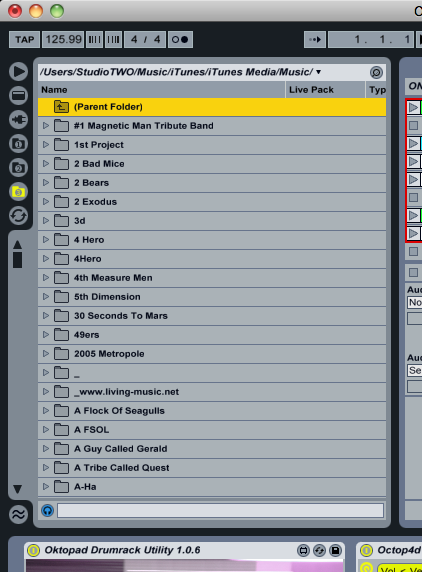
There are workarounds and some are ingenious in their approach but these feel more like hacks rather than a streamlined integrated solution.

So instead many DJs choose to create a large template, containing every tune they think they’re going to be playing! Preparing such a template feels a little bit like packing a crate of tunes for a DJ session.

But when you come to think of it, focusing on your set before you turn up (just like vinyl DJs used to when packing a crate for the night) can actually be a very good thing.

Using Ableton Live with Max4Live

OK so we’ve coped with the shortcomings, realised the benefits, and we’re ready to start pushing the envelope with our DJing, doing things that leave the Traktor and Serato boys way behind. Here’s where Max4Live along with my software for the APC40 and Novation Launchpad helps you to better use Ableton Live as a DJ.

Max for Live is best seen as a toolkit for adding new behaviours to Ableton Live. My procuts – Isotonik and Oktopad – are templates for the Akai APC40 and Novation Launchpad that use this toolkit to put some pretty cool stuff in your hands.

Easier DJing with parts and sections
Ableton guru Tom Cosm championed what he called his “megaset” DJing principle, where each full track is split into its relevant parts – intro, drums, break, vocal etc. This is a popular way of using Ableton Live for DJing, as you can really get stuck into remixing on the fly, get a visible indication of where you are in a track, and have the ability to create infinite cue points.

Although Serato has just upped its game with the ability to name cue points, you’re limited to five in total, and while Traktor Pro 2.5 with the new Kontrol F1 controller again are nodding in Ableton’s direction, we have yet to see how that system will pan out.

Megaset Principle

The "megaset" principle of Ableton Live DJing: Lots of tunes ready to play, all pre-assembled.

However, the downside of using Ableton this way comes when triggering the following clip. Currently you can set “follow actions” with Ableton within each clip, choosing from a number of defined actions to occur after a certain number of bars, beats and units from the clip initially started.
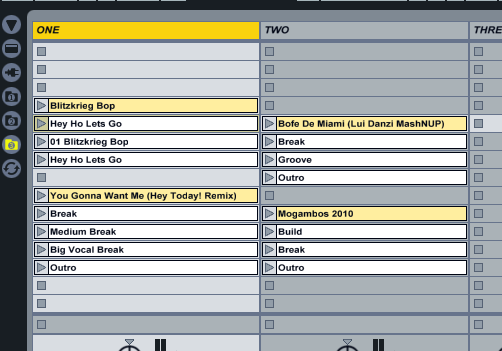
With a little bit of effort this can be done quickly but each clip needs to be set separately and if in the middle of a clip you decide to engage a loop then your follow action will occur at the originally set time regardless of the fact that the clip has not met its end.

So here’s where Max4Live comes in. It circumvents this limitation in Ableton, by keeping an eye on where you actually are in a clip no matter what you’re doing and only triggering the next clip when you actually reach the end. No follow actions, no lengthy set up and the ability to perform looping within tracks!


Better looping
Ableton offers a great deal of configurability for Midi Mapping (not as much as Traktor admittedly, but easily equalled when using a third-party utility such as Bomes Midi Translator). However much of what can be mapped relies on what is in focus.

Wouldn’t pressing a single button to set a four-bar loop be much more preferable?

For instance, you can map a Midi controller to set a loop start and end point and toggle the loop on and off; however, you can only do this on the clip that’s in focus. therefore to loop a clip, you’d have to navigate to it first, unnecessary mouse-pushing which, in a dark venue and with a glowing screen can lead to that “just checking Facebook” look. Wouldn’t pressing a single button to set a four-bar loop be much more preferable?

Again, Max4Live to the rescue! With Max4Live you can send message to hidden parameters. Once you understand the nuances of getting the message order right, it’s ultimately possible to set up on-the-fly looping for the eight tracks within the Novation Launchpad’s Clip Launch rectangle (the 8×8 grid of clips that can be triggered from the pads of the Launchpad), setting loops and halving, doubling and moving them with even more control than either Traktor or Serato.

Nudge, nudge…
Having each clip pre-warped, you’ll never have a clashed beat again! Well, almost…

Sometimes no matter how well you warp a clip it’ll just not sit right with another clip’s bassline or hi-hats. On a pair of turntables, jogwheels or touchstrips you’d just give the offending track a little nudge to bring things sonically back into line. Unfortunately, with Ableton it’s not as straightforward.

The Novation Launchpad

The Launchpad: a perfect pairing for Ableton with an iPad.

While Ableton has a Midi-mappable set of nudge buttons, but like the looping functionality you can only nudge the clip in focus. Plus, it will also only perform a nudge in the size of the current Global Launch quantize.

Once again, the, you’ve got multiple button presses to contend with: Change quantization to none, focus on clip and then nudge. All a far cry from reaching out your right hand and holding two fingers against the platter of a 1210…

But once again, Max4Live to the rescue! By sending a simple message to the playing clip with a value of 0.01 you’ll be back to one physical action to achieving the nudging result – just like the + and – buttons on a Denon CD player.

Here’s a bonus: Ever started a track a bar too late or early? Well simply ask Max4Live to jump forwards or back a bar! Again, it’s simple, one-click stuff.

Mixing in key
Many digital musicians love mixing in key, analysing their music files for key and colour coding them in Ableton according to the Camelot wheel for easy harmonic mixing and mashups. Well for them, the ability of Max4Live to be change the pitch of a clip on the fly brings brand new mashup possibilities to the fore, with an endless number of accapellas now becoming suitable to lay over virtually any instrumental.


Finally…

I made Isotonik and Oktopad because I love the creative possibilities of Ableton Live but wanted to address some of these very real concerns that DJs moving across from other systems have with the program.

You’ll end up with friends that you only recognise through their avatar on a forum!

However, it’s not for everyone. Ableton is still a far cry from two-decks-and-a-mixer. Hopefully Max4Live with the APC40 or Launchpad and my templates makes it easier and more fun, but the truth is, you’ll never finish building your source tunes template, and with this and other issues, it’ll own your life, ruin your relationships, and see you end up with friends that you only recognise through their avatar on a forum!

I can’t do anything about all of that, I’m afraid – and I can’t bring parallel waveforms back for you, either. Apart from that, though, for the adventurous DJ, Ableton Live plus Max4Live with Isotonik and/or Oktopad, does, in my opinion, present the most powerful DJing platform out there today.

• Isotonik and Oktopad are fully featured templates for the Akai APC40 and Launchpad respectively. Subscribers benefit from a steady dream of updates as new functionality is requested and realised. More details and videos can be found at Darren’s website, and subscribers can get involved on his Facebook Page.

Have you tried or considered Ableton Live DJing? Do you currently DJ with Ableton Live? What are your experiences of Ableton, Max4Live, or Darren’s templates? Please share your thoughts in the comments.

Now go to:
5 Crazy Ableton Live Controllers
Kontrol F1 Hardware & Traktor Pro 2.5 Software Announced

Want to escape the bedroom and play in public - fast?
Our 1000s-selling How To Digital DJ Fast video course shows you how.

Learn to DJ Free - email course plus bonus PDF book
Sign up for our weekly email course for beginners now...

Trouble choosing a controller? Visit the web's #1 guide!
DJ Controllers: The Ultimate Buyer’s Guide 2013.


Tags: , , , ,


Creative Commons LicenseThis work is licensed under a Creative Commons Attribution-NonCommercial-NoDerivs 3.0 Unported License.

39 Responses to “Mission: Turn Ableton Live Into A Killer DJ Tool!”
  1. Aidan Johnson says:

    About the ‘being a DJ’ thing… someone said to me only last week “I hate these DJ’s who build up and slow down, I just want banger after banger all night”. This has been my philosophy whenever I have DJ’d (although the sort of crowds I play too are, um, up-for-it, VERY happy – understand?). I can appreciate the slow down/speed up philosophy of this article for playing at a house club, or beerheads in a townie club, but in a sweaty techno/psytrance club, it’s gotta be bangers all night – it’s what I want as a clubber and apparently so do others.
    On the Ableton front, it’s a killer program. I have lost 3 years of my life to Traktor, dunno if I have the time to loose another 3 (probably more) to Ableton (I would like to though!).
    Ableton and Traktor are both trying to take each other’s ground now (what with the F2 update to Traktor’s sample decks). I think producers are always going to like Live and DJ’s will always tend toward Traktor. It’s about the workflow that each has got used to and ‘grown up’ with. Will there ever be a kickass app in the middle of the production/DJ-ing crossover, that does both equally well? Will be interesting to see. Traktor F2 with a session view perhaps?? Oh, and please NI – VST plugins!!!

    [ link ]
    • You now can use VST synced with traktor’s bpm and per deck too.

      Check out this new VST Host tool from Maurice Norris:
      http://digitaldjtools.net/tools/stompy/

      Awesome!

      [ link ]
      • Do you know how I can do this with internal mix mode and with Jack OSX? Kind of stuck I use:

        Traktor 2.5 (2 decks only) with a DNMC6000. I use Ableton 8.3.3 with a Traktor Audio 10 Soundcard. I use 2 channels on DNMC6000 for Ableton (1 for Audio, 1 for Monitoring). I have Ableton Sync to Traktor 2.5 and controlled by APC40. My operating system is OSX 10.7.4.

        I will be using Stompy to use Guitar Rig 5 VST for effects with Traktor 2.5.

        Thanks in advance for any assistance!

        DJ MAYOMBE

        [ link ]
    • Paul says:

      Great article Darren.
      Great replies.
      I am still torn…
      I love the precision I can get out of my effects when djing with ableton.
      But I do spend ridiculous amounts of time warping tracks and prepping sets because it is just too risky to be in the middle of a set and try to use a song and realize ableton won’t warp it correctly and then I spend two minutes trying to ge the track warped on the fly…. etc…
      I am hoping bitwig could address this need for a true hybrid of daw and dj software.

      Best,
      P

      [ link ]
  2. Ruesue says:

    As much as I love the innovations with software and the work and time that goes into developing the mappings I cant see myself using my eyes more than my ears.

    [ link ]
    • my exact feelings as well, performing is as little as watching the screen for me as digging through a record box….

      [ link ]
  3. I do love ableton. i use it for FX chains and routing audio from traktor
    I don’t have an apc. but i have a launchpad and I guess i’m just really disappointed in the mapping capabilities in the standalone software without automap and every other app out there. They’ve got to improve that soon if they want to be taken as a DJ software. If they want to stick to production, they’ve definitely got me as a customer.

    [ link ]
  4. djdain says:

    I’ve repeated many of the concepts in this article to people who ask me how I DJ with Ableton Live. Looks like my desire for Max4Live is surely becoming a need. Better start budgeting!

    [ link ]
  5. I use Ableton for jjing, worked my “megaset” based on a template I found online. The project does take quite a while to prepare but, as you said, it’s better to go through the tracks and get to know them before a gig.
    @ Ruesue what’s the difference between looking in a record box or in a screen? Once the mappings are in place you only have to look in it to find your next song.
    On a side note, with my APC 40 I had 2 instances where the music stopped altogether due to a wrong button being pushed. Learned the lesson but still..awkward

    [ link ]
    • I midi map my stop all clips and the stop transport button to two empty clip slots! Was on stage once with the APC in an awkward position and my hand brushed the transport stop button, went from mashing 4 tracks together to utter silence…. Lesson learnt!

      Cheers
      D

      [ link ]
  6. djdecibel says:

    I used Ableton Live with the Bridge in Serato and I love it. Can’t Dj with it alone, I do need the feeling of vinyl and an ACTUAL crossfader off my TTM57.

    [ link ]
    • Joe Blvd says:

      Yup, I agree!

      My next venture is to integrate The Bridge with Serato Video. I need to beef up the RAM on the computer just a bit, but it will be so worth it.

      [ link ]
    • Tim Nice says:

      I use ableton with an audio card with 4 sets of stereo outputs. The only internal controls are channel levels within ableton which I try not to move too much. Otherwise, all of my mixing & gain control is on a standard dj mixer.

      [ link ]
  7. DJ Gerard says:

    So much possibilities, but lacks the ease and comfort of simple DJing. Performance of a 30 minute set YES. If you get to know those tracks but for all night DJing? No way. I want to be able to pick a song and play. I do not want to spend more time setting warp markers home than I do playing out.
    I have owned and used all 3 mentioned. I choose Traktor. Traktor is definitely a cross-breed of SSL and Live. The bridge just missed. IMO

    [ link ]
    • For me the setting of warp markers is the same as beatgriding in Traktor no?

      I hope that we’re just at part one for the Bridge though….

      Cheers
      D

      [ link ]
      • DJ Gerard says:

        No, I don’t think so because I can tap in the grid on Traktor and that is only if it isn’t correct to begin with which is not often. Plus I can always mix it manually if necessary not restricting my playlist to what has been warped.
        I like Max for Live effects and Ableton fx but that is a little expensive for a DJ just to have effects they may or may not use when and if they will while DJing.
        I LOVE Live for any customizing I want to do to a track or mix.
        Keep up the good work!! It is nice seeing products aimed at DJ production and customization.

        [ link ]
  8. Jerome says:

    Live is awesome.
    I agree that Live browser is hudge lack. I personnaly browse from my mac finder with a resized window on the bottom of my screen, and it works perfectly.
    That said, I mainly use the “build your crate before each gig” method, like we used to do before computers came up last decade. It’s sometime good to think that crate size can not exceed 100 “vinyls”: you are forced to be creative and relevant when you prepare a gig.
    As DJ Gerard said, Live is not made to pick and play. Pick from your crate, yes. Pick from your collection, no.
    Tracktor and Serato are not simple enough, but not tweakable enough.
    I personnaly use Live for 2 hours performance sets, but also love Algoriddim Dj4 for its simplicity to pick and play, for other events. Two different worlds.

    [ link ]
  9. Dopopo says:

    Agree with the article! i personnaly use Ableton with touchAble for iPad, and it’s the best controller ever in my opinion, http://www.touch-able.com

    [ link ]
    • Broomptish says:

      Meant to say you know liine has released the jazzmutant lemur app? It looks great too, I need an ipad LOL

      [ link ]
      • Darren E Cowley says:

        I’ve got a setup that uses the Lemur app to control my clip launching as when combined with the bridge i dont have to use half my serato screen to look at ableton….

        Awesome tool!!

        Cheers
        D

        [ link ]
  10. Chrisw says:

    Phil,

    Being a DJ who has both used Traktor and Ableton I have found ableton being alot more keyed in. I switched from Traktor to ableton about a year ago. And control my whole set using an APC20. And as for mixing I havent had any trouble if you use the warping of the tracks correctly. However I cant wait till berrhingers new USB Mixer comes out because I already have a Smart Mixing Mapping planned out. Thus allowing me superb control of 4 decks without the worry of jogwheels and anything else.

    [ link ]
  11. Broomptish says:

    I started djing with ableton but have switched to Traktor due to the time consuming warping but I really want to be able to sync the two which I am having issues with, on pc windows 7 using jack audio and midi yoke but keep getting feedback in ableton, been trying for a while now and no joy :(

    Main reason wanting to sync the two is to use octopad, this would be a great portable dj rig to compliment my faderfoxdj3 and denon dn-sc2000, as it is ableton isnt getting used at all for djing, or the launchpad which is a shame as the I love the octopad and it would be a great addition to any dj setup, the effects great!

    [ link ]
  12. ARBYSKEE says:

    ETbh Everytime I see a dj using ableton I just don’t the same feeling.I respect what they do, but for me there just feels like there’s something missing. for example… I’ve seen sasha dj back in the day and also in period of using abeloton and it just didn’t have the same spirit. now he’s gone back to using cdj’s, he seems back to what he was.. just my opinion though.

    [ link ]
  13. Scummers says:

    You can always tell when a “DJ” is using Live… You can hear it… It works sometimes. Sometimes not.

    I use Live for production way more than I use it in live situations… though I have used it live… I would really like to see an Ableton “Not Live” that was just aimed 100% at production. I’d rather use Traktor or some CDJ’s to drop the tunes I make with Live.

    [ link ]
  14. Scott says:

    Really cool article. Justice are a great example of top notch Ableton DJing. Even back in 2007 for A Cross The Universe they were implementing stems from different tracks all over the place. And it isn’t like they are doing it to be tricky or fancy – it just seems to be the best method for playing out their sounds live in a coherent set (as opposed to being limited to mixing one track into another like “normal”). I freaking love Justice…I need to see their new set this year haha.

    [ link ]
    • Thank you :-D

      Saw Digitalism do the same i think and it was pretty inspiring, that said i’ve also seen a few that have simply pressed play on a very eleborate set and havent reached for the headphones once, when it’s not your own material i dont see the point in this…. Got caught out once very early in using it when a previous dj basically played every tune i’d prepared, i now make sure i have a mega set approach with my main cutting up of tracks being limited to acapellas and drum loops….

      Cheers
      D

      [ link ]
  15. I have used both Traktor and Ableton Live.
    I also used controllers for both (Trigger Finger, APC 40, MIDIKeyboard)and the man-in-the-middle Xone X4.

    At the end, Traktor is for DJing other’s tracks and Ableton is for production and DJing one’s tracks, loops, phrases and samples.

    [ link ]
  16. A bit advanced fr me in the later parts of the article, I don’t have Max4Live.

    I’ve just custom midi mapped my APC40 to be a basic turntable I guess. I use about 8 effects (only have the Live Lite Ed), so I’m using two decks, each with some beat repeats to mess around with and the kamoni live strip. Also I heard it was good to use a limit gain so I have that on a master track. I don’t really rely on delays, filters, etc because I like to really play with loops and create newer sounds and fills.

    [ link ]
  17. Breached says:

    It has been quite a few years since I DJ’d with Ableton, but when I did, I found Torq incredible as a rewire slave, provided you don’t want to use Torq as a DVS. I am surprised that this is never mentioned as a solution to remedy Ableton’s shortcomings. With Torq you have essentially all the features and more of a CDJ player but with rewire, all of your audio is routed into individual tracks within Ableton and the master tempo is slaved from Ableton (if desired). I haven’t upgraded my copy of Torq in a while, but from what I have heard, the new version of Torq is way better than it used to be.

    [ link ]
  18. DJ Forced Hand says:

    While I think it’s awesome that you made Ableton work for you, I very much agree with what DJ Gerard and DJ Decibel are saying. For simplicity’s sake, DJ Gerard is right. Certainly, there will be a lot of people who will try the Kontrol F1 as an Ableton replacement (even though those samples won’t be live instruments, nor incorporate VST effects) in Traktor mainly because Ableton doesn’t have an “ease of use” interface like Traktor.

    DJ Gerard and DJ Decibel are also right when referring to Ableton as a great add-on (or accompaniment) for DJing. Be it in a live set or in the studio remixing a tune, Ableton is great but I’m not convinced it’s “Ready for Prime Time” all by itself… especially when the people at Serato and Ableton have teamed up in a very expensive collaboration project (the Bridge).

    I also find it a little bit of a let down that Native Instruments decided to try to “do things their own way” rather than working with an industry standard company like Ableton.

    [ link ]
  19. GBO says:

    “So here’s where Max4Live comes in. It circumvents this limitation in Ableton, by keeping an eye on where you actually are in a clip no matter what you’re doing and only triggering the next clip when you actually reach the end. No follow actions, no lengthy set up and the ability to perform looping within tracks!”

    Could you please provide a name for the plugin that allows to do this? It would be a real killer feature!

    [ link ]
    • There’s two devices that do this, if you have an APC40 then the ISotonik device does it as part of it’s feature set…

      If you don’t then the Follow device which is part of the Modular Series allows you to not only have this feature but define whether its the next clip, previous, random and many other choices… It can also be set to trigger a scene at clip end as well…

      Details are at http://www.isotonikstudios.com

      Cheers
      D

      [ link ]
  20. Luke says:

    Hi,
    I’m kind of fresh with ableton and dj’ing with it but I see a big potential of this setup and I’m thinking about buying APC. Just one (maybe stupid) question – is it possible to hear your track on headphones before you gonna play it to the main out (something like cue in dj mixer) ?

    [ link ]
    • Yes, but to do so you’ll need a soundcard with a least two sets of outputs, the Audio DJ2 is a good budget solution!

      Cheers
      D

      [ link ]
  21. Isotonik has now reached version NINE, it has a number of upgraded features including:

    The ability to define the size of loops set
    Fully scalable floating windows
    Up to 100 Smart effects

    And many more…

    http://www.isotonikstudios.com for more details!

    Cheers
    D

    [ link ]
  22. Clay says:

    good article. I used traktor for a few years but I find ableton so much easier and more professional. If you are mixing tracks with similar BPMs, I would definately go with ableton. I mainly mix tech/jazz house so I just set my liveset bpm to 128. As for warping, its really easy. Some people make a big deal out of it but I can go though my library, pick out like 50 songs I want to use in my next set and warp them all in under an hour. I usually only change about 5-10 tracks between sets so this process really only takes me like 5 minutes for each time I dj.

    I also have a solutuion to the looper issue. I just send a bunch of tracks to two return tracks and solo the returns. Then i put effects like a looper on there. I make loops live with the push of a button…

    [ link ]
  23. Rohan says:

    Enjouyed this article would love to see a template like those above but for ableton push for a DJ setup!!

    [ link ]

Leave a Reply

Enter your details:

Or connect with:


Be constructive, be polite. Full guidelines here. Asking a question? Use the forum instead. Comment that don't meet our posting standards won't be published.


New to Digital DJ Tips? | What DJ controller? | Learn to DJ | Testimonials and Feedback | Privacy Policy