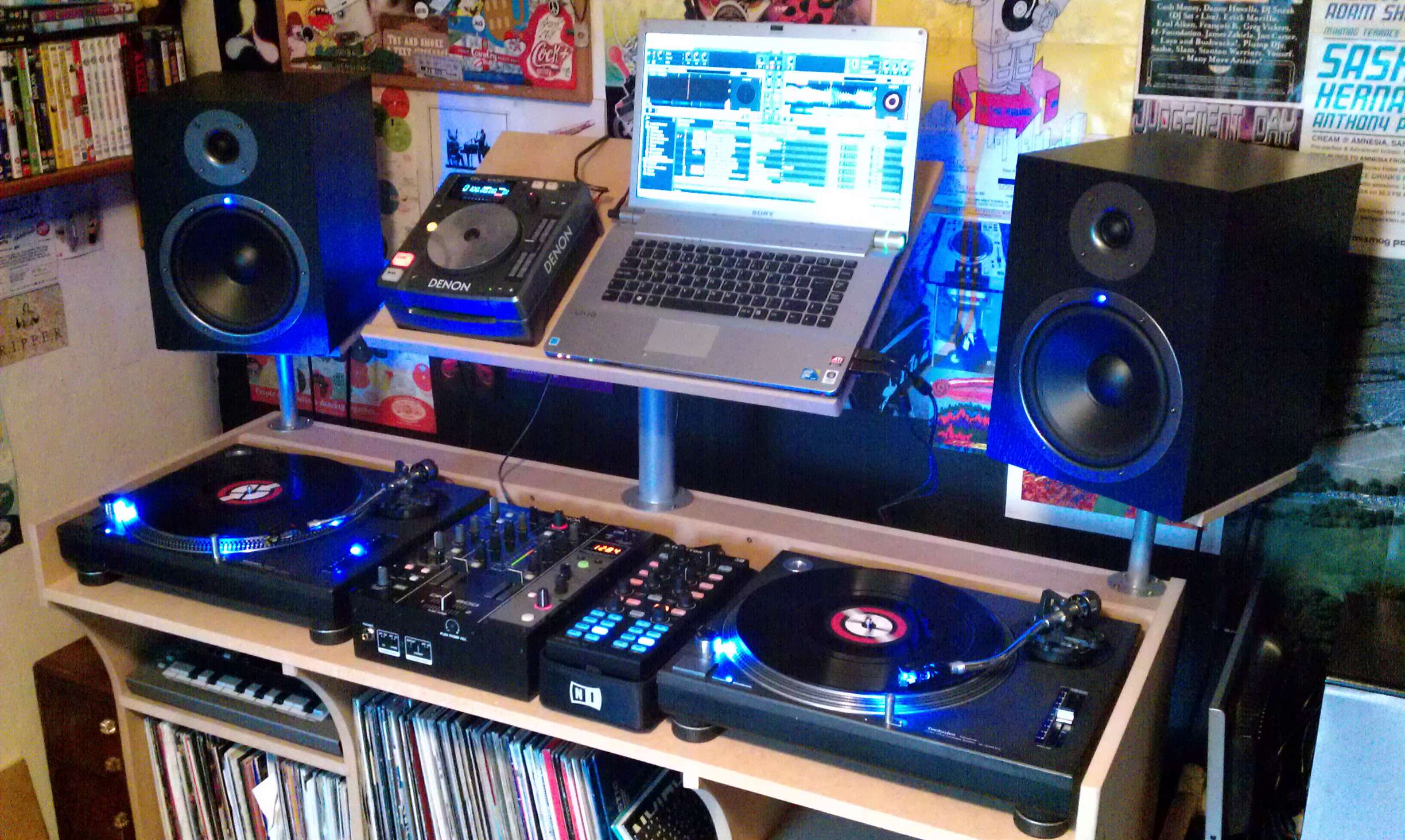
While it's not always possible to obey all the rules below, the closer you can stick to them, the better your set-up will sound. Pic:The Electronomist
Last time in A Beginner DJ’s Guide To Monitors, Part 1: Choosing Your Speakers we talked through the options available to you and how to make sure you choose a speaker system that’s suitable for your needs.
This time, we’ll look at little tricks for setting your speakers up, and some common pitfalls to avoid, before we add the final piece to the jigsaw in part 3, when we’ll consider how to set up the room itself.
The aim of positioning (that means your speakers, your desk and your DJ gear), is so that when you’re musically “in the zone”, doing your thing, you’re also physically in the right place – in the “sweet spot” where you get the best possible sound and stereo imagery from your speakers.
Why? Because it’s here that you’re hearing the sound as true to how it should be as possible. You’re likely to mix better, EQ better, and produce better results when recording your work if you’re monitoring it from the best physical position.
Five tricks to positioning speakers
- Put them in an equilateral triangle with your head – Imagine a triangle, with the speakers at two of the three points, and your head at the third. That’s how the speakers should be set up, with them pointing diectly at the third point, ie your head
- Make sure the tweeters are level with your ears – The high frequencies that the tweeters produce are the most directional of all, and so it’s imperative that you get the “full force” of them. One trick here is to put wedges under the speakers to point them up at your head, should they be on a desk and too low down. This reduces one downside of not being able to…
- Put your speakers on stands – Part of what we’re trying to achieve here is as little bouncing of the soundwaves off objects before they reach your ears as possible. Putting them on stands usually helps with this immensely. Otherwise, if they’re on a desk, the desk surface will bounce the signal to your ears, colouring what you hear
- Try and keep them away from walls and corners – Leave a couple of feet if you can between the speakers and the wall (not always possible; we can’t do it here at Digital DJ Tips, for intance). And try and make sure that if the speakers are near a corner, the distance between both walls and the speaker is different. Again, we’re trying to prevent excessive “bouncing” of sound
- Put the subwoofer half-way between the two main speakers, pointing at you – Subwoofers don’t need anywhere near as careful positioning as your main speakers because bass is not very directional (that’s why you only have one sub-woofer), so if you can’t do this don’t fret too much. Indeed, one trick that I’ve never tried but that I read in an M-Audio speaker guide once is to put your subwoofer on your chair with a bassy track going, then crawl around your room on the floor. Where you hear the bass loudest is where you should put your subwoofer!
Of course, it goes without saying that you shouldn’t have anything obstructing the line between you and your speakers.
Finally…
You won’t be able to do all of the above in all circumstances, and so you’ll have to make compromises. The important thing is to trust your ears, preferably using as tune you know well to test as you make adjustments. Next time: Room acoustics…
How much of the above have you managed to achieve in your own personal home practice studio? How do you find it best to set up your speakers for accurate mixing and monitoring? Please share your thoughts in the comments.
Now go to:
A Beginner DJ’s Guide To Monitors, Part 1: Choosing Your Speakers
A Beginner DJ’s Guide To Monitors, Part 3: Getting Your Room Acoustics Right
Review & Video: KRK Rokit 6 Powered Monitor Speakers
Want to escape the bedroom and play in public - fast?
Our 1000s-selling How To Digital DJ Fast video course shows you how.
Learn to DJ Free - email course plus bonus PDF book
Sign up for our weekly email course for beginners now...
Trouble choosing a controller? Visit the web's #1 guide!
DJ Controllers: The Ultimate Buyer’s Guide 2013.
Tags: beginner digital dj tips, monitor positioning, speaker positioning
This work is licensed under a Creative Commons Attribution-NonCommercial-NoDerivs 3.0 Unported License.

Nice guide, but there’s one error. Subwoofer placement is quite possibly the most important part of the whole thing. In most untreated rooms, the bass is very uneven, and as you walk around, some sub bass notes will be significantly louder than others in different spots, and some notes will completely vanish in certain places. Placing your subwoofer in the optimal location can help somewhat, so play a song with a bunch of different notes in the bass and move the sub until they sound in the listening position is as even as possible. Once you find the best place, play a sine wave descending through 2-3 octaves, and adjust the volume of the sub so you can’t tell where your speakers stop and the subwoofer starts.
[ link ]Thanks for the tip Tyler, I agree with you a lot depends on the room – see next week’s final piece in the jigsaw
)
Gotta disagree with you that the subwoofer is the most important part of the whole equation though. After all, most people don’t even have one, and while you can DJ quite fine without a subwoofer, the same can’t be said for your main speakers… and subwoofers are far less directional. I agree it’s worth setting it up properly, but personally I wouldn’t overstate it for DJ practice.
[ link ]A good and cunning trick for placement of the subwoofer in case there are severe problems with the acoustics of the room (causing the bass to either be “weak” (cancellation) or too powerful, due to “standing waves”):
place the subwoofer at your listening position, that is, at your chair. Play one of yor favourite tunes. Move around in the room and spot the place where the bass of the track sounds more natural to you. Place the subwoofer to that spot.
[ link ]Good tip! Didn’t we mention that? Maybe it’s in next week’s post. I read that in an M-Audio speaker setup guide, I agree it’s cunning and also common sense when you think about it.
[ link ]Silly me! You did mention it – I somehow lost that paragraph when I read the article!
[ link ]It’s a cool idea, I just like the idea of people crawling around on all fours searching for maximum bass!
[ link ]The sub should be placed right in one of the front corners of the room for the best sound.
[ link ]There is an alternative, which I read from John Digweeds rider: Speakers positioned 90 degrees to the left and right of you with a third, sub-woofer I think, positioned directly behind. I guess the idea is to set up like a large pair of headphones. I’ve seen the set-up in Sankeys many a time.
As for my own, the new place I’m in the positioning is well off for soundstage, but with dance music does stereo really matter, prob not. However, my hi-fi speakers which I got before getting dj kit, have the tweeter below the main driver – according the the manufacturers it improves the pace, rhythm and timing – so its even less than waist height. Though how much directional info does one need for djing?
[ link ]Since you mentioned you found this on a rider, I assume Mr. Digweed likes this setup in a concert venue or club (where there already is a lot of sound from the main PA bouncing around already) to be able to hear the stereo difference more clearly. To use two speakers like this in a small room, will in fact make it more difficult to hear the stereo difference, as the sound will bounce off the opposite wall almost immediately.
[ link ]Hi Phil,
Bit off topic i’m afraid but do you know what DJ stand that is pictured above?
[ link ]No idea, I’m afraid
[ link ]Ok, how about some more info about us that can’t place speakers away from the wall? Like for example: buy monitors with front bass reflex?
[ link ]Good point, we didn’t cover front/back bass ports.
[ link ]This is actually a really important point. Rear ported speakers are made to take advantage of bass reflection and generally sound best perpendicular to the wall and well spaced. If you have them at off angles or too close to a wall, you loose much of the accuracy and fullness of the bass. For this reason I’ve always preferred front ported monitors. This may also have something to do with the popularity of the front-ported KRK Rootkits, tho I personally have a set of B&W 685s.
[ link ]what if i get only 1 speaker and 1 sub woofer? will i be able to get the stereo effect or is it an obligation to get at least 2 speakers ?
[ link ]You won’t get stereo, and this would be a very unusual set-up, but that’s not to say it wouldn’t work. Little known fact is that most club systems run in mono anyway, and a club I DJed in for 10 years only had one monitor speaker, so I was effectively DJing in mono for a decade! But really, a pair of “main” speakers is better than one “main” and one subwoofer. All three is best
[ link ]I would also consider vertical placement (height not direction) of the subwoofer. There are 3 moduli in any subwoofer equation and improper placement can lead to noise cancellation. The subwoofer isn’t just something to plop down anywhere to add bass.
It is known that the ear has 11 distinct points of contact which collect (read as bounce) the sound into the ear. I’m a fan of lateral placement of monitor speakers… perpendicularly facing your head from the side think straight line through your head from speaker to speaker with your head being in the middle. I know a lot of people don’t have this kind of space to deal with, but this provides the truest sound for stereo audio (Left is actually Left, Right is actually Right) with the widest spread and the sound has less bouncing to do to get to your ear drum. If you don’t have physical space for a stand, try hanging the speakers from the ceiling with metal braided wire (and eye hooks).
I don’t think anyone has addressed this point: When you wire the speakers (from the mixing board) for your own enjoyment, the Stereo channels should reflect where you’re sitting (just like headphones) however for any public address, remember that the audience is FACING YOU and therefore the audience (“House”) hears the Stereo channels reversed (from the perspective of the DJ, “Stage”). The audience hears (Stereo Left from Stage Right, and Stereo Right from Stage Left)… you might not think this matters much but there are songs that clearly pan left-to-right.
If you’re really invested in making the cleanest sound possible, you might consider audio isolation “foam fingers” on your walls and ceiling… and a removable port over your window. This keeps reflection down and simulates (some of) what happens when you play music into a crowd.
[ link ]One thing I’d add though is that every decent-sized club PA I’ve ever played on (that I can recall) has been mono not stereo.
[ link ]Which is pretty logic since a club is packed with speakers all over the place so you get a solid sound pressure in every corner.
Not like a festival where you have 2 big line arrays taking care of the stereo image … the best place there would be in front of the central PA tower.
[ link ]I have experienced Stereo and True Spatial Sound (discrete sound outs for each speaker) in bigger clubs.
[ link ]Good stuff! I can only report what I have seen
[ link ]Hello,
i have a question concerning monitors connection, it s kinda stupid and i dont really know where to ask.
i have a pair of KRK 8 and a traktor audio 2 soundcard.
its outputs are 2 1/4 jack, and i want to use one for the master channel, and one for headphone cueing.
my question is this : how do i connect two speakers to one output ?
do i absolutely have to use a 1/4 to rca and plug into the unbalanced rca plug of my speakers ?
since the speakers are kinda far away from the soundcard i d rather use balanced cables, but i dont really know how to make that set up work.
anyway any help would be apreciated,
keep up the good work on the website !
[ link ]The Audio 2′s output is unbalanced anyway, so the cable you suggest is exactly the right one to use.
[ link ]thanks
[ link ]PHIL, WHEN ARE GONNA GET A FULL REVIEW ON THE MACKIE MR8MK2. Already covered the pioneer sdj08 and krk. Theese are all same price range. Please review them! Peace!
[ link ]They’re on our list! Please be patient
[ link ]