


Pioneer DDJ-SX Serato DJ Controller Review
The Pioneer DDJ-SX is the first DJ controller designed for Serato DJ, the new DJ software from, yup, Serato. (Update: Also take a look at the Pioneer DDJ-SZ). Both this controller and the software are launched today, and so the controller is plainly a big deal for both companies. The good news is that it is pretty much an awesome success. It’s as if Pioneer’s designers sat down with Serato and said: “Let’s take the best bits of every DJ controller out there, and incorporate them into one controller, without compromise.” Better, they seem to have done for a price which, while high, is not extortionately so.
So you’ve got the build quality of the Numark NS6, the performance controls of the revolutionary Novation Twitch and later the Vestax VCI-380, the proper four-channel standalone mixer and hardware filters of the Vestax VCI-400, and a full-strength, highly capable “in the box” software solution fully tuned to make the most of the controller’s features (as with the Traktor Kontrol S4).
Hardware vs software
It is to an extent impossible to review any DJ controller without talking about the software it runs / comes with. That’s even more the case with this one, as it is currently the only controller that works with Serato DJ. This is because the other DJ controllers that will in time work with the software haven’t yet been added to it. However, this review will nonetheless focus more on the Pioneer hardware than the Serato DJ software; we’ve got a full Serato DJ software review which you can read alongside this review.
First impressions and setting up
We had a review sample to prepare this piece, so it wasn’t boxed in the finished packaging, and didn’t have anything in the box except a mains adaptor (better quality build than most, and with Pioneer’s name on it rather than a generic example), a USB cable and the unit itself. However, expect yours to have a CD-ROM, warranty / quickstart instructions and so on.
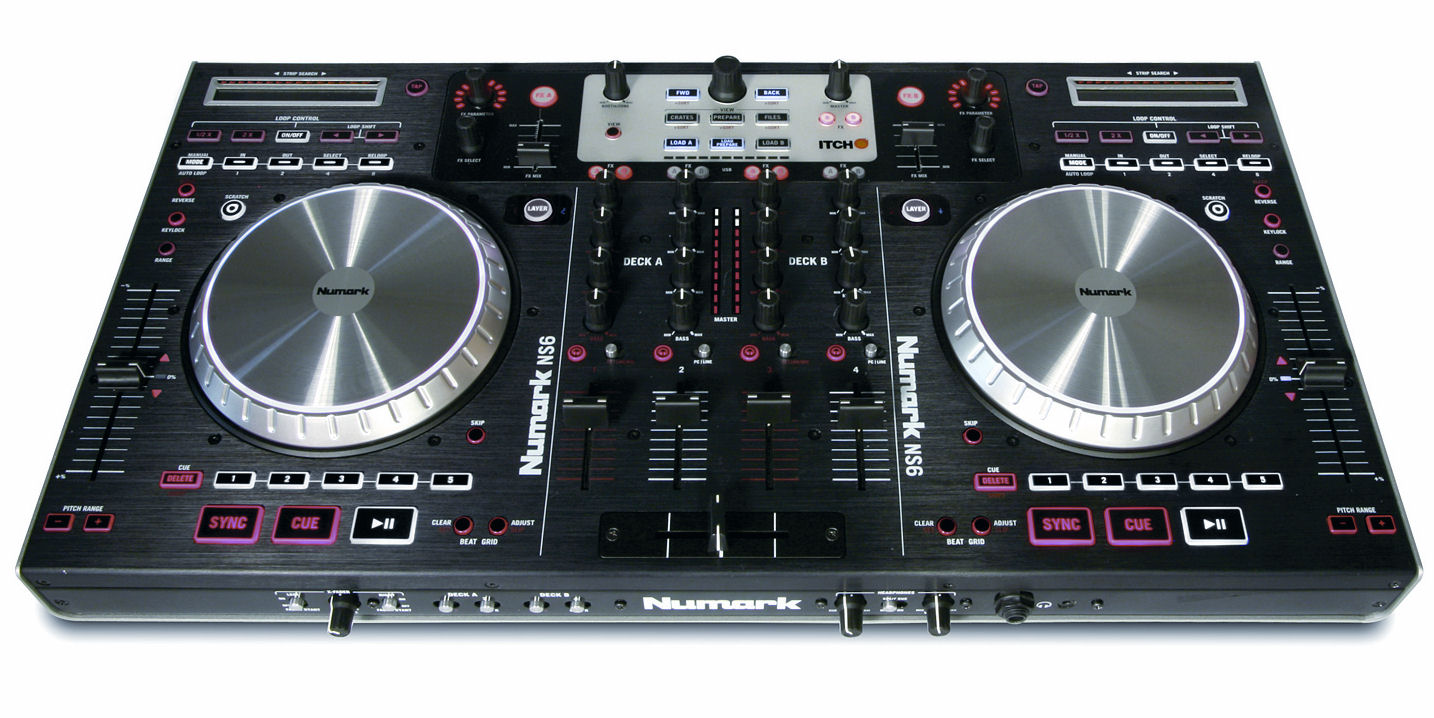
The first impression of the unit on removing it from the packaging is that it is like a slightly larger Numark NS6, with the performance pads of the Novation Twitch tacked on underneath each jogwheel. It shares the same high quality of primarily metal construction, although unlike the Numark model it has a plastic casing on the underside. Being so big, it is definitely a “transportable” rather than a “portable” controller – car, not backpack.
The overall feel is of a pro-quality device, a feeling confirmed when you touch any of the knobs (a mixture of rubber and plastic, and bolted to an internal faceplate below the external black metal one), play with the jogwheels (smooth, silent and with an attractive internal LED feature) or slide the faders (weighted lines, looser crossfader, decent long-throw pitch faders).
Front and back
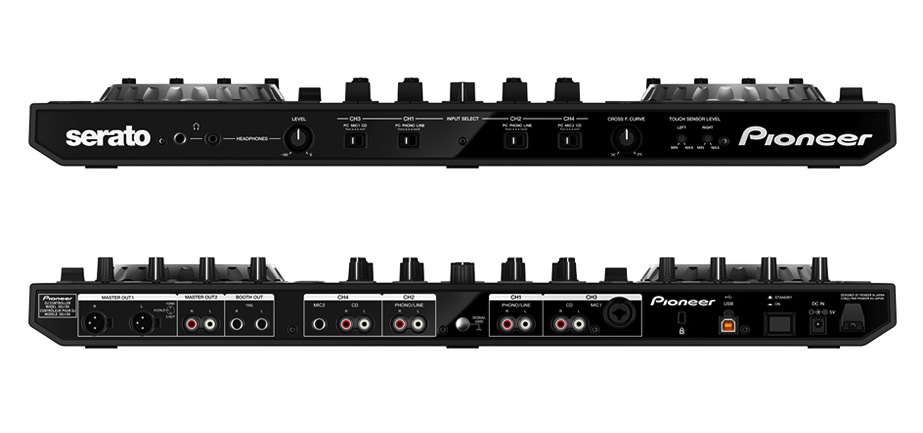
On the front of the unit are a pair of headphones sockets (1/8″ and 1/4″ TRS) complete with level control knob; the input source switches for each of the DDJ-SX’s four channels (there are two phonos, four line and two microphone channels as well as the expected four PC channels), a crossfader curve knob, and two touch sensor level knobs for adjusting the sensitivity of the jogwheels. The headphones and crossfader curve knobs are the push-to-retract type.
Meanwhile, round the back are the usual power switch, USB and DC in sockets (the latter with a plastic cable hook), and a Kensington slot; in addition of course there is a whole raft of inputs and outputs. These are: Balanced XLR & unbalanced RCA master outs, balanced TRS booth outs, and inputs for the four phono/line sources plus the two microphones (one a dual TRS/XLR, one just TRS). I think it would have been nice to have at least one of those microphone sockets on the front or top for ease of access. Finally, there’s a ground pin for earthing Technics record decks.
Decks
The two deck areas are identical rather than the more normal mirror image of each other (or some combination of the two). Straight off I can see one potential issue with this, which is that while the right-hand deck pitch fader is easy to access as it’s the last control on the far right of the unit, the left-hand deck one is tucked between the EQ knobs for the far-left line, and the big, very sensitive jogwheel.
Even on a controller this size, it feels a bit cramped and you’ll have to be careful not to accidentally hit the jogwheel when moving in to make pitch adjustments.

From the top, each deck has a long needle search strip for quick movement though tracks; a big jogwheel (metal top, plastic edge, that works like similar jogs on other DJ controllers, particularly the Numark models); the aforementioned long-throw tempo fader; and a handful of control buttons for adjusting the beatgrid, switching the jog mode to/from vinyl emulation, slip mode, adjusting the tempo range / keylock, and something called “dual deck”. We’ll discuss most of these functions later.
Below this part of the deck is a section containing the performance pads (for hot cues, loop roll, slicer and sampler), the transport buttons / sync control (laid out in typical vertical Pioneer style), and the autoloop controls.
It’s worth mentioning here that each pitch fader has two small “takeover” arrows. These are related to a feature called “soft takeover”, which is used to allow two decks (as this is a four-channel mixer) to share one tempo fader.
For the uninitiated, soft takeover is a system whereby when you switch from one deck to another deck that you were previously using, the control in question won’t function until it’s moved back to where it was when you left the first deck. This is to stop sudden jumps in (in this case) speed.
All these little arrows do is show you which direction to move the fader in in order to “take over” control again. It saves looking at the screen to check – which in this case, is pretty much essential as Serato DJ doesn’t have a pitch control display at all.
Mixer
Taking up just under a third of the width of the unit, the four-channel mixer down the centre doesn’t feel so different to Pioneer’s standalone mixers in quality, which is a good thing. However, it is a little more cramped than, for instance, the Pioneer DJM-850 we have here in the workshop, mainly because it slots in an extra fader right in the middle, used for sample volume.
Each of the four channels has: gain; hi, mid and low EQs with a channel VU meter alongside; a one-knob filter; a cue button; a line fader; and a crossfader assign three-way switch. Down the middle of the unit are, as is customary, the master / booth output controls and a master stereo VU meter. This is also where you’ll find the cue / master headphones mix knob. Finally, at the very bottom, is the removable, replaceable crossfader. It’s as good as those on Pioneer’s standalone mixers: Loose, but in all honesty not loose enough to have the most technical scratch DJs singing its praises.
There is a channel fader start function for each line fader, which unusually isn’t on a switch; instead, you hold shift while opening the facer to use it.
Effects & library sections

At the very top of the decks are two identical FX sections, comprising four knobs and four buttons, the first three knobs being standard, the fourth being a stepped rotary encoder. Meanwhile, above each of the mixer lines are two small buttons to decide which effects each of the channels is routed through. We’ll look in more detail at what these sections do later.
Right at the top middle, above the mixer, are the library controls. Here is the big(ger) stepped rotary encoder for scrolling through track lists, file/folder navigation buttons, and buttons for loading/instant doubling tracks to any of the for channels.
Other controls
Right underneath the dual deck controls on each deck there is a small shift button. This is used to access a whole host of additional functions, from effects select and behaviour to loop shift; channel fader start to library sorting; tempo range to tap BPM.
Interestingly, the manual alludes to forthcoming functions for several buttons that don’t currently have any modifier actions programmed in this edition of Serato DJ.
Finally, at the very top left of the whole unit is a small button labelled “panel select”: This allows you to cycle through the various panels available within Serato DJ such as FX and sampler; something you could only do using the mouse pointer with Serato’s previous controller software, ITCH. Definite improvement there.
Setting up
Pioneer recommends simply downloading the latest version of the software from Serato’s website, which makes perfect sense: With Serato, the software is always free for users of this controller, because you “buy” it when you buy the controller (which incidentally means free upgrades for life).
On a Windows machine, you need to install Pioneer / Serato’s ASIO driver for outputting audio, before you install Serato DJ; with Macs, you simple install Serato DJ and you’re done. Also only with Windows, there’s a settings utility to allow you to adjust the latency (buffer size) of the ASIO driver; obviously there is no such thing for Mac users as it’s not necessary for proper functioning due to the way audio works on OS X.
On plugging in, the DDJ-SX unit cycles rather pleasingly through all its myriad LEDs from top to bottom, before settling with a mixture of blue, red and white controls lit; the cue and play / pause buttons on each deck flashing; and a very Pioneer CDJ-esque centre section of circular LED bars lit inside each jogwheel.
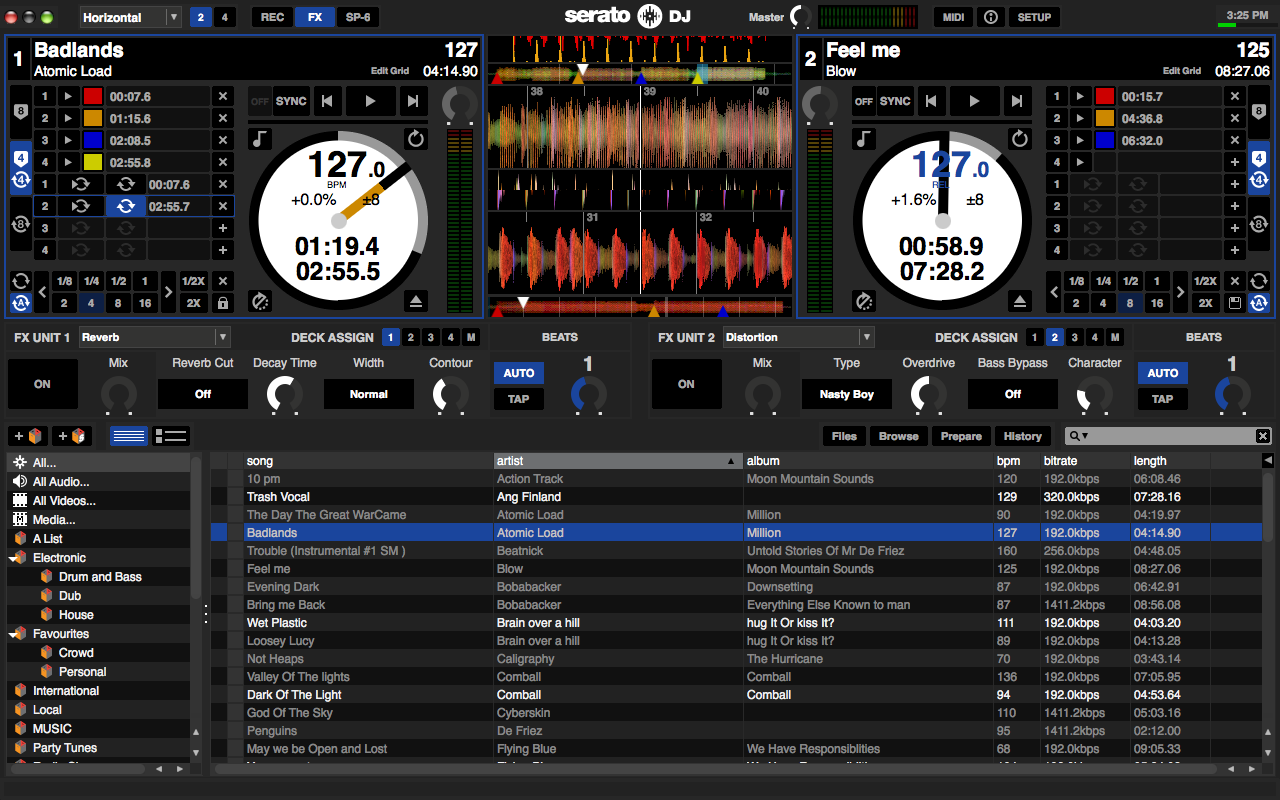
Also on plugging in, the Serato DJ software switches from “offline” mode to “online” mode, and all four decks appear on-screen, with four vertical waveforms up the centre of the display and the library at the bottom. There are various views available to you including two and four deck options. Overall this is far more like Traktor than ITCH ever was.
You can add tracks to the library from your hard drive or other sources connected to your computer by drag and dropping them into the left-hand crate area of the library; as with all DJ software, Serato DJ analyses them for BPM and peak volume information etc, and they’re then ready to use. This is best done ahead of performance time.
In use
Selecting and loading tracks
By holding shift and pressing the “back” button underneath the rotary library encoder, you can switch software views, and on a 1440×900 monitor or smaller you may want to do this to get a better view of your library, especially when in four-deck mode with maybe the effects panel also open. In this instance, there’s little room to see your tunes list otherwise. The aforementioned keyboard shortcut cycles through various modes, one of which is a library view.

Once in a folder of tunes, you can press shift with one of the four load buttons at the top of the screen to sort by track, BPM, song or artist, to facilitate track selection. This is OK, but I’d prefer it to have it sort by the first four columns in the folder. That way, you could organise the folder with the columns that matter to you first (for instance, you may choose genre or key), and then sort by those. As it is, you have to use the mouse pointer to click on the column headers to achieve sorting by a column that isn’t those mentioned above.
Turning the rotary encoders lets you choose your song, and pressing one of the four “load” buttons at the top of the line channels loads to that deck. Decks 1 & 2 are colour coded blue, 3 & 4 white (this also applies to the deck layer/dual deck function buttons).
Scrubbing and cueing
Once you’ve loaded a track, you preview it using the “cue” buttons; these are individual on/off so it is possible to have multiple cue buttons activated at once. It’s at this point you first encounter the brilliance of these jogwheels. There has never been any such thing as a poor degree of jogwheel control with any Serato software – from DJ Intro to ITCH, jogwheel mappings have always been completely tight and one-to-one, and so it is here. It feels perfect.
Therefore cueing is intuitive and fun. More often than not, you’ll either use the “cue” button to drop a temporary cue, or add cues using a hot cue function on the performance pads (whereby cues are remembered for later). You may also use the touchstrip to navigate the tune, either to preview a section somewhere in the middle of it to see if it suits the mix you’re planning, or just to find a part to start playing from further into the tune.
The jogwheels
This is also when you’ll first encounter the vinyl emulation circle of LED bars in the centre of each jogwheel. These show you a complete rotation of the “record” (you can even set 33 or 45 RPM in the software settings), and correspond with the bar in the deck circles on the software screen. It’s tight and intuitive, but it does brings up one thing I didn’t like about these jogs.

As someone used to using vinyl, I’ve always partly judged jogwheels by how realistic they feel when compared to manipulating a record on a turntable with a slipmat underneath it.
Let me explain: On a turntable, you can spin back a tune and it’ll do a couple of rotations easily enough, giving a pleasing spinback effect. On some controllers (such as the Vestax VCI-380), because the wheels are properly weighted and / or have tension adjusters, you can set them to do exactly the same. It’s great for spinbacks, but also deck to deck hip-hop mixing, and in this instance, those vinyl emulation lights would be a great aid and add to the fun.
Except, the second your hand leaves the jogwheel, it moves maybe a quarter of a turn then stops. This is similar to the behaviour of the Traktor Kontrol S4, and it just doesn’t feel natural to me. It’s not a big point, but it may irk hardcore vinyl scratch guys coming to this controller.
Gain staging
One huge difference between cheaper DJ controllers and pro controllers is the gain staging – or in other words, the control you have over the volume of your track as it moves through the system. Proper gain staging is not only important for best sound quality, but also is a creative tool (for instance, a decent gain structure can allow you to mix with loops from very quiet parts of tunes by manually boosting everything, returning the controls to normal when you’re finished with that part of the mix).
To give you an example of the difference, the Mixtrack Pro (which will also get Serato DJ compatibility in good time) doesn’t even have a gain control, and the Denon DJ MC2000 doesn’t have any onboard metering at all. As you might expect, the DDJ-SX goes the other way – and then some, as it turns out!

Serato DJ has autogain built in. That means that when it loads a track to a deck, its algorithm analyses where the volume peaks are, and adjusts the overall gain accordingly. This setting is usually going to be around 50% of the available boost / cut range, and is shown on a small rotary on the screen next to the track, alongside a VU meter on which you can confirm that Serato has it right and that your tune isn’t peaking into the red. (This is switchable, by the way, so if you don’t want it, you can turn it off.) But in this case there would be no reason to, because it turns out that this is a “pre-gain” gain! That is, next in line you have the gain control on your Pioneer DDJ-SX, where you can further trim, using the DDJ-SX’s individual channel VUs as your guide. Turning this gain control has no effect on the VU meter or the gain control knob on the screen.
Next in line is the line volume itself and any EQ and effects settings which may boost or cut the overall volume, and of course the volume of any additional music playing through the system from further channels. Your readout for the master mix is a VU meter at the top of the Serato DJ screen, and unlike the individual track VUs on the screen, this one is affected by settings on the DDJ-SX. All settings, that is, except the master volume level control! This, it turns out, affects the overall output level after Serato has done its bit. That’s where the five-bar master level VU pair is your guide, with its clear yellow and red bars.
Confused? I admit it was a bit confusing for me at first, but it doesn’t take long to get used to it, and it makes a lot of sense when you factor in the way external inputs work. Basically, the mixer in the DDJ-SX is a full standalone mixer and needs its own full channel-by-channel and master EQing to do that job well. This way, it’s got it.
And anyway, it’s always better to have more VU and gain staging options than less. As a pro DJ, it’s your job to ensure you know how to use them properly. Top marks to Pioneer and Serato for the way this has all been implemented.
Filter and FX
Let’s cover the filter first. It’s a proper hardware filter, like on the Vestax VCI-400. That means that you can use the filter on your external sources too, which is a great boon. Frankly, give me a mixer with just filters and no other FX and I’ll be fine, and I am sure many other DJs feel the same – it’s got to be one of the main reasons that filters are being broken out of the main FX areas so often nowadays. This particular filter sounds great: You have one on each channel, and it’s exactly as you’d expect a one-knob filter to be: Left is low-pass, right is high-pass, and centre is through.

So onto the FX section. Much has been made of the new effects in Serato DJ, and we cover them further in our Serato DJ software review. Here I’m going to try and concentrate more on the hardware controls available to you. So to select an effect, you press shift and any of the “on” buttons. This brings up a menu, the repeated pressing lets you cycle through the available effects. There’s delay, echo, reverb, phaser, flanger, low-pass filter, hi-pass filter, combined low/hi-pass filter, distortion, and ping-pong delay.
I don’t really see the need for all of those filter options on this controller with its hardware filters, but understand the software has to cater for mere mortal controllers too! However, I would like to have seen at least a gater effect here.
But what do they sound like? Well as you might expect, the quality is there (they are iZotope-sourced and they do sound good, a definite improvement over the old ITCH effects), and a bonus is that they’re post fader.
That means that for echo, delay and reverb, the effect continues even if you move the crossfader away from the channel, or turn its line fader down, or stop the track entirely. This is the preferred behaviour to have, because if you want the effect to stop dead, you can always make this happen by turning it off. This way, you have the choice.
Each effect has a number of parameters adjustable. You variously get control over mix level (ie wet/dry), intensity, cutoff frequency, LFO depth, loop size and many more parameters depending upon the chosen effect, while the “beats” knob allows you to control the cycle of the effect as a factor of the currently determined BPM, including dotted / triplet notes – great for that classic dub echo sound!
Finally, in order to assign an effect to a channel, you press either the “1” or “2” FX button above the channel line controls. To preview effects in your headphones, you press the “master cue” button in the middle of the mixer. The biggest surprise is that you can only control one effect per bank. You would expect that each of the effects sections would be able to give you the choice of chaining three effects, instead of comprehensive control over one effect, should you wish for this. This looks like it’s coming, given away by the “single/multi” button (shift + tap) plus three separate effects select options per channel, but for now you’re limited to one effect per side (plus a filter of course).
As I say we’re not going into too much depth about the software in this review as it’ll be exhaustively covered in the forthcoming Serato DJ review, but suffice to say here’s some clear blue water between Traktor and Serato DJ v1.0; if one effect per deck plus per-channel filters sounds like plenty for you, you’re in business, but if you fancy yourself as an FX-layering demon controllerist, Serato DJ and the Pioneer DDJ-SX – at least in their current incarnation – maybe aren’t for you.
Looping
The standard looping section comprise five buttons at the bottom right of each deck. You have manual or auto loops. Autoloop loops a fraction or multiple of the currently detected beatgrid bars, meaning basically it delivers properly beatmatched loops at the push of a button. You have a number of loop slots that you can also have pre-defined loops prepared in.
In auto looping, one shortcoming is that while you can halve or double the length of the current loop, there’s no way to see what value is currently set without turning the loop on. In other words, pressing half / double will do what it says, but you can’t see it in the software; the 1/8 bar, 1/4 bar, 8 bars, 16 bars indicators etc. remain unlit.

It is possible to shift the currently active autoloop by its own length left or right (ie backwards or forwards in the music) by holding “shift” and pressing the “1/2” and “2x” buttons respectively. Manual looping is controlled by in and out buttons; you press “in” where you want the loop to being, and “out” where you want it to end. By then holding the in or out button and turning the jogwheel, you can fine adjust the start and end points of the loop, and the waveform freezes to facilitate this.
Performance pads
First appearing on the Novation Twitch, performance pads have been shamelessly copied by several controllers since, and the Pioneer DDJ-SX is thus just the latest in this line. Here’s a brief look at what they do in this particular controller:
- Hot cue. There are a generous eight hot cues per track – pre-determined places where you can trigger playback from. In certain display modes you can see them all on the screen, but in some you can only see four. (You get to choose whether to display eight hot cues or four hot cues and four loops.) Pressing shift then a hot cue deletes it; the blue light in the pad that lights to indicate it as set then turns off
- Loop roll. Press this and the performance pads become loop controllers. Using the parameter buttons you can choose whether the range is 1/32 of a beat up four beats, all the way up to 1/4 of a beat to 32 beats. You perform loops by pressing the buttons, and when you release them, the track carries on playing from where it would have been had you not done anything
- Slicer. The biggest lift from Novation’s Twitch. This takes a loop (anything from one bar to eight bars, which you set using the parameter buttons and shift), and divides it into eight equal parts that are then assigned to the performance pads. Press the slicer button once, and this is rolling – ie the track plays as usual with the “loop” moving along as you go. But press it twice and it “sticks” on the current loop. Now, you can remix that section by hitting the performance pads in an order of your choice. When you’re done, switch away from slicer and everything carries on as normal
- Sampler. Like the effects, the sampler controls are maybe over-simple. There are four banks of six sample slots, remembered between sessions. You drag samples from your library to each slot, and can choose one hit, complete play or loop for each one. Each slot has its own Sync button, keylock and mute. The disappointment here for me is that you have to revert to the mouse pointer to control all of this. This controller is huge – let’s have some hardware control! Once samples are assigned, the performance pads trigger them. There’s a nice touch here: If you hold the sampler button for over a second, you enter sampler velocity mode, where the volume of the sample is dependent on how hard you hit the pads
Slip mode
Borrowed from Pioneer’s own CDJs and Denon’s DJ CD players (where it used to be called “dump” mode), and also a recent addition to Traktor where it’s called “flux”, slip mode is similar to loop roll that we previously described, in that it takes note of where the track would have been had you continued simply playing it, ready to jump back when you disengage slip. But it takes it beyond looping.
That means you can scratch, loop, even stop the tune with a long brake time (brake, or the speed a tune slows down at, is something you can set in Serato DJ’s options), and when you disengage slip, everything carries on as if you had done nothing. Therefore by using the autoloop and slip, you can do pretty much the same thing that “roll” allows you to do with the performance pads. It’s activated and deactivated by pressing the “slip” buttons top right of each deck.
Dual deck mode
This is one of my favourite features, and it’s nicely implemented too. Basically it allows you to join both decks up on each side of the controller.

As with all four-channel controllers that only have two jogwheels (ie every single one of them), there are layer buttons – we spoke about them when describing the tempo control’s takeover lights.
Basically, you choose which deck you want active control over by pressing 1 or 3 (left side) or 2 or 4 (right side). But the DDJ-SX adds a unique feature here: it lets you “link” the two decks by pressing the “dual deck” button that appears between the layer buttons. This lights up in a cute two-tone colour to represent the blue and white colour coding of the deck layers, and then when you start, stop, scratch loop and so on, it happens on both decks at once.
So for instance you could get an acappella running over a bassline instrumental, and scratch the whole thing, or beatmix the whole thing with another track on the opposite side of the crossfader, really easily.
It’s a great idea, and it’s well implemented. Top marks.
Standalone mixer
With two mics, two phono channels and two line channels, there’s plenty of scope for external sources with the Pioneer DDJ-SX. You select each source with the three-way switches on the front panel. If you turn a channel to an external source, the word “THRU” appears on the software deck, and control is handed over to the internal mixer of the Pioneer DDJ-SX.
In some systems, you get the choice to route through the software, so you can use the effects and so on on your external source, but not here: it is just what it says, a “thru”. While that may be disappointing, at least it means that if the laptop goes down your external sources don’t. I tried it; I just pulled the USB out, and no problems, my iPod in one of the external channels carried on unabated. However, while you can’t use software FX, you can use the filter and all volume and EQ controls, so all is not lost! It’s all we ever had in the 80s (ooh, it was great in ’88 😉 ).
As mentioned earlier, metering is organised so you get full per-channel “pre-fade listen” gain control and master metering. In short, the standalone mixer is well implemented and works well.
Sound quality
Funnily enough I couldn’t find any mention anywhere of the audio interface on the specs of this, but I’d assume it’s going to be on a par with Pioneer’s best installation pro DJ gear.
It certainly sounded great to me – we had it running through some new Reloop Wave 8 DJ/producer monitor speakers, and a pair of Ultrasone Signature DJ headphones, and the sound certainly appeared on a level with the DJM-850’s audio interface, that being the other piece of Pioneer gear we had lying around to compare it to.
Firmware adjustments
Finally, let’s look at the firmware. By holding shift plus play/pause while turning on, you enter the firmware set-up mode. Here you can do this stuff:
- Set the velocity curve for the sample pads. It can be straight, concave or convex, but also it can be in three steps – I like the idea of the latter for more “mechanical” pad drumming…
- Switch the unit into Midi mode. Want to use your Pioneer DDJ-SX with other DJ software? You can switch it away from Serato and to a universal Midi mode with one key stroke here
- Turn sync on/off for channel fader start. By default, a song will start when you open the fader with sync off, but if you want it to sync, you can set that behaviour here
- Attenuate the master output. Choose from 0dB (default), -3dB or -6dB
- Disable slip mode flashing controls. When the slip mode is engages, the controls you can use flash. If you don’t like that, you can turn it off
- Disable the demo mode. Leave the unit 10 minutes, and everything starts flashing like a Christmas tree, just as if someone’s spilled water into the thing. Don’t like it? Turn it off. Done
- Set aftertouch for the sampler. You can have an aftertouch behaviour where how hard you press a sample pad after it’s triggered a sample gives you continuous control over that sample’s volume. Here’s where you turn that off and on
- Set the LED pattern for the jogwheels. There are a few variations as to how the LEDs indicate motion in the centre of the jogs; here’s where you choose your favourite
Conclusion
Let’s get the bad out of the way first. Some of this is software related, to be fair.
They’ve missed a trick with the over-simplified effects, despite the fact that they sound great. While we’re here, it would have been nice to see some effect innovation – maybe fader effects, or throwing them to the pads? The sampler needs far too much mouse pointer attention to be truly easy to use – I’d like to have seen much better hardware integration, especially on a controller of this size. But truly, apart from these small points, there’s very little I can find fault with, excepting the damned thing’s size! It may have borrowed lots of features from Novation’s loveable little Twitch, but it certainly didn’t borrow any sense of portability from it.
As such, it is going to find favour with those who drive to their gigs, as a semi-permanent installation device in smaller bars, lounges etc, or – and I suspect that this is its prime market – as the ultimate home DJ controller.
As the heart of a hybrid digital / analogue set-up, it is an unsurpassed device. The standalone mixer is superb, and the quality of all controls is market leading. It has just about everything you might want on a DJ controller, and all of this makes it amazing fun to use. As I mentioned at the start, Pioneer has borrowed the best bits of every other controller. In doing so, it has come up with probably the most complete DJ controller on the market. The fact that Serato DJ also lets you Midi-map external devices, means that someone may well come up with a sample player control box, or you could certainly map your own.
Unlike the Traktor Kontrol S4 and Traktor Scratch, you can’t use this with Serato Scratch Live vinyl, which is a shame. However I’m going to guess that down the line you will be able to do just that with Serato DJ controllers, because to me it is pretty obvious that the next software move for Serato is to combine Serato Scratch Live and Serato DJ – “Serato Scratch DJ”, anyone? At that point, who knows, maybe digital vinyl compatibility will arrive for the Pioneer DDJ-SX.
But overall, this is a worthy first controller for the software that marks a new chapter in Serato’s story. I expect it to sell well, and I even think it might poach users of other software systems.
Product summary
Video Review
The ultimate DJ controller? Would you buy this even if not to use with Serato DJ? Or are there functions / features you think are missing? Please share your thoughts in the comments.


Phil Morse

