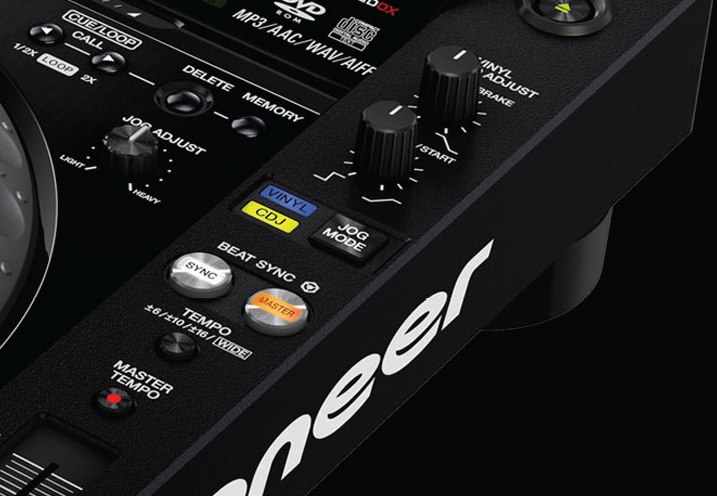
With one-button beatmatching now in pro DJ booths too, is there any need for pitch faders any more? Today we look at four reasons why they’re still relevant.
With Pioneer adding a sync button to its new CDJ2000nexus, the battle is won (or lost, depending what side of the fence you’re on): The “sync” button is now part of DJing. Today’s article isn’t going to debate the pros and cons (it’s been done to death, and continues to be done all over the web seemingly everywhere I look), rather, to discuss a more intriguing, practical matter: What’s the use of the now seemingly redundant pitch faders, if not for manual beatmatching?
The truth is, even if you always use sync and never even attempt to beatmatch manually using them (although you really should; see 5 Reasons Why All DJs Should Learn To Beatmatch By Ear for why), there are actually plenty of things they’re still good for. So today we’ll recap what the pitch fader is really there for, before considering four alternative uses for it in a “sync button age”.
What a pitch fader is meant to do
Pitch faders permanently adjust the BPM (beats per minute) of your tune. In other words, they adjust the speed of the music.

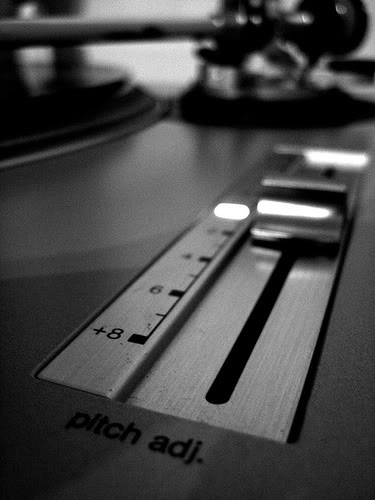
The Technics turntable pitch control, a tool which nearly all DJ controllers also have a version of on board.
“Manual beatmatching” describes use this as a tool to help you to get two tunes to the same speed before mixing one into the other. You use the jogwheel to momentarily speed up or slow down one of the tunes until both sets of beats line up, and then adjust the pitch fader to “lock in” the change so they don’t drift apart again. It’s a trial and error thing, but that is the classical use for the pitch fader and the reason why it’s there at all.
However, as we stated in the introduction, nowadays the sync button can, nine times out of ten, do all that troublesome stuff for you. Beatgridding (or pre-preparing this stuff so your computer doesn’t have to guess) can deal with most of the rest. All of this effectively makes the pitch fader redundant.
But not so fast! Here are our four reasons why even if you’re addicted to the “sync” button (and there’s no reason why you shouldn’t be), you shouldn’t be scared of some manual pitch fader action either.
4 reasons to use the pitch fader
1. To mix tunes with large BPM differences
A good rule of thumb is never to mix tunes with more than about 4BPM difference between them. That means a 120BPM tune can be mixed into anything with a BPM of 116 to 124. Any more and tunes can start to sound weird. But often you do want to attempt a beatmix with tunes with a wider BPM variance.
A good rule of thumb is never to mix tunes with more than about 4BPM difference between them…
Trouble is, if you hit “sync”, the incoming tune is likely to be matched to the current tune or the master clock (don’t worry about the difference for the sake of this explanation), so if the current tune is 120 and the incoming tune is 130, the incoming tune will be slowed down to 120. In other words it’s a long way (10BPM) from where it should be played – more than 4BPM.
The better suggestion is to gradually adjust the outgoing (120BPM) tune to half of the difference between the two or 125BPM, using the manual pitch fader, then press “sync” on the 130BPM tune on the other deck (which means it will be slowed down to 125, which is better than 120). Once you’ve done the mix, you choose your next tune, and do this “50%” trick with the new tunes too.
In this instance, you’ve reduced the BPM jump to 5% which is much better than the original 10%.
2. To achieve a brake or speeding up effect
Depending on your DJ software or controller, you may be able to change the “pitch range” of your pitch fader. Pitch faders are usually set to +/-6% or +/-8%; that means that fully “up” or “down”, the pitch fader can slow or speed up your tune by 6% or 8%. But normally there’s a button that allows you to change this, to maybe 12%, or 25%, or 50%, or even 100%.

Many DJ controllers have ‘vinyl mode’ so your jogs can emulate turntables, but the switch-off ‘brake’ effect is better emulated with the pitch fader. Pic: hinhuatdj.com
While the trade-off here is that any adjustment made will probably be less accurate when set to one of these settings, the good thing about (especially) a 100% option is that you can use it as an effect, similar to turning a record deck’s power off when the record is playing, so it slows down gradually but audibly. Just set your pitch fader to 100%, and slowly move it “down” (which is actually up, or away from you) while playing a tune. Of course, you can speed a track up by doing the same thing.
You can also do it really quickly on sound effects like sirens and so on for more extreme effects. Can be a great, expressive thing to do especially when you combine your chosen track with effects. (Definitely one to experiment with at home before inflicting it on a club audience, though.)
3. To make harmonic mixes sound better
Harmonic mixing is mixing tunes in the same or a related musical key together. This can often result in exceptionally good sounding mixes, and is made child’s play by simple-to-use software like Mixed In Key, which analyses musical key for you and adds it to your files so your DJ software can display it for you.
But one prerequisite for mixing in key easily is using the “keylock” function on your software, which means that no matter at what speed your track is playing, the key remains the same – the track is maintained at the key it was originally recorded in. (In other words, the software prevents the notes getting higher when you speed the track up, or lower when you slow it down.)
Trouble is, keylock can make tunes sound bad – thin, raspy, and generally a poor substitute to the same track played without the keylock on. It’s a symptom of your computer doing its trickery to keep that musical key where it should be.
It doesn’t always sound bad, and not so much when the track is close enough to its original BPM (see point 1 above), but it can still be an issue.

The yellow musical note in Traktor Pro 2 that tells you your track is “keylocked” – but beware the sound quality if doing this.
Ptich fader to the rescue! Here’s how DJs get around this. Once you’ve mixed a tune in with the keylock on, if it sounds a little ropey (usually it’ll be because it is a few BPMs too many away from its recorded speed), use the pitch fader to slowly bring it back to the BPM it was recorded at.
Once the tune is at exactly the speed it should be, you don’t need the keylock on at all, so you can switch it off without any adverse effect on what your audience is hearing – and now, the track is playing exactly as intended, and at the highest quality possible.
When combined intelligently with the skill taught in point 1, and always keeping an eye on the BPMs to keep variances as low as possible, this is one of those tricks that can fool most of the people, most of the time; it means that for the majority of your DJing time, the sound quality is improved markedly, while you dtill get to take advantage of harmonic mixing techniques.
4. To manually control acappellas on decks 3 and 4, while syncing on decks 1 & 2
This is a Jedi trick, and one used a hell of a lot by DJs who have mastered manual beatmatching.
Now, all but the most purist digital DJs are quite happy using sync (it saves time), so typically they will do just that when mixing from one deck to another (say, decks one and two) in “normal” DJing. But if you want to drop acappellas in over your tunes, a good place to have those is lined up on decks 3 and 4.
By using sync for the primary decks and the pitch faders for the “extras”, you get the best of both worlds.
Thing is, acappellas don’t have a beat, so unless you’ve painstakingly beatgridded them beforehand, you can’t get them at the same speed as your playing tracks by hitting the “sync” button for them. No, you need to do it manually. Hence the pitch fader/jogwheel juggle as described in the introduction is necessary – just not for the “main” tracks, only for the samples, acappellas etc. that you’re using on your “extra” decks.
By using sync for the primary decks and the pitch faders for the “extras”, you get the best of both worlds.
Finally…
I don’t think the pitch fader is dead, far from it. Despite it being absent from some DJ controllers (I’m thinking the Reloop Contour and the DJ Tech 4Mix), and transformed into a pitch knob on at least one other (Novation Twitch), it’s still essential for manual beatmatching, and you really ought to know how to do that for all kinds of reasons as stated at the start of the piece.
I don’t think the pitch fader is dead, far from it…
But hopefully this article has given you some insights into ways the pitch fader’s use has morphed over time as digital with all its techniques and advances has edged into the DJ box. As with all the knobs, buttons and faders on whatever box of tricks you DJ with, though, there are really no rules – so feel free to experiment and use the pitch fader however you wish. Let your ears and your audience be the judges…
Have you got a use for the pitch fader that I haven’t touched on? Please share your thoughts in the comments!
Now go to:
5 Reasons Why All DJs Should Learn To Beatmatch By Ear
Your Questions: Why Don’t Jogwheels Alter BPMs Permanently?
“I’m A Pro DJ, But I’ve Never Felt The Need To Mix”
Want to escape the bedroom and play in public - fast?
Our 1000s-selling How To Digital DJ Fast video course shows you how.
Learn to DJ Free - email course plus bonus PDF book
Sign up for our weekly email course for beginners now...
Trouble choosing a controller? Visit the web's #1 guide!
DJ Controllers: The Ultimate Buyer’s Guide 2013.
Tags: beginner digital dj tips, manual beatmatching, pitch fader, sync button
This work is licensed under a Creative Commons Attribution-NonCommercial-NoDerivs 3.0 Unported License.

An obvious use would be to use it as a *musical pitch* fader, meaning: have it control the key of the song instead of the tempo. So – keep the master tempo lock on and go wild on tone “height” instead.
BTW: I always wondered why it was called “pitch” fader on *DJ* equipment since its primary purpose for DJing is to alter the tempo. However, traditionally (before 1200/1210′s) it was used to raise or lower the *tone* of the music in case the pressing was made too fast or slow on bad equipment. Also, depending on the weight of the record, some record players may have beeen playing the recording too slow with their weak, belt-diven motors. Or too fast if the vinyl was very light.
[ link ]Yes, excellent use, and easily mappable in Dj software too. I always wondered hy it was called the pitch fader rather than the tempo fader, too: Thanks for that.
[ link ]Phil
[ link ]“Yes, excellent use, and easily mappable in Dj software too”.
Why then this is something rarely mentioned and yet to be seen as standard on popular DJ controllers and Software??
And most important, what plug-in or DJ software provides separate KEY and TEMPO, and does this in good sound quality and -at the same time- actually works well in terms of low latency and integration???
//My read is that the second part of this relevant question is yet not technically answered… simply does not exist. despite last year advancements in related algorytms.
I am asking this directly to you because for the easiness and supposed good quality of existing solutions, I am yet to see comparative reviews and actual usage examples of this long sought DJing feature…
Thank you in advance for anyone commenting on this.
There is no such thing as a perfect keylock algorithm, but Virtual DJ (for instance) has both key and tempo locks.
[ link ]I heard a story that decks had pitch faders originally because they were used for Karaoke; so the jock could help “singers” that were a bit out of tune. Would need more than +- 7% for me though I think…
[ link ]They predated karaoke by at least a decade I reckon…
[ link ]Pitch control definitely predated Karaoke
I guess before technics came up with the 1200s there was a wide range of players used by DJs, but these two models (Garrard 301 & 401) appear to have been the most popular workhorses.
Seems like the guys at garrard didn’t quite know what to call this feature, since there’s nothing written on the pitch control knobs of both models:
http://imageshack.us/photo/my-images/822/garradr1.jpg/
http://imageshack.us/photo/my-images/195/garrard401.jpg/
They had a transitional drive motor and were the most powerful things before direct driven models became useable. They were drives only. You had to mount them an a plate or into a case with an additional tonearm. Refurbished units are still popular among the vintage audiophile community.
[ link ]Hmm… looking into this a bit further it seems these things didn’t really have a technics-style pitch control suitable for beatmatching. It’s only there for fine adjustment of playback speed and only spans about half a semitone…
[ link ]Does anyone here know who actually introduced “real” pitch control into turntables? Just being curious…
Anyone else who feel that sync and pitch FADER is a rather cumbersome combination. I personally feel that pitch KNOB is much more convenient.
[ link ]Agreed, as it doesn’t actually fade anything in or out like a “real” fader, although as it tends to be a slider, “knob” isn’t normally going to work either.
[ link ]Damn it, I ment to say pitch ROTARY…but you get the idea.
[ link ]I got a twitch and I’m not a fan of the pitch rotary. Very hard to manually beat match with that as it is dependant on the acceleration of your turn to determine the rate at which the pitch is adjusted. Sync is always active on my twitch for that one reason.
Not to say I’m not a fan of the twitch (great for slicing/dicing and beat juggling tracks) but that pitch rotary is its massive weakness.
I’m going to have a go at remapping it to the strip as a shift function in Traktor soon.
[ link ]I love using the pitch fader to gradually speed or slow the tempo of a song drastically whilst also fading in a new song of a different BPM. For example, a the 174bpm mix of Get By by Delta Heavy has a build up that is almost identical to the 140bpm version, so by crossfading the two songs but pitching up and fading out the 140bpm version in sync with the 174bpm version, they cross over very nicely until a little vocal sample before the drop where you can use the cross fader to instantly switch. I love this example and have used it in sets before, works a treat with other songs too
[ link ]I like your thinking – so using them for drastic tempo switches but smoothing it over by using the same song to make the tempo switch.
[ link ]Yeah, it works best with an original and a remix. Also songs that use triplets such as Vapourise by Sub Focus, or have a simple synth pattern like the second breakdown to Falling Down VIP by Sub Focus can be used to transition into a higher BPM by looping 2 or 4 bars then pitching up and fading in the new song. These are ways I use the pitch fader anyway, I do like relying on the sync button most of the time though for standard-similar-bpm mixing.
[ link ]Sweet idea!
[ link ]I like to remap the pitch fader on my Umix Control Pro for other purposes such as effects depth and then adjust the pitch fader on the screen with the mouse.
[ link ]Fair point! There’s nothing wrong with using a pair of keyboard keys either for pitch if youonly use it irregularly – like you say, frees up the pitch fader for something more creative.
[ link ]In most instances…I gravitate to using the pitch fader over the sync button for everyday beatmatching and sets just because that’s how I learned some 2 decades ago. It does help with my harmonic mixed mashups if they have different keys to start with. But sync has its moments of usefulness also.
Shameless plug:
http://soundcloud.com/mr-maniacal
[ link ]Sync is never foolproof. I use sync, but I’m ready at the drop of a dime to shut it off and go manual when I see it’s not working for a track.
[ link ]Since I got my Traktor S2 controller I only use the pitch fader and rarely use sync. initially I did this was that I want to learn to ‘proper’ DJ ing by beat-matching. But now I think beat-matching helps me understand the music that I play more deeply. I am on a steep learning curve moving form punter to DJ , thanks for this website Phil.
[ link ]I agree with you I do the same Thing, since I got my s2 I just use manual beat match just to see how it felt from normal turntables and I like it makes mixing more fun. And yes helps you understand the music better!
[ link ]i’m currently using a DJ2GO with VDJPro7 and I’ve remapped my pitch faders to be deck volume controls. Then the knobs for deck volume have been mapped for filters. Makes things a little more fun
[ link ]Missing something obvious here: Back to back DJing with someone who uses another format. I do it all the time, and so should you. It’s fun and challenging. When you and the DJ you’re playing with have done it a couple of times and you sort of know each other’s styles, it can really make a club night. Mind you, it can totally spoil it when you mess it up.
[ link ]Anyway, as someone who uses a DVS half of the time and controllers the other half of the time, I will always need some sort of pitch control. You just can’t sync from laptop to vinyl or CD.
And BTW, a fader feels more natural to me compared to some sort of rotary encoder. I just like it better.
Very good point, and a sound argument for learning manual beatmatching.
[ link ]Ive had my Twitch for a few months now and have gotten very used to the rotary encoder pitch control on it, and really like it. Especially how I can do fine adjustments close to the original BPM without worrying about the centre detente. The only problem I have found is that I sometimes when I’m browsing my crates for the next song, I discover I’m turning the right channel pitch rotary instead of the browse rotary! Oops.
[ link ]Ironically, I have just re-mapped the sync buttons on my controller as they are the only ones I never use!
[ link ]bpm as close as possible and 1,2,3,4…
[ link ]I partially agree with the second half of point #1. It is easy to bump up the bpm of the outgoing track and kick in the incoming track at a lower speed if there is a largish bpm gap. I would advise to make sure to push the incoming track back up to the original bpm so it doesn’t feel like it’s dragging.
I personally would never lower the bpm of a song during it’s play just so I could mix in a song with a slower bpm. Once a track is playing, I never want to slow it down, even with key lock, especially if it is a song people know very well. (I play mostly top 40, hip hop, house remixes with those two elements).
One of my mentors, who does both club work, as well as on air personality work on a top 40 station in town told me that he always bumps up his tempo 1-3 bpm more than the original, just so the song feels like it has a little bit more “pep” to it.
[ link ]We still need to control the speed of our songs even with Keylock! No one wants to hear (FEEL) the same exact bpm all night. But it still seems odd using it for anything else for me. I like the idea as a filter effect.
History note: The 1st 1200′s (SL-Mk 1) used pitch rotary knobs to adjust the speed of the turntable. SO anyone thinking it isn’t “right” is wrong.
http://www.google.com/imgres?hl=en&sa=X&biw=1280&bih=679&tbm=isch&prmd=imvns&tbnid=nr5Gf3AjOj6T3M:&imgrefurl=http://www.no-future.com/erutufon/showthread.php%3Ft%3D30266&docid=dS8LiNooN96SUM&imgurl=http://usr.audioasylum.com/images/4/40632/Technics1200.jpg&w=639&h=479&ei=PbtLUIjPPM7C0AG8nIDIAQ&zoom=1&iact=rc&dur=602&sig=114306079629969213481&page=2&tbnh=146&tbnw=196&start=15&ndsp=21&ved=1t:429,r:4,s:15,i:138&tx=101&ty=86
[ link ]WHOA . . . the MK 1′s were what I cut my DJ teeth with oh-so-many moons ago. The rotary pitch knobs married to the rotary pots on the Bozak mixer. I only wish that I could have recovered them from the club, which was closed by the authorities back in 1978!
[ link ]Of course i meant a “transcriptional drive”. Major brain malfunction here…
[ link ]My english is very bad, but i’ll try my best
I still have old polish gramophone (GS 424 ADAM) with pitch-knob instead of pitch fader. I was always wondering why pitch is always controlled with a fader. I think that whole “dj technology” is still looking at technics as a holy grail. Although we have mind blowing technology (you can mid-mapp almost everything) we are still holding SL-1200 standards like they are something sacred. At first there was no pitch control. Then suddenly devices with pitch controll appeared and it was revolution. And then.. nothing. Pitch faders have never been changed for more than 40 years (I think it’s more than most of DDJT readers live). Totally stagnation. There is a whole new breed of DJ’s today, but they are still useing things invented before they were born. We need to break this circle and reinvent it. Manual Beatmatching is very important and I thnik that more people vill learn it when they will have option to choose something else than good-old pitch faders. Knob, buttons, touchpads… anything. Just give them right to choose theyr style of work.
BTW, Contour have pitch encoder too
(shift + loop lenght)
[ link ]Very true… and remember, the pitch control idea is a hack anyway! Technics were never intended to be put to the use DJs ended up butting them to…
[ link ]Perfect article Phil! I do exactly as you described on 1 and 3. I always mix with Sync on but almost never with 2 tracks at the same BPMs so I use the Pitch to put the 2 tracks in the same BPMs before I hit Sync again (never with more than 4 BPMs apart) ! And with the help of Mixed in key my mixes all sound perfect!
[ link ]I rarely use sync – If at all… Mainly due to the fact I know the song like the back of my hand but also for me beat matching has become a simple process over the years, Like second nature.
One thing I do use the pitch fader for though is to add that effect to a loop. For example a loop engaged in 1/16 and thus set the fader to 100% I can then slow it up or down. Pretty effective just before a drop. Engage the loop, speed it right up then right down so that the track stops (adding that suspense) Disengage the loop and reset the pitch slider and boom
[ link ]When I use sync on an incoming track (say Deck B) and say the fader’s positioned in the middle at normal speed but it needs speeding up so the software displays it’s speeded up,then I load a new track (Deck A)and the track playing in Deck B needs to be slowed down to match Deck A as soon as I move the fader down a notch it jumps to where it actualy is & you notice! So it’s normal speed is 128, it’s synced at 130, the new track being loaded is 126, i go to slow it down then u notice the shift in key from 130 to 128. Is there any way round this. I’ve been moving the faders on the incoming track to match the playing track then pressing sync but it’s wasting time.
[ link ]I, sometimes use the pitch fader for faking a sampler, I set up my cue points, and move around the fader to give the cue points different pitch as if I were playing on a keyboard, you have to do this really fast, or it will sound weird.
[ link ]So you don’t need serato with that do you?
[ link ]I might get flamed for this, but I think Torq 2′s pitch-lock sounds pretty good as far as 10bpm. By 15, especially slowing down, voices start sounding unnatural and stretched, but during a mix, I think you could get away with it. I’ve heard commercial remixes that get away with a lot worse.
I use the pitch fader in conjunction with sync during a mix, speeding or slowing both tracks to the tempo of the incoming tune DURING the mix. It brings a bit of extra drama to the change-over, and something I could never pull of manually (I can beatmatch, but without jog wheels, speeding up two songs at once? Nope!).
[ link ]I have yet to hear a key lock algorithm that is actually usable for correcting pitch when playing a track on it’s own (using it musically is a different point). Digital artifacts, lost attacks, lost high end and general clarity, mushy and sometime glitchy sound. No thanks. There are of course numerous exceptions, but I normally don’t mix tracks that are more than 2 BPM apart, because that +/-1,5% or +/-25 cent difference doesn’t sound out of tune yet. That said, when I do play tracks that are further than 2 BPM apart, or when I’m mixing tracks that don’t fit harmonically, but I want to do a tight melodic part-on-melodic part mix, I use key lock on the incoming track, pitch matched to the non-keylocked currently playing track, then at the switch spot I turn it off and turn on a corresponding correction on the outgoing track, so there’s a non-corrected full quality track playing all the time on top, and the thinned-out and sonically less meaninful track is key corrected. That way I can avoid harmonic clashes and keep the sound quality the best I can.
[ link ]And to add: I rarely (need to) do drastic tempo changes, I usually start around 128-130 BPM and over the course of my set climb to 134-136 BPM maybe, depending on the set, vibe, night etc of course. I haven’t used a pitch fader in a while (with Traktor that is, a CDJ yes), but I’ve mapped a fine-increment +/- buttons so I can nudge the tempo up slowly over a long breakdown/build, for instance.
[ link ]